

How to Enable or Disable Screen Savers in Vista, Windows 7, and Windows 8
InformationThis tutorial will show you how to enable or disable screen savers from being able to run for all or specific users in Vista, Windows 7, and Windows 8.
You must be logged in as an administrator to be able to do the steps in this tutorial.
NoteBy default the Windows 7 Starter and Windows 7 Home Basic editions do not include the Personalization features such as change desktop background, Desktop Slideshow, and Windows Color and Appearance.
This Screen Saver shortcut will allow you to change the Screen Saver Settings in the Windows 7 Starter and Windows 7 Home Basic editions even though they do not include the Desktop context menu Personalize item included.
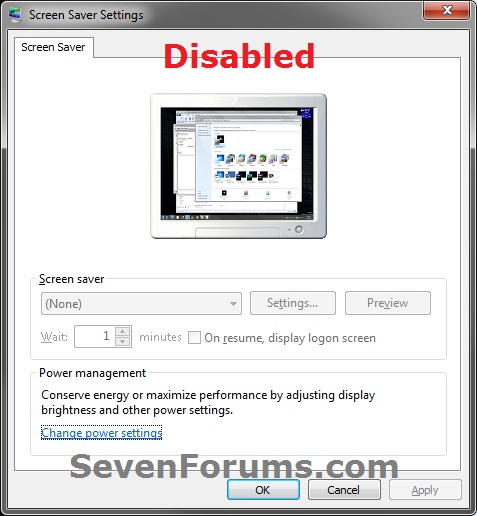
EXAMPLE: Screen Savers Enabled and Disabled
NOTE: When disabled, the Screen Saver Settings window is grayed out.
OPTION ONETo Enable or Disable Screen Savers using a REG File Download
1. To Enable Screen Savers for All Users
NOTE: This is the default setting.
A) Click/tap on the Download button below to download the file below, and go to step 3 below.2. To Disable Screen Savers for All Users
Enable_Screen_Savers.reg
A) Click/tap on the Download button below to download the file below, and go to step 3 below.3. Save the .reg file to your desktop.
Disable_Screen_Savers.reg
4. Double click/tap on the downloaded .reg file to merge it.
5. Click/tap on Run, Yes (Windows 7/8) or Continue (Vista), Yes, and OK when prompted.
6. If open, close and reopen the Screen Saver Settings window to apply.
7. When finished, you can delete the downloaded .reg file if you like.
OPTION TWOTo Enable or Disable Screen Savers using Group Policy
1. Open the all users, specific users or groups, or all users except administrators Local Group Policy Editor for how you want this policy applied.That's it,
2. In the left pane, click/tap on to expand User Configuration, Administrative Templates, Control Panel, and Personalization. (see screenshot below)
3. In the right pane, double click/tap on Enable screen saver to edit it. (see screenshot above)
4. To Enable Screen Saver
A) Select (dot) either Not Configured or Enabled. (see screenshot below step 6)5. To Disable Changing Screen Saver
NOTE: Not Configured is the default setting.
B) Go to step 6.
A) Select (dot) Disabled. (see screenshot below step 6)6. Click/tap on OK. (see screenshot below)
7. Close the Local Group Policy Editor window.
8. If open, close and reopen the Screen Saver Settings window to apply.
Shawn
Related Tutorials
- How to Turn Screen Saver On or Off in Windows 7 and Windows 8
- How to Change the Screen Saver in Windows 7
- How to Create a "Screen Saver Settings" Shortcut in Windows
- How to Enable or Disable Screen Saver Password Protection in Windows 7 and Windows 8
- How to Set or Change the Screen Saver Timeout Period in Windows 7
- How to Specify a Default Screen Saver for All Users in Windows 7
- How to Allow or Prevent Changing Screen Saver in Windows 7 and Windows 8
- How to Add "Enable/Disable Screen Saver" to Desktop Context Menu
Screen Saver - Enable or Disable
-
New #1
Wait is grey'ed out, can't enable it
My HP 6930p doesn't activate the screensaver ever. I put it to sleep. I've adjusted the power saving features, changed the screensaver selection but it never activates. The local group policy says it should but it doesn't work.
The "Wait XX Minutes and check On resume, display logon screen" part of the Screensaver dialog is grey and I can't change it.
Where can I enable this?
-
New #2
Hello Smacky, and welcome to Seven Formus.
You might be able to using Option Two or Option Three in the tutorial below. If these options are not set to the default setting, then they prevent users from being able to change the "Wait" time.
Screen Saver Timeout Period - Set or Change
Hope this helps,
Shawn
-
New #3
Screensaver won't activate
Used option 2 to enable the time option. Its no longer grey'ed out but setting it doesn't do anything.
I set the time to 1 minute, waited 90 seconds, nothing happened, then set to 2 minutes, waited 150 seconds, nothing happened.
Removed the powersave password prompt in regedit - no change. Powersave options don't trigger anything, dimming screen, putting it to sleep. I can manually put it to sleep with the Func F3 (sleep key), manually lock it with CTRL-ALT-DEL Enter. But can't get it to auto lock or sleep.
-
New #4
Did you also select a screen saver other than (None)?
Could you also post a screenshot of your Screen Saver Settings window to see if something may standout?
-
New #5
Screenshot
Here's a screen shot attached, thanks for the help.
-
New #6
If you waited and let the computer be idle for that amount of time, then you might see if running a sfc /scannow command may be able to help if it's a bad system file issue.
-
New #7
mscorsvw.exe running
scannow isn't running but mscorsvw.exe is running using about 50% of CPU. I quit all my apps, still running.
Is this keeping the computer from going idle? Any thoughts on how to kill it?
-
New #8
The solution used at the link below may be able to help in your case as well. It may take a bit for it to finish, and be sure to open a elevated command prompt.
How to disable mscorsvw.exe from startup

Screen Saver - Enable or Disable
How to Enable or Disable Screen Savers in Vista, Windows 7, and Windows 8Published by Brink


 Quote
Quote
Related Discussions