

How to Add "Search" to "My Computer" Context Menu in Vista and Windows 7
InformationThis will show you how to add Search to the "My Computer" context menu for all users in Windows 7 or Vista. This is for when you right click on Computer from the Start Menu, navigation pane in Windows Explorer, or desktop icon.
EXAMPLE: "Search" added to "My Computer" Context Menu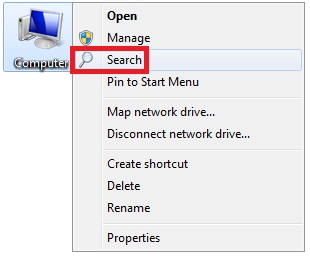
Here's How:1. To Add "Search" to "My Computer" Context MenuThat's itA) Click on the Download button below to download the file below.2. To Remove "Search" from "My Computer" Context MenuAdd_Search_to_My_Computer_Context_Menu.regB) Go to step 3.
NOTE: This is the default setting.A) Click on the Download button below to download the file below.3. Save the .reg file to the desktop.Remove_Search_from_My_Computer_Context_Menu.reg
4. Right click on the downloaded .reg file and click on Merge.
5. When prompted, click on Run, Yes (UAC-Windows 7) or Continue (UAC-Vista), Yes, and OK to approve merging the .reg file.
6. You can now delete the downloaded .reg file if you like.
Shawn
Related Tutorials
- How to Search in Windows 7
- How to Change or Restore the Default Windows 7 Search Options
- How to Turn Windows 7 Search On or Off
- How to Save a Search in Windows 7
- How to Have More Accurate Search Results in Windows 7 and Vista
- How to Configure and Fully Utilize Windows 7 Search
- How to Add "Device Manager" to "My Computer" Context Menu in Vista and Windows 7
- How to Add "Devices and Printers" to "Computer" or "This PC" in Windows 7 and Windows 8
Search - Add or Remove from "My Computer" Context Menu
-
-
-
New #3
Remove Search from Context menu
Shawn,
Your REG file did not work for me. Have any other suggestions? Thank you.
CJ Cotter
-
New #4
Hello CJ, and welcome to Seven Forums. :)
Were you able to successfully merge the .reg file from step 1?
-
New #5
Search - Add or Remove from "My Computer" Context Menu
Yes. No problem whatsoever.
-
New #6
Search - Remove from "My Computer" Context Menu
I used notepad to look inside the "remove" REG file. That same alpha-numeric registry key is located in a number of places throughout my registry. None of them say "search" or "Windows search".
-
New #7
Search is not in the context menu by default unless you had added it. The "remove" .reg in this tutorial was designed to remove what was added be the "add" .reg file.
If you added Search to your "My Computer" context menu using some other method than this tutorial, then please export the registry key below and upload it here. I'll be happy to take a look at it to see which key is the one for it on your computer, and post back with a .reg file that will remove it for you. :)
[HKEY_CLASSES_ROOT\CLSID\{20D04FE0-3AEA-1069-A2D8-08002B30309D}
-
New #8
Search - Remove from Context Menu
Thank you for your help! Attached is the REG file. For my search engine, I'm using Agent Ransack.
-
New #9
The entry for this context menu is not at the registry location where this tutorial adds it. Could you post a screenshot of your "My Computer" context menu to see if it may help to ID the issue?
Screenshots and Files - Upload and Post in Seven Forums

Search - Add or Remove from "My Computer" Context Menu
How to Add "Search" to "My Computer" Context Menu in Vista and Windows 7Published by Brink


 Quote
Quote
Related Discussions