

How to Enable or Disable the Windows Explorer "Preview Pane" in Windows 7
InformationThis will show you how to enable or disable the ability to turn on the preview pane in Windows Explorer for specific or all users in Vista and Windows 7.
You must be logged in as an administrator to be able to do the steps in this tutorial.
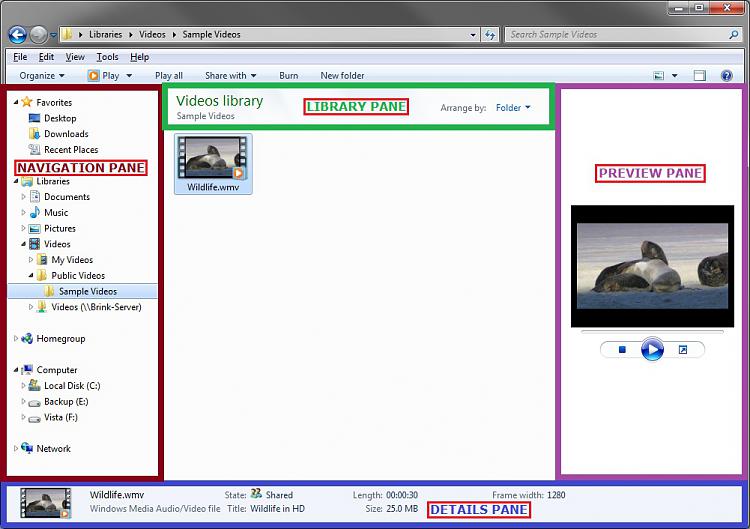
EXAMPLE: Preview Pane enabled and disabled in Windows Explorer
NOTE: When disabled, notice that it also removes the preview pane button towards the upper right corner under the search bar.
OPTION ONETo Enable or Disable ability to Turn On "Preview Pane" using a REG File
1. Do step 2 or 3 below for what you would like to do.
2. To Enable Windows Explorer "Preview Pane" for Only Current User
NOTE: This is the default setting.A) Click/tap on the Download button below to download the file below.Enable_Preview_Pane.regB) Go to step 4 below.3. To Disable Windows Explorer "Preview Pane" for Only Current UserA) Click/tap on the Download button below to download the file below.
Disable_Preview_Pane.regB) Go to step 4 below.4. Save the .reg file to the desktop.
5. Double click/tap on the downloaded .reg file to Merge it.
6. If prompted, click/tap on Run, Yes (UAC), Yes, and OK.
7. Log off and on, or restart explorer to apply.
8. When finished, you can delete the downloaded .reg file if you like.
OPTION TWOTo Enable or Disable ability to Turn On "Preview Pane" in Group Policy
1. Open the all users, specific users or groups, or all users except administrators Local Group Policy Editor for how you want this policy applied.
2. In the left pane, click/tap on to expand User Configuration, Administrative Templates, Windows Components, Windows Explorer, and open Explorer Frame Pane. (see screenshot below)3. In the right pane of Explorer Frame Pane, double click/tap on Turn off Preview Pane. (see screenshot above)That's it,
4. Do step 5 or 6 below for what you would like to do.
5. To Enable Windows Explorer "Preview Pane"
A) Select (dot) Disabled or Not Configured, and click/tap on OK. (see screenshot below step 6A)6. To Disable Windows Explorer "Preview Pane"
NOTE: Not Configured is the default setting.
B) Go to step 7 below.
A) Select (dot) Enabled, click/tap on OK, and go to step 7 below. (see screenshot below)7. You can now close the Local Group Policy Editor window if you like.
Shawn
Preview Pane - Enable or Disable in Windows 7

Preview Pane - Enable or Disable in Windows 7
How to Enable or Disable the Windows Explorer "Preview Pane" in Windows 7Published by Brink


Related Discussions