Preview Pane - Turn On or Off

How to Turn the Preview Pane On or Off in Windows 7


   Information
You can use the preview pane in Windows Explorer to see the contents of most files. If you select an e‑mail message, text file, picture, or video for example, you can see a preview of its contents without opening it in a program. The preview pane is turned off by default in Windows 7.

This will show you how to turn the Preview pane on or off in all Windows Explorer windows in Windows 7.
   Tip
When the Preview pane is turned on, you can drag it's left border line left and right to increase or decrease the size of the Preview pane.

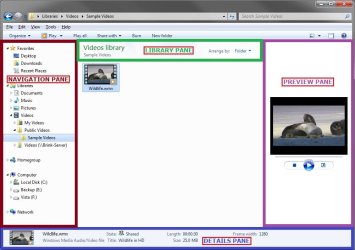
EXAMPLE: Windows Explorer Layout
NOTE: The preview pane is the far right pane in Windows Explorer.
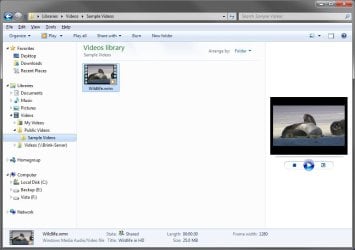
Layout1.jpg

Layout2.jpg


OPTION ONE

To Turn "Preview Pane" On or Off in Windows Explorer


1. Open Windows Explorer (explorer.exe).

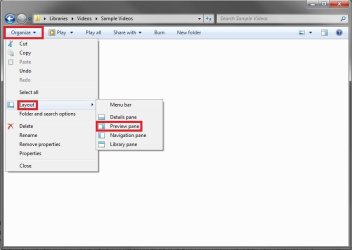
2. On the toolbar, click on Organize and Layout. (see screenshots below)
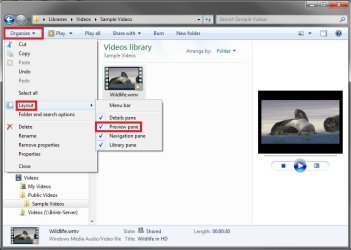
PP_on.jpg

PP_off.jpg

3. To Turn On the Preview Pane in Windows Explorer
A) Select (click) Preview pane to have it checked. (see screenshots above)

OR

B) Click on the Preview pane icon on the far right of the toolbar. (see screenshot below)
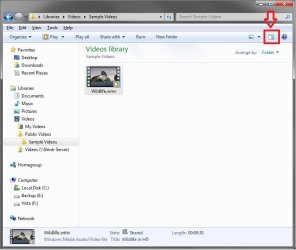
Toolbar.jpg
4. To Turn Off the Preview Pane in Windows Explorer
A) Select (click) Preview pane to have it unchecked with the icon now showing. (see screenshots below step 2)

OR

B) Click on the Preview pane icon on the far right of the toolbar. (see screenshot below)
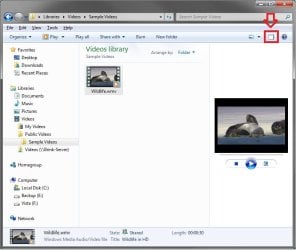
Toolbar2.jpg
5. All Windows Explorer windows will now open as you set this.


OPTION TWO

To Turn "Preview Pane" On or Off using a REG File Download


1. To Turn On the Preview Pane in Windows Explorer
A) Click on the Download button below to download the file below.
Turn_Preview_Pane_On.reg


Download


B) Go to step 3.
2. To Turn Off the Preview Pane in Windows Explorer
A) Click on the Download button below to download the file below.
Turn_Preview_Pane_Off.reg


Download


3. Save the .reg file to the desktop.

4. Right click on the downloaded .reg file, and click on Merge.

5. Click on Run, Yes, Yes, and OK when prompted.

6. Close and reopen any open Windows Explorer window to apply.

7. When done, you can delete the downloaded .reg file on the desktop if you like.
That's it,
Shawn


Attachments

Last edited:
Is there a hack to move the preview pane under the list of files?
 

My Computer My Computer

OS
7264x64/7260x86
Hello Copernicus,

Sorry, but no. :(
 

My Computer My Computer

Computer type
PC/Desktop
Computer Manufacturer/Model Number
Self built custom
OS
64-bit Windows 11 Pro for Workstations
CPU
Intel i7-8700K OC'd to 5 GHz
Motherboard
ASUS ROG Maximus XI Formula Z390
Memory
64 GB (4x16GB) G.SKILL TridentZ RGB DDR4 3600 MHz
Graphics Card(s)
ASUS ROG-STRIX-GTX1080TI-O11G-GAMING
Sound Card
Integrated
Monitor(s) Displays
2 x Samsung Odyssey G7 27"
Screen Resolution
2560x1440
Hard Drives
1TB Samsung 990 PRO M.2,
4TB Samsung 990 PRO PRO M.2,
TerraMaster F8 SSD Plus NAS
PSU
Seasonic Prime Titanium 850W
Case
Thermaltake Core P3
Cooling
Corsair Hydro H115i
Keyboard
Logitech wireless K800
Mouse
Logitech MX Master 4
Internet Speed
2 Gb/s Download and 100 Mb/s Upload
Antivirus
Malwarebyte Anti-Malware Premium
Browser
Google Chrome
Other Info
Logitech Z625 speaker system,
Logitech BRIO 4K Pro webcam,
HP Color LaserJet Pro MFP M477fdn,
APC SMART-UPS RT 1000 XL - SURT1000XLI,
Galaxy S23 Plus phone
Great Post Shawn!!

Gerry
 

My Computer My Computer

Computer Manufacturer/Model Number
Home Made
OS
Windows 7 Home Premium
CPU
Intel I5Core750
Motherboard
Gigabyte P55A-UD3
Memory
6 GB Corsair DDR3 1600
Graphics Card(s)
Zotac GeForce 9600 GT
Sound Card
7:1 on otherboard
Monitor(s) Displays
ViewSonic VG2030m (one of the last 4 by 3 monitors)
Screen Resolution
1400 by 1050 (Native Resolution)
Hard Drives
2 500 GB Western Digital SATA
PSU
Thermaltake TR2 500W
Case
Cooler Master Elite 332
Cooling
Thermaltake SpinQ
Keyboard
400 v1.0
Mouse
Logitech LX-8
Internet Speed
9.82 Mbs download speed 1.87 Mbs Upload speed
Other Info
Monochrome Laser Printer -HP 1020
Ink-Jet color all in one without fax - Canon Pixma MP 170
500GB external portable hard drive - Iomega
Nice post. Still think this should be saved / remembered as a "Per Folder" option in the registry.
(Along with your folder layout - as per XP - rather than the limited folder 5 or so document 'types' layout we are stuck with now in 7).
 

My Computer My Computer

OS
Windows 7
Hello MoRbIdBoY,

Yeah, it would be nice to have this and the other panes settings on a per folder basis like the folder views. :(
 

My Computer My Computer

Computer type
PC/Desktop
Computer Manufacturer/Model Number
Self built custom
OS
64-bit Windows 11 Pro for Workstations
CPU
Intel i7-8700K OC'd to 5 GHz
Motherboard
ASUS ROG Maximus XI Formula Z390
Memory
64 GB (4x16GB) G.SKILL TridentZ RGB DDR4 3600 MHz
Graphics Card(s)
ASUS ROG-STRIX-GTX1080TI-O11G-GAMING
Sound Card
Integrated
Monitor(s) Displays
2 x Samsung Odyssey G7 27"
Screen Resolution
2560x1440
Hard Drives
1TB Samsung 990 PRO M.2,
4TB Samsung 990 PRO PRO M.2,
TerraMaster F8 SSD Plus NAS
PSU
Seasonic Prime Titanium 850W
Case
Thermaltake Core P3
Cooling
Corsair Hydro H115i
Keyboard
Logitech wireless K800
Mouse
Logitech MX Master 4
Internet Speed
2 Gb/s Download and 100 Mb/s Upload
Antivirus
Malwarebyte Anti-Malware Premium
Browser
Google Chrome
Other Info
Logitech Z625 speaker system,
Logitech BRIO 4K Pro webcam,
HP Color LaserJet Pro MFP M477fdn,
APC SMART-UPS RT 1000 XL - SURT1000XLI,
Galaxy S23 Plus phone
Back
Top