

How to Enable or Disable to Backup Data Files in Windows 7
InformationThis will allow you to enable or disable the ability of all users on the computer to Backup User and System Data Files in Windows 7. This is enabled by default in Windows 7.
EXAMPLE: When Backup is Disabled Messages

OPTION ONEUsing a REG File Download
1. To Enable Backup Data Files
A) Click on the Download button below to download the file below.2. To Disable Backup Data Files
Enable_Backup_Data_Files.zipB) Go to step 3.
A) Click on the Download button below to download the file below.3. Click on Save, and save the .zip file to the desktop.
Disable_Backup_Data_Files.zip
4. Open the .zip file and extract the .reg file to the desktop.
5. Right click on the .reg file and click on Merge.
6. Click on Run, Yes, Yes, and OK when prompted.
7. When done, you can delete the downloaded .reg and .zip files if you like.
OPTION TWOThrough the Local Group Policy Editor
1. Open the all users, specific users or groups, or all users except administrators Local Group Policy Editor for how you want this policy applied.That's it,
2. In the left pane, click on to expand User Configuration, Administrative Templates, Windows Components, Backup, and Client. (See screenshot below)
3. In the right pane, right click on Turn off the ability to back up data files and click on Edit. (See screenshot above)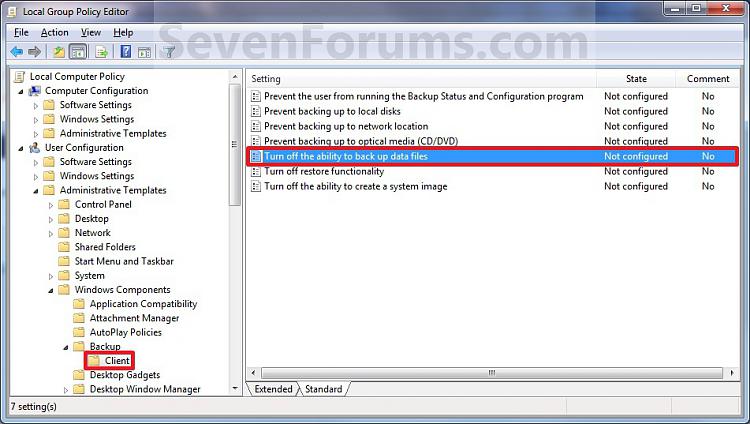
4. To Enable Backup Data Files
A) Select (dot) either Not Configured or Disabled. (See screenshot below step 6)5. To Disable Backup Data Files
B) Go to step 6.
A) Select (dot) Enabled. (See screenshot below step 6)6. Click on OK. (See screenshot below)
7. Close the Local Group Policy Editor window.
Shawn
Related Tutorials
- How to Enable or Disable the Ability to Create a System Image in Windows 7
- How to Backup User and System Files in Windows 7
- How to Reset the Backup Files Configuration in Windows 7
- How to Turn the Windows 7 Backup Files Schedule On or Off
- How to Delete Windows 7 User and System Backup Files
- How to Restore Backup User and System Files in Windows 7
- How to Create a Windows 7 Backup User and System Files Shortcut
- How to Create a Windows 7 Restore Backup User and System Files Shortcut
- How to Enable or Disable Backing up to a Network Location in Windows 7
- How to Enable or Disable Backing up to a CD or DVD in Windows 7
- How to Enable or Disable Backing up to Local Hard Disks in Windows 7
- How to Enable or Disable Restoring Backup Files in Windows 7
Backup User and System Data Files - Enable or Disable
-
New #1
Does this backup save all your user and program settings? Atm I rely on copying my appdata folder to another location to back up the program/user settings.
-
New #2
Hi Swarfega,
Yes, sure it can if selected. The backup files feature has been updated in the 7057 build to be a lot better in selecting what you want backed up. See the screenshot under step 9 here to see the new selection options. :)
Backup User and System Files
-
New #3
Yeah gave it a go shortly after I posted. It has improved so I think Ill take advantage of this feature to make clean installs easier.
-
New #4
I can't wait to see what improvements they make in the next build to. This was a nice one. :)

Backup User and System Data Files - Enable or Disable
How to Enable or Disable to Backup Data Files in Windows 7Published by Brink


 Quote
Quote
Related Discussions