
How to Create a "Notification Area Icons" Shortcut in Windows 7 and Windows 8
Information
The notification area is a part of the taskbar that provides a temporary source for notifications and status. It can also be used to display icons for system and program features that are not on the desktop.
This tutorial will show you how to create or download a Notification Area Icons customize shortcut that you can use or pin where you like in Windows 7 and Windows 8.
This tutorial will show you how to create or download a Notification Area Icons customize shortcut that you can use or pin where you like in Windows 7 and Windows 8.
EXAMPLE: Notification Area Icons
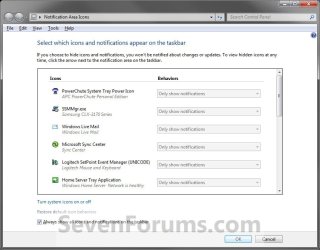
OPTION ONE
To Download a "Notification Area Icons" Shortcut
1. Click/tap on the Download button below to download the file below.
Notification_Area_Icons.zip
Download
2. Save the .zip file to your desktop.
3. Open the .zip file, and extract (drag and drop) the Notification Area Icons shortcut to your desktop.
4. Unblock the Notification Area Icons shortcut.
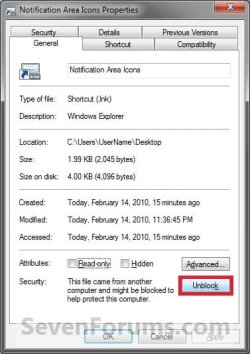
5. In Windows 7, you can now Pin to Taskbar or Pin to Start Menu, add to Quick Launch, assign a keyboard shortcut to it, or move this shortcut to where you like for easy use.
6. In Windows 8 and 8.1, you can Pin to Taskbar on desktop, Pin to Start screen, add to Quick Launch, assign a keyboard shortcut to it, or move this shortcut to where you like for easy use.
7. When finished, you can delete the downloaded .zip file if you like.
OPTION TWO
To Manually Create a "Notification Area Icons" Shortcut
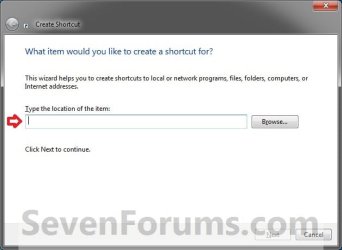
1. Right click or press and hold on an empty area on your desktop, and click/tap on New and Shortcut.
2. Copy and paste either location below into the location area, and click/tap on the Next button. (See screenshot below)
%windir%\explorer.exe shell:::{05d7b0f4-2121-4eff-bf6b-ed3f69b894d9}
OR
%SystemRoot%\System32\rundll32.exe shell32.dll,Options_RunDLL 5
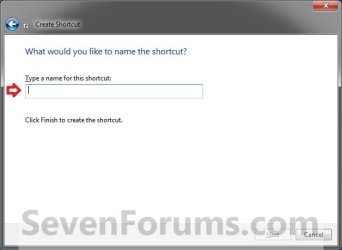
3. Type Notification Area Icons for the name, and click/tap on the Finish button. (See screenshot below)
NOTE: You can name this anything you would like though.
4. Right click or press and hold on the new Notification Area Icons shortcut, and click/tap on Properties.
5. Click/tap on the Shortcut tab, then click/tap on the Change Icon button. (See screenshot below)

6. In the line under "Look for icons in this file", copy and paste in the location below, and press Enter. (See screenshot below)
%SystemRoot%\System32\taskbarcpl.dll
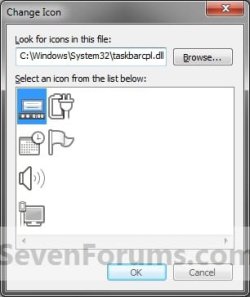
7. Select the icon highlighted in blue above, and click/tap on OK. (See screenshot above)
NOTE: You can use any icon that you would like instead though.
8. In Windows 7, you can now Pin to Taskbar or Pin to Start Menu, add to Quick Launch, assign a keyboard shortcut to it, or move this shortcut to where you like for easy use.
9. In Windows 8 and 8.1, you can Pin to Taskbar on desktop, Pin to Start screen, add to Quick Launch, assign a keyboard shortcut to it, or move this shortcut to where you like for easy use.
That's it,
Shawn
Related Tutorials
- How to Turn System Icons On or Off in Windows 7 and Windows 8
- How to Hide or Show System Icons and Notifications in Windows 7 and Windows 8
- Reset and Clean Out Old Notification Area Icons in Vista, Windows 7, and Windows 8
- How to Enable or Disable System Icons on Taskbar in Windows 7 and Windows 8
- How to Add or Remove the Notification Area from the Taskbar in Windows 7 and Windows 8
- How to Customize the Notification Area Icons in Windows 7
- How to Create a "System Icons" Settings Shortcut in Windows 7 and Windows 8
- How to Enable or Disable Changing "Notification Area Icons" Settings in Windows 7
- Enable or Disable Automatic Promotion of Notification Area Icons to Taskbar in Windows 7 and 8
Attachments

Last edited: