

Checking executables
I thought I'd post a way of checking any new unsigned executables that attempt to run anywhere on your system but just for information purposes and not to suggest that it's a good idea to install this software. I've been using it for some time. There's a one year free license.
https://secureaplus.secureage.com/Main/secureaplus_download.php
Personally I use the offline No AV version. Once installed the initial scan of executables that are already present on your system takes around an hour or more. Those executables will be whitelisted.
What happens when an unsigned executable attempts to run - you get the option to block it:
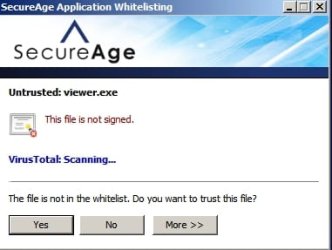
The file gets scanned on VirusTotal and the result is shown.

Configuration options:
Prompt when a file is not in the whitelist
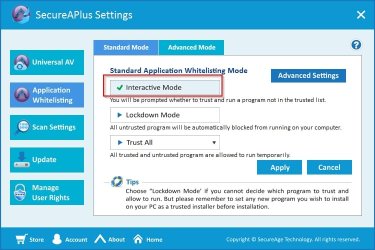
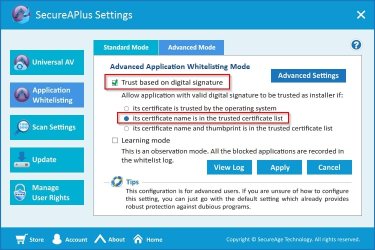
Trust the file based on digital signature if it's in the trusted list
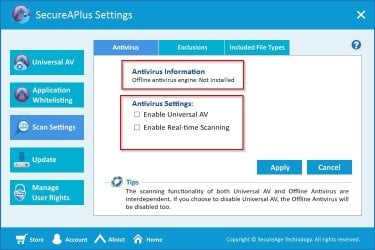
Disable AV and rely on your installed AV or optionally enable/ disable it when needed for a secondary scan
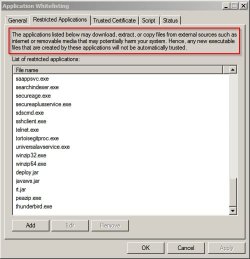
Add any application capable of downloading/ creating executables to the restricted application list.
Typically:
Any/all web browsers installed on your computer
Entire MS Office suite (Access, Excel, Outlook, PowerPoint, Word)
Sun (now Oracle) Java
Any media player (Windows Media Player, VLC, iTunes, RealPlayer, QuickTime, Winamp)
Any software that waits and listens for a network connection
Any Adobe product that you see frequently listed within Adobe's Security bulletins and advisories.
No need to add flash player - the plugin is protected by adding the browser's executable.
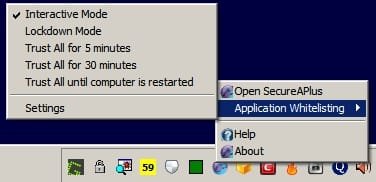
When installing trusted software there's an option to "Trust All"
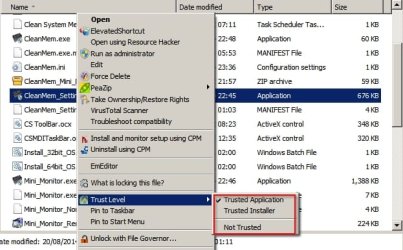
There's also the option to change trust level for any executable on your system
I feel that it does add an additional layer of security but it doesn't seem to get mentioned often here on SevenForums. I guess that it suits users who wish to be kept informed of what's going on on their system and who don't mind responding to pop ups. I like pop ups!
I thought I'd post a way of checking any new unsigned executables that attempt to run anywhere on your system but just for information purposes and not to suggest that it's a good idea to install this software. I've been using it for some time. There's a one year free license.
https://secureaplus.secureage.com/Main/secureaplus_download.php
Personally I use the offline No AV version. Once installed the initial scan of executables that are already present on your system takes around an hour or more. Those executables will be whitelisted.
What happens when an unsigned executable attempts to run - you get the option to block it:
The file gets scanned on VirusTotal and the result is shown.
Configuration options:
Prompt when a file is not in the whitelist
Trust the file based on digital signature if it's in the trusted list
Disable AV and rely on your installed AV or optionally enable/ disable it when needed for a secondary scan
Add any application capable of downloading/ creating executables to the restricted application list.
Typically:
Any/all web browsers installed on your computer
Entire MS Office suite (Access, Excel, Outlook, PowerPoint, Word)
Sun (now Oracle) Java
Any media player (Windows Media Player, VLC, iTunes, RealPlayer, QuickTime, Winamp)
Any software that waits and listens for a network connection
Any Adobe product that you see frequently listed within Adobe's Security bulletins and advisories.
No need to add flash player - the plugin is protected by adding the browser's executable.
When installing trusted software there's an option to "Trust All"
There's also the option to change trust level for any executable on your system
I feel that it does add an additional layer of security but it doesn't seem to get mentioned often here on SevenForums. I guess that it suits users who wish to be kept informed of what's going on on their system and who don't mind responding to pop ups. I like pop ups!
Last edited:
My Computer
- Computer type
- Laptop
- Computer Manufacturer/Model Number
- ASUS
- OS
- Microsoft Windows 7 Home Premium 64-bit 7601 Multiprocessor Free Service Pack 1
- CPU
- AMD C-60 APU with Radeon(tm) HD Graphics
- Motherboard
- ASUSTeK COMPUTER INC. X501U
- Memory
- 4.00 GB
- Graphics Card(s)
- AMD Radeon HD 6290 Graphics
- Sound Card
- (1) AMD High Definition Audio Device (2) Realtek High Defi
- Screen Resolution
- 1366 x 768 x 32 bits (4294967296 colors) @ 60 Hz
- Hard Drives
- Hitachi HTS545050A7E380 SATA Disk Device
- Antivirus
- Comodo CIS & FW, SecureAplus App Whitelisting, Threatfire
- Browser
- Cyberfox 64bit, Opera 64bit, Airfox
- Other Info
- Spy-The-Spy, HitmanPro.Alert, Norton Connect Safe, MJRegWatcher, BitDefender TrafficLight, Voodoo Shield, Zemana AntiMalware


