Solved Restoring Macrium BackUp from an External Hard Drive

richc46

Moderator
VIP
SF Team
Local time
6:12 AM
Messages
17,783
Location
CT
I have been backing up to an external hard drive using Macrium. I have backed up as images rather than a clone. I would like to reassure myself as to the proper procedure to restore to a new internal SS hard drive. My hard drive is failing and I do have all my stuff backed up, but would like to avoid actually reinstalling both the OS, as well as my stuff. Would like to use the Macrium Image.
LOL thought it best to ask now before that inevitable day actually arrives.
 

My Computer My Computer

Computer type
PC/Desktop
Computer Manufacturer/Model Number
Dell XPS 420
OS
Windows 10, Home Clean Install
CPU
Intel Core2 processsor Q8200(2.33Ghz 1333FSB) Quad Core Tech
Motherboard
Dell
Memory
6 gb
Graphics Card(s)
ATI Radeon 256MB HD3650
Sound Card
Intergrated 7.1 Channel Audio
Monitor(s) Displays
Dell SP2009W 20"
Hard Drives
640 GB Serial ATA Hard drive
Cooling
Fan
Keyboard
Dell USB Keyboard
Mouse
Dell Premium Optical USB
Internet Speed
DSL 2.85
OK well I did precisely this and had no problems. Furthermore I had purchased the Paragon Migrate product and wasn't happy with it.
This is what I did and is just a bit different from the WHS tutorial.

Prepare the SSD. Here I am including a system reserved partition of size 205MB. From an elevated command prompt
1) Diskpart
2) List Dist
3) Select disk n
......n is the SSD disk number
4) create partition primary size=205 align=1024
......the system reserved partition
5) create partition primary align=1024
......the OS partition
6) List partition
......should show
---------------------offset
partition 1 primary 1024 kB
partition 2 primary 206 MB
7) select partition 1
8) active
9) select partition 2
10) assign letter=c
The SSD is now prepared.
Connect SSD to sata port 0 and disconnect all other internal HDDs

Transfer the Macrium Images
Using Macrium Reflect free V5. Drag and drop the partition images onto the SSD prepared partitions. The images will then use the target partition alignment. See
Partition Alignment

That's about it. Check Trim and that disk drefrag is off. Windows seems to take care of this.
 

My Computer My Computer

Computer type
PC/Desktop
Computer Manufacturer/Model Number
Own build
OS
Windows 7x64 Home Premium SP1
CPU
Intel i7 2600k
Motherboard
ASUS P8Z68 Deluxe
Memory
G.Skill Ripjaws (DDR3-1600) 2x4GB
Graphics Card(s)
Nvidia GeForce GTS 450; Intel HD Graphics 3000(GT2+)
Monitor(s) Displays
Dell Ultrasharp IPS panel U2311H, Samsung SyncMaster P2350
Screen Resolution
1920x1080
Hard Drives
Samsung 850 Pro SSD 256GB, Samsung SSD 840 120GB, Seagates 1TB Barracuda ST31000528AS x2
PSU
Seasonic M12II 520W
Case
Lian Li Lancool PC-K60
Cooling
Case: 1x120mm, 3x140mm CPU: Hyper 212+
Keyboard
Logitech MK520 (wireless)
Mouse
Logitech MK520
Internet Speed
6-7 Mbps
Antivirus
Norton Security Premium, Malwarebytes on 2 (MSE on 3rd PC)
Browser
FireFox
Other Info
Audio: Logitech Z523 2.1
Thank you so very much, Michael. That is just the information that I was looking for. I was very surprised last night when I began to back up my OS with Macrium and it stalled Several times at 11%. My work here gave me the knowledge to know that it was probably the hard drive. I tested and sure enough bad news. It is only a problem with a cluster, now, but we both know it will get worse, probably very soon.
Fortunately, I have the time to prepare, double back up, shop fora HD, and then act. Your help has made it so much easier. Now. I dont have to reinstall, but merely use my backup image.
I know now how all those that I have helped must have felt. Probably much like me, right now, gratitude and thanks for this Forum and the helpful membership.
All that I could do to say thanks is to give you well deserved rep, and it is done.
Thanks, again.
 

My Computer My Computer

Computer type
PC/Desktop
Computer Manufacturer/Model Number
Dell XPS 420
OS
Windows 10, Home Clean Install
CPU
Intel Core2 processsor Q8200(2.33Ghz 1333FSB) Quad Core Tech
Motherboard
Dell
Memory
6 gb
Graphics Card(s)
ATI Radeon 256MB HD3650
Sound Card
Intergrated 7.1 Channel Audio
Monitor(s) Displays
Dell SP2009W 20"
Hard Drives
640 GB Serial ATA Hard drive
Cooling
Fan
Keyboard
Dell USB Keyboard
Mouse
Dell Premium Optical USB
Internet Speed
DSL 2.85
Dear richc46,
What mjf posted was fantastic, though i did not understand it well at all! He was speaking from a "level superior" and considering both of your knowledge and experience, it was but logical that he spake:shock: thus.

Now i wish to ask you a few things,1) you did not mention in the system specs which version,32 or the 64-bit is installed, though i would dare to assume it's the latter.
2) What is the external drive(and it's GB space) you are using and how many Macrium images have you in it? Is there a"RAID" facility? What is the transfer speed you have noticed? Kindly excuse my inquisitiveness,since i regularly use the M-R free for taking "IMAGES"(sorry for the bold type). Are you "Verifying" the system Image after creating the Image?

3) How old is the PC? Have you tried any software like Acronis Disk Monitor to assess the health of the Internal HD and even the Extn.HD? Website to download: Acronis Drive Monitor Review - Acronis Drive Monitor Download - Softpedia

I personally use both the lightwight ADM and a wonderful and lightwight software "SPECCY" free version. It may be downloaded from: Speccy - Download.

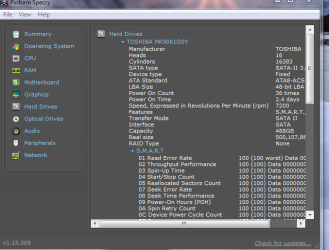
I again crave your indulgence and request you to reply,as it will be a learning for me! Kindly view this SNAP showing the Disk heath. Rep me if you find Speccy free and Acronis Disk Monitor (ADM) useful.

regards and thanks for the patient reading:).
 

Attachments

  • _2012-02-20_20-51-22.png
    _2012-02-20_20-51-22.png
    27.7 KB · Views: 18

My Computer My Computer

Computer Manufacturer/Model Number
Sony Vaio C series VPCCB35FN laptop
OS
MS Windows 7 Home Premium 64-bit SP1
CPU
IntelCore [email protected]; Sandy Bridge 32nm Tech.
Motherboard
Sony Vaio Version:C609NJYJ
Memory
4096Mb RAM; Single ChannelDDR3@665MHz; DRAM Freq:662MHz
Graphics Card(s)
AMD Radeon HD 6630M; GPU:Whistler;BIOS Core&mem Clock:123.36
Sound Card
REALTEK High Definition Audio Device; INTEL Display Card
Monitor(s) Displays
Generic PnP Intel HD;Resolution:1920*1040 Pixels; BPP:32bits
Screen Resolution
Current Resolution:1920*1080 Pixels; Monitor Frequency:60Hz
Hard Drives
Internal HD:TOSHIBA MK5061GSY; Real Size:488 GB;NTFS; 3 Partitions; SATA; HEADS:16

External HDD: WD Elements 1023 PORTABLE; Estimated Size: 1TB; NTFS; 3 Partitions
Cooling
Lateral Exhaust with a Cooling Pad Placed Beneath.
Keyboard
Logitech Bluetooth+ Generic Integrated K-B
Mouse
Logitech Bluetooth
Internet Speed
2MBPS
Other Info
1)Trend Micro Titanium Maximum Security Suite Version:3
2)SAS-PRO

3)MBAM--PRO


4)WATERFOX+IE9 +WOT+LINKEXTEND+ DRWEBCUREIT LINK CHECKER

5)SPYWAREBLASTER

6) WINPATROL PLUS

7) SANDBOXIE and
8) A BIT OF COMMON SENSE.
Dear richc46,
What mjf posted was fantastic, though i did not understand it well at all! He was speaking from a "level superior" and considering both of your knowledge and experience, it was but logical that he spake:shock: thus.

Now i wish to ask you a few things,1) you did not mention in the system specs which version,32 or the 64-bit is installed, though i would dare to assume it's the latter.
2) What is the external drive(and it's GB space) you are using and how many Macrium images have you in it? Is there a"RAID" facility? What is the transfer speed you have noticed? Kindly excuse my inquisitiveness,since i regularly use the M-R free for taking "IMAGES"(sorry for the bold type).

3) How old is the PC? Have you tried any software like Acronis Disk Monitor to assess the health of the Internal HD and even the Extn.HD? Website to download: Acronis Drive Monitor Review - Acronis Drive Monitor Download - Softpedia

I personally use both the lightwight ADM and a wonderful and lightwight software "SPECCY" free version. It may be downloaded from: Speccy - Download.

I again crave your indulgence and request you to reply,as it will be a learning for me! Kindly view this SNAP showing the Disk heath. Rep me if you find Speccy free and Acronis Disk Monitor (ADM) useful.

regards and thanks for the patient reading:).

Hope that I can give you as much help as I was given

I have Windows Seven 64 Bit.
The external drive is the drive that I saved my images too. You may know it as an external hard drive. It is a good thing that I did not save to my internal drive (which has the Operating System) or I would really be screwed. My back up would be on the drive with the problem.
I have about half a dozen images. I just bought my external hard drive at the end of last year and make a back up at least after a windows update.
My external has 500 GB of space.
No raid.
Did not really notice the transfer rate, but takes about 10 minutes.

My PC is new, just little over 3 years old. Hard Drives can go for any number of reasons, defects, improper shutdown, abrupt movement of the computer while running. The average expected life is about 5 years @ about 6 hours a day, but the lifetime varies widely.
I am familar with Speccy, and have suggested it to others, but dont need or want it myself.
 

My Computer My Computer

Computer type
PC/Desktop
Computer Manufacturer/Model Number
Dell XPS 420
OS
Windows 10, Home Clean Install
CPU
Intel Core2 processsor Q8200(2.33Ghz 1333FSB) Quad Core Tech
Motherboard
Dell
Memory
6 gb
Graphics Card(s)
ATI Radeon 256MB HD3650
Sound Card
Intergrated 7.1 Channel Audio
Monitor(s) Displays
Dell SP2009W 20"
Hard Drives
640 GB Serial ATA Hard drive
Cooling
Fan
Keyboard
Dell USB Keyboard
Mouse
Dell Premium Optical USB
Internet Speed
DSL 2.85
Back
Top