Solved Macrium etc Free Software--How to avoid CNET Virus/Adware/malware prog

XP VM User

New member
Member
VIP
Local time
9:40 AM
Messages
279
Hi everyone!

I was advised earlier on this thread:: http://www.sevenforums.com/backup-restore/357684-need-new-backup-storage-program-5.html

....that Macrium (and AOMEI) are good to use to backup my Laptop HDD to an external drive.

Larger 2TB, external drive purchased, and is on its way...

Now I'd like to get the Free Backup program Macrium.

One problem still remains:

I've stopped using CNET Downloads since myself (and others as experienced in this Google search), have been seriously harmed by CNET downloads


There have been problems with reported with the CNET site since 2008, check Google page:

https://www.google.com/search?clien...ET+downloads&sourceid=opera&ie=UTF-8&oe=UTF-8

I got hit by their malware/adware/toolbars so I refuse to use them as you can't remove them!!!! (On XP computer so I won't bother asking you here about them).

This is for a Laptop running Windows 7 Professional, so I don't want anything to go wrong (not mine, its a relatives' computer).

This thread from another (not Windows Seven Forum) website : http://www.thewindowsclub.com/safe-software-download-sites

....mentioned that "all" sites have a "direct link" so you don't have to use CNET Downloads,

Well.. I've looked high and low and even clicked on the paid versions of Macrium.... all seem to FORCE you to use the CNET download (with their CNET "installer" of course you must agree to install in order to get their "free" download (sorry for using so many quote marks, I'm using these words sarcastically if no one has noticed yet)

I don't want to have to go to an unofficial, potentially virus-laden site to get this program that will be making important, valuable irreplaceable copies of the only Drive in the Laptop! So don't refer me to anywhere else but the "official Macrium" download site....

Question is now: How to get free (or paid) Macrium backup software without all the CNET malware/adware/toolbars who knows what else??? installed automatically??

I checked Windows Seven Forum first, found a few helpful items... but no answers for me.

Layback Bear did a good reply here: (copied in full as its buried deep inside a thread)

Layback Bear

Thank you DavidW7ncus. The article (website) in your post #41 was great.

It was very informative and I recommend all to read. Sites like Cnet state their downloads are virus and spyware free. It does not state that they are free of all unwanted little goodies what ever name they may be called by. Just because something is not considered a virus or spyware does not mean you want it included. The adding of a unwanted Tool Bar which is not considered a virus or spyware is still not a good thing. The Tool Bar itself is not spyware but it does open the back door for spyware.

Beware of the tricky wording some sites use.

Their is no such thing as a no-brainier when it comes to downloading anything. That is exactly what the download site wants people to think or better yet not to think. Just run with the download. After all they love us all and would never do anything to harm us. Bull Droppings.

Britton30 also added

Thanks for the credit Jack. I will hazard a guess that c|net add all the crapware, it's all about money. I no longer believe them that "this download has been checked and is free of adware and spyware."

Thanks again for reading a long initial question everyone!

XP VM USER (sorry got stuck with name on my first visit here)
 

My Computer My Computer

Computer type
Laptop
Computer Manufacturer/Model Number
SONY VAIO VPCS111FM
OS
Windows7 Professional 64bit
CPU
Intel(R) Core (TM) i5 CPU M 430 @2.27 Ghz
Memory
8.0 GB
Hard Drives
Seagate 500GB Momentus
Cooling
Internal fan
Mouse
Logitech bluetooth trackball
Browser
Pale Moon Browser for x64

My Computer My Computer

Computer type
PC/Desktop
Computer Manufacturer/Model Number
home built
OS
Multi-Boot W7_Pro_x64 W8.1_Pro_x64 W10_Pro_x64 +Linux_VMs +Chromium_VM
CPU
AMD Athlon II x4 620
Motherboard
Gigabyte GA-MA785G-UD3H
Memory
6GB GSkill DDR2 800
Graphics Card(s)
AMD 4670 GPU + AMD 4200 IGP
Sound Card
on board Realtek ALC889A
Monitor(s) Displays
RCA 40" LCD TV, Insignia 32" LCD TV, HP 15" LCD monitor
Screen Resolution
1680 x 1050
Hard Drives
OCZ Vertex 3 120GB,
Samsung F3 1TB (3),
Several others - WD, Seagate, Hitachi, ...
PSU
Corsair 500 W
Case
Rosewill mid tower
Cooling
CM 90mm rifle
Keyboard
Gyration wireless, Logitech wireless, Dell USB wired
Mouse
Gyration wireless, Logitech wireless, V7 USB wired
Internet Speed
Spectrum - 100Mbps D / 10Mbps U
Antivirus
Avast, MBAM3, EMET, WinPatrol
Browser
Pale Moon, Firefox, IE
Other Info
2 multi-boot PC's
Mainly HTPC/Office/Gen purpose (no gaming).
Trendnet USB KVM.
LG DVD burner/Blue Ray Player.
Tray system for removable SATA backup drives.

Not currently OCd, under-volted.
I use Hybrid sleep, rarely re-boot or shutdown.

Hauppauge HD-PVR, Avermedia PCIe TV Tuner, Hauppauge PCI TV Tuner.
Looks like the ANSWER!

Hi DavidE!

Thanks for the link... (I should keep Major Geeks for other items too if its ok)

I clicked on the download to inspect its address:

it says: (nice trick, the Forum automatically shortened this link so I re did it below with full address given)

Reimage - PC Repair Online

h t t p : / / ox-d.majorgeeks.com/w/1.0/rc?ts=1fHJpZD04NTQxOThlYy0wODE5LTRmZjItODE1Yi1lNzYxNDY3YTI5NGZ8cnQ9MTQyMjMxNDU0MnxhdWlkPTEyNjg5fGF1bT1ETUlELldFQnxzc2lkPTI0MDF8c2lkPTU1MXxwdWI9MTU4NXxwYz1VU0R8cmFpZD0yYzFlNGI2Mi02NmYzLTQ5MmMtOGU2MS1hM2NhZTViY2MzYjd8YWlkPTUzNzE2NDg0NHx0PTF8YXM9MzM2eDI4MHxsaWQ9NTM3MTI5MzM1fG9pZD03MzYyNnxwPTIwMDB8cHI9MjAwMHxhZHY9NDU5MXxhYz1VU0R8cG09UFJJQ0lORy5DUE18Ym09QlVZSU5HLk5PTkdVQVJBTlRFRUR8bGM9Mnxsdz0xNDQwfHVyPTBvTWUwQzZPYVQ

I guess I have to trust you on this one that it has no malware/adware, et al....

I usually look for hidden "CNET" or other redirects inside links...

But something like this is totally undecipherable to me!

Am I alone in thinking this???

(Various musings out loud) : I don't know how Macrium actually works, so I will wait until I hook up the External Drive before I do the download, as sometimes its easier for the program right after it downloads/installs on its first run time, to detect the two drives and right away it gives me choices of what do I want to do, versus just downloading, and turning it on at another time (might also be some registration ?? requirements I don't know yet) so again I'm unsure if I should download it before I try saving everything just as a big "save" like Forum member ignatzatsonic recommended I do first when I get the new HDD, since it has the room, and restore point (which I do always of course) may not satisfy me as to protecting everything from a new program....

Thanks again... I'll mark as SOLVED!!! to give you credit too (as soon as I do download ok?)

XP VM USER
 

My Computer My Computer

Computer type
Laptop
Computer Manufacturer/Model Number
SONY VAIO VPCS111FM
OS
Windows7 Professional 64bit
CPU
Intel(R) Core (TM) i5 CPU M 430 @2.27 Ghz
Memory
8.0 GB
Hard Drives
Seagate 500GB Momentus
Cooling
Internal fan
Mouse
Logitech bluetooth trackball
Browser
Pale Moon Browser for x64
There was a recent SF thread about downloads and trusted sites.
MajorGeeks is still one of the trusted sites, I've been using it for years.
If I can find the thread link, i'll post back with it.

Downloading anything, well, seems to be getting worse ...
The user really has to pay attention and read everything ...
 

My Computer My Computer

Computer type
PC/Desktop
Computer Manufacturer/Model Number
home built
OS
Multi-Boot W7_Pro_x64 W8.1_Pro_x64 W10_Pro_x64 +Linux_VMs +Chromium_VM
CPU
AMD Athlon II x4 620
Motherboard
Gigabyte GA-MA785G-UD3H
Memory
6GB GSkill DDR2 800
Graphics Card(s)
AMD 4670 GPU + AMD 4200 IGP
Sound Card
on board Realtek ALC889A
Monitor(s) Displays
RCA 40" LCD TV, Insignia 32" LCD TV, HP 15" LCD monitor
Screen Resolution
1680 x 1050
Hard Drives
OCZ Vertex 3 120GB,
Samsung F3 1TB (3),
Several others - WD, Seagate, Hitachi, ...
PSU
Corsair 500 W
Case
Rosewill mid tower
Cooling
CM 90mm rifle
Keyboard
Gyration wireless, Logitech wireless, Dell USB wired
Mouse
Gyration wireless, Logitech wireless, V7 USB wired
Internet Speed
Spectrum - 100Mbps D / 10Mbps U
Antivirus
Avast, MBAM3, EMET, WinPatrol
Browser
Pale Moon, Firefox, IE
Other Info
2 multi-boot PC's
Mainly HTPC/Office/Gen purpose (no gaming).
Trendnet USB KVM.
LG DVD burner/Blue Ray Player.
Tray system for removable SATA backup drives.

Not currently OCd, under-volted.
I use Hybrid sleep, rarely re-boot or shutdown.

Hauppauge HD-PVR, Avermedia PCIe TV Tuner, Hauppauge PCI TV Tuner.

My Computer My Computer

Computer Manufacturer/Model Number
HP, Dell, Gateway, Toshiba - 4 laptops and 2 desktops
OS
Vista, Windows7, Mint Mate, Zorin, Windows 8
CPU
from 1.6GHz Duo to i7
Monitor(s) Displays
2x HP w2207
Hard Drives
5x HDD, 7x SSD, 12x Externals
Keyboard
with trackball - no mices
Mouse
Trackball mice
Internet Speed
DSL 6000
@XP VM User

I just clicked on the link you posted in post #3.
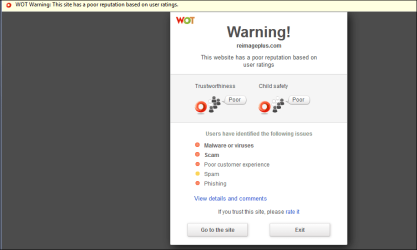
I got redirected - and a WOT warning.
When I click on the link I posted in post #2, i don't get re-directed.

:confused:
 

My Computer My Computer

Computer type
PC/Desktop
Computer Manufacturer/Model Number
home built
OS
Multi-Boot W7_Pro_x64 W8.1_Pro_x64 W10_Pro_x64 +Linux_VMs +Chromium_VM
CPU
AMD Athlon II x4 620
Motherboard
Gigabyte GA-MA785G-UD3H
Memory
6GB GSkill DDR2 800
Graphics Card(s)
AMD 4670 GPU + AMD 4200 IGP
Sound Card
on board Realtek ALC889A
Monitor(s) Displays
RCA 40" LCD TV, Insignia 32" LCD TV, HP 15" LCD monitor
Screen Resolution
1680 x 1050
Hard Drives
OCZ Vertex 3 120GB,
Samsung F3 1TB (3),
Several others - WD, Seagate, Hitachi, ...
PSU
Corsair 500 W
Case
Rosewill mid tower
Cooling
CM 90mm rifle
Keyboard
Gyration wireless, Logitech wireless, Dell USB wired
Mouse
Gyration wireless, Logitech wireless, V7 USB wired
Internet Speed
Spectrum - 100Mbps D / 10Mbps U
Antivirus
Avast, MBAM3, EMET, WinPatrol
Browser
Pale Moon, Firefox, IE
Other Info
2 multi-boot PC's
Mainly HTPC/Office/Gen purpose (no gaming).
Trendnet USB KVM.
LG DVD burner/Blue Ray Player.
Tray system for removable SATA backup drives.

Not currently OCd, under-volted.
I use Hybrid sleep, rarely re-boot or shutdown.

Hauppauge HD-PVR, Avermedia PCIe TV Tuner, Hauppauge PCI TV Tuner.

My Computer My Computer

Computer Manufacturer/Model Number
HP, Dell, Gateway, Toshiba - 4 laptops and 2 desktops
OS
Vista, Windows7, Mint Mate, Zorin, Windows 8
CPU
from 1.6GHz Duo to i7
Monitor(s) Displays
2x HP w2207
Hard Drives
5x HDD, 7x SSD, 12x Externals
Keyboard
with trackball - no mices
Mouse
Trackball mice
Internet Speed
DSL 6000
You posted faster than I typed my reply!

Hi DavidE!

Confused a bit... [note to self---I revised this based upon your two recent postings back to me! I was "typing" this reply]

I just posted my reply... worked on it a while to get it to look just right with the http:// addresses

I copied the address twice, first one went to your page you gave me, second one I broke apart so no "url" blue underline so you can see all the weird letters...

But

When I posted it.... some other automated "bot" or jantor program at Windows Seven Forum cleaned it up and when I clicked on the link.... guess where it went to????

NOT to the page you originally posted about downloading Macrium from Major Geek site..

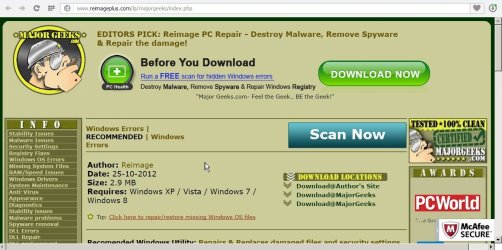
But at the Major Geek Site.. this ADVERTISEMENT for another one of their products!!!

Copied and pasted top of the page writing here:

EDITORS PICK: Reimage PC Repair - Destroy Malware, Remove Spyware & Repair the damage!

What just happened??
Is this site like CNET? Trying to get some extra money from us? Or Free program with something "little" added in ??

What did I do wrong DavidE in my post?

(Not upset with advice, just asking what happened here!!)

[Yes I see the links you provided, showing Major Geeks is ok--thanks]

[Still does not explain why when I took it off my "Word Pad" where I was composing the message, pasted it onto Windows Seven Forum Reply box... checked and previewed it.... and made changes too! Did the "bot" or "janitor" change my blue address to that other one!
I did not intend to re-direct it! I confirmed it operated using the "preview" before posting!!!]

[What is going on???]

Thanks!
 

My Computer My Computer

Computer type
Laptop
Computer Manufacturer/Model Number
SONY VAIO VPCS111FM
OS
Windows7 Professional 64bit
CPU
Intel(R) Core (TM) i5 CPU M 430 @2.27 Ghz
Memory
8.0 GB
Hard Drives
Seagate 500GB Momentus
Cooling
Internal fan
Mouse
Logitech bluetooth trackball
Browser
Pale Moon Browser for x64
Thanks whs!

Now that is more of what I need... simple language, easy to follow screen shots and guaranteed results (and YES I love it when they explain about sometimes a scan will come up with a single hit... but more likely its made an error and file is still safe---and to rescan it if you want to be certain nothing has changed since Virus Total.com (Bookmarked and saved the page)..

It recommends adding this to your broswer---- I don't have a working Firefox on this device, only Opera works..... (long story, want to hear it?---I'm joking, I'll post it someday in the "browsers" section here if I ever type it out)..

Thanks again!!
 
Last edited:

My Computer My Computer

Computer type
Laptop
Computer Manufacturer/Model Number
SONY VAIO VPCS111FM
OS
Windows7 Professional 64bit
CPU
Intel(R) Core (TM) i5 CPU M 430 @2.27 Ghz
Memory
8.0 GB
Hard Drives
Seagate 500GB Momentus
Cooling
Internal fan
Mouse
Logitech bluetooth trackball
Browser
Pale Moon Browser for x64
I'm not arguing the pros and cons of CNET downloads. I find it a worry when the Macrium site (linked in the free program section here) itself points potential users to a CNET download. If CNET is a risky download then what does this say for Macrium.
 

My Computer My Computer

Computer type
PC/Desktop
Computer Manufacturer/Model Number
Own build
OS
Windows 7x64 Home Premium SP1
CPU
Intel i7 2600k
Motherboard
ASUS P8Z68 Deluxe
Memory
G.Skill Ripjaws (DDR3-1600) 2x4GB
Graphics Card(s)
Nvidia GeForce GTS 450; Intel HD Graphics 3000(GT2+)
Monitor(s) Displays
Dell Ultrasharp IPS panel U2311H, Samsung SyncMaster P2350
Screen Resolution
1920x1080
Hard Drives
Samsung 850 Pro SSD 256GB, Samsung SSD 840 120GB, Seagates 1TB Barracuda ST31000528AS x2
PSU
Seasonic M12II 520W
Case
Lian Li Lancool PC-K60
Cooling
Case: 1x120mm, 3x140mm CPU: Hyper 212+
Keyboard
Logitech MK520 (wireless)
Mouse
Logitech MK520
Internet Speed
6-7 Mbps
Antivirus
Norton Security Premium, Malwarebytes on 2 (MSE on 3rd PC)
Browser
FireFox
Other Info
Audio: Logitech Z523 2.1
WOT=?

=DavidE;

I just clicked on the link you posted in post #3.
I got redirected - and a WOT warning.
When I click on the link I posted in post #2, i don't get re-directed.

:confused:

I guess I could Google it.. . what is WOT in computer error codes?
 

My Computer My Computer

Computer type
Laptop
Computer Manufacturer/Model Number
SONY VAIO VPCS111FM
OS
Windows7 Professional 64bit
CPU
Intel(R) Core (TM) i5 CPU M 430 @2.27 Ghz
Memory
8.0 GB
Hard Drives
Seagate 500GB Momentus
Cooling
Internal fan
Mouse
Logitech bluetooth trackball
Browser
Pale Moon Browser for x64
I'm not arguing the pros and cons of CNET downloads. I find it a worry when the Macrium site (linked in the free program section here) itself points potential users to a CNET download. If CNET is a risky download then what does this say for Macrium.

Michael, I bet this is all done for commercial considerations. I bet Macrium gets some kick-backs. They have to make money for their freebies somehow.
 

My Computer My Computer

Computer Manufacturer/Model Number
HP, Dell, Gateway, Toshiba - 4 laptops and 2 desktops
OS
Vista, Windows7, Mint Mate, Zorin, Windows 8
CPU
from 1.6GHz Duo to i7
Monitor(s) Displays
2x HP w2207
Hard Drives
5x HDD, 7x SSD, 12x Externals
Keyboard
with trackball - no mices
Mouse
Trackball mice
Internet Speed
DSL 6000

My Computers My Computers

System One System Two

  • Computer type
    PC/Desktop
    OS
    7 X64
    CPU
    i5 8400
    Motherboard
    gigabyte b365m ds3h
    Memory
    2x8gb 3200mhz
    Hard Drives
    various
    PSU
    pure power 11 400w cm
    Case
    Coolermaster
    Cooling
    cryorig m9i
  • Computer type
    PC/Desktop
    OS
    7x64
    CPU
    g5400
    Motherboard
    ga b365m ds3h
    Memory
    8gb ddr4 2400
    PSU
    xfx pro 450w
=DavidE;

I just clicked on the link you posted in post #3.
I got redirected - and a WOT warning.
When I click on the link I posted in post #2, i don't get re-directed.

:confused:
I guess I could Google it.. . what is WOT in computer error codes?

WOT = Web Of Trust

Do you use any real-time security protection ?
I think you don't, but i might be thinking of some other poster/thread ...
I use several real-time security programs and protection.

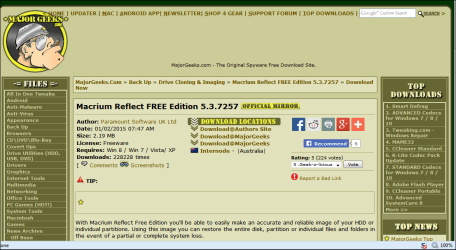
When I click on the link i gave you in post #2 i see screen print 1
When I click on the link you gave me in post #3 i see screen print 2

MG_Macrium_DL_01.PNG

Macrium_DL_waring_01.PNG
 

My Computer My Computer

Computer type
PC/Desktop
Computer Manufacturer/Model Number
home built
OS
Multi-Boot W7_Pro_x64 W8.1_Pro_x64 W10_Pro_x64 +Linux_VMs +Chromium_VM
CPU
AMD Athlon II x4 620
Motherboard
Gigabyte GA-MA785G-UD3H
Memory
6GB GSkill DDR2 800
Graphics Card(s)
AMD 4670 GPU + AMD 4200 IGP
Sound Card
on board Realtek ALC889A
Monitor(s) Displays
RCA 40" LCD TV, Insignia 32" LCD TV, HP 15" LCD monitor
Screen Resolution
1680 x 1050
Hard Drives
OCZ Vertex 3 120GB,
Samsung F3 1TB (3),
Several others - WD, Seagate, Hitachi, ...
PSU
Corsair 500 W
Case
Rosewill mid tower
Cooling
CM 90mm rifle
Keyboard
Gyration wireless, Logitech wireless, Dell USB wired
Mouse
Gyration wireless, Logitech wireless, V7 USB wired
Internet Speed
Spectrum - 100Mbps D / 10Mbps U
Antivirus
Avast, MBAM3, EMET, WinPatrol
Browser
Pale Moon, Firefox, IE
Other Info
2 multi-boot PC's
Mainly HTPC/Office/Gen purpose (no gaming).
Trendnet USB KVM.
LG DVD burner/Blue Ray Player.
Tray system for removable SATA backup drives.

Not currently OCd, under-volted.
I use Hybrid sleep, rarely re-boot or shutdown.

Hauppauge HD-PVR, Avermedia PCIe TV Tuner, Hauppauge PCI TV Tuner.
Just get it from my previous post. No need to go anywhere.
 

My Computers My Computers

System One System Two

  • Computer type
    PC/Desktop
    OS
    7 X64
    CPU
    i5 8400
    Motherboard
    gigabyte b365m ds3h
    Memory
    2x8gb 3200mhz
    Hard Drives
    various
    PSU
    pure power 11 400w cm
    Case
    Coolermaster
    Cooling
    cryorig m9i
  • Computer type
    PC/Desktop
    OS
    7x64
    CPU
    g5400
    Motherboard
    ga b365m ds3h
    Memory
    8gb ddr4 2400
    PSU
    xfx pro 450w
Neither CNET nor the MajorGeeks sites give me a WOT or a Norton safe site warning. All toolbar offerings I've come across can be refused.
I take it that CNET are not checking all the sites they host and there is a belief that MajorGeeks do check all the sites they host?
 

My Computer My Computer

Computer type
PC/Desktop
Computer Manufacturer/Model Number
Own build
OS
Windows 7x64 Home Premium SP1
CPU
Intel i7 2600k
Motherboard
ASUS P8Z68 Deluxe
Memory
G.Skill Ripjaws (DDR3-1600) 2x4GB
Graphics Card(s)
Nvidia GeForce GTS 450; Intel HD Graphics 3000(GT2+)
Monitor(s) Displays
Dell Ultrasharp IPS panel U2311H, Samsung SyncMaster P2350
Screen Resolution
1920x1080
Hard Drives
Samsung 850 Pro SSD 256GB, Samsung SSD 840 120GB, Seagates 1TB Barracuda ST31000528AS x2
PSU
Seasonic M12II 520W
Case
Lian Li Lancool PC-K60
Cooling
Case: 1x120mm, 3x140mm CPU: Hyper 212+
Keyboard
Logitech MK520 (wireless)
Mouse
Logitech MK520
Internet Speed
6-7 Mbps
Antivirus
Norton Security Premium, Malwarebytes on 2 (MSE on 3rd PC)
Browser
FireFox
Other Info
Audio: Logitech Z523 2.1
Adding what to your browser?

Aomei backupper , click this blue link and it will come straight at you: Local Download

Aomei Partition assistant new version here: PartAssist

I prefer Aomei, but macrium works fine as well, here: View attachment 347663
I wrote them again a mail about their crummy UI. They said they would fix that. I asked when but did not get an answer.

Btw - OneKey does not work when the bootmgr is not in the system partition (but in the C partition or in the recovery partition like on Dells) and they cannot image bitlocker encrypted C partitions - which they id as dynamic partitions. I keep sending them stuff and logs but they take long (if any) to answer. Where are those people.
 

My Computer My Computer

Computer Manufacturer/Model Number
HP, Dell, Gateway, Toshiba - 4 laptops and 2 desktops
OS
Vista, Windows7, Mint Mate, Zorin, Windows 8
CPU
from 1.6GHz Duo to i7
Monitor(s) Displays
2x HP w2207
Hard Drives
5x HDD, 7x SSD, 12x Externals
Keyboard
with trackball - no mices
Mouse
Trackball mice
Internet Speed
DSL 6000
Responding to many replies So much to show!

Hi everyone!

Thanks for all your posts and discussions!

Trying to keep up with you..

I'll post some here, and some I missed first time around (but by then I know there will be some responses I should get back to also!)

You are all great at this... I'm learning a LOT today!

I'm behind the times for those who ask about Virus protection.. I have Norton Internet Security plus malwarebytes.com (from prior posting here was reccommended thanks!)

I should get "real time"? one, but Norton keeps posting boxes when I click on sites telling me site is safe or not, and how many Norton users use it or find it bad or whatnot... (appears in a sliding box on the lower right side of screen, so you can't miss it)

Here are some replies!

Thanks for WOT Definition!

=DavidE;

I just clicked on the link you posted in post #3.
I got redirected - and a WOT warning.
When I click on the link I posted in post #2, i don't get re-directed.

:confused:

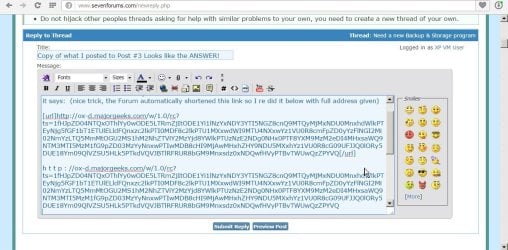
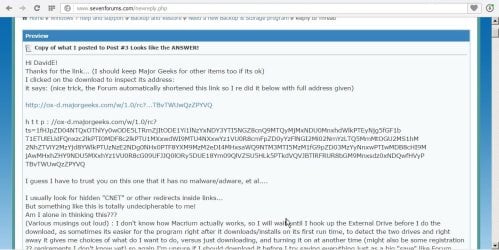
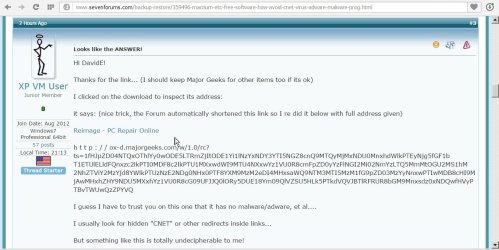
Here are my screen shots (if they post correctly for what happens when I click on the blue link in post #3... I wish I took a screen shot of my oriignal page, maybe I can duplicate it so you can see what I INTENDED to post and what happened to it??? will try..

Screen Shot 1 What I get redirected to


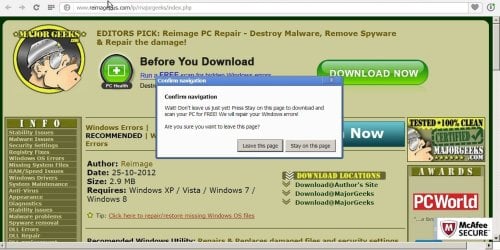
Screen Shot 2 What happens when you try to cancel out of that page, stop the download, etc

Screen Shot 3 THIS is what I originally typed AS SHOWN in the PREVIEW WINDOW to be posted for the message in Post #3... why does it not equal what you saw? Pass it along to whoever runs this site... some crazy error as you can see in "preview" this is not what I was shown! nor what it clicks to!!!


Screen Shot 4 THIS is what I saw.... Compare this to my actual Posting in Post #3

Screen Shot 5 INCREDIBLE!!! This is what actually posts in Post # 3 when you press final "submit reply" Note white arrow pointing at what everyone here clicked on to get the WOT warning and wrong page!
Someone explain what is going on here?? I want to be able to direct helpful members here to the right site when I post http/ urls/ etc!! I need to learn what I am doing wrong!! Thanks!

Thanks for reading and helping me on these confusing concepts!
 

Attachments

  • W 7 Forum PS17108 page 1.jpg
    W 7 Forum PS17108 page 1.jpg
    120.5 KB · Views: 0
  • W 7 Forum PS17109 page 2.jpg
    W 7 Forum PS17109 page 2.jpg
    127.9 KB · Views: 0
  • W 7 FORUM PS17110 page 3.jpg
    W 7 FORUM PS17110 page 3.jpg
    141.5 KB · Views: 0
  • W 7 FORUM PS17111 page 4.jpg
    W 7 FORUM PS17111 page 4.jpg
    125.1 KB · Views: 0
  • W 7 FORUM PS17113 page 5.jpg
    W 7 FORUM PS17113 page 5.jpg
    104.7 KB · Views: 0

My Computer My Computer

Computer type
Laptop
Computer Manufacturer/Model Number
SONY VAIO VPCS111FM
OS
Windows7 Professional 64bit
CPU
Intel(R) Core (TM) i5 CPU M 430 @2.27 Ghz
Memory
8.0 GB
Hard Drives
Seagate 500GB Momentus
Cooling
Internal fan
Mouse
Logitech bluetooth trackball
Browser
Pale Moon Browser for x64
The UI is one of the things that gets the most praise. Though I understand your particular difficulty with visibility.

Bootmgr must be on the system partition or your machine will not boot into windows. Not sure what you mean. Do you mean it needs a separate system partition (as opposed to system and boot both being the same volume ) ?

Strange, my windows volume is both boot and system, therefore bootmgr is on what you would call C. Onekey works fine.

No idea about bitlocker though, I don't use it.

Adding what to your browser?

Aomei backupper , click this blue link and it will come straight at you: Local Download

Aomei Partition assistant new version here: PartAssist

I prefer Aomei, but macrium works fine as well, here: View attachment 347663
I wrote them again a mail about their crummy UI. They said they would fix that. I asked when but did not get an answer.

Btw - OneKey does not work when the bootmgr is not in the system partition (but in the C partition or in the recovery partition like on Dells) and they cannot image bitlocker encrypted C partitions - which they id as dynamic partitions. I keep sending them stuff and logs but they take long (if any) to answer. Where are those people.
 

My Computers My Computers

System One System Two

  • Computer type
    PC/Desktop
    OS
    7 X64
    CPU
    i5 8400
    Motherboard
    gigabyte b365m ds3h
    Memory
    2x8gb 3200mhz
    Hard Drives
    various
    PSU
    pure power 11 400w cm
    Case
    Coolermaster
    Cooling
    cryorig m9i
  • Computer type
    PC/Desktop
    OS
    7x64
    CPU
    g5400
    Motherboard
    ga b365m ds3h
    Memory
    8gb ddr4 2400
    PSU
    xfx pro 450w
The UI is one of the things that gets the most praise. Though I understand your particular difficulty with visibility.
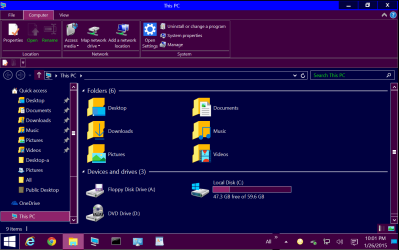
You must be kidding me. Light yellow writing on a fair blue background for error messages cannot be read. Even my wife whoi has 20/20 eyesight could only read it with the magnifier. And the rest of the UI is hardly readable also. It is just too tiny.

Bootmgr must be on the system partition or your machine will not boot into windows.
On all my systems the bootmgr is on C and on Dell (and some others), the bootmgr is on the recovery partition. With my configuration no OneKey BCD was written.

No idea about bitlocker though, I don't use it.
Never buy an Asus system. They have this habit of encrypting the C partition. It is a real pain. Had to send it to their service centre so that they can flash a new 8.1 on it. Now we have a second Asus at a friend with the same problem.

Btw - this is what I call a readable UI:
 

Attachments

  • 2015-01-27_0101.png
    2015-01-27_0101.png
    41.9 KB · Views: 1

My Computer My Computer

Computer Manufacturer/Model Number
HP, Dell, Gateway, Toshiba - 4 laptops and 2 desktops
OS
Vista, Windows7, Mint Mate, Zorin, Windows 8
CPU
from 1.6GHz Duo to i7
Monitor(s) Displays
2x HP w2207
Hard Drives
5x HDD, 7x SSD, 12x Externals
Keyboard
with trackball - no mices
Mouse
Trackball mice
Internet Speed
DSL 6000
Back
Top