Solved Zero stars for Macrium

PosslPussl

New member
Local time
8:10 AM
Messages
20
Hello all,
I have got off to a very bad start with Macrium Reflect 8 Home edition

I signed up for the trial version, received an email with following text - (where ***** is the unique registration code they supplied)


________________________
Thank you for your interest in Macrium Reflect.

Your Registration Code is : ******

What do I need this for?
Your registration code is paired with your email address. Use copy and paste to enter if prompted in the installer registration page.
Find out more here: Unique Registration Code - Knowledgebase 8.0 - Macrium Reflect Knowledgebase

To complete your registration and start the download, please click the following link.
Macrium Software | Error Downloading

We hope you find our software useful.
The Macrium Team

At any time, you can unsubscribe or update your communication options here.
Macrium Software | Communication Preferences

Please read about how we protect your privacy here.
Macrium Software | Terms and Privacy Statement

__________________________

So far so good. I downloaded and installed the software, then used it to create a system image of my Dell e6420 (which at the moment is working just fine).

Now I want to do an experiment to see if I can restore the machine after first reformatting the hard drive.
So I went to this site

Macrium Software | Restoring a System Image with Macrium Reflect

and watched a completely useless video - which didn't cover installing on a new or reformatted disk.

I then went to the contact link at the bottom of the webpage, clicked

"Submit a technical support ticket" and got to a login or sign up page. AND I CAN'T GET PAST THIS PAGE

I can neither log in or sign up. I thought perhaps my registration code would be a password but it seems not to be, the "Forgot your password?" link sends me an email with instructions for setting a new password, which I do, but their system still won't accept it, so you can imagine that I am not too impressed with Macrium. If this is an indication of what their tech support is going to be like, then they can keep their software.

My experiment was going to be to first reformat the HDD, so it's wiped completely, and then to restore the machine to what it is now from the Macrium system image.
(What if the hard disk had failed, so that I needed to restore to a new HDD? Would that be possible - I don't know.)

But I can't begin without some tech support from Macrium, and I can't login or sign up.

Unless someone can tell me please, exactly how I should proceed now with my experiment?

Thanks for any help forthcoming,
Posslpussl
 

My Computer

Computer type
PC/Desktop
Computer Manufacturer/Model Number
HP
OS
Windows 7 Professional 64bit with SP1
CPU
Intel(R) Core(TM)2 Duo CPU
Memory
4G
Sound Card
realtek HD Audio
Antivirus
Microsoft Security Essentials
Browser
firefox, chrome
.... exactly how I should proceed now with my experiment?

The tutorial below has screenshots from Reflect v6, but the process hasn't changed much in v7 or v8.

First you need to make the rescue USB or CD so you can boot from that to do the restore (Part Two of the tutorial). Then boot from that to be able to do the restore (Part Five).

Backup and Restore with Macrium Reflect | Tutorials


My experiment was going to be to first reformat the HDD, so it's wiped completely, and then to restore the machine to what it is now from the Macrium system image. (What if the hard disk had failed, so that I needed to restore to a new HDD? Would that be possible - I don't know.)

Yes, you can restore to a new HDD, in fact for your experiment I'd recommend doing that rather than wiping your current HDD if you have a spare HDD available. It is very easy to swap out the HDD on your Dell Latitude E6420. See page 29 of its Service Manual here:

https://downloads.dell.com/manuals/...aptop/latitude-e6420_owner's manual_en-us.pdf
 

My Computers

System One System Two

  • Computer type
    Laptop
    Computer Manufacturer/Model Number
    Toshiba satellite C650D
    OS
    Windows 7 Home Premium x64
    CPU
    AMD V120
    Memory
    4GB
    Internet Speed
    150 Mbps
    Antivirus
    MSE
    Browser
    IE11, Edge, Firefox
    Other Info
    I also have W7 Pro on my System Two, and several W7 Hyper-V VMs. My other machines run Windows 10/11. Their specs are in my Ten Forums & Eleven Forum profiles.
  • Computer type
    Laptop
    System Manufacturer/Model Number
    Lenovo Thinkpad T430
    OS
    Windows 7 Pro x64
    CPU
    Intel i5-3320M
    Memory
    8 GB
    Hard Drives
    250GB Samsung SSD 860 EVO
    Other Info
    Antivirus: MSE
Macrium v6 through v8 (even earlier versions) has a freeware edition with the capability of full imaging and restoration without the need to trial or purchase. If you decide later to purchase for the "full" edition, you can then just buy the registration code. I have one (1) purchased copy of the full edition for incremental backups of images on my main machine. My 2nd backup machine just has the freeware edition.

As Bree comments, there are many utubes and manuals to show the simple steps for imaging and restoring without using the Macrium help line. There are full tutorials on sevenforums here.

You must make a bootable Macrium USB disk for Restore ... this is on the drop-down menu "Other Tasks - Create Rescue Media".

And again as Bree commented, do your first restore test on another HDD, not your current fully working disk. Fully agree with your idea to test this image-restore action, as you need to trust this, but a 1st-up go is better done without risk to your curremt work disk.
 

My Computer

Computer type
Laptop
Computer Manufacturer/Model Number
HP 250 G7
OS
Windows 7 Pro x64
CPU
Intel i5-8265U
Motherboard
Intel Coffee Lake
Memory
8gb
Graphics Card(s)
Intel Iris Plus 655
Sound Card
Realtek HDA
Monitor(s) Displays
Generic
Screen Resolution
1366 x 768
Hard Drives
Crucial P5 NVMe 1Tb internal
WD's 4Tb, 3Tb, 2 x 2Tb external
Mouse
Logi wireless
Internet Speed
45 Mbps
Antivirus
AVG
Browser
Firefox 88, Pale Moon 29, Brave 129
Other Info
Combination of i5-8265U with Crucial P5 achieves Crystal Bench scores > 5000

Iris Plus GPU (Whiskey Lake) driver from BioStar

HP 250 G7 is a budget machine
Progresss report....

Thanks for your replies Bree and ian50.
Here's where I am at the moment. I've made the Macrium rescue disk - actually I chose the .iso file option and then burned it to a DVD, the burn verified ok.
So now I have a .iso and a DVD,. and a system image of my e6420 made earlier, which is sitting on an external USB HDD.

Now I'm about to to format the e6420 HDD, and then what? I don't know how to proceed from here.

I suppose I'll have to boot from the optical drive, but then how is it going to find the system image? Where will that have to be located?
I'm puzzled - help please?

Thanks, Posslpussl

PS - ok so it might be risky attempting to recover to my existing HDD, but if the restore fails and I'm left with a dead machine, I still have the last resort option of reinstalling windows 7 from my OEM disk. That will be a pain, but with a bit of luck it won't be necessary.
 

My Computer

Computer type
PC/Desktop
Computer Manufacturer/Model Number
HP
OS
Windows 7 Professional 64bit with SP1
CPU
Intel(R) Core(TM)2 Duo CPU
Memory
4G
Sound Card
realtek HD Audio
Antivirus
Microsoft Security Essentials
Browser
firefox, chrome
Now I'm about to to format the e6420 HDD

Why?


If you boot the rescue cd you should be able to browse to the image as long as the hd containing the image is attached to the machine. No need to restore it yet. Then you can reboot

Try that first to get accustomed to the rescue media .

If you later decide to do a restore, you dont need to format the target. The restore process will take care of that.
If you want to do a trial run, best to use an old mechanical hd to restore to as a test.
 

My Computers

System One System Two

  • Computer type
    PC/Desktop
    OS
    7 X64
    CPU
    i5 8400
    Motherboard
    gigabyte b365m ds3h
    Memory
    2x8gb 3200mhz
    Hard Drives
    various
    PSU
    pure power 11 400w cm
    Case
    Coolermaster
    Cooling
    cryorig m9i
  • Computer type
    PC/Desktop
    OS
    7x64
    CPU
    g5400
    Motherboard
    ga b365m ds3h
    Memory
    8gb ddr4 2400
    PSU
    xfx pro 450w
Thanks SIW2 - it seems Posslpussl may have been about to do what we had advised against as yet.

@
Posslpussl

Do you have another disk that you can test on, apart from your
e6420 HDD ?

- - - Updated - - -

@Posslpussl

There is another non-risk way to at least examine the image that you've made so you can see that all the files etc are there.

With your USB disk with image attached to your PC, open Macrium and click the drop-down Restore menu. You'll see a choice "Explore Image". When you click that, the programme will find your new image on the USB connection, assign a drive letter and open a virtual disk of your image in Explorer for you to examine.

The programme will not let you delete or damage any of the files on this virtual disk, so don't worry unduly about that. Just satisfy yourself that all the needed files are there in your new backup image. That should help on your first go here.

When you're done, the same drop-down menu then offers "Detach Image". Click this and the virtual disk will be removed from RAM (your backup image on the USB remains untouched, of course).
 

My Computer

Computer type
Laptop
Computer Manufacturer/Model Number
HP 250 G7
OS
Windows 7 Pro x64
CPU
Intel i5-8265U
Motherboard
Intel Coffee Lake
Memory
8gb
Graphics Card(s)
Intel Iris Plus 655
Sound Card
Realtek HDA
Monitor(s) Displays
Generic
Screen Resolution
1366 x 768
Hard Drives
Crucial P5 NVMe 1Tb internal
WD's 4Tb, 3Tb, 2 x 2Tb external
Mouse
Logi wireless
Internet Speed
45 Mbps
Antivirus
AVG
Browser
Firefox 88, Pale Moon 29, Brave 129
Other Info
Combination of i5-8265U with Crucial P5 achieves Crystal Bench scores > 5000

Iris Plus GPU (Whiskey Lake) driver from BioStar

HP 250 G7 is a budget machine
further progress report... and what is DBAN?

Thanks for your replies SIW2 and ian50.
I tried both those method for viewing the system image, they both worked ok, the system image looks just fine.

(To create the macrium rescue disk, I chose the .iso option, then I burned the iso to a DVD with Windows Disc Image Burner.
Then I booted from that DVD and was able to look at the system image on the external HDD, as you suggested SIW2.

So now I'm ready to test this Macrium software.
But a real test would be restoring from my system image onto a brand new unformatted empty HDD. I haven't got one of those, so how to emulate one?

Does anyone know anything about DBAN?

It seems I download the iso file, either burn it to DVD or create a bootable usb using Rufus, and then boot from whichever.
And when it's finished, the HDD is completely erased and unformatted, and I'm ready to reboot with the Macrium rescue disk and my system image

Will Macrium restore onto this "new" HDD? Or am I likely to end up with a dead machine?

Comments please - is it a good idea or not?

Thanks,
Posslpussl
 

My Computer

Computer type
PC/Desktop
Computer Manufacturer/Model Number
HP
OS
Windows 7 Professional 64bit with SP1
CPU
Intel(R) Core(TM)2 Duo CPU
Memory
4G
Sound Card
realtek HD Audio
Antivirus
Microsoft Security Essentials
Browser
firefox, chrome
You dont need to use dban. You can restore a disk image to a disk that already has partitions and data on it. They will be overwritten. So you need to be careful which disk you select to restore to - it will ask for confirmation that you have selected the correct restore target.

In some cases, you might only want to restore a single partition (e.g. the windows partition ) and the restore program is capable of doing that. You can select which partition out of the image to restore and where to restore it to. In that case the target partition you have selected will be overwritten with the restored partition image.

Comments please - is it a good idea or not?

Probably not. It is unlikely something will go wrong but you are new to this and might make a mess.

Better to test on a spare hd. You can pick one up at CEX for less than a fiver.

https://uk.webuy.com/search/?categoryIds=886&categoryName=sata-hard-drives

Alternatively, treat yourself to a sata ssd to use as your main disk ( will make quite a difference even on your old sata2 connectors). And use your current mechanical hd as a spare or for data and backup storage.
 
Last edited:

My Computers

System One System Two

  • Computer type
    PC/Desktop
    OS
    7 X64
    CPU
    i5 8400
    Motherboard
    gigabyte b365m ds3h
    Memory
    2x8gb 3200mhz
    Hard Drives
    various
    PSU
    pure power 11 400w cm
    Case
    Coolermaster
    Cooling
    cryorig m9i
  • Computer type
    PC/Desktop
    OS
    7x64
    CPU
    g5400
    Motherboard
    ga b365m ds3h
    Memory
    8gb ddr4 2400
    PSU
    xfx pro 450w
Thanks SIW2 for reply. I've done a successful Macrium restore onto existing HDD, I even managed to change some partition sizes in the process. (The very small system active partition - only 55MB - was preventing Windows from creating its own system image. Well its now 100MB so maybe Windows will be able to create its system image. I haven't tried that yet, in the meantime I'm sticking with Macrium)

But - I still want to know how a Macrium restore would go if I were to have a HDD failure, and had to restore to a brand new disk.
I do not want to go and buy a brand new disk and fit it to the machine, partly from cost, and partly because I'm having enough trouble with software, without messing about with hardware as well.

So my question is - how to I get my existing HDD back to the state in which it left the factory? I mean the Hard Disk factory, before it was ever installed in a machine. Ie unformatted, no partitions, no anything.

So far I've come across nothing except DBAN - any better ideas?

Thanks,
Posslpussl
 

My Computer

Computer type
PC/Desktop
Computer Manufacturer/Model Number
HP
OS
Windows 7 Professional 64bit with SP1
CPU
Intel(R) Core(TM)2 Duo CPU
Memory
4G
Sound Card
realtek HD Audio
Antivirus
Microsoft Security Essentials
Browser
firefox, chrome
how to I get my existing HDD back to the state in which it left the factory?

You cant. The manufacturer has special llf facilities, but I dont know if even that will remove the smart data which reports for example the power on hours and so on. They have probably got separate tools which they could reprogram the disk controller.

Do you mean if you want to give it away and ensure there is no recoverable data?

There are third party tools, and there is also a Clean All command in diskpart that can do it. It can take a while on a mechanical disk because it writes 1 and zero all across the disk effectively overwriting everything that was on there some of them do several passes. And it is hard work for the disk.

dont try it on an ssd, there are different tools for cleaning those

I were to have a HDD failure, and had to restore to a brand new disk.

It will be fine ( unless the new disk is faulty which is unlikely)
 

My Computers

System One System Two

  • Computer type
    PC/Desktop
    OS
    7 X64
    CPU
    i5 8400
    Motherboard
    gigabyte b365m ds3h
    Memory
    2x8gb 3200mhz
    Hard Drives
    various
    PSU
    pure power 11 400w cm
    Case
    Coolermaster
    Cooling
    cryorig m9i
  • Computer type
    PC/Desktop
    OS
    7x64
    CPU
    g5400
    Motherboard
    ga b365m ds3h
    Memory
    8gb ddr4 2400
    PSU
    xfx pro 450w
...how to I get my existing HDD back to the state in which it left the factory? I mean the Hard Disk factory, before it was ever installed in a machine. Ie unformatted, no partitions, no anything.

As SIW2 says, Diskpart's CLEAN command will return the HDD to a completely uninitialised state, no partition table or anything. If that's all you need, then use it without the ALL option and it will be quick to complete. If for security you want to write zeros to every sector as well, then add the ALL option, this is what can take a long time.

Code:
DISKPART> help clean

     Removes any and all partition or volume formatting from the disk with
     focus.

Syntax:  CLEAN [ALL]

    ALL         Specifies that each and every byte\sector on the disk is set to
                zero, which completely deletes all data contained on the disk.

    On master boot record (MBR) disks, only the MBR partitioning information
    and hidden sector information are overwritten. On GUID partition table
    (GPT) disks, the GPT partitioning information, including the Protective
    MBR, is overwritten. If the ALL parameter is not used, the first 1MB
    and the last 1MB of the disk are zeroed. This erases any disk formatting
    that had been previously applied to the disk. The disk's state after
    cleaning the disk is 'UNINITIALIZED'.

Example:

    CLEAN

DISKPART>
 

My Computers

System One System Two

  • Computer type
    Laptop
    Computer Manufacturer/Model Number
    Toshiba satellite C650D
    OS
    Windows 7 Home Premium x64
    CPU
    AMD V120
    Memory
    4GB
    Internet Speed
    150 Mbps
    Antivirus
    MSE
    Browser
    IE11, Edge, Firefox
    Other Info
    I also have W7 Pro on my System Two, and several W7 Hyper-V VMs. My other machines run Windows 10/11. Their specs are in my Ten Forums & Eleven Forum profiles.
  • Computer type
    Laptop
    System Manufacturer/Model Number
    Lenovo Thinkpad T430
    OS
    Windows 7 Pro x64
    CPU
    Intel i5-3320M
    Memory
    8 GB
    Hard Drives
    250GB Samsung SSD 860 EVO
    Other Info
    Antivirus: MSE
Thanks for your replies S1W2 and Bree, I'll give that DISKPART CLEAN a try.

- - - Updated - - -

No luck, diskpart clean didn't work. I got an error message saying that it can't clean the disk containing the current boot, system, pagefile etc.

It's my internal HD with the OS that I want to clean. I accessed command prompt with windows running. was that wrong?
I found the start option "safe mode with command prompt", should I access diskpart from there?

Suppose that works and I do end up with an "uninitialised" disk. Am I right in assuming that Macrium Reflect will do all the necessary formatting and partitioning to restore my system image onto it?

Help please,
Posslpussl
 

My Computer

Computer type
PC/Desktop
Computer Manufacturer/Model Number
HP
OS
Windows 7 Professional 64bit with SP1
CPU
Intel(R) Core(TM)2 Duo CPU
Memory
4G
Sound Card
realtek HD Audio
Antivirus
Microsoft Security Essentials
Browser
firefox, chrome
It's my internal HD with the OS that I want to clean. I accessed command prompt with windows running. was that wrong?

The internal C:\ drive cannot be reduced to bare metal while it's in use. To do that with the drive still in the machine, you need to boot independently from a USB or a DVD. SIW2 has an iso on the forum here that can be burnt to a USB or DVD for that purpose

Am I right in assuming that Macrium Reflect will do all the necessary formatting and partitioning to restore my system image onto it?

Only the paid edition of Macrium (Home or Pro) will take you through from the bare metal to a fully restored installation. The freeware edition will restore to an already formatted disc. You need to boot (independently) either Aomei Partition or MiniTool Partition freeware (in fact, there are a number of such programmes available) to do this before using Macrium Restore.

As we've suggested before, try reading the manuals first please.
 

My Computer

Computer type
Laptop
Computer Manufacturer/Model Number
HP 250 G7
OS
Windows 7 Pro x64
CPU
Intel i5-8265U
Motherboard
Intel Coffee Lake
Memory
8gb
Graphics Card(s)
Intel Iris Plus 655
Sound Card
Realtek HDA
Monitor(s) Displays
Generic
Screen Resolution
1366 x 768
Hard Drives
Crucial P5 NVMe 1Tb internal
WD's 4Tb, 3Tb, 2 x 2Tb external
Mouse
Logi wireless
Internet Speed
45 Mbps
Antivirus
AVG
Browser
Firefox 88, Pale Moon 29, Brave 129
Other Info
Combination of i5-8265U with Crucial P5 achieves Crystal Bench scores > 5000

Iris Plus GPU (Whiskey Lake) driver from BioStar

HP 250 G7 is a budget machine
No luck, diskpart clean didn't work. I got an error message saying that it can't clean the disk containing the current boot, system, pagefile etc.
It's my internal HD with the OS that I want to clean. I accessed command prompt with windows running. was that wrong?

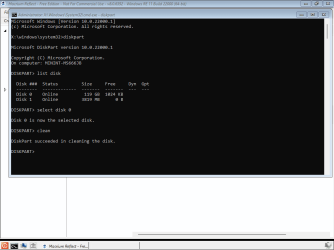
Yes, you cannot clean the drive that you are currently booted from as it is in use. To clean that drive you need to boot from something else and bring up a command prompt. You can do that by booting from an install usb, but the Macrium rescue usb also has a command prompt you can open from its taskbar. Boot from the Macrium rescue usb, open a command prompt and run diskpart from there. The drive will not be in use and you will be allowed to clean it.

screenshot - clean.png

Suppose that works and I do end up with an "uninitialised" disk. Am I right in assuming that Macrium Reflect will do all the necessary formatting and partitioning to restore my system image onto it?

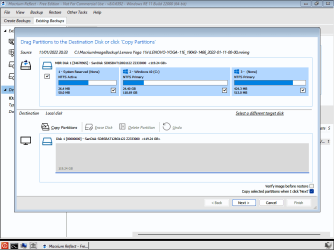
Yes, Reflect Free can do that. @ian50 is incorrect. The 'bare metal' restore he referred to in the paid for version is only used if restoring to completely dissimilar hardware, and includes the ability to obtain any required new drivers. You're intending to restore to the same drive in the same PC so there should be no need for any of that.

In fact I have just tested doing so on one of my PCs. You can see that it is ready to copy all the partitions from the image to the drive I cleaned with Diskpart in the screenshot above. Note that it says 'Reflect - Free Edition' at the top.

screenshot ready to restore.png
 
Last edited:

My Computers

System One System Two

  • Computer type
    Laptop
    Computer Manufacturer/Model Number
    Toshiba satellite C650D
    OS
    Windows 7 Home Premium x64
    CPU
    AMD V120
    Memory
    4GB
    Internet Speed
    150 Mbps
    Antivirus
    MSE
    Browser
    IE11, Edge, Firefox
    Other Info
    I also have W7 Pro on my System Two, and several W7 Hyper-V VMs. My other machines run Windows 10/11. Their specs are in my Ten Forums & Eleven Forum profiles.
  • Computer type
    Laptop
    System Manufacturer/Model Number
    Lenovo Thinkpad T430
    OS
    Windows 7 Pro x64
    CPU
    Intel i5-3320M
    Memory
    8 GB
    Hard Drives
    250GB Samsung SSD 860 EVO
    Other Info
    Antivirus: MSE
Thanks for replies ian50 and Bree. I'll try your solution Bree, boot from the Macrium rescue USB and see what happens.

Posslpussl
 

My Computer

Computer type
PC/Desktop
Computer Manufacturer/Model Number
HP
OS
Windows 7 Professional 64bit with SP1
CPU
Intel(R) Core(TM)2 Duo CPU
Memory
4G
Sound Card
realtek HD Audio
Antivirus
Microsoft Security Essentials
Browser
firefox, chrome
Bree is right in that I had misunderstood the end purpose for Posslpussl in reducing his HDD to blank unpartitioned was for use in another machine - so my "bare metal" comment using the paid Macrium edition was based on this. Not so, it's apparent - simply a test of trust. So I had inadvertently misdirected ... apologies.

The Macrium v8 manual in pdf is on:

https://knowledgebase.macrium.com/ Complete User Guide

A useful publication.
 

My Computer

Computer type
Laptop
Computer Manufacturer/Model Number
HP 250 G7
OS
Windows 7 Pro x64
CPU
Intel i5-8265U
Motherboard
Intel Coffee Lake
Memory
8gb
Graphics Card(s)
Intel Iris Plus 655
Sound Card
Realtek HDA
Monitor(s) Displays
Generic
Screen Resolution
1366 x 768
Hard Drives
Crucial P5 NVMe 1Tb internal
WD's 4Tb, 3Tb, 2 x 2Tb external
Mouse
Logi wireless
Internet Speed
45 Mbps
Antivirus
AVG
Browser
Firefox 88, Pale Moon 29, Brave 129
Other Info
Combination of i5-8265U with Crucial P5 achieves Crystal Bench scores > 5000

Iris Plus GPU (Whiskey Lake) driver from BioStar

HP 250 G7 is a budget machine
Macrium recovery all sorted...

Your solution worked ok Bree - boot from rescue USB then command prompt, diskpart, clean etc. to wipe the HDD.
System image restored ok after that.

ian50 thanks for your link to the Macrium v8 manual. Unfortunately I got a Page-not-found error, but I did find it available for download on

Macrium Reflect User Guide - Knowledgebase 8.0 - Macrium Reflect Knowledgebase

485 pages - wow! Looks like much much more than I'll ever need to know. I don't think I'll print it out - although I do prefer reading from paper rather than the screen.

I'm going to mark this thread as closed now, because I've learned a huge amount about backup and restore that I didn't know before - enough to keep me out of serious trouble, I hope.
So thanks to all who helped,
Posslpussl


ps - I withdraw and apologise for my initial zero stars to Macrium. It was frustrating getting started, but I'd have to give it five stars now. Well, four and a half perhaps, because nothing's perfect...
 

My Computer

Computer type
PC/Desktop
Computer Manufacturer/Model Number
HP
OS
Windows 7 Professional 64bit with SP1
CPU
Intel(R) Core(TM)2 Duo CPU
Memory
4G
Sound Card
realtek HD Audio
Antivirus
Microsoft Security Essentials
Browser
firefox, chrome
I'm going to mark this thread as closed now, because I've learned a huge amount about backup and restore that I didn't know before - enough to keep me out of serious trouble, I hope....

ps - I withdraw and apologise for my initial zero stars to Macrium. It was frustrating getting started, but I'd have to give it five stars now. Well, four and a half perhaps, because nothing's perfect...
:thumbsup:
 

My Computers

System One System Two

  • Computer type
    Laptop
    Computer Manufacturer/Model Number
    Toshiba satellite C650D
    OS
    Windows 7 Home Premium x64
    CPU
    AMD V120
    Memory
    4GB
    Internet Speed
    150 Mbps
    Antivirus
    MSE
    Browser
    IE11, Edge, Firefox
    Other Info
    I also have W7 Pro on my System Two, and several W7 Hyper-V VMs. My other machines run Windows 10/11. Their specs are in my Ten Forums & Eleven Forum profiles.
  • Computer type
    Laptop
    System Manufacturer/Model Number
    Lenovo Thinkpad T430
    OS
    Windows 7 Pro x64
    CPU
    Intel i5-3320M
    Memory
    8 GB
    Hard Drives
    250GB Samsung SSD 860 EVO
    Other Info
    Antivirus: MSE
Good that you've come out ahead ...

485 pages - wow! Looks like much much more than I'll ever need to know

Well, quite a lot of it is for Workstation, Server, Server Plus editions that most people won't ever need to use.

In my v8 edition, pages 9-12 of a Comparison Chart list the segments of the programme applicable to these various editions, so you can see at a glance which aspects you can use. I've found the bookmarks
supplied in the left-side pane useful in describing each action I'd thought about.

One of the best aspects of this programme (and Aomei Backupper, another excellent freeware choice) is that as you build an action choice by choice (such as an image generation or restore), you're not committed to it until the final click - so if you become lost in the build, you can reverse or cancel to start over. The manual has quite a few tutorials on that aspect.

There is also a dedicated Macrium forum:

https://forum.macrium.com

These have become very sophisticated, versatile, useful programmes ... and the freeware editions are more than adequate.
 

My Computer

Computer type
Laptop
Computer Manufacturer/Model Number
HP 250 G7
OS
Windows 7 Pro x64
CPU
Intel i5-8265U
Motherboard
Intel Coffee Lake
Memory
8gb
Graphics Card(s)
Intel Iris Plus 655
Sound Card
Realtek HDA
Monitor(s) Displays
Generic
Screen Resolution
1366 x 768
Hard Drives
Crucial P5 NVMe 1Tb internal
WD's 4Tb, 3Tb, 2 x 2Tb external
Mouse
Logi wireless
Internet Speed
45 Mbps
Antivirus
AVG
Browser
Firefox 88, Pale Moon 29, Brave 129
Other Info
Combination of i5-8265U with Crucial P5 achieves Crystal Bench scores > 5000

Iris Plus GPU (Whiskey Lake) driver from BioStar

HP 250 G7 is a budget machine
As ian50 says, Macrium Support Forum is another good resource. Everyone can read the forum, but to register and be able to post you have to have purchased Reflect.
 

My Computers

System One System Two

  • Computer type
    Laptop
    Computer Manufacturer/Model Number
    Toshiba satellite C650D
    OS
    Windows 7 Home Premium x64
    CPU
    AMD V120
    Memory
    4GB
    Internet Speed
    150 Mbps
    Antivirus
    MSE
    Browser
    IE11, Edge, Firefox
    Other Info
    I also have W7 Pro on my System Two, and several W7 Hyper-V VMs. My other machines run Windows 10/11. Their specs are in my Ten Forums & Eleven Forum profiles.
  • Computer type
    Laptop
    System Manufacturer/Model Number
    Lenovo Thinkpad T430
    OS
    Windows 7 Pro x64
    CPU
    Intel i5-3320M
    Memory
    8 GB
    Hard Drives
    250GB Samsung SSD 860 EVO
    Other Info
    Antivirus: MSE
Back
Top