Are there any programs exactly like NT Backup, but for Windows 7 ?

According to Wikipedia- "NTBackup can be used under Windows Vista and up by copying the NTBackup files from a Windows XP machine."
 

My Computer My Computer

At a glance

Windows 7 Pro SP1 64 bit8 GB
Computer type
Laptop
Computer Manufacturer/Model Number
Dell M6500 Precision Work Station
OS
Windows 7 Pro SP1 64 bit
Memory
8 GB
Screen Resolution
1920x
Internet Speed
30 Mbps
Antivirus
Norton Security
Browser
IE 11
According to Wikipedia- "NTBackup can be used under Windows Vista and up by copying the NTBackup files from a Windows XP machine."
The full quote from Wikipedia indicates that you won't have tape backup available...
NTBackup can be used under Windows Vista and up by copying the NTBackup files from a Windows XP machine. To use tapes or other backup locations that use the Removable Storage Manager, you will need to turn it on in the Turn Windows features on or off control panel, but in Windows 7 and up, the component was removed
NTBackup - Wikipedia

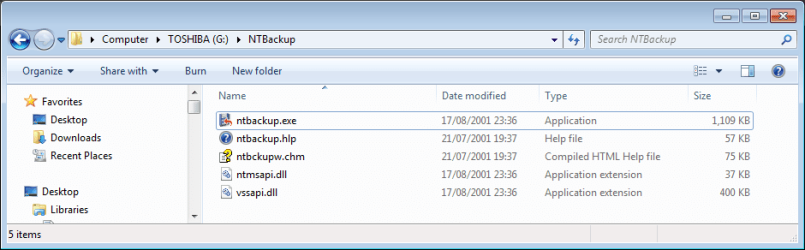
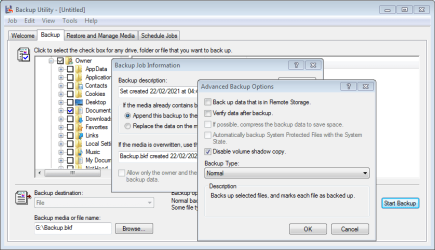
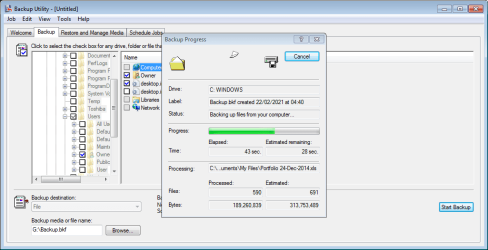
There are actually a couple of .dll files you'd need too, without them it won't open. Also, under Windows 7 you have to turn off using Volume Shadow Copy else it will fail, because one of those required dlls is XP's vssapi.dll.

Code:
Backup Status
Operation: Backup
Active backup destination: File
Media name: "Backup.bkf created 22/02/2021 at 04:35"
Error returned while creating the volume shadow copy:Catastrophic failure
 Aborting Backup.
  ----------------------
The operation did not successfully complete.
  ----------------------
The required files are: ntbackup.exe, ntbackup.hlp, ntbckupw.chm, ntmsapi.dll & vssapi.dll
If you don't have an XP machine you can use the EXPAND command in a command prompt to extract them from the I386 folder of an XP install CD (as I did).

Even with all those dlls it will fail to run under Windows 10.


Personally I think it is a step too far trying to use NT Backup in W7, better to look at more modern solutions...
....
 

Attachments

  • NTBackup files.PNG
    NTBackup files.PNG
    26.1 KB · Views: 0
  • NTBackup1.PNG
    NTBackup1.PNG
    23.8 KB · Views: 0
  • NTBackup2.PNG
    NTBackup2.PNG
    23.7 KB · Views: 0
Last edited:

My Computers My Computers

  • At a glance

    Windows 7 Home Premium x64AMD V1204GB
    Computer type
    Laptop
    Computer Manufacturer/Model Number
    Toshiba satellite C650D
    OS
    Windows 7 Home Premium x64
    CPU
    AMD V120
    Memory
    4GB
    Internet Speed
    150 Mbps
    Antivirus
    MSE
    Browser
    IE11, Edge, Firefox
    Other Info
    I also have W7 Pro on my System Two, and several W7 Hyper-V VMs. My other machines run Windows 10/11. Their specs are in my Ten Forums & Eleven Forum profiles.
  • At a glance

    Windows 7 Pro x64Intel i5-3320M8 GB
    Computer type
    Laptop
    System Manufacturer/Model Number
    Lenovo Thinkpad T430
    OS
    Windows 7 Pro x64
    CPU
    Intel i5-3320M
    Memory
    8 GB
    Hard Drives
    250GB Samsung SSD 860 EVO
    Antivirus
    MSE
double post, my bad.
 

My Computer My Computer

At a glance

Windows 7, 64bit pro
Computer type
PC/Desktop
OS
Windows 7, 64bit pro
grrrreeeat, must try that, I'll let you know if it worked (yep I still have my old XP machine, as a veteran it's part of the family lol can't get rid of it)


yeah I know about modern solutions, but modernity goes along with expensiveness most often, you know... I mean, why do I have to buy a 400gb hd just to make a system backup that requires 30GB or something like that? saying this because most "complete" backup softwares I tried (or " I wasted my bandwidth with") only have that option (full copy of the hard disk or nothing)... as my experiences says, the compulsion of modernity is just a waste of money most often, because people are preferring the simpler solution and all of these new softs look cool and stuff but they can't even do the simplest and most basic task... sometimes simpler doesn't mean better, sometimes it just means thoughtless. It's a "Don't Make Me Think" society, Steve Krug would say...

NT Backup was just the best, I mean, everytime I restored the system with it, it all was like a travel in the past, exactly like it was at the moment of backup and no files were skipped (while other modern softwares, including sync softwares sometimes fail at some files which are used by system, no matter if I run it with admin rights or not). It's not a matter of "nostalgia" or my personal opinion/convinction, it's a matter of real effectiveness. :)
 

My Computer My Computer

At a glance

Windows 7, 64bit pro
Computer type
PC/Desktop
OS
Windows 7, 64bit pro
NT Backup was just the best, I mean, everytime I restored the system with it, it all was like a travel in the past, exactly like it was at the moment of backup and no files were skipped (while other modern softwares, including sync softwares sometimes fail at some files which are used by system, no matter if I run it with admin rights or not). It's not a matter of "nostalgia" or my personal opinion/convinction, it's a matter of real effectiveness. :)

It is the use of the Volume Shadow Copy (VSS) that allows a backup to back up all files, whether they are in use or not. As I showed above, NT Backup cannot use VSS in W7.

Also, I'd be very surprised if NT Backup could restore a complete W7 system. W7 is two Windows versions newer than XP, with substantial changes that NT Backup would be unaware of and unable to handle. At best, NT Backup would be able to back up your user files, but not the complete system.

... I mean, why do I have to buy a 400gb hd just to make a system backup that requires 30GB or something like that? saying this because most "complete" backup softwares I tried (or " I wasted my bandwidth with") only have that option (full copy of the hard disk or nothing)...
A disk imaging solution like Macrium Reflect by default only includes in the image those sectors of the drive that are in use. With its default medium compression, a Macrium image of a hard drive is about 50-60% of the total used space on the partitions being backed up. 30GB of used space would result in an image of only about 15-20GB, even if the HDD being imaged was much larger. The unused space would just be ignored. Macrium also uses VSS, so there's no chance of anything being skipped.
 

My Computers My Computers

  • At a glance

    Windows 7 Home Premium x64AMD V1204GB
    Computer type
    Laptop
    Computer Manufacturer/Model Number
    Toshiba satellite C650D
    OS
    Windows 7 Home Premium x64
    CPU
    AMD V120
    Memory
    4GB
    Internet Speed
    150 Mbps
    Antivirus
    MSE
    Browser
    IE11, Edge, Firefox
    Other Info
    I also have W7 Pro on my System Two, and several W7 Hyper-V VMs. My other machines run Windows 10/11. Their specs are in my Ten Forums & Eleven Forum profiles.
  • At a glance

    Windows 7 Pro x64Intel i5-3320M8 GB
    Computer type
    Laptop
    System Manufacturer/Model Number
    Lenovo Thinkpad T430
    OS
    Windows 7 Pro x64
    CPU
    Intel i5-3320M
    Memory
    8 GB
    Hard Drives
    250GB Samsung SSD 860 EVO
    Antivirus
    MSE
Looks cool, I've tried it and it seems to compress it well.
What I want to achieve, though, is something like, hypothetical case:
- my pc screws up, got to format over
- re-install windows 7, now what about the programs and settings, do I have to do it all over again to restore windows in the same way as it was before screwing up?
- nope, I can use the backup software
In this case, which kind of backup should I select from Macrium ?
I've tried "System Backup" (I still wonder why they call it "system backup", when it's more like a " DRIVE Backup " ) because I can choose which folders to exclude (example: some documents and games which are not needed specifically by the system). Will it work ?
Should I also use another additional software for registry backup (I already have some) or does Macrium do it automatically ?

 

My Computer My Computer

At a glance

Windows 7, 64bit pro
Computer type
PC/Desktop
OS
Windows 7, 64bit pro
An image created by Maximum Reflect, would contain the registry. As I understand it, the image will not only contain all Windows files and any other files on the selected disk/partition. However, before I get myself into too much trouble, I'll leave further discussion on that to Bree. One thing you want to do, if you use Marcrium Reflect to create an image, is too create it's recovery CD. See the help on that.
 

My Computer My Computer

At a glance

Windows 7 Pro SP1 64 bit8 GB
Computer type
Laptop
Computer Manufacturer/Model Number
Dell M6500 Precision Work Station
OS
Windows 7 Pro SP1 64 bit
Memory
8 GB
Screen Resolution
1920x
Internet Speed
30 Mbps
Antivirus
Norton Security
Browser
IE 11
Looks cool, I've tried it and it seems to compress it well.
What I want to achieve, though, is something like, hypothetical case:
- my pc screws up, got to format over
- re-install windows 7, now what about the programs and settings, do I have to do it all over again to restore windows in the same way as it was before screwing up?
- nope, I can use the backup software
In this case, which kind of backup should I select from Macrium ?
I've tried "System Backup" (I still wonder why they call it "system backup", when it's more like a " DRIVE Backup " ) because I can choose which folders to exclude (example: some documents and games which are not needed specifically by the system). Will it work ?
Should I also use another additional software for registry backup (I already have some) or does Macrium do it automatically ?

If you have installed Macrium Reflect on a PC, then it has an item in the list to the left in Backup Tasks named 'Create an image of the partition(s) required to backup and restore Windows'. Click this and Reflect will automatically select all partitions that are necessary for a working system. You may then include other partitions if you wish, such as ones that you only use for data.

Should your drive fail or become corrupted you should boot the machine from the Macrium recovery USB (make sure to make one and test that you can boot from it). You can then restore the image to the original drive (if it's still working) or replacement drive if it's not.

What you end up with is a working system exactly as it was when you made the image. Al the files, registry settings and partitions will be exactly as they were before.

See here for more detailed instructions.

Creating a backup image of your computer, drive or partitions - KnowledgeBase v7.2 - Macrium Reflect Knowledgebase
 

My Computers My Computers

  • At a glance

    Windows 7 Home Premium x64AMD V1204GB
    Computer type
    Laptop
    Computer Manufacturer/Model Number
    Toshiba satellite C650D
    OS
    Windows 7 Home Premium x64
    CPU
    AMD V120
    Memory
    4GB
    Internet Speed
    150 Mbps
    Antivirus
    MSE
    Browser
    IE11, Edge, Firefox
    Other Info
    I also have W7 Pro on my System Two, and several W7 Hyper-V VMs. My other machines run Windows 10/11. Their specs are in my Ten Forums & Eleven Forum profiles.
  • At a glance

    Windows 7 Pro x64Intel i5-3320M8 GB
    Computer type
    Laptop
    System Manufacturer/Model Number
    Lenovo Thinkpad T430
    OS
    Windows 7 Pro x64
    CPU
    Intel i5-3320M
    Memory
    8 GB
    Hard Drives
    250GB Samsung SSD 860 EVO
    Antivirus
    MSE
Back
Top