Solved Image your system with free Macrium

Forgot to mention the other part of your question, "Repair" media. It's often used to refer to a Windows System Repair disc (or USB stick). It's a handy media to have on hand. I'd recommend creating one for your Win 7 PC. You can repair Windows boot issues on the HDD from the CMD console and repair other Windows OS issues.

To create a Windows System Repair DVD, here's one way:

From the Start Menu, enter this in the "search" field: recdisc

You'll see the recdisc icon at the top of your search results. Click on that icon and the "create media" dialog will guide you through the procedure.
 

My Computer My Computer

Computer type
PC/Desktop
Computer Manufacturer/Model Number
Built at Micro Center Richardson, TX
OS
Windows 7 Home Premium 64 bit
CPU
Intel i5 650 Dual Core 3.20 GHz Cache 4MB Threads: 4
Motherboard
ASUS PRO P7P55D-E
Memory
Corsair 16GB DDR3 1600MHz 9-9-9-24 P/N: CMZ8GX3M2A1600C
Graphics Card(s)
ZOTAC GeFORCE 9500 ZT-95TEK2M-FSL 1GB GDDR2
Sound Card
Mother Bd
Monitor(s) Displays
ASUS V228H 21.5” Diag
Screen Resolution
1440 x 900
Hard Drives
SEAGATE BARRACUDA (2ea) 3.5” INTERNAL 1Tb 16 MB SATA ST1000DM003-9YN162 7200RPM, 64MB, SATA 6Gb/s ** 2 Sata Hot-Swap Racks installed in Tower
PSU
Thermaltake Model TR2 RX 750W
Cooling
2 Tower Fans
Keyboard
Dell Quietkey PS/2 Windows 104 P/N 0463CD
Mouse
Kensington Mechanical Trackball USB Model 64217
Internet Speed
35/35
Antivirus
Norton 360 & MBAM Pro
Browser
IE10
Other Info
Printer: HP DeskJet 3520 USB 2.0 **
Speakers: ALTEC Model VS4621 2.1 28 W/Channel w/Sub-woofer **
IOGEAR HDMI Monitor Switcher Swx3 MODEL GHDSW3 ** Addonics ZDRWESU3 eSata/USB 3.0 external DVD Read/Write DVD Drive** SEAGATE GoFlex USB 2.0 Portable HD 500GB 5400 RPM P/N: 9ZF2A2-570
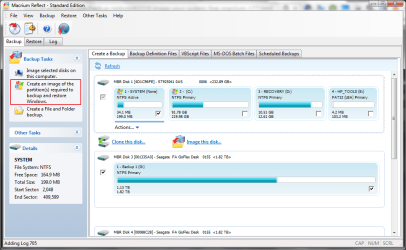
If you chose the option shown below Macrium will backup the partitions needed to recover your system...
 

Attachments

  • Image 20141121001.png
    Image 20141121001.png
    45 KB · Views: 1

My Computer My Computer

Computer type
Laptop
Computer Manufacturer/Model Number
Hewlett-Packard/G62-107SA Notebook
OS
Microsoft Windows 7 Home Premium 64-bit Service Pack 1
CPU
Intel(R) Core(TM) i3 CPU M 330 @ 2.13GHz
Motherboard
Hewlett-Packard 1425
Memory
8 GB DDR3
Graphics Card(s)
Intel(R) HD Graphics
Sound Card
Realtek High Definition Audio
Monitor(s) Displays
Builtin
Screen Resolution
1366 x 768 x 32 bits (4294967296 colors) @ 60 Hz
Hard Drives
250 GB SATA Hard Disk Drive 7200 rpm
2TB Seagate GoFlex USB 2 Drive
1TB Iomega Prestige USB 2 Drive
1.5TB Iomega Prestige USB 2 Drive (Samsung)
2TB WD MyBook Live NAS.
Mouse
Logitech Anywhere MX
Internet Speed
152 Mbs download 10 Mbs upload
Antivirus
Norton 360
Browser
Chrome
On the Macrium web site, Reflect is offered for download as a 30-day trial.

Will it stop working after 30 days?
 

My Computer My Computer

Computer type
Laptop
Computer Manufacturer/Model Number
HP ProBook 455 G1
OS
Windows 7 Professional x64
CPU
AMD A4-4300M, Revision TN-A1
Motherboard
HP 194E Socket FS1 Ver. A2019DD203 AMD A55/A60M/A8 (Speccy)*
Memory
4 GB DDR3 (3276 MBytes acc. to Speccy)
Graphics Card(s)
Radeon HD 7420G
Sound Card
IDT High Def Audio CODEC; AMD High Def Audio Device
Screen Resolution
1366 x 768
Hard Drives
Seagate 465 GB ST500LT0 12-1DG142 SATA-III
Keyboard
Std 101/102-Key or Micros. Natural PS/2 Keyb'd for HP Hotkey
Mouse
Synaptics PS/2 Port TouchPad
Antivirus
Microsoft Security Essentials
Browser
Firefox release channel (also Chrome and IE 11)
Other Info
Hard disk is encrypted. In addition to above motherboard info from Speccy, CPU-Z reports: "Model: HP 194E, KBC Vers. 91.0D; Chipset: AMD 15 IMC, Ver. 00; Southbridge: AMD A76M FCH, Rev. 2.6; LPCIO: SMSC"
On the Macrium web site, Reflect is offered for download as a 30-day trial.

Will it stop working after 30 days?

Sorry, malvoglio, I'm not the one who can answer that.
Someone who does know will chime in, I'm sure.
 

My Computer My Computer

Computer type
PC/Desktop
OS
Windows 7 Ultimate 32 Bit
I can't say as I;ve never tried it, but I suspect it will as most trial software does. However the free version (Macrium Reflect FREE Edition - Information and download) will do most anything most of us need. Just watch out for the add ons. Uncheck them and they will not install. It's C-Net
 

My Computers My Computers

System One System Two

  • Computer type
    PC/Desktop
    Computer Manufacturer/Model Number
    ALWAYS UNDER CONSTRUCTION
    OS
    Windows 11 Pro
    CPU
    Ryzen 9 5900X
    Motherboard
    Asus X570 Crosshair Viii Hero
    Memory
    32GB G Skill DDR4-3600
    Graphics Card(s)
    EVGA RTX 3080 FTW 3 Ultra
    Sound Card
    On Board/Sennheiser PC37X Headset
    Monitor(s) Displays
    3 X Asus 27"
    Screen Resolution
    2560x1440
    Hard Drives
    2 X 1 TB NVME drives
    PSU
    EVGA 850
    Case
    Phanteks Eclipse P400A
    Cooling
    EVGA 280 AIO
    Keyboard
    Logitech G510s/ Logitech G13
    Mouse
    Logitech G502
    Internet Speed
    24/1
    Antivirus
    ESET/MBAM Pro/SAS Pro
    Browser
    Chrome/ Firefox/ Edge
  • Computer type
    Laptop
    System Manufacturer/Model Number
    Dell 16 Plus
    OS
    Windows 11 Pro
    CPU
    Intel Ultra 9 288V
    Memory
    32 GB LPDDR5X 8533
    Monitor(s) Displays
    16" Mini-LED HDR600 Touch 90 Hz
    Screen Resolution
    2560X1600
    Hard Drives
    1 TB NVME

My Computer My Computer

Computer Manufacturer/Model Number
HP, Dell, Gateway, Toshiba - 4 laptops and 2 desktops
OS
Vista, Windows7, Mint Mate, Zorin, Windows 8
CPU
from 1.6GHz Duo to i7
Monitor(s) Displays
2x HP w2207
Hard Drives
5x HDD, 7x SSD, 12x Externals
Keyboard
with trackball - no mices
Mouse
Trackball mice
Internet Speed
DSL 6000

My Computer My Computer

Computer type
PC/Desktop
Computer Manufacturer/Model Number
n/a
OS
W7 Ultimate SP1, LM19.2 MATE, W10 Home 1703, W10 Pro 1703 VM, #All 64 bit
CPU
AMD Phenom II x6 1100T, 3.3 GHz
Motherboard
ASUS M4A88T-M/USB3 (AM3)
Memory
12GB DDR3 1333 G-Skill (4GB x 2), G-Skill (2GB x 2)
Graphics Card(s)
NVIDIA GeForce GTX 660
Sound Card
Realtek?
Monitor(s) Displays
Samsung S23B350
Screen Resolution
1920x1080
Hard Drives
WD Green 2TB (SATA), WD Green 3TB (SATA), WD Blue 4TB (SATA), WD Blue 6TB (SATA)
PSU
Cooler Master
Case
Antec GX300 Tower
Cooling
3x Antec TRICOOL 120mm Fans
Mouse
Wired Optical
Internet Speed
DSL
Antivirus
Avast
Browser
Pale Moon (64 bit)
Other Info
2018-12-27 Upgraded HDDs
2015-12-10 Upgraded case, graphics card, storage
2015-08-15 Upgraded motherboard & RAM
2015-07-15 Upgraded LM17.1 to LM17.2
Malvoglio:

Here's a download link for the Free version at Macrium.

Macrium Reflect FREE Edition - Information and download

You can scroll down at that link to see a chart comparing the various versions.

Most here use just the Free version.

The features you may want from a non-Free version would include:

1: Incremental and differential backups. But most here don't use them and think they are a complication that can easily be avoided by just making periodic full images.

2: File and folder backup. Most here use other programs for this task, although as far as I know Macrium Standard does a good job of this

3: Support from Macrium. I haven't needed it and get all the help I've needed from this forum. You can of course read Macrium's own forums with the Free edition, you just can't request support.

The Free version has an easily understood interface. Here are the main things you'd have to be concerned with:

1: Make the rescue disk and make sure it will in fact boot your PC. Use the "WinPE" method to make the disc, rather than the Linux choice. It's done within the Macrium interface.

2: Make an image file of the correct partitions. That would be C as well as any partition containing boot files. Either separately or all in a single image file. Store the image files on some unrelated disc and make new images periodically.

3: After I had a rescue disk and had made an image file, I'd pretend I needed to restore and walk a few steps into the restoration process so I knew I fully understood the process. You could even make and restore a small test partition that did not contain an OS in order to develop some confidence in the procedure.

4: I'd be sure to back up the image files just as I would any other valuable data.
 

My Computer My Computer

Computer type
PC/Desktop
Computer Manufacturer/Model Number
Ignatz Special; 4 speed manual gearbox; factory air conditioning; one of one
OS
Windows 7 Home Premium SP1, 64-bit
CPU
Intel Skylake i5-6600K, not overclocked
Motherboard
AsRock Z170M Extreme 4, micro ATX
Memory
8 GB HyperX DDR4-2666 (2 x 4 GB)
Graphics Card(s)
none; graphics are integrated on CPU
Sound Card
onboard: Realtek ALC1150; external: USB Behringer UF0-202
Monitor(s) Displays
Dell S2340M 23 inch IPS
Screen Resolution
1600 x 900
Hard Drives
System: Crucial MX100 series SSD, 128 GB;
Data: Samsung Spinpoint 103SJ, 1 TB;
Backup: WD Caviar Green WD30EZRX-00D8PB0, 3 TB
PSU
Rosewill SilentNight 500 watt fanless, semi-modular
Case
Antec Solo II
Cooling
Noctua NH-U12S; Noctua F12 intake, Noctua S12A exhaust
Keyboard
Microsoft 200 6JH-00001 USB
Mouse
Dell or Microsoft optical wired; USB
Antivirus
Microsoft Security Essentials and Malwarebytes Premium
Browser
Pale Moon
Other Info
All fans PWM; speeds at idle: CPU circa 500 rpm; intake circa 600 rpm; exhaust circa 600 rpm; CPU temps 27 idle and 47 C load in a warm room (27 C/81 F) when running Intel Extreme Tuning Utility stress test.
Thanks ignatz.
2: Make an image file of the correct partitions. That would be C as well as any partition containing boot files. Either separately or all in a single image file. Store the image files on some unrelated disc and make new images periodically.

What about my D: partition (HP_RECOVERY), does it contain boot files? I guess it is wise to include this partition in the image if possible, just in case?

4: I'd be sure to back up the image files just as I would any other valuable data.
That's why I was asking about a way to keep more than one image on the external hard disk. Or do you mean that a copy of the image should be stored somewhere else entirely, such as in the cloud? (But does Dropbox allow you to upload a 65 GB file?)

Thinking of taking the following tack:

  1. Weekly full image backups, possibly alternating between Windows Backup and the soon-to-be-installed Macrium Reflect Free
  2. Daily backup of work product (data files) using SyncBack Free
 
Last edited:

My Computer My Computer

Computer type
Laptop
Computer Manufacturer/Model Number
HP ProBook 455 G1
OS
Windows 7 Professional x64
CPU
AMD A4-4300M, Revision TN-A1
Motherboard
HP 194E Socket FS1 Ver. A2019DD203 AMD A55/A60M/A8 (Speccy)*
Memory
4 GB DDR3 (3276 MBytes acc. to Speccy)
Graphics Card(s)
Radeon HD 7420G
Sound Card
IDT High Def Audio CODEC; AMD High Def Audio Device
Screen Resolution
1366 x 768
Hard Drives
Seagate 465 GB ST500LT0 12-1DG142 SATA-III
Keyboard
Std 101/102-Key or Micros. Natural PS/2 Keyb'd for HP Hotkey
Mouse
Synaptics PS/2 Port TouchPad
Antivirus
Microsoft Security Essentials
Browser
Firefox release channel (also Chrome and IE 11)
Other Info
Hard disk is encrypted. In addition to above motherboard info from Speccy, CPU-Z reports: "Model: HP 194E, KBC Vers. 91.0D; Chipset: AMD 15 IMC, Ver. 00; Southbridge: AMD A76M FCH, Rev. 2.6; LPCIO: SMSC"
My HP G62 laptop recovery partition does not contain boot files but I have made one image of it as it should not change. I did in fact restore it once when a program started writing in it and filled it up.

I personally do not back up the image files. I don't see the point in that. If you are that concerned image to more than one disk.

I use FreeFileSync for my data backups (link in my sig).
 

My Computer My Computer

Computer type
Laptop
Computer Manufacturer/Model Number
Hewlett-Packard/G62-107SA Notebook
OS
Microsoft Windows 7 Home Premium 64-bit Service Pack 1
CPU
Intel(R) Core(TM) i3 CPU M 330 @ 2.13GHz
Motherboard
Hewlett-Packard 1425
Memory
8 GB DDR3
Graphics Card(s)
Intel(R) HD Graphics
Sound Card
Realtek High Definition Audio
Monitor(s) Displays
Builtin
Screen Resolution
1366 x 768 x 32 bits (4294967296 colors) @ 60 Hz
Hard Drives
250 GB SATA Hard Disk Drive 7200 rpm
2TB Seagate GoFlex USB 2 Drive
1TB Iomega Prestige USB 2 Drive
1.5TB Iomega Prestige USB 2 Drive (Samsung)
2TB WD MyBook Live NAS.
Mouse
Logitech Anywhere MX
Internet Speed
152 Mbs download 10 Mbs upload
Antivirus
Norton 360
Browser
Chrome
What about my D: partition (HP_RECOVERY), does it contain boot files? I guess it is wise to include this partition in the image if possible, just in case?

........Or do you mean that a copy of the image should be stored somewhere else entirely, such as in the cloud? (But does Dropbox allow you to upload a 65 GB file?)

Thinking of taking the following tack:

  1. Weekly full image backups, possibly alternating between Windows Backup and the soon-to-be-installed Macrium Reflect Free
  2. Daily backup of work product (data files) using SyncBack Free

Post a screen shot of Windows Disk Management.

We need to see which of your partitions are marked as being a "system" partition.

There is no harm at all in making a one-time image of any partition that you think you might need later, including recovery or tools partitions. But you MUST restore C and any partitions marked "system" to recover from a disaster.

I don't trust the cloud for anything. My images are stored on a separate drive D and backed up to a backup drive E. I also make periodic backups of data (including image files, but not Windows) to an internal drive that I mount in an external dock--every couple of months.

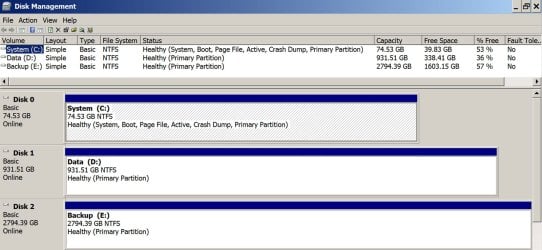
Here is my Disk Management. Note 3 internal drives. All with a single partition. C is all I have to make an image of--notice that it is marked "system, boot, page file, active....". Most likely, your C partition is NOT marked as "system".

I'd think a reasonable plan for you would be to:

1: Make recurring images of C. Weekly would be fine.

2: Make a one-time image of whatever other partitions are marked as "system". Restore both images when you need to recover from a bad situation that System Restore cannot resolve. The thinking being that you'd only need a one-time image of the other partition(s) because they aren't likely to change over time like C will.

An alternative would be to make a recurring single image file containing BOTH C and any "system" partition. One image file in which you deliberately include multiple partitions. That way you don't have to concern yourself with the non-C partitions possibly changing over time.

Of course, you could make 2 image files every time: one of C and another of the system partition.

You can keep 1, 2, or 100 image files on an external disk. They are just files like any other. You'd just need to have sufficient space. I put each of mine in a dated folder like D:\images\120214 for Dec 2, 2014 to avoid any confusion. When I make a new image, I put it in a newly made dated folder.

You just have to understand what's needed, what you've done, and how to manage and locate the image files when the time comes.

Your plan looks OK. I know some people do alternate with imaging programs, figuring at least one will work. You might also consider Aomei Backupper to make images. It's free and not confusing. I think it will also do file by file data backup like Syncback Free. I use FreeFileSync for data backup, just like Kado897.
 

Attachments

  • Untitled-1.jpg
    Untitled-1.jpg
    162.7 KB · Views: 2

My Computer My Computer

Computer type
PC/Desktop
Computer Manufacturer/Model Number
Ignatz Special; 4 speed manual gearbox; factory air conditioning; one of one
OS
Windows 7 Home Premium SP1, 64-bit
CPU
Intel Skylake i5-6600K, not overclocked
Motherboard
AsRock Z170M Extreme 4, micro ATX
Memory
8 GB HyperX DDR4-2666 (2 x 4 GB)
Graphics Card(s)
none; graphics are integrated on CPU
Sound Card
onboard: Realtek ALC1150; external: USB Behringer UF0-202
Monitor(s) Displays
Dell S2340M 23 inch IPS
Screen Resolution
1600 x 900
Hard Drives
System: Crucial MX100 series SSD, 128 GB;
Data: Samsung Spinpoint 103SJ, 1 TB;
Backup: WD Caviar Green WD30EZRX-00D8PB0, 3 TB
PSU
Rosewill SilentNight 500 watt fanless, semi-modular
Case
Antec Solo II
Cooling
Noctua NH-U12S; Noctua F12 intake, Noctua S12A exhaust
Keyboard
Microsoft 200 6JH-00001 USB
Mouse
Dell or Microsoft optical wired; USB
Antivirus
Microsoft Security Essentials and Malwarebytes Premium
Browser
Pale Moon
Other Info
All fans PWM; speeds at idle: CPU circa 500 rpm; intake circa 600 rpm; exhaust circa 600 rpm; CPU temps 27 idle and 47 C load in a warm room (27 C/81 F) when running Intel Extreme Tuning Utility stress test.
I also use AOMEI Backupper as a secondary imaging tool. It seems quite good but I have not restored a system with it yet.
 

My Computer My Computer

Computer type
Laptop
Computer Manufacturer/Model Number
Hewlett-Packard/G62-107SA Notebook
OS
Microsoft Windows 7 Home Premium 64-bit Service Pack 1
CPU
Intel(R) Core(TM) i3 CPU M 330 @ 2.13GHz
Motherboard
Hewlett-Packard 1425
Memory
8 GB DDR3
Graphics Card(s)
Intel(R) HD Graphics
Sound Card
Realtek High Definition Audio
Monitor(s) Displays
Builtin
Screen Resolution
1366 x 768 x 32 bits (4294967296 colors) @ 60 Hz
Hard Drives
250 GB SATA Hard Disk Drive 7200 rpm
2TB Seagate GoFlex USB 2 Drive
1TB Iomega Prestige USB 2 Drive
1.5TB Iomega Prestige USB 2 Drive (Samsung)
2TB WD MyBook Live NAS.
Mouse
Logitech Anywhere MX
Internet Speed
152 Mbs download 10 Mbs upload
Antivirus
Norton 360
Browser
Chrome
Post a screen shot of Windows Disk Management.

We need to see which of your partitions are marked as being a "system" partition.

Here you go. English translation of words in the screenshot:

Einfach = Simple
Fehlerfrei = Healthy
Auslagerungsdatei = Paging (swap) file
Absturzabbild = Crash dump

Drive G: is the UMTS modem, drive H: currently is a flash memory stick.

b
 

Attachments

  • bandicam 2014-12-02 13-02-05-431.jpg
    bandicam 2014-12-02 13-02-05-431.jpg
    120.1 KB · Views: 7

My Computer My Computer

Computer type
Laptop
Computer Manufacturer/Model Number
HP ProBook 455 G1
OS
Windows 7 Professional x64
CPU
AMD A4-4300M, Revision TN-A1
Motherboard
HP 194E Socket FS1 Ver. A2019DD203 AMD A55/A60M/A8 (Speccy)*
Memory
4 GB DDR3 (3276 MBytes acc. to Speccy)
Graphics Card(s)
Radeon HD 7420G
Sound Card
IDT High Def Audio CODEC; AMD High Def Audio Device
Screen Resolution
1366 x 768
Hard Drives
Seagate 465 GB ST500LT0 12-1DG142 SATA-III
Keyboard
Std 101/102-Key or Micros. Natural PS/2 Keyb'd for HP Hotkey
Mouse
Synaptics PS/2 Port TouchPad
Antivirus
Microsoft Security Essentials
Browser
Firefox release channel (also Chrome and IE 11)
Other Info
Hard disk is encrypted. In addition to above motherboard info from Speccy, CPU-Z reports: "Model: HP 194E, KBC Vers. 91.0D; Chipset: AMD 15 IMC, Ver. 00; Southbridge: AMD A76M FCH, Rev. 2.6; LPCIO: SMSC"
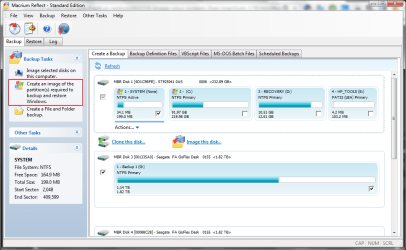
Disk 0 looks to have the same layout as mine. I image SYSTEM and WINDOWS. In fact Macrium has an option to select the partitions needed by Windows.
 

Attachments

  • Image 20141202001.png
    Image 20141202001.png
    48.7 KB · Views: 2

My Computer My Computer

Computer type
Laptop
Computer Manufacturer/Model Number
Hewlett-Packard/G62-107SA Notebook
OS
Microsoft Windows 7 Home Premium 64-bit Service Pack 1
CPU
Intel(R) Core(TM) i3 CPU M 330 @ 2.13GHz
Motherboard
Hewlett-Packard 1425
Memory
8 GB DDR3
Graphics Card(s)
Intel(R) HD Graphics
Sound Card
Realtek High Definition Audio
Monitor(s) Displays
Builtin
Screen Resolution
1366 x 768 x 32 bits (4294967296 colors) @ 60 Hz
Hard Drives
250 GB SATA Hard Disk Drive 7200 rpm
2TB Seagate GoFlex USB 2 Drive
1TB Iomega Prestige USB 2 Drive
1.5TB Iomega Prestige USB 2 Drive (Samsung)
2TB WD MyBook Live NAS.
Mouse
Logitech Anywhere MX
Internet Speed
152 Mbs download 10 Mbs upload
Antivirus
Norton 360
Browser
Chrome
Looks to me like you'd need to have image files of C and "System".

C has about 56 GB used. System uses less than 1 GB.

Those combined should yield Macrium images totaling somewhere above 20 GB in size, probably less than 30 GB. Keep however many you want, depending on how far back in time you think you might want to restore to. Not likely you'd want to restore to 6 months ago. I make monthly images and keep the most recent 2 or 3.
 

My Computer My Computer

Computer type
PC/Desktop
Computer Manufacturer/Model Number
Ignatz Special; 4 speed manual gearbox; factory air conditioning; one of one
OS
Windows 7 Home Premium SP1, 64-bit
CPU
Intel Skylake i5-6600K, not overclocked
Motherboard
AsRock Z170M Extreme 4, micro ATX
Memory
8 GB HyperX DDR4-2666 (2 x 4 GB)
Graphics Card(s)
none; graphics are integrated on CPU
Sound Card
onboard: Realtek ALC1150; external: USB Behringer UF0-202
Monitor(s) Displays
Dell S2340M 23 inch IPS
Screen Resolution
1600 x 900
Hard Drives
System: Crucial MX100 series SSD, 128 GB;
Data: Samsung Spinpoint 103SJ, 1 TB;
Backup: WD Caviar Green WD30EZRX-00D8PB0, 3 TB
PSU
Rosewill SilentNight 500 watt fanless, semi-modular
Case
Antec Solo II
Cooling
Noctua NH-U12S; Noctua F12 intake, Noctua S12A exhaust
Keyboard
Microsoft 200 6JH-00001 USB
Mouse
Dell or Microsoft optical wired; USB
Antivirus
Microsoft Security Essentials and Malwarebytes Premium
Browser
Pale Moon
Other Info
All fans PWM; speeds at idle: CPU circa 500 rpm; intake circa 600 rpm; exhaust circa 600 rpm; CPU temps 27 idle and 47 C load in a warm room (27 C/81 F) when running Intel Extreme Tuning Utility stress test.
OK I've downloaded and installed Macrium Reflect Free.

A number of people here have said to create a bootable disk using Windows PE included with Macrium. In the "Advanced" option for doing so, I can choose between Windows PE 3.1, 4.0 or 5.0 rescue media. 3.1 is pre-selected, should I choose 4.0 or 5.0 instead?

The Macrium help file says:

Auto versus Pre-built WIM


  • The pre-built Windows PE component is included with the full Macrium Reflect installer.
  • The Auto PE option is a 1.7 GB download from the Microsoft web site.
  • The Auto PE option allows for the creation of a custom rescue environment. This can be used to add your own programs or drivers, however, this functionality is outside the scope of this documentation.
  • Both the auto and pre-built Windows PE rescue environments can be loaded from CD/DVD, external USB/Flash media or from a Windows boot menu.
  • Due to Microsoft licensing restrictions, the pre-built WIM is only available to customers who have purchased before Reflect before the end of October 2012.
Does this mean that in creating the boot disk, Reflect will gulp a humongous 1.7 GB from the 'Net?

http://www.macrium.com/help/v5/reflect_v5.htm
 

My Computer My Computer

Computer type
Laptop
Computer Manufacturer/Model Number
HP ProBook 455 G1
OS
Windows 7 Professional x64
CPU
AMD A4-4300M, Revision TN-A1
Motherboard
HP 194E Socket FS1 Ver. A2019DD203 AMD A55/A60M/A8 (Speccy)*
Memory
4 GB DDR3 (3276 MBytes acc. to Speccy)
Graphics Card(s)
Radeon HD 7420G
Sound Card
IDT High Def Audio CODEC; AMD High Def Audio Device
Screen Resolution
1366 x 768
Hard Drives
Seagate 465 GB ST500LT0 12-1DG142 SATA-III
Keyboard
Std 101/102-Key or Micros. Natural PS/2 Keyb'd for HP Hotkey
Mouse
Synaptics PS/2 Port TouchPad
Antivirus
Microsoft Security Essentials
Browser
Firefox release channel (also Chrome and IE 11)
Other Info
Hard disk is encrypted. In addition to above motherboard info from Speccy, CPU-Z reports: "Model: HP 194E, KBC Vers. 91.0D; Chipset: AMD 15 IMC, Ver. 00; Southbridge: AMD A76M FCH, Rev. 2.6; LPCIO: SMSC"

My Computer My Computer

Computer type
Laptop
Computer Manufacturer/Model Number
Hewlett-Packard/G62-107SA Notebook
OS
Microsoft Windows 7 Home Premium 64-bit Service Pack 1
CPU
Intel(R) Core(TM) i3 CPU M 330 @ 2.13GHz
Motherboard
Hewlett-Packard 1425
Memory
8 GB DDR3
Graphics Card(s)
Intel(R) HD Graphics
Sound Card
Realtek High Definition Audio
Monitor(s) Displays
Builtin
Screen Resolution
1366 x 768 x 32 bits (4294967296 colors) @ 60 Hz
Hard Drives
250 GB SATA Hard Disk Drive 7200 rpm
2TB Seagate GoFlex USB 2 Drive
1TB Iomega Prestige USB 2 Drive
1.5TB Iomega Prestige USB 2 Drive (Samsung)
2TB WD MyBook Live NAS.
Mouse
Logitech Anywhere MX
Internet Speed
152 Mbs download 10 Mbs upload
Antivirus
Norton 360
Browser
Chrome
I finally solved it. It was something to do with the XHCI setting in the BIOS. At the default of 'Smart Auto' or with it set to 'Enabled', there is no input with the rescue media. However, if I choose 'Disabled' or 'Auto', the USB mouse and keyboard work fine.

Thanks for all the help/suggestions.

Just wanted to say thank you for posting this--solved my issue as well on ASUS motherboard.
 

My Computer My Computer

Computer type
PC/Desktop
Computer Manufacturer/Model Number
Home built
OS
Windows 7 Home Premium 64 bit
CPU
i5-4670k
Motherboard
ASUS z87 Pro
Memory
2x4GB G.Skill ddr3-1600
Graphics Card(s)
Power Color r9-280
Sound Card
onboard Realtek HD
Monitor(s) Displays
ASUS 24"
Screen Resolution
1080p
Hard Drives
primary-Samsung 850 evo--OS installed
secondary--WD black 1GB--data only
USB external HD's x2 --data only
PSU
EVGA 850G2
Cooling
Cooler Master Hyper 212 Evo
Antivirus
MSE
Browser
Chrome
False alarm created by Spybot S&D old version (may affect the new Spybot S&D version as well) when creating a Macrium usb rescue boot flash drive. Had to disable Spybot S&D before it would let me create the Macrium rescue media.

Free Edition 64 bit
Build 7256


2/1/2015 4:31:46 PM Encountered and terminated Fraud.WindowsRecovery in C:\ProgramData\Macrium\Reflect\Windows AIK\Tools\amd64\wimserv.exe!
 

My Computer My Computer

Computer type
PC/Desktop
Computer Manufacturer/Model Number
Dell All in one Inspiron 2020
OS
W10 32 bit, XUbuntu 18.xx 64 bit
CPU
Intel(R) Celeron(R) CPU G1620T @ 2.40GHz, 2400 Mhz
Motherboard
Dell
Memory
4GB
Graphics Card(s)
Intel HD graphics
Sound Card
High Definition Audio Device
Monitor(s) Displays
20 inch Screen
Screen Resolution
W7=1280 x 720 & Linux Mint Xfce=1360 x 768
Hard Drives
500 GB hard drive
Keyboard
Usb
Mouse
Usb
Internet Speed
High-Speed
Antivirus
MSE
Browser
Main Browser Firefox
Other Info
I have done a clean install of Windows 7 using Dell re-installation disk (Dell sent me one). I also use Free Macrium reflect backup and restore.
Back
Top