Solved Image your system with free Macrium

If you have backed up the System reserved partition along with C you can restore both. I have done it many times.

Thanks for helping.

It was only restoring C and not the System Reserved when only the partitions were created. Only when I reinstalled Windows on those partitions and then restored backup was it able to boot with the restored Windows.
 

My Computer My Computer

Computer type
PC/Desktop
OS
Win7 Ultimate 32bit
You need to include the System reserved when you make the backup then it will be automatically restored along with C when you select Restore Image.
 

My Computer My Computer

Computer type
Laptop
Computer Manufacturer/Model Number
Hewlett-Packard/G62-107SA Notebook
OS
Microsoft Windows 7 Home Premium 64-bit Service Pack 1
CPU
Intel(R) Core(TM) i3 CPU M 330 @ 2.13GHz
Motherboard
Hewlett-Packard 1425
Memory
8 GB DDR3
Graphics Card(s)
Intel(R) HD Graphics
Sound Card
Realtek High Definition Audio
Monitor(s) Displays
Builtin
Screen Resolution
1366 x 768 x 32 bits (4294967296 colors) @ 60 Hz
Hard Drives
250 GB SATA Hard Disk Drive 7200 rpm
2TB Seagate GoFlex USB 2 Drive
1TB Iomega Prestige USB 2 Drive
1.5TB Iomega Prestige USB 2 Drive (Samsung)
2TB WD MyBook Live NAS.
Mouse
Logitech Anywhere MX
Internet Speed
152 Mbs download 10 Mbs upload
Antivirus
Norton 360
Browser
Chrome
Next time should I create a seperate image of the System Reserved partition?

Is it possible to restore the Macrium backup without installing Windows first?
Yes you should select both the System reserved and operating system partition when making an image. This makes it more straightforward than storing a separate system reserved partition image.

Macrium system image restore should not require reinstalling Windows first. With a number of system images you probably never need to perform a reinstall ("clean install") of Windows ever again.

You may also want to consider upgrading to the latest v5 of Macrium. A Macrium rescue pe ISO is provided in the tutorial
http://www.sevenforums.com/tutorials/73828-imaging-free-macrium.html
 

My Computer My Computer

Computer type
PC/Desktop
Computer Manufacturer/Model Number
Own build
OS
Windows 7x64 Home Premium SP1
CPU
Intel i7 2600k
Motherboard
ASUS P8Z68 Deluxe
Memory
G.Skill Ripjaws (DDR3-1600) 2x4GB
Graphics Card(s)
Nvidia GeForce GTS 450; Intel HD Graphics 3000(GT2+)
Monitor(s) Displays
Dell Ultrasharp IPS panel U2311H, Samsung SyncMaster P2350
Screen Resolution
1920x1080
Hard Drives
Samsung 850 Pro SSD 256GB, Samsung SSD 840 120GB, Seagates 1TB Barracuda ST31000528AS x2
PSU
Seasonic M12II 520W
Case
Lian Li Lancool PC-K60
Cooling
Case: 1x120mm, 3x140mm CPU: Hyper 212+
Keyboard
Logitech MK520 (wireless)
Mouse
Logitech MK520
Internet Speed
6-7 Mbps
Antivirus
Norton Security Premium, Malwarebytes on 2 (MSE on 3rd PC)
Browser
FireFox
Other Info
Audio: Logitech Z523 2.1
When I first was able to successfully restore the backup, there was a black screen with mouse pointer for almost 10 minutes and then desktop appeared. It was hanging very badly so I restarted PC and it was ok after that. I used it for more than 15 hours and made backups of all remaining data on the HDD and there were no more delays\BSODs\hangs.

I tried another restore and after it restarted it got stuck after the Starting Windows screen and gave this BSOD error:

0X000000F4 (0x00000003 , 0x871C94A8 , 0x871C9614 , 0x82C29EA0)

then I restarted PC and it has not given another BSOD since.

Both times when I reinstalled Windows before restoring image there were no BSODs or black screens.

You need to include the System reserved when you make the backup then it will be automatically restored along with C when you select Restore Image.

Thanks for helping.

Yes it was checked and on the Summary page before starting the restore process 'Restore MBR = Y' was shown.

Next time should I create a seperate image of the System Reserved partition?

Is it possible to restore the Macrium backup without installing Windows first?
Yes you should select both the System reserved and operating system partition when making an image. This makes it more straightforward than storing a separate system reserved partition image.

Macrium system image restore should not require reinstalling Windows first. With a number of system images you probably never need to perform a reinstall ("clean install") of Windows ever again.

You may also want to consider upgrading to the latest v5 of Macrium. A Macrium rescue pe ISO is provided in the tutorial
http://www.sevenforums.com/tutorials/73828-imaging-free-macrium.html

Thanks for helping.

I selected both the System reserved and C partition when I made the image. I am using the DVD made from the iso link given in this tutorial for restoring.

Which version of v5 is the best? Or is the latest version ok to use?
 

My Computer My Computer

Computer type
PC/Desktop
OS
Win7 Ultimate 32bit
For me I use the latest (free version) V5 build. I get an automatic update notification on opening Macrium when one is available and run the patch. They tell you what the fixes are in the update notification.
V4 was good but one of the advantages of V5 is the ability to perform a system image restore of the OS partition to a smaller sized partition. This can be useful when going from an HDD to a smaller SSD.

I can't help with the BSOD description you report. It's not normal behavior and maybe someone else can help here.
 

My Computer My Computer

Computer type
PC/Desktop
Computer Manufacturer/Model Number
Own build
OS
Windows 7x64 Home Premium SP1
CPU
Intel i7 2600k
Motherboard
ASUS P8Z68 Deluxe
Memory
G.Skill Ripjaws (DDR3-1600) 2x4GB
Graphics Card(s)
Nvidia GeForce GTS 450; Intel HD Graphics 3000(GT2+)
Monitor(s) Displays
Dell Ultrasharp IPS panel U2311H, Samsung SyncMaster P2350
Screen Resolution
1920x1080
Hard Drives
Samsung 850 Pro SSD 256GB, Samsung SSD 840 120GB, Seagates 1TB Barracuda ST31000528AS x2
PSU
Seasonic M12II 520W
Case
Lian Li Lancool PC-K60
Cooling
Case: 1x120mm, 3x140mm CPU: Hyper 212+
Keyboard
Logitech MK520 (wireless)
Mouse
Logitech MK520
Internet Speed
6-7 Mbps
Antivirus
Norton Security Premium, Malwarebytes on 2 (MSE on 3rd PC)
Browser
FireFox
Other Info
Audio: Logitech Z523 2.1
The first boot after a restore may take a little bit longer as it has to create the page and hybernation files which are excluded from the image. This should bot be as long as you said though.
 

My Computer My Computer

Computer type
Laptop
Computer Manufacturer/Model Number
Hewlett-Packard/G62-107SA Notebook
OS
Microsoft Windows 7 Home Premium 64-bit Service Pack 1
CPU
Intel(R) Core(TM) i3 CPU M 330 @ 2.13GHz
Motherboard
Hewlett-Packard 1425
Memory
8 GB DDR3
Graphics Card(s)
Intel(R) HD Graphics
Sound Card
Realtek High Definition Audio
Monitor(s) Displays
Builtin
Screen Resolution
1366 x 768 x 32 bits (4294967296 colors) @ 60 Hz
Hard Drives
250 GB SATA Hard Disk Drive 7200 rpm
2TB Seagate GoFlex USB 2 Drive
1TB Iomega Prestige USB 2 Drive
1.5TB Iomega Prestige USB 2 Drive (Samsung)
2TB WD MyBook Live NAS.
Mouse
Logitech Anywhere MX
Internet Speed
152 Mbs download 10 Mbs upload
Antivirus
Norton 360
Browser
Chrome
On my first try I only deleted the System Reserved

If you do not image and restore the system reserved partition, then you have no bootmgr (unless you transferred that to the C partition). So it is normal that the system would not boot in such a setup.

There are some special cases - e.g. Dell - that keep the bootmgr on the recovery partition. So you have to watch out for those. Best is to always first check which partition is the active partition. That's the one containing the bootmgr.
 

My Computer My Computer

Computer Manufacturer/Model Number
HP, Dell, Gateway, Toshiba - 4 laptops and 2 desktops
OS
Vista, Windows7, Mint Mate, Zorin, Windows 8
CPU
from 1.6GHz Duo to i7
Monitor(s) Displays
2x HP w2207
Hard Drives
5x HDD, 7x SSD, 12x Externals
Keyboard
with trackball - no mices
Mouse
Trackball mice
Internet Speed
DSL 6000
For me I use the latest (free version) V5 build. I get an automatic update notification on opening Macrium when one is available and run the patch. They tell you what the fixes are in the update notification.
V4 was good but one of the advantages of V5 is the ability to perform a system image restore of the OS partition to a smaller sized partition. This can be useful when going from an HDD to a smaller SSD.

I can't help with the BSOD description you report. It's not normal behavior and maybe someone else can help here.

Thanks for helping.

I will have to get a new HDD as this one is failing. The OS image was from a 60GB (13GB used) partition on a 320GB SATA HDD so when I have to restore the partition using the WinPE recovery DVD to the new 500GB SATA HDD that partition would also need to be 60GB?

The first boot after a restore may take a little bit longer as it has to create the page and hybernation files which are excluded from the image. This should bot be as long as you said though.

Thanks for helping.

The long first boot times and BSODs were due to the faulty HDD. Hopefully it will be ok when I restore to new HDD.

On my first try I only deleted the System Reserved
If you do not image and restore the system reserved partition, then you have no bootmgr (unless you transferred that to the C partition). So it is normal that the system would not boot in such a setup.

There are some special cases - e.g. Dell - that keep the bootmgr on the recovery partition. So you have to watch out for those. Best is to always first check which partition is the active partition. That's the one containing the bootmgr.

Thanks for helping.

What is the best way to restore to a new HDD? Do any partitions need to be created on it before the restore? Or will the partitions be automatically created during the process?

---

Thanks to everyone for helping.

I'm sorry for asking so many questions again and again. Should I create a seperate thread for further questions?
 

My Computer My Computer

Computer type
PC/Desktop
OS
Win7 Ultimate 32bit
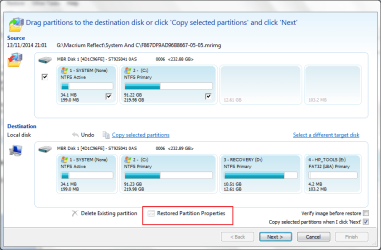
Macrium allows you to resize the partitions on restore. It is in the partition properties link on the first restore dialog...
 

Attachments

  • Image 20141114002.png
    Image 20141114002.png
    29.6 KB · Views: 0

My Computer My Computer

Computer type
Laptop
Computer Manufacturer/Model Number
Hewlett-Packard/G62-107SA Notebook
OS
Microsoft Windows 7 Home Premium 64-bit Service Pack 1
CPU
Intel(R) Core(TM) i3 CPU M 330 @ 2.13GHz
Motherboard
Hewlett-Packard 1425
Memory
8 GB DDR3
Graphics Card(s)
Intel(R) HD Graphics
Sound Card
Realtek High Definition Audio
Monitor(s) Displays
Builtin
Screen Resolution
1366 x 768 x 32 bits (4294967296 colors) @ 60 Hz
Hard Drives
250 GB SATA Hard Disk Drive 7200 rpm
2TB Seagate GoFlex USB 2 Drive
1TB Iomega Prestige USB 2 Drive
1.5TB Iomega Prestige USB 2 Drive (Samsung)
2TB WD MyBook Live NAS.
Mouse
Logitech Anywhere MX
Internet Speed
152 Mbs download 10 Mbs upload
Antivirus
Norton 360
Browser
Chrome

My Computer My Computer

Computer type
PC/Desktop
Computer Manufacturer/Model Number
home built
OS
windows 8.1 Pro x64
CPU
intel i5 4670k @ 4.3ghz
Motherboard
asus z87-plus
Memory
16 gig ram ddr3 @ 1600 corsair vengeance
Graphics Card(s)
evga 970 GTX 4 GIG FTW ACX 2.0
Sound Card
asus xonar D2X
Monitor(s) Displays
benq gw2765ht
Screen Resolution
2560x1440
Hard Drives
Samsung 850 pro SSD 512gig - boot device wooosh
WD black cavalier 640gig WD6401AALS
Seagate 500gig ST3500630AS
WD 2TB Green WDC20EARS
2 x WD Red 3TB WD30EFRX
Samsung 750gig HD753LG - on asmedia controller
PSU
coolermaster silent pro 600watt modular
Case
fractal define R4
Cooling
artic freezer i30, 3 case fans
Keyboard
microsoft business ps2 keyboard
Mouse
microsoft optical black mouse
Internet Speed
80/20 FTTC SkyBB
Antivirus
Nod32 AV v8, HitmanProAlert, SRP, System Hardening
Browser
Chrome x64
Other Info
Intel controller is in AHCI mode currently using IaSTOR 12.8.0.1016 drivers
I would suggest you use differentials rather than incrementals. The reason is that there are fewer files to get corrupted. A long incremental chain can be destroyed by just one corrupt file.
 

My Computer My Computer

Computer type
Laptop
Computer Manufacturer/Model Number
Hewlett-Packard/G62-107SA Notebook
OS
Microsoft Windows 7 Home Premium 64-bit Service Pack 1
CPU
Intel(R) Core(TM) i3 CPU M 330 @ 2.13GHz
Motherboard
Hewlett-Packard 1425
Memory
8 GB DDR3
Graphics Card(s)
Intel(R) HD Graphics
Sound Card
Realtek High Definition Audio
Monitor(s) Displays
Builtin
Screen Resolution
1366 x 768 x 32 bits (4294967296 colors) @ 60 Hz
Hard Drives
250 GB SATA Hard Disk Drive 7200 rpm
2TB Seagate GoFlex USB 2 Drive
1TB Iomega Prestige USB 2 Drive
1.5TB Iomega Prestige USB 2 Drive (Samsung)
2TB WD MyBook Live NAS.
Mouse
Logitech Anywhere MX
Internet Speed
152 Mbs download 10 Mbs upload
Antivirus
Norton 360
Browser
Chrome

My Computers My Computers

System One System Two

I don't even bother with incrementals or differentials anymore. My system images are only 26GB big and I only keep the last few (and the one I made when I first set up the computer) so I don't have to worry about how much space I need or the amount of time it takes to make an image; it takes only ten minutes to make an image and verify it. I make an image only once a week and before making any changes to the system.
 

My Computer My Computer

Computer type
PC/Desktop
Computer Manufacturer/Model Number
Custom Build
OS
Win 7 Ultimate 64 bit
CPU
Intel i7-3930K
Motherboard
ASUS P9X79 WS
Memory
Kingston HyperX Genesis 32GB Kit (8x4GB Modules) 1600MHz DDR
Graphics Card(s)
MSI R7850 Twin Frozr 2GD5/OC Radeon HD 7850 2GB 256-bit GDDR
Sound Card
Asus Xonar Essence STX
Monitor(s) Displays
3x Asus VG248QE 24", Vizio 32" TV
Screen Resolution
1920 x 1080, ?
Hard Drives
Samsung 128GB 840 Pro SSD (1),
Samsung 4TB 850 EVO SSDs (4)
Samsung 4TB 850 EVO SSDs (16) external backup drives used in 2.5" hot swap bays in the computer.
PSU
Corsair HX750w
Case
Antec Two Hundred v2 (modified)
Cooling
Cooler Master GeminII S524 120mm (fan replaced with a 140mm)
Keyboard
Logitech G510s
Mouse
Logitech M525 (two in use)
Internet Speed
=< 32Mbps down, 8Mbps up
Antivirus
AVAST!, MBAM, SAS, Spybot S&D (all but MBAM free) Glary Util
Browser
IE11
Other Info
LSI 9211-8i HBA card (8 SATA III ports), 2.5" & 3.5" Hot Swap Bays, HooToo HT-CR001 PCI-E to USB 3.0 Internal Hub + 6 Slot Card Reader, and LG Model CH12LS28 BD-ROM Optical Drive. Also, ScanSnap S1500 ADF duplexing scanner, Canon 9000F flat bed scanner, Corsair SP2500 2.1 speakers, Samsung CLP 415nw laser color printer, Cyberpower PP2200SW UPS
LF, That's the way to go. I do the same. It is a lot less messy.
 

My Computer My Computer

Computer Manufacturer/Model Number
HP, Dell, Gateway, Toshiba - 4 laptops and 2 desktops
OS
Vista, Windows7, Mint Mate, Zorin, Windows 8
CPU
from 1.6GHz Duo to i7
Monitor(s) Displays
2x HP w2207
Hard Drives
5x HDD, 7x SSD, 12x Externals
Keyboard
with trackball - no mices
Mouse
Trackball mice
Internet Speed
DSL 6000
I also just keep full images. My problem is I probably keep too many of them. It's a bit like the junk that clutters up your house because "You may need it one day".
 

My Computer My Computer

Computer type
PC/Desktop
Computer Manufacturer/Model Number
Own build
OS
Windows 7x64 Home Premium SP1
CPU
Intel i7 2600k
Motherboard
ASUS P8Z68 Deluxe
Memory
G.Skill Ripjaws (DDR3-1600) 2x4GB
Graphics Card(s)
Nvidia GeForce GTS 450; Intel HD Graphics 3000(GT2+)
Monitor(s) Displays
Dell Ultrasharp IPS panel U2311H, Samsung SyncMaster P2350
Screen Resolution
1920x1080
Hard Drives
Samsung 850 Pro SSD 256GB, Samsung SSD 840 120GB, Seagates 1TB Barracuda ST31000528AS x2
PSU
Seasonic M12II 520W
Case
Lian Li Lancool PC-K60
Cooling
Case: 1x120mm, 3x140mm CPU: Hyper 212+
Keyboard
Logitech MK520 (wireless)
Mouse
Logitech MK520
Internet Speed
6-7 Mbps
Antivirus
Norton Security Premium, Malwarebytes on 2 (MSE on 3rd PC)
Browser
FireFox
Other Info
Audio: Logitech Z523 2.1
Just to be different I do weekly full images and daily differentials.
 

My Computer My Computer

Computer type
Laptop
Computer Manufacturer/Model Number
Hewlett-Packard/G62-107SA Notebook
OS
Microsoft Windows 7 Home Premium 64-bit Service Pack 1
CPU
Intel(R) Core(TM) i3 CPU M 330 @ 2.13GHz
Motherboard
Hewlett-Packard 1425
Memory
8 GB DDR3
Graphics Card(s)
Intel(R) HD Graphics
Sound Card
Realtek High Definition Audio
Monitor(s) Displays
Builtin
Screen Resolution
1366 x 768 x 32 bits (4294967296 colors) @ 60 Hz
Hard Drives
250 GB SATA Hard Disk Drive 7200 rpm
2TB Seagate GoFlex USB 2 Drive
1TB Iomega Prestige USB 2 Drive
1.5TB Iomega Prestige USB 2 Drive (Samsung)
2TB WD MyBook Live NAS.
Mouse
Logitech Anywhere MX
Internet Speed
152 Mbs download 10 Mbs upload
Antivirus
Norton 360
Browser
Chrome
I also just keep full images. My problem is I probably keep too many of them. It's a bit like the junk that clutters up your house because "You may need it one day".

I hear you! I don't know about the free version, but the Pro version of Macrium Reflect can be set to either discard older images based on age or keep only the latest images up to a certain number. If I didn't have mine set to keep only the last eight images (four to eight weeks worth, depending on how many a week I make), I would have an obscene number on my computer.

My System files don't change all that much over a week's time (and most of the changes aren't critical) so a weekly full image is fine for me (and even that is probably overkill; I just want to maintain a habit of doing so). If I do make a change that could cause an issue, like trying out a new program or making a major configuration change, I just make a full image just before making the change. No fuss, no muss.
 

My Computer My Computer

Computer type
PC/Desktop
Computer Manufacturer/Model Number
Custom Build
OS
Win 7 Ultimate 64 bit
CPU
Intel i7-3930K
Motherboard
ASUS P9X79 WS
Memory
Kingston HyperX Genesis 32GB Kit (8x4GB Modules) 1600MHz DDR
Graphics Card(s)
MSI R7850 Twin Frozr 2GD5/OC Radeon HD 7850 2GB 256-bit GDDR
Sound Card
Asus Xonar Essence STX
Monitor(s) Displays
3x Asus VG248QE 24", Vizio 32" TV
Screen Resolution
1920 x 1080, ?
Hard Drives
Samsung 128GB 840 Pro SSD (1),
Samsung 4TB 850 EVO SSDs (4)
Samsung 4TB 850 EVO SSDs (16) external backup drives used in 2.5" hot swap bays in the computer.
PSU
Corsair HX750w
Case
Antec Two Hundred v2 (modified)
Cooling
Cooler Master GeminII S524 120mm (fan replaced with a 140mm)
Keyboard
Logitech G510s
Mouse
Logitech M525 (two in use)
Internet Speed
=< 32Mbps down, 8Mbps up
Antivirus
AVAST!, MBAM, SAS, Spybot S&D (all but MBAM free) Glary Util
Browser
IE11
Other Info
LSI 9211-8i HBA card (8 SATA III ports), 2.5" & 3.5" Hot Swap Bays, HooToo HT-CR001 PCI-E to USB 3.0 Internal Hub + 6 Slot Card Reader, and LG Model CH12LS28 BD-ROM Optical Drive. Also, ScanSnap S1500 ADF duplexing scanner, Canon 9000F flat bed scanner, Corsair SP2500 2.1 speakers, Samsung CLP 415nw laser color printer, Cyberpower PP2200SW UPS
Backups of Backups of Backups ...

I also just keep full images. My problem is I probably keep too many of them. It's a bit like the junk that clutters up your house because "You may need it one day".
:ditto:
I have several TBs of backup images (some are backups of the backup images) on external HDDs.

I have had:

  • A couple of images become unusable for no apparent reason.
  • Some corrupted backup images on one of my internal HDDs, because the HDD happened to lose some sectors in that area (typical).
Having "too many" copies seems worthwhile. :D
 
Last edited:

My Computer My Computer

Computer type
PC/Desktop
Computer Manufacturer/Model Number
n/a
OS
W7 Ultimate SP1, LM19.2 MATE, W10 Home 1703, W10 Pro 1703 VM, #All 64 bit
CPU
AMD Phenom II x6 1100T, 3.3 GHz
Motherboard
ASUS M4A88T-M/USB3 (AM3)
Memory
12GB DDR3 1333 G-Skill (4GB x 2), G-Skill (2GB x 2)
Graphics Card(s)
NVIDIA GeForce GTX 660
Sound Card
Realtek?
Monitor(s) Displays
Samsung S23B350
Screen Resolution
1920x1080
Hard Drives
WD Green 2TB (SATA), WD Green 3TB (SATA), WD Blue 4TB (SATA), WD Blue 6TB (SATA)
PSU
Cooler Master
Case
Antec GX300 Tower
Cooling
3x Antec TRICOOL 120mm Fans
Mouse
Wired Optical
Internet Speed
DSL
Antivirus
Avast
Browser
Pale Moon (64 bit)
Other Info
2018-12-27 Upgraded HDDs
2015-12-10 Upgraded case, graphics card, storage
2015-08-15 Upgraded motherboard & RAM
2015-07-15 Upgraded LM17.1 to LM17.2
I also just keep full images. My problem is I probably keep too many of them. It's a bit like the junk that clutters up your house because "You may need it one day".
:ditto:
I have several TBs of backup images (some are backups of the backup images) on external HDDs.

I have had:

  • A couple of images become unusable for no apparent reason.
  • Some corrupted backup images on one of my internal HDDs, because the HDD happened to lose some sectors in that area (typical).
Having "too many" copies seems worthwhile. :D

You are as anal as I am. I have four HDDs—two locals and two offsite—for each HDD I have installed and in use in my machine (I'm sort four HDDs so one of my installed HDDs is not in use right now; I'm hoping for a good sale before I pull the trigger on the four).

I've never had an image fail to restore. I did have one fail verification; I reran the image and that one verified. That's a good argument for verification.
 

My Computer My Computer

Computer type
PC/Desktop
Computer Manufacturer/Model Number
Custom Build
OS
Win 7 Ultimate 64 bit
CPU
Intel i7-3930K
Motherboard
ASUS P9X79 WS
Memory
Kingston HyperX Genesis 32GB Kit (8x4GB Modules) 1600MHz DDR
Graphics Card(s)
MSI R7850 Twin Frozr 2GD5/OC Radeon HD 7850 2GB 256-bit GDDR
Sound Card
Asus Xonar Essence STX
Monitor(s) Displays
3x Asus VG248QE 24", Vizio 32" TV
Screen Resolution
1920 x 1080, ?
Hard Drives
Samsung 128GB 840 Pro SSD (1),
Samsung 4TB 850 EVO SSDs (4)
Samsung 4TB 850 EVO SSDs (16) external backup drives used in 2.5" hot swap bays in the computer.
PSU
Corsair HX750w
Case
Antec Two Hundred v2 (modified)
Cooling
Cooler Master GeminII S524 120mm (fan replaced with a 140mm)
Keyboard
Logitech G510s
Mouse
Logitech M525 (two in use)
Internet Speed
=< 32Mbps down, 8Mbps up
Antivirus
AVAST!, MBAM, SAS, Spybot S&D (all but MBAM free) Glary Util
Browser
IE11
Other Info
LSI 9211-8i HBA card (8 SATA III ports), 2.5" & 3.5" Hot Swap Bays, HooToo HT-CR001 PCI-E to USB 3.0 Internal Hub + 6 Slot Card Reader, and LG Model CH12LS28 BD-ROM Optical Drive. Also, ScanSnap S1500 ADF duplexing scanner, Canon 9000F flat bed scanner, Corsair SP2500 2.1 speakers, Samsung CLP 415nw laser color printer, Cyberpower PP2200SW UPS
I also just keep full images. My problem is I probably keep too many of them. It's a bit like the junk that clutters up your house because "You may need it one day".
You can never have too many. I just was able to fix a problem on one of my laptops with an image from early 2013 - anything younger would not do.
 

My Computer My Computer

Computer Manufacturer/Model Number
HP, Dell, Gateway, Toshiba - 4 laptops and 2 desktops
OS
Vista, Windows7, Mint Mate, Zorin, Windows 8
CPU
from 1.6GHz Duo to i7
Monitor(s) Displays
2x HP w2207
Hard Drives
5x HDD, 7x SSD, 12x Externals
Keyboard
with trackball - no mices
Mouse
Trackball mice
Internet Speed
DSL 6000
Back
Top