
IE9, Flash and YouTube

UsernameIssues

a.k.a. UNI
Guru
Gold Member
Local time
12:30 PM
Messages
8,138
(now IE10) IE9, Flash and YouTube

I have a friend that I support that has a problem with IE9-32bit on this system:
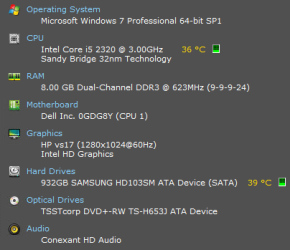
specs.png
Most of the tests below started with IE9 closed and Flash not showing in task manager. The URL of interest was pasted into the Start > Search programs and files field and the resulting link was clicked on. IE9 is the default browser.


IE9 will not play this link*:
Magic Clerk - Easter Edition: The Tonight Show with Jay Leno - YouTube
IE9 will always play this link**:
Magic Clerk - Easter Edition: The Tonight Show with Jay Leno - YouTube
IE9 will sometimes play this link***:
Magic Clerk Easter Chick

*this is true for every video on youtube.com that I tested
(But Chrome 26 plays them.)
IE fails to play videos from other domains too:
NASA - Multimedia - Video Gallery
(never loads the player)
NBA.com - NBA Videos and Highlights | NBA.com
(plays after reloading the page a time or two)
Da"u Corporate Rides the Scott Gambler 2013 - iceman2058 - Mountain Biking Videos - Vital MTB
(plays after reloading the page a time or two)

IE plays these:
HowStuffWorks "Videos"
Copper Chloride - The Periodic Table of Videos does Molecules
Videos - Sesame Street


**this is true for every YouTube video via youtube-nocookie.com that I tested

***if I clear IE's cache, start IE9 and load that page, I get "Movie not loaded..."
If I load the video via the nocookie domain in another tab,
...then reload that tab from the biggeekdad, it plays in the reloaded tab.
Movie not loaded.png
IE8 via the XP Mode plays the videos from YouTube just fine.

Things I've done:
reset IE (including personal favorites) using it Internet Options

used this SF tool to re-register IE and reset IE
(I'm doing this via remote control while the friend is away, so I did not reset the winsock. It is a Wi-Fi connection).

used Flash 11.7.700.165 (beta) and the "stable" 11.6.602.180.

used this un-installer and these steps to remove any remnants:
Uninstall Flash Player | Windows


Not flash related, but might have something to do with flash not loading on some websites. More times than not, IE9 barfs some pages when they load:
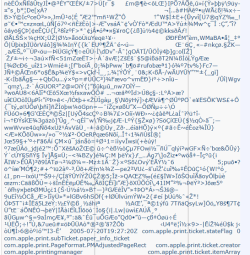
barf.png
I could never get that same page to barf using Chrome or my IE9-32bit. Given enough reloads, the page may eventually render correctly on my friend's computer. Using the compatibility mode always messes it up on my friend's computer, but never on mine.

Using a new user profile on my friend's computer did not cure these video and page barfing woes.

IE9-partial screen.png

SFC comes out clean.

Edit: I also changed the DNS settings from the ISP's to OpenDNS - no joy.
 
Last edited:

My Computer

Computer type
Laptop
Computer Manufacturer/Model Number
Employer provided Dell Latitude
OS
W7 Pro SP1 64bit
CPU
i7
Memory
8GB
Graphics Card(s)
Intel HD Graphics
Hard Drives
crappy SSD
Antivirus
Employer mandated Symantec Endpoint Protection
Browser
Pale Moon 64bit, IE11 64bit & Chrome 64bit

My Computer

Computer type
PC/Desktop
OS
Windows 10 Home x64
CPU
INTEL Core i5-750 Quad-Core 3.37GHz
Motherboard
ASUS P7P55D
Memory
HyperX Fury Black Series 8GB (2 x 4GB) 1866Mhz
Graphics Card(s)
EVGA GeForce GTX 750 Superclocked 1GB 128-Bit GDDR5
Monitor(s) Displays
LG 32MA68HY 32" IPS
Screen Resolution
1920 x 1080
Hard Drives
Samsung 840 Evo 120GB, SEAGATE 500GB Barracuda® 7200.12, SATA 3 Gb/s, 7200 RPM, 16MB cache
PSU
ANTEC TruePower New TP-550, 80 PLUS, 550W
Case
ANTEC Three Hundred Illusion
Cooling
COOLER MASTER Hyper 212 Plus, 4 x 120mm 1 x 140mm Noctua's
Internet Speed
85 + Mbps
Antivirus
Avast
Browser
Vivaldi
Thanks for the suggestions. I should have thought of the safe mode. I shy away from msconfig when working on a computer via remote control. But I'll give that a try... being careful to allow the Remote Administration Tools (RATs) to load.

Funny (sad) thing, when I ran Speccy for this post, I noticed that there was a video driver from LogMeIn. I have LogMeIn Free installed as my 2nd way to remote into this computer. As a test, I uninstalled LogMeIn Free. Then I did the hours of testing mentioned above (with several computer restarts).

Sadly, TeamViewer (TV) has gotten into a state where it will not let me control the remote computer. I can connect, I can transfer files - I just cannot control the remote computer. When I ask TV to reboot the remote computer. A small TV dialog box comes up on the remote computer asking for a username and password. Feeding that TV dialog the remote computer's admin Windows account info fails (no blank password allowed) and TV will not restart the remote computer.

I've seen TV fail in a variety of ways over the years, but this failure mode is a new one for me. It is for failures like this that I usually keep more than one RAT installed. I'll test the safe mode once I can contact my friend. Thanks again.
 

My Computer

Computer type
Laptop
Computer Manufacturer/Model Number
Employer provided Dell Latitude
OS
W7 Pro SP1 64bit
CPU
i7
Memory
8GB
Graphics Card(s)
Intel HD Graphics
Hard Drives
crappy SSD
Antivirus
Employer mandated Symantec Endpoint Protection
Browser
Pale Moon 64bit, IE11 64bit & Chrome 64bit
Okay, I got back in. Everything looks fine in the safe mode. And a clean-ish boot did not solve the issues in the regular mode. I cannot do a total clean boot or I would not be able to remote in. TeamViewer (TV) was the only RAT installed when I gathered the data for the OP. I installed two other RATs and uninstalled TV. The problem persisted in the normal mode. The only services and apps that were allowed to start were those that related to the RAT being used.

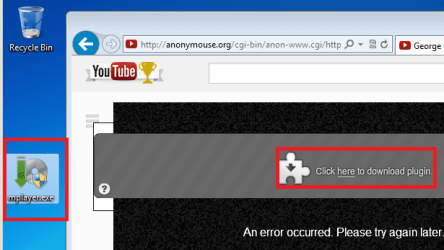
Anonymouse.org told me that I needed to download this player:
https://www.virustotal.com/en/file/...075fdb825765f6f0217b07d42a396fa3dda/analysis/

I thought that might be a fluke (just a bad advert) but the popup came 3 more times and looked different each time:
mplayer.png
I moved to my VM and repeated the test. I got the same prompts about needing a plugin. Even after I installed it, I still got the prompts.

I have cleaned up after someone installed Mplayer/Q-Installer. I always wondered how so many apps came in on the same day and the owner did not recall installing any of them.


Anyway, I'm out of ideas - so I'll try the less logical ones - like try a different network card.

Any other suggestions?
 

My Computer

Computer type
Laptop
Computer Manufacturer/Model Number
Employer provided Dell Latitude
OS
W7 Pro SP1 64bit
CPU
i7
Memory
8GB
Graphics Card(s)
Intel HD Graphics
Hard Drives
crappy SSD
Antivirus
Employer mandated Symantec Endpoint Protection
Browser
Pale Moon 64bit, IE11 64bit & Chrome 64bit
I've updated this to IE10 with 64bit tabs.

Still barfs webpages and will not play a video the way that YouTube embeds them.
 

My Computer

Computer type
Laptop
Computer Manufacturer/Model Number
Employer provided Dell Latitude
OS
W7 Pro SP1 64bit
CPU
i7
Memory
8GB
Graphics Card(s)
Intel HD Graphics
Hard Drives
crappy SSD
Antivirus
Employer mandated Symantec Endpoint Protection
Browser
Pale Moon 64bit, IE11 64bit & Chrome 64bit
You are now having issues in both 32 bit and 64 bit (I know IE10 is different, and the distinction between 2 separate browsers is gone)? The fact it works in safe mode obviously points to something loaded in windows, such as a video driver, etc. Sorry about anonymouse, that's very odd, you can try with hide my ass as well

Free Proxy - Surf Anonymously & Hide Your IP Address - Hide My Ass!

Since no cookie youtube works, it may not help.

Your remoting in makes it harder for you. Forgive me if I missed it, have you disabled individual add-ons to see if that helps? A Guy
 

My Computer

Computer type
PC/Desktop
OS
Windows 10 Home x64
CPU
INTEL Core i5-750 Quad-Core 3.37GHz
Motherboard
ASUS P7P55D
Memory
HyperX Fury Black Series 8GB (2 x 4GB) 1866Mhz
Graphics Card(s)
EVGA GeForce GTX 750 Superclocked 1GB 128-Bit GDDR5
Monitor(s) Displays
LG 32MA68HY 32" IPS
Screen Resolution
1920 x 1080
Hard Drives
Samsung 840 Evo 120GB, SEAGATE 500GB Barracuda® 7200.12, SATA 3 Gb/s, 7200 RPM, 16MB cache
PSU
ANTEC TruePower New TP-550, 80 PLUS, 550W
Case
ANTEC Three Hundred Illusion
Cooling
COOLER MASTER Hyper 212 Plus, 4 x 120mm 1 x 140mm Noctua's
Internet Speed
85 + Mbps
Antivirus
Avast
Browser
Vivaldi
Thanks for sticking with me on this.

I should have mentioned that IE9 64bit gave the same results as described in the OP. I did not expect that installing IE10 would fix any of this.

The safe mode disables a ton of MS apps and services - so the barfing might not be due to an app that is running in the normal mode. Let's forget about the videos for now, because I'm pretty sure that it is a page rendering issue. If I disable all plug-ins/add-ons (including Flash). The YouTube videos play via HTML5. With Flash enabled, Flash loads and then it is like each method defers to the other and nothing plays.


The one web page that barfs so regularly in IE9 and IE10 works fine via the HMA proxy.

What now?
 

My Computer

Computer type
Laptop
Computer Manufacturer/Model Number
Employer provided Dell Latitude
OS
W7 Pro SP1 64bit
CPU
i7
Memory
8GB
Graphics Card(s)
Intel HD Graphics
Hard Drives
crappy SSD
Antivirus
Employer mandated Symantec Endpoint Protection
Browser
Pale Moon 64bit, IE11 64bit & Chrome 64bit

My Computer

Computer type
PC/Desktop
Computer Manufacturer/Model Number
Custom assembled by me :}
OS
Win-7-Pro64bit 7-H-Prem-64bit
CPU
i7-5930K 2nd i9-9940x both water blocked VRM's too
Motherboard
ASUS SABERTOOTH X99 2nd ASUS x299 Apex
Memory
Trident-z 3200C14 2nd Trident-z 3600C16
Graphics Card(s)
EVGA 1080ti ftw3 2nd Titan Xp both water blocked
Sound Card
Built-in Realtek
Monitor(s) Displays
1-AOC G2460PG 24"G-Sync 144Hz/ 2nd 1-ASUS VG248QE 24" 144Hz
Screen Resolution
1920 x 1080 144Hz
Hard Drives
2-Samsung M.2 Evo & Evo Plus
2-Samsung 850 EVO 500GB SSD's/ 3-2.5 W.D. Black 1tb-&3-1tb/3-3.5 WD Black 1tb hdd's
PSU
EVGA SuperNOVA 1000-P2 2nd 1200-P2
Case
2-Corsair Obsidian Series 450D Black ATX Mid Tower
Cooling
Custom water loops
Keyboard
Logitech G710+/ 2nd Logitech G910
Mouse
2-RedDragon M901 Perdition 16400 dpi Gaming mouse = wired
Internet Speed
Comcast Ping 19ms 89.31mbps download speed 6.12mbps upload
Antivirus
Malwarebytes Pro/ Superantispyware Pro
Browser
FireFox & Pale moon
Other Info
2nd ASUS X299 Apex/Intel i9-9940x with Custom water loop/7H-Prem-x64/Corsair 450D case/Ram Trident-z 3600C16 4x8gb / Samsung970Evo plus 500gb SSD/Dual ssd EZ swap evo/PSU EVGA SuperNova 1200w-P2 80+Platinum/GPU Titan Xp /8-ML-140 on push-pull on 2-280GTX rads
My IE11 played NASA without issue.

NBA needed Flash. I only have Flash in Chrome.

The person that owns this computer is happy using another browser. If that other thread comes up with a lasting solution, I might test it on this computer. Thanks for testing with IE10.
 

My Computer

Computer type
Laptop
Computer Manufacturer/Model Number
Employer provided Dell Latitude
OS
W7 Pro SP1 64bit
CPU
i7
Memory
8GB
Graphics Card(s)
Intel HD Graphics
Hard Drives
crappy SSD
Antivirus
Employer mandated Symantec Endpoint Protection
Browser
Pale Moon 64bit, IE11 64bit & Chrome 64bit
Website imbedded content is always weird to say the least even this site :p
Flash pretty much sux so I do not have it installed.
If the site requires it I just pass on bothering to watch it until they update the site.
Best to validate the html of the site and forward the error report to them showing all of the errors ;)

Animated radars... sometimes work sometimes don't best thing to do is find a site that does work chron.com seems to work okay without flash installed
Houston Chron : Weather

Yep this thread was well before my time posting here although I was a member I don't believe I commented for some time after
ie10 still rules but it is a bit different on my new build so the NVidia driver is definitely funky with ie in general compared to my older system with a little bitty gt 640 card that windows updates supply the drivers for 347.52 and my new one has a funky 353.??
 

My Computer

Computer type
PC/Desktop
Computer Manufacturer/Model Number
Custom assembled by me :}
OS
Win-7-Pro64bit 7-H-Prem-64bit
CPU
i7-5930K 2nd i9-9940x both water blocked VRM's too
Motherboard
ASUS SABERTOOTH X99 2nd ASUS x299 Apex
Memory
Trident-z 3200C14 2nd Trident-z 3600C16
Graphics Card(s)
EVGA 1080ti ftw3 2nd Titan Xp both water blocked
Sound Card
Built-in Realtek
Monitor(s) Displays
1-AOC G2460PG 24"G-Sync 144Hz/ 2nd 1-ASUS VG248QE 24" 144Hz
Screen Resolution
1920 x 1080 144Hz
Hard Drives
2-Samsung M.2 Evo & Evo Plus
2-Samsung 850 EVO 500GB SSD's/ 3-2.5 W.D. Black 1tb-&3-1tb/3-3.5 WD Black 1tb hdd's
PSU
EVGA SuperNOVA 1000-P2 2nd 1200-P2
Case
2-Corsair Obsidian Series 450D Black ATX Mid Tower
Cooling
Custom water loops
Keyboard
Logitech G710+/ 2nd Logitech G910
Mouse
2-RedDragon M901 Perdition 16400 dpi Gaming mouse = wired
Internet Speed
Comcast Ping 19ms 89.31mbps download speed 6.12mbps upload
Antivirus
Malwarebytes Pro/ Superantispyware Pro
Browser
FireFox & Pale moon
Other Info
2nd ASUS X299 Apex/Intel i9-9940x with Custom water loop/7H-Prem-x64/Corsair 450D case/Ram Trident-z 3600C16 4x8gb / Samsung970Evo plus 500gb SSD/Dual ssd EZ swap evo/PSU EVGA SuperNova 1200w-P2 80+Platinum/GPU Titan Xp /8-ML-140 on push-pull on 2-280GTX rads
Back
Top