IE10 "Open in new tab" gives blank page

inglewoodpete

New member
Local time
7:59 AM
Messages
13
I have been using IE10 for about 6 months.

A few days ago, immediately after the regular monthly windows update from Microsoft, one IE10 feature has been consistently misbehaving.

Regardless of the method I use, when I try to open a link in a new tab, the tab is created with a completely blank page. The tab itself is also blank. The URL displayed in the address field is that of the calling page.

I raised this issue here in Microsoft Answers and have had assistance from ThrashZone. ThrashZone suggested I post the results of an AdwCleaner scan for feedback from this forum, hinting that the computer may have a virus. I use up-to-date Kaspersky IS 2012 AV which appears to be 'on the ball' and both my wife and I have pretty tame browsing habits, so I do not suspect a virus at this point. However, I'll keep an open mind.

Any analysis or thoughts from forum members?

The output for AdwCleaner:
# AdwCleaner v3.008 - Report created 18/10/2013 at 22:09:56
# Updated 17/10/2013 by Xplode
# Operating System : Windows 7 Home Premium Service Pack 1 (32 bits)
# Username : deleted by IWP
# Running from : E:\Apps\Tools\AdwCleaner.exe
# Option : Scan
***** [ Services ] *****

***** [ Files / Folders ] *****
Folder Found C:\ProgramData\apn
***** [ Shortcuts ] *****

***** [ Registry ] *****
Key Found : HKLM\SOFTWARE\Classes\CLSID\{2CE4D4CF-B278-4126-AD1E-B622DA2E8339}
Key Found : HKLM\SOFTWARE\Classes\Interface\{2CE4D4CF-B278-4126-AD1E-B622DA2E8339}
Key Found : HKLM\Software\InstallIQ
Key Found : HKLM\SOFTWARE\Microsoft\Tracing\ApnSetup_RASAPI32
Key Found : HKLM\SOFTWARE\Microsoft\Tracing\ApnSetup_RASMANCS
***** [ Browsers ] *****
-\\ Internet Explorer v10.0.9200.16720

*************************
AdwCleaner[R0].txt - [857 octets] - [18/10/2013 22:09:56]
########## EOF - C:\AdwCleaner\AdwCleaner[R0].txt - [916 octets] ##########
 

My Computer My Computer

At a glance

Windows 7 Home Premium 32bitIntel Pentium 4 3GHz 478pins2GB DDR400nVidia FX5700VE 256MB
Computer type
PC/Desktop
Computer Manufacturer/Model Number
Custom Build
OS
Windows 7 Home Premium 32bit
CPU
Intel Pentium 4 3GHz 478pins
Motherboard
ECS 865PE
Memory
2GB DDR400
Graphics Card(s)
nVidia FX5700VE 256MB
Hard Drives
Samsung HD161HJ ATA (Boot)
WDX WD1200JD-00HBB0 ATA (Data)
Internet Speed
~19 Mbits/s
Antivirus
Kaspersky IS 2012
Browser
IE10
Please go ahead and run the Delete part of ADWare cleaner and then post the resulting txt file. You have InstallIQ which is an downloader for some software downloads.
 

My Computer My Computer

At a glance

Windows 7 Ultimate X64 SP1Intel i5-2550K, Differing ~4.4-4.8GHz No buil...16GB G.Skill Sniper 1866MHz @ 2133MHz 2x8GBASUS GTX650TIB-DC2OC-2GD5, (650TI Boost)
Computer type
PC/Desktop
Computer Manufacturer/Model Number
Home Built Desktop By DataTech
OS
Windows 7 Ultimate X64 SP1
CPU
Intel i5-2550K, Differing ~4.4-4.8GHz No built in GPU
Motherboard
ASUS P8Z68-V PRO/GEN3
Memory
16GB G.Skill Sniper 1866MHz @ 2133MHz 2x8GB
Graphics Card(s)
ASUS GTX650TIB-DC2OC-2GD5, (650TI Boost)
Sound Card
Onboard Realtek 5-1
Monitor(s) Displays
Samsung P2570HD
Screen Resolution
1920x1080
Hard Drives
Samsung 840 Pro 256GB SSD for OS, 500GB Seagate Constellation (Enterprise drive) for Data
PSU
Corsair HX650W
Case
Inwin Dragon Rider
Cooling
Hyper 212 EVO w/two Noctua fans, push-pull, @1300 RPM
Keyboard
E-Z Eyes, bright yellow keys with large characters
Mouse
steelseries SENSEI Laser Pro Gaming
Internet Speed
48-51Mbs Mbs down, 11 Mbs up Xfinity Cable
Antivirus
Norton Internet Security 2013
Browser
IE 10, Opera, Pale Moon if needed
Other Info
4 case fans, LG BluRay-RE, ASUS DVD-RW, Mr. Fusion power supply, 1.21 gigawatts.
Now "Cleaned"

OK. I have run AdwCleaner's clean option and posted a fresh log file below. While the deleted applications could be called 'undesirable', I wouldn't rate them as malicious.

However, the problem with IE10 persists: Regardless of the method I use, when I try to open a link in a new tab, the tab is created with a completely blank page. The tab itself is also blank. The URL displayed in the address field is that of the calling page.

My suspicion is that something broke during the Microsoft update of my PC, simply because of the timing of the change.

There have been quite a few similar threads around the forums over the past few years: it appears that IE8, IE9 and IE10 have shown the same symptoms.

I have tried the following suggestions from the other forums:
I turned off IE10, was prompted for a reboot so I rebooted it.
iexplorer.exe disappeared from C:\Program Files\Internet Explorer and my newly created shortcuts changed icons.
I then turned IE10 on, there was no prompt to reboot, and tried IE10. Either with or without -extoff, the blank tab problem persists.
I chose to reboot again. Checked C:\Program Files\Internet Explorer and iexplore.exe has reappeared. Once again, either with or without the -extoff switch, the blank tab problem persists.
BTW, I don't use many add-ons (Microsoft stuff that they install as policy, Oracle Java, Kaspersky AV, Adobe Shockwave and PDF Reader).
 

My Computer My Computer

At a glance

Windows 7 Home Premium 32bitIntel Pentium 4 3GHz 478pins2GB DDR400nVidia FX5700VE 256MB
Computer type
PC/Desktop
Computer Manufacturer/Model Number
Custom Build
OS
Windows 7 Home Premium 32bit
CPU
Intel Pentium 4 3GHz 478pins
Motherboard
ECS 865PE
Memory
2GB DDR400
Graphics Card(s)
nVidia FX5700VE 256MB
Hard Drives
Samsung HD161HJ ATA (Boot)
WDX WD1200JD-00HBB0 ATA (Data)
Internet Speed
~19 Mbits/s
Antivirus
Kaspersky IS 2012
Browser
IE10
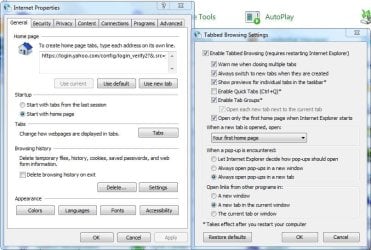
Do you have your Internet Properties/Tabs set like this?

Tabs.JPG

If you have a restore point before the last round of updates you could try that. If so, install the re-offered updates 5-6 at a time, rebooting between batches.
 

My Computer My Computer

At a glance

Windows 7 Ultimate X64 SP1Intel i5-2550K, Differing ~4.4-4.8GHz No buil...16GB G.Skill Sniper 1866MHz @ 2133MHz 2x8GBASUS GTX650TIB-DC2OC-2GD5, (650TI Boost)
Computer type
PC/Desktop
Computer Manufacturer/Model Number
Home Built Desktop By DataTech
OS
Windows 7 Ultimate X64 SP1
CPU
Intel i5-2550K, Differing ~4.4-4.8GHz No built in GPU
Motherboard
ASUS P8Z68-V PRO/GEN3
Memory
16GB G.Skill Sniper 1866MHz @ 2133MHz 2x8GB
Graphics Card(s)
ASUS GTX650TIB-DC2OC-2GD5, (650TI Boost)
Sound Card
Onboard Realtek 5-1
Monitor(s) Displays
Samsung P2570HD
Screen Resolution
1920x1080
Hard Drives
Samsung 840 Pro 256GB SSD for OS, 500GB Seagate Constellation (Enterprise drive) for Data
PSU
Corsair HX650W
Case
Inwin Dragon Rider
Cooling
Hyper 212 EVO w/two Noctua fans, push-pull, @1300 RPM
Keyboard
E-Z Eyes, bright yellow keys with large characters
Mouse
steelseries SENSEI Laser Pro Gaming
Internet Speed
48-51Mbs Mbs down, 11 Mbs up Xfinity Cable
Antivirus
Norton Internet Security 2013
Browser
IE 10, Opera, Pale Moon if needed
Other Info
4 case fans, LG BluRay-RE, ASUS DVD-RW, Mr. Fusion power supply, 1.21 gigawatts.
Do you have your Internet Properties/Tabs set like this?

If you have a restore point before the last round of updates you could try that. If so, install the re-offered updates 5-6 at a time, rebooting between batches.

I had a couple of Tab options that were different. (Eg "Always switch to new tab when created" was off and "Let Internet Explorer decide how pop ups should open" was selected). I changed to your suggestion, exited IE10 and restarted it. No change to the behaviour.

I am coming to the conclusion that I'll have to go back to an earlier restore point. My last experience with going back to a two-week old restore point was not good. W7 failed to start and the PC went into system recovery - a bit tedious. I see that my current iexplore.exe is dated 23-Sep-2013, so I'll go for the next point prior to that.
 

My Computer My Computer

At a glance

Windows 7 Home Premium 32bitIntel Pentium 4 3GHz 478pins2GB DDR400nVidia FX5700VE 256MB
Computer type
PC/Desktop
Computer Manufacturer/Model Number
Custom Build
OS
Windows 7 Home Premium 32bit
CPU
Intel Pentium 4 3GHz 478pins
Motherboard
ECS 865PE
Memory
2GB DDR400
Graphics Card(s)
nVidia FX5700VE 256MB
Hard Drives
Samsung HD161HJ ATA (Boot)
WDX WD1200JD-00HBB0 ATA (Data)
Internet Speed
~19 Mbits/s
Antivirus
Kaspersky IS 2012
Browser
IE10
Have you tried removing IE10, which will revert to IE9, then reinstall it? You might try running it with no addons too.
 

My Computer My Computer

At a glance

Windows 7 Ultimate X64 SP1Intel i5-2550K, Differing ~4.4-4.8GHz No buil...16GB G.Skill Sniper 1866MHz @ 2133MHz 2x8GBASUS GTX650TIB-DC2OC-2GD5, (650TI Boost)
Computer type
PC/Desktop
Computer Manufacturer/Model Number
Home Built Desktop By DataTech
OS
Windows 7 Ultimate X64 SP1
CPU
Intel i5-2550K, Differing ~4.4-4.8GHz No built in GPU
Motherboard
ASUS P8Z68-V PRO/GEN3
Memory
16GB G.Skill Sniper 1866MHz @ 2133MHz 2x8GB
Graphics Card(s)
ASUS GTX650TIB-DC2OC-2GD5, (650TI Boost)
Sound Card
Onboard Realtek 5-1
Monitor(s) Displays
Samsung P2570HD
Screen Resolution
1920x1080
Hard Drives
Samsung 840 Pro 256GB SSD for OS, 500GB Seagate Constellation (Enterprise drive) for Data
PSU
Corsair HX650W
Case
Inwin Dragon Rider
Cooling
Hyper 212 EVO w/two Noctua fans, push-pull, @1300 RPM
Keyboard
E-Z Eyes, bright yellow keys with large characters
Mouse
steelseries SENSEI Laser Pro Gaming
Internet Speed
48-51Mbs Mbs down, 11 Mbs up Xfinity Cable
Antivirus
Norton Internet Security 2013
Browser
IE 10, Opera, Pale Moon if needed
Other Info
4 case fans, LG BluRay-RE, ASUS DVD-RW, Mr. Fusion power supply, 1.21 gigawatts.

My Computer My Computer

At a glance

Desk1 7 Home Prem / Desk2 10 Pro / Main lap A...Desk1 i5 3750K / Laptop i7 GTX 860M / Desk2 i...Desk1 8GB (1866) / Desk2 16GB (1333) / Laptop...Desk 1& 2NVidia GTX 650 & Laptops on board Intel
Computer type
PC/Desktop
Computer Manufacturer/Model Number
Own build (new) Desk1 / Asus ROG Win 7 / Desk2 1st build
OS
Desk1 7 Home Prem / Desk2 10 Pro / Main lap Asus ROG 10 Pro 2 laptop Toshiba 7 Pro Asus P2520 7 & 10
CPU
Desk1 i5 3750K / Laptop i7 GTX 860M / Desk2 i5 2500
Motherboard
Desk1 Asus P877-V / Desk2 Gigabyte H67 UD3H / Laptop ?
Memory
Desk1 8GB (1866) / Desk2 16GB (1333) / Laptop 8Gb DDR3
Graphics Card(s)
Desk 1& 2NVidia GTX 650 & Laptops on board Intel
Sound Card
Desk 1 & 2 -XONAR DG Realtek High Def audio Laptop
Monitor(s) Displays
Desk 1 Benq HD 2450 / Desk2 Philips 24" / Laptop 17.5"
Screen Resolution
1920x1080 D1 & D2 & Laptop 1
Hard Drives
Desk1 Samsung 120GB 830 SSD
Asus ROG 256GB 850 Pro SSD
Desk2 Samsung 840 256 SSD
Toshiba 120GB EVO
PSU
Desk 1 Corsair HX 1050/ Laptop ? / Desk 2 Corsair HX 650
Case
Desk 1 Cooler HAF XM ? Toshiba laptop / Desk2 Coolermaster
Cooling
Fans on all Desk1 -2 Desk2 - all Coolermasters 5 Laptop ?
Keyboard
Desk 1 MS Sidewinder X6 Desk 2 MS Sidewinder X 4
Mouse
Desk 1&2 - Gigabyte MS 900 gamer - laptop - Logitec wireless
Internet Speed
ADSL2+
Other Info
One other Desktop (tester) and spare Toshba laptop both with SSD's
Running Kaspersky 2016 ISS on all machines config'd identically
Logitec audio stereo systems on each machine (x3)
Canon MG5250MFC
Router/modem TP-Link running WPA2SK
Can IE10 be removed? I thought it could only be updated or turned on or off. My problem with updating it is that the downloadable Microsoft installer/updater is older then what I already have installed. Refer to the following log taken from IE10_main.log

If you know how to uninstall IE10 then can you point me to where I can get instructions? It's not visible in the Programs and Feature selection list.

00:00.000: 00:00.000: ====================================================================
00:00.172: Started: 2013/10/19 (Y/M/D) 18:23:06.142 (local)
00:00.203: Time Format in this log: MM:ss.mmm (minutes:seconds.milliseconds)
00:00.250: Command line: "E:\Apps\Tools\IE10-Windows6.1-x86-en-us.exe"
00:00.297: INFO: Setup installer for Internet Explorer: 10.0.9200.16521
00:00.343: INFO: Previous version of Internet Explorer: 10.0.9200.16720
00:00.375: INFO: Checking if iexplore.exe's current version is between 10.0.8100.0...
00:00.422: INFO: ...and 10.1.0.0...
00:00.453: INFO: Maximum version on which to run IEAK branding is: 10.1.0.0...
00:00.484: ERROR: A newer version of Internet Explorer is already installed on the system.
00:00.547: ERROR: Internet Explorer version check failed.
00:04.375: INFO: Setup exit code: 0x00009C48 (40008) - A more recent version of Internet Explorer is installed.
00:04.562: INFO: Scheduling upload to IE SQM server: http://sqm.microsoft.com/sqm/ie/sqmserver.dll
00:09.625: ERROR: SQM Upload failed while uploading "C:\Users\Peter Gee\AppData\Local\Microsoft\Windows\Temporary Internet Files\SQM\iesqmdata_setup0.sqm" with error: 2147500036
00:09.640: ERROR: SQM Upload failed while uploading "C:\Users\Peter\AppData\Local\Microsoft\Windows\Temporary Internet Files\SQM\iesqmdata_setup1.sqm" with error: 2147500036
00:09.672: ERROR: SQM Upload failed while uploading "C:\Users\Peter\AppData\Local\Microsoft\Windows\Temporary Internet Files\SQM\iesqmdata_setup2.sqm" with error: 2147500036
00:09.687: INFO: Cleaning up temporary files in: C:\Windows\TEMP\IE15FFB.tmp
00:09.718: INFO: Unable to remove directory C:\Windows\TEMP\IE15FFB.tmp, marking for deletion on reboot.
00:09.750: INFO: Released Internet Explorer Installer Mutex
 
Last edited:

My Computer My Computer

At a glance

Windows 7 Home Premium 32bitIntel Pentium 4 3GHz 478pins2GB DDR400nVidia FX5700VE 256MB
Computer type
PC/Desktop
Computer Manufacturer/Model Number
Custom Build
OS
Windows 7 Home Premium 32bit
CPU
Intel Pentium 4 3GHz 478pins
Motherboard
ECS 865PE
Memory
2GB DDR400
Graphics Card(s)
nVidia FX5700VE 256MB
Hard Drives
Samsung HD161HJ ATA (Boot)
WDX WD1200JD-00HBB0 ATA (Data)
Internet Speed
~19 Mbits/s
Antivirus
Kaspersky IS 2012
Browser
IE10
First make sure you download and keep in downloads IE9 (see link below) I keep my Downloads as a desktop icon but you can keep it where you like.
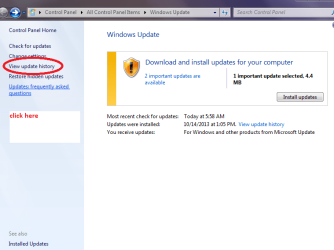
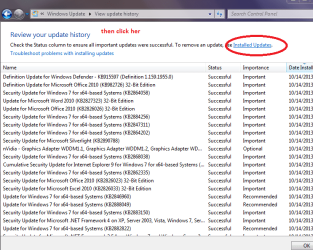
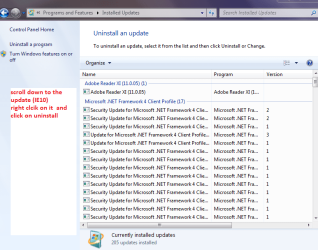
Now follow the pics Windows updates > check history > scroll down to IE10 and right click > uninstall.

The go to Downloads and run the downloaded IE9 Download Internet Explorer 9 - Microsoft Windows make sure yo pick the right language.
When the update comes up for IE10 (set the updates to let you know they are available) and right click and HIDE.
 

Attachments

  • WU1.PNG
    WU1.PNG
    29.1 KB · Views: 1
  • WU2.PNG
    WU2.PNG
    24.4 KB · Views: 3
  • WU3.PNG
    WU3.PNG
    31.2 KB · Views: 1

My Computer My Computer

At a glance

Desk1 7 Home Prem / Desk2 10 Pro / Main lap A...Desk1 i5 3750K / Laptop i7 GTX 860M / Desk2 i...Desk1 8GB (1866) / Desk2 16GB (1333) / Laptop...Desk 1& 2NVidia GTX 650 & Laptops on board Intel
Computer type
PC/Desktop
Computer Manufacturer/Model Number
Own build (new) Desk1 / Asus ROG Win 7 / Desk2 1st build
OS
Desk1 7 Home Prem / Desk2 10 Pro / Main lap Asus ROG 10 Pro 2 laptop Toshiba 7 Pro Asus P2520 7 & 10
CPU
Desk1 i5 3750K / Laptop i7 GTX 860M / Desk2 i5 2500
Motherboard
Desk1 Asus P877-V / Desk2 Gigabyte H67 UD3H / Laptop ?
Memory
Desk1 8GB (1866) / Desk2 16GB (1333) / Laptop 8Gb DDR3
Graphics Card(s)
Desk 1& 2NVidia GTX 650 & Laptops on board Intel
Sound Card
Desk 1 & 2 -XONAR DG Realtek High Def audio Laptop
Monitor(s) Displays
Desk 1 Benq HD 2450 / Desk2 Philips 24" / Laptop 17.5"
Screen Resolution
1920x1080 D1 & D2 & Laptop 1
Hard Drives
Desk1 Samsung 120GB 830 SSD
Asus ROG 256GB 850 Pro SSD
Desk2 Samsung 840 256 SSD
Toshiba 120GB EVO
PSU
Desk 1 Corsair HX 1050/ Laptop ? / Desk 2 Corsair HX 650
Case
Desk 1 Cooler HAF XM ? Toshiba laptop / Desk2 Coolermaster
Cooling
Fans on all Desk1 -2 Desk2 - all Coolermasters 5 Laptop ?
Keyboard
Desk 1 MS Sidewinder X6 Desk 2 MS Sidewinder X 4
Mouse
Desk 1&2 - Gigabyte MS 900 gamer - laptop - Logitec wireless
Internet Speed
ADSL2+
Other Info
One other Desktop (tester) and spare Toshba laptop both with SSD's
Running Kaspersky 2016 ISS on all machines config'd identically
Logitec audio stereo systems on each machine (x3)
Canon MG5250MFC
Router/modem TP-Link running WPA2SK
Thanks for the assistance. That got rid of IE10 BUT not the problem!

The 'Update' (IE10) was uninstalled and the system rebooted. When I open Internet Explorer, I was greeted by the message "Your browser has been upgraded"; "Check out Internet Explorer 9".

When I <Ctrl>Clicked on the first link that I found, it opened in a new, empty tab. Exactly the same symptoms as before but now in IE9! I can assure you that the (dis)functionality only started this week, not months ago.

Where to from here? I think I'll try removing all windows updates for the last week and ses if that has any effect. Any thoughts?
 
Last edited:

My Computer My Computer

At a glance

Windows 7 Home Premium 32bitIntel Pentium 4 3GHz 478pins2GB DDR400nVidia FX5700VE 256MB
Computer type
PC/Desktop
Computer Manufacturer/Model Number
Custom Build
OS
Windows 7 Home Premium 32bit
CPU
Intel Pentium 4 3GHz 478pins
Motherboard
ECS 865PE
Memory
2GB DDR400
Graphics Card(s)
nVidia FX5700VE 256MB
Hard Drives
Samsung HD161HJ ATA (Boot)
WDX WD1200JD-00HBB0 ATA (Data)
Internet Speed
~19 Mbits/s
Antivirus
Kaspersky IS 2012
Browser
IE10
I have been doing some experimenting with the tabs of the browser (now IE9).

There appears to be a non-reporting error occurring when an attempt to open a new webpage in another tab is made. The tab is created, with its (blank) page. The (new) address is not placed in the address field but the address field remains transparent.

I discovered this while clicking back and forth between tabs. Whenever I click on an empty tab that I have created, the address bar does not change from what was there for the previously displayed tab.

So I now suspect that something in the system is causing an error to occur during the opening of a new tab. This is not unique to IE10 but, for me, also occurs in IE9. Reading posts in some forums from other people suggests that the same problem also occurs in IE8.

But does this get me any closer to a solution?
 

My Computer My Computer

At a glance

Windows 7 Home Premium 32bitIntel Pentium 4 3GHz 478pins2GB DDR400nVidia FX5700VE 256MB
Computer type
PC/Desktop
Computer Manufacturer/Model Number
Custom Build
OS
Windows 7 Home Premium 32bit
CPU
Intel Pentium 4 3GHz 478pins
Motherboard
ECS 865PE
Memory
2GB DDR400
Graphics Card(s)
nVidia FX5700VE 256MB
Hard Drives
Samsung HD161HJ ATA (Boot)
WDX WD1200JD-00HBB0 ATA (Data)
Internet Speed
~19 Mbits/s
Antivirus
Kaspersky IS 2012
Browser
IE10
I subscribed to your thread when you first posted. I've not chimed in yet because I've not found anything for you to try.

My googling of the topic found...
...it impacts IE8, 9 and 10, so switching versions did not seem to cure this ill.
(which is pretty much what you just posted)
...the "cure" varies from computer to computer
(more than one setting can cause this barf)
...the "cure" for some involved a registry edit to add TabProcGrowth
(electronically search for TabProcGrowth in this thread)
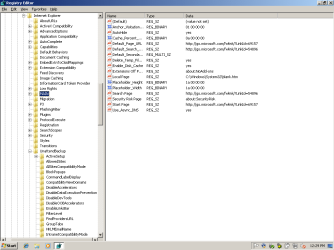
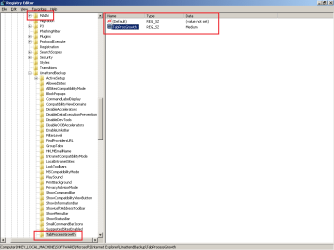
There are too many things that I don't understand about the TabProcGrowth Value to recommend adding or changing it. For instance, the post says to set the Data that Value to 0 or 1 or higher. In my registry, TabProcGrowth under the Key named Main is set to Medium. There is no number.

Even more puzzling:
I have a W7 Virtual Machine (VM) that does not have the latest updates applied. I checked to see what value the TabProcGrowth had in that VM and the Value is not there at all! Applying the latest round of updates did not change that fact. I do not know when/how that Value gets added/set.

The image below is from a W7 pro 32bit VM with IE8
(IE9 and IE10 were about the same)
(W7 pro 32bit and W7 pro 64bit were about the same):

1-IE8 32bit.png


There is a Key and a Value named TabProcGrowth a bit farther down from where that post suggested adding the info.

2-IE8 32bit.png

So..... all I can do is ask you if you have that Value under the Key named Main.

Don't change anything - just look and let me know. If you cannot resist making changes, create a system restore point first or image your entire system drive.

Edit: a bit more info here:
http://blogs.msdn.com/b/askie/archi...a-new-process-with-internet-explorer-8-0.aspx
 
Last edited:

My Computer My Computer

At a glance

W7 Pro SP1 64biti78GBIntel HD Graphics
Computer type
Laptop
Computer Manufacturer/Model Number
Employer provided Dell Latitude
OS
W7 Pro SP1 64bit
CPU
i7
Memory
8GB
Graphics Card(s)
Intel HD Graphics
Hard Drives
crappy SSD
Antivirus
Employer mandated Symantec Endpoint Protection
Browser
Pale Moon 64bit, IE11 64bit & Chrome 64bit
See what this comes up with and post the results,
autoruns,
http://technet.microsoft.com/en-us/sysinternals/bb963902.aspx
What to Not uncheck,
http://forum.sysinternals.com/faq-common-autoruns-issues_topic4719.html
Because No Add-ons mode works,
"C:\Program Files\Internet Explorer\iexplore.exe" -extoff
I'd also see what Clean boot produces,
Clean boot,
http://www.sevenforums.com/tutorials/179159-troubleshoot-application-conflicts-performing-clean-startup.html
I'd also give this a try,
http://www.sevenforums.com/tutorials/98056-sf-ie-restorator-troubleshooting-general-issues-ie.html
 
Last edited:

My Computer My Computer

At a glance

Win-7-Pro64bit 7-H-Prem-64biti7-5930K 2nd i9-9940x both water blocked VRM'...Trident-z 3200C14 2nd Trident-z 3600C16EVGA 1080ti ftw3 2nd Titan Xp both water blocked
Computer type
PC/Desktop
Computer Manufacturer/Model Number
Custom assembled by me :}
OS
Win-7-Pro64bit 7-H-Prem-64bit
CPU
i7-5930K 2nd i9-9940x both water blocked VRM's too
Motherboard
ASUS SABERTOOTH X99 2nd ASUS x299 Apex
Memory
Trident-z 3200C14 2nd Trident-z 3600C16
Graphics Card(s)
EVGA 1080ti ftw3 2nd Titan Xp both water blocked
Sound Card
Built-in Realtek
Monitor(s) Displays
1-AOC G2460PG 24"G-Sync 144Hz/ 2nd 1-ASUS VG248QE 24" 144Hz
Screen Resolution
1920 x 1080 144Hz
Hard Drives
2-Samsung M.2 Evo & Evo Plus
2-Samsung 850 EVO 500GB SSD's/ 3-2.5 W.D. Black 1tb-&3-1tb/3-3.5 WD Black 1tb hdd's
PSU
EVGA SuperNOVA 1000-P2 2nd 1200-P2
Case
2-Corsair Obsidian Series 450D Black ATX Mid Tower
Cooling
Custom water loops
Keyboard
Logitech G710+/ 2nd Logitech G910
Mouse
2-RedDragon M901 Perdition 16400 dpi Gaming mouse = wired
Internet Speed
Comcast Ping 19ms 89.31mbps download speed 6.12mbps upload
Antivirus
Malwarebytes Pro/ Superantispyware Pro
Browser
FireFox & Pale moon
Other Info
2nd ASUS X299 Apex/Intel i9-9940x with Custom water loop/7H-Prem-x64/Corsair 450D case/Ram Trident-z 3600C16 4x8gb / Samsung970Evo plus 500gb SSD/Dual ssd EZ swap evo/PSU EVGA SuperNova 1200w-P2 80+Platinum/GPU Titan Xp /8-ML-140 on push-pull on 2-280GTX rads
Now my two cents worth as well as what the others have said and this option is entirely up to you.
You could do a system restore I suppose back to before the update for 10 was done and see what it has then go to updates scroll down and "hide" the 10 update.
To do that right click it in available updates and hide.

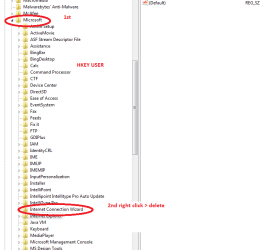
Now the other option is in the registry. What I have done in the past is to go into regedit and use to change stuff admin hit the HKEY for the USER and LOCAL MACHINE listings open up Software > Microsoft > internet explorer > right click the whole entry > delete.

Now before you go to that extreme you need to back up the whole registry > File > export > find a spot to put it (I use either documents s or the desktop > let it run takes less than a minute > then go back and do the above.

Now this will delete the entire internet explorer from the machine's registry and you must make sure you have the IE9 downloaded into Downloads before you even think about this option and I also for insurance save that download to a stick.

Then just reinstall the IE9.

Now you do this at your own risk but as I said I have done this on a few occasions for IE10 and other stuff that even Revo will not cope with like some of those irritating add on bars you accidentally download and cannot get rid of.
 

Attachments

  • REG1.PNG
    REG1.PNG
    13.5 KB · Views: 2
  • REG2.PNG
    REG2.PNG
    14.7 KB · Views: 2

My Computer My Computer

At a glance

Desk1 7 Home Prem / Desk2 10 Pro / Main lap A...Desk1 i5 3750K / Laptop i7 GTX 860M / Desk2 i...Desk1 8GB (1866) / Desk2 16GB (1333) / Laptop...Desk 1& 2NVidia GTX 650 & Laptops on board Intel
Computer type
PC/Desktop
Computer Manufacturer/Model Number
Own build (new) Desk1 / Asus ROG Win 7 / Desk2 1st build
OS
Desk1 7 Home Prem / Desk2 10 Pro / Main lap Asus ROG 10 Pro 2 laptop Toshiba 7 Pro Asus P2520 7 & 10
CPU
Desk1 i5 3750K / Laptop i7 GTX 860M / Desk2 i5 2500
Motherboard
Desk1 Asus P877-V / Desk2 Gigabyte H67 UD3H / Laptop ?
Memory
Desk1 8GB (1866) / Desk2 16GB (1333) / Laptop 8Gb DDR3
Graphics Card(s)
Desk 1& 2NVidia GTX 650 & Laptops on board Intel
Sound Card
Desk 1 & 2 -XONAR DG Realtek High Def audio Laptop
Monitor(s) Displays
Desk 1 Benq HD 2450 / Desk2 Philips 24" / Laptop 17.5"
Screen Resolution
1920x1080 D1 & D2 & Laptop 1
Hard Drives
Desk1 Samsung 120GB 830 SSD
Asus ROG 256GB 850 Pro SSD
Desk2 Samsung 840 256 SSD
Toshiba 120GB EVO
PSU
Desk 1 Corsair HX 1050/ Laptop ? / Desk 2 Corsair HX 650
Case
Desk 1 Cooler HAF XM ? Toshiba laptop / Desk2 Coolermaster
Cooling
Fans on all Desk1 -2 Desk2 - all Coolermasters 5 Laptop ?
Keyboard
Desk 1 MS Sidewinder X6 Desk 2 MS Sidewinder X 4
Mouse
Desk 1&2 - Gigabyte MS 900 gamer - laptop - Logitec wireless
Internet Speed
ADSL2+
Other Info
One other Desktop (tester) and spare Toshba laptop both with SSD's
Running Kaspersky 2016 ISS on all machines config'd identically
Logitec audio stereo systems on each machine (x3)
Canon MG5250MFC
Router/modem TP-Link running WPA2SK
Thanks for the feedback and suggestions. Some of my assumptions (conclusions?) seem to be confirmed among the replies. The issue appears to have a range of causes and remedies. I just haven't found the right combination yet!

With two days of stuffing around, I've gotten behind in what I'm supposed to be doing. The computer is a tool and, with a deadline of tonight, I've had to focus on getting some work done. All the time, cursing Internet Explorer. My son has suggested switching to FireFox, which I may have to do yet.

@UsernameIssues:
Wise words about backing up the system drive. It's happening right now.

I found some discussion last night to do with TabProcGrowth. The parameter is absent from my HKEY_CURRENT_USER\Software\Microsoft\Internet Explorer\Main I'll have to get a better handle of what it does before inserting/changing it.

The only occurence I found was TabProcGrowth=Medium as REG_SZ under HKEY_LOCAL_MACHINE\SOFTWARE\Microsoft\Internet Explorer\UnattendBackup\TabProcessGrowth

@ICit2lol:
The probem seems to be independent of the IE version: I've already reverted back to IE9 and the problem persists. Blowing IE9 away altogether in the registry is an option which I won't discount but I'll put it near the bottom of my list! At some point I may get desperate enough to do this. After all, I used to have to reload XP every 18 or 24 months.

@ThrashZone:
Thanks for the links. When I click on each one, it is a little reminder of the problem: I get a new, empty tab and then have to copy and paste to URL into the new address field :confused:. I'll digest these and report back in the next few days.
 

My Computer My Computer

At a glance

Windows 7 Home Premium 32bitIntel Pentium 4 3GHz 478pins2GB DDR400nVidia FX5700VE 256MB
Computer type
PC/Desktop
Computer Manufacturer/Model Number
Custom Build
OS
Windows 7 Home Premium 32bit
CPU
Intel Pentium 4 3GHz 478pins
Motherboard
ECS 865PE
Memory
2GB DDR400
Graphics Card(s)
nVidia FX5700VE 256MB
Hard Drives
Samsung HD161HJ ATA (Boot)
WDX WD1200JD-00HBB0 ATA (Data)
Internet Speed
~19 Mbits/s
Antivirus
Kaspersky IS 2012
Browser
IE10
No probs mate the only other option is you know what and that is a PITA eh? But if you do go that route do like I said and have updates notify you they are ready to download an hide that IE10.
 

My Computer My Computer

At a glance

Desk1 7 Home Prem / Desk2 10 Pro / Main lap A...Desk1 i5 3750K / Laptop i7 GTX 860M / Desk2 i...Desk1 8GB (1866) / Desk2 16GB (1333) / Laptop...Desk 1& 2NVidia GTX 650 & Laptops on board Intel
Computer type
PC/Desktop
Computer Manufacturer/Model Number
Own build (new) Desk1 / Asus ROG Win 7 / Desk2 1st build
OS
Desk1 7 Home Prem / Desk2 10 Pro / Main lap Asus ROG 10 Pro 2 laptop Toshiba 7 Pro Asus P2520 7 & 10
CPU
Desk1 i5 3750K / Laptop i7 GTX 860M / Desk2 i5 2500
Motherboard
Desk1 Asus P877-V / Desk2 Gigabyte H67 UD3H / Laptop ?
Memory
Desk1 8GB (1866) / Desk2 16GB (1333) / Laptop 8Gb DDR3
Graphics Card(s)
Desk 1& 2NVidia GTX 650 & Laptops on board Intel
Sound Card
Desk 1 & 2 -XONAR DG Realtek High Def audio Laptop
Monitor(s) Displays
Desk 1 Benq HD 2450 / Desk2 Philips 24" / Laptop 17.5"
Screen Resolution
1920x1080 D1 & D2 & Laptop 1
Hard Drives
Desk1 Samsung 120GB 830 SSD
Asus ROG 256GB 850 Pro SSD
Desk2 Samsung 840 256 SSD
Toshiba 120GB EVO
PSU
Desk 1 Corsair HX 1050/ Laptop ? / Desk 2 Corsair HX 650
Case
Desk 1 Cooler HAF XM ? Toshiba laptop / Desk2 Coolermaster
Cooling
Fans on all Desk1 -2 Desk2 - all Coolermasters 5 Laptop ?
Keyboard
Desk 1 MS Sidewinder X6 Desk 2 MS Sidewinder X 4
Mouse
Desk 1&2 - Gigabyte MS 900 gamer - laptop - Logitec wireless
Internet Speed
ADSL2+
Other Info
One other Desktop (tester) and spare Toshba laptop both with SSD's
Running Kaspersky 2016 ISS on all machines config'd identically
Logitec audio stereo systems on each machine (x3)
Canon MG5250MFC
Router/modem TP-Link running WPA2SK
I manually added the TabProcGrowth Value to the Main Key inside a Virtual Machine and, while it did no harm, I cannot be sure what it might do in combination with the other settings on your computer.
 

My Computer My Computer

At a glance

W7 Pro SP1 64biti78GBIntel HD Graphics
Computer type
Laptop
Computer Manufacturer/Model Number
Employer provided Dell Latitude
OS
W7 Pro SP1 64bit
CPU
i7
Memory
8GB
Graphics Card(s)
Intel HD Graphics
Hard Drives
crappy SSD
Antivirus
Employer mandated Symantec Endpoint Protection
Browser
Pale Moon 64bit, IE11 64bit & Chrome 64bit
See what this comes up with and post the results,
autoruns,
http://technet.microsoft.com/en-us/sysinternals/bb963902.aspx
What to Not uncheck,
http://forum.sysinternals.com/faq-common-autoruns-issues_topic4719.html
Because No Add-ons mode works,
"C:\Program Files\Internet Explorer\iexplore.exe" -extoff
I'd also see what Clean boot produces,
Clean boot,
http://www.sevenforums.com/tutorials/179159-troubleshoot-application-conflicts-performing-clean-startup.html
I'd also give this a try,
http://www.sevenforums.com/tutorials/98056-sf-ie-restorator-troubleshooting-general-issues-ie.html

Well, I'm back on the case.
  • First, the assumption that "...Because No Add-ons mode works..." is not correct: to date nothing makes "Open in New Tab" work.
  • I tried a clean boot. Result: no change
  • I tried the "Restorator" (Love that word!). Result: It didn't. (Tried Reregister 32-bit IE on 32-bit Win7 and also Reset IE options).
  • Finally, I Ran AutoRuns and saved (what I assume is) the output to a file called Autorans.arn. But now I have a problem. The html "Reply to Thread" editor can't upload the file to the forum. When I click on the Attachments (paperclip) icon, it opens a new (blank) tab :(, reminding me once again of the problem my computer has. Right clicking on the icon does not provide a "Copy shortcut" option, so I'm can't post the file for others to cast an opinion. The file appears to be a binary format.
After a week of thought, I don't think TabProcGrowth is going to help, unless some hidden feature is corrupted. I'm only trying to open the second tab of the browser, after all!

Blowing away the registry entries for IE and reloading IE is looking more attractive but I'll delay that until Sunday (local time).

A final(?) question: IE9 or IE10 after the proposed data deletion?
 

My Computer My Computer

At a glance

Windows 7 Home Premium 32bitIntel Pentium 4 3GHz 478pins2GB DDR400nVidia FX5700VE 256MB
Computer type
PC/Desktop
Computer Manufacturer/Model Number
Custom Build
OS
Windows 7 Home Premium 32bit
CPU
Intel Pentium 4 3GHz 478pins
Motherboard
ECS 865PE
Memory
2GB DDR400
Graphics Card(s)
nVidia FX5700VE 256MB
Hard Drives
Samsung HD161HJ ATA (Boot)
WDX WD1200JD-00HBB0 ATA (Data)
Internet Speed
~19 Mbits/s
Antivirus
Kaspersky IS 2012
Browser
IE10
You'd have to zip the file. There are a limited number of file types supported by the uploader. Anyone needing to open the .arn file will also have to have Autoruns on their system.

I don't mean to get into the way of the others working your problem, but I don't see any reply that you tried the System File Checker scan suggested early on?

http://www.sevenforums.com/tutorials/1538-sfc-scannow-command-system-file-checker.html

You might also consider a Repair Install ultimately

http://www.sevenforums.com/tutorials/3413-repair-install.html

Manually editing registry entries can be problematic. As to IE9 or IE10. I recently changed to IE10, and personally have encountered no issues. You might consider going IE9, then updating to IE10. That would leave you the option of just rolling back to IE9 if you encounter any issues in your personal use of IE10.

A Guy
 

My Computer My Computer

At a glance

Windows 10 Home x64INTEL Core i5-750 Quad-Core 3.37GHzHyperX Fury Black Series 8GB (2 x 4GB) 1866MhzEVGA GeForce GTX 750 Superclocked 1GB 128-Bit...
Computer type
PC/Desktop
OS
Windows 10 Home x64
CPU
INTEL Core i5-750 Quad-Core 3.37GHz
Motherboard
ASUS P7P55D
Memory
HyperX Fury Black Series 8GB (2 x 4GB) 1866Mhz
Graphics Card(s)
EVGA GeForce GTX 750 Superclocked 1GB 128-Bit GDDR5
Monitor(s) Displays
LG 32MA68HY 32" IPS
Screen Resolution
1920 x 1080
Hard Drives
Samsung 840 Evo 120GB, SEAGATE 500GB Barracuda® 7200.12, SATA 3 Gb/s, 7200 RPM, 16MB cache
PSU
ANTEC TruePower New TP-550, 80 PLUS, 550W
Case
ANTEC Three Hundred Illusion
Cooling
COOLER MASTER Hyper 212 Plus, 4 x 120mm 1 x 140mm Noctua's
Internet Speed
85 + Mbps
Antivirus
Avast
Browser
Vivaldi
Thanks for the additional suggestions A Guy. By the time I read your post (on a separate machine), I was already in the process of blowing IE9 away and reloading a squeaky clean copy.

Oh brother! I'm having so much fun - NOT.

I downloaded Microsoft's IE10 installer, backed up the registry and then deleted references to Internet Explorer under USERS and LOCAL MACHINE. Some entries were a bit pedantic about ownership but I eventually removed them all.

At this point I installed IE10 using the previously downloaded file. Perhaps I should have rebooted first?

Thinking it through after the event, perhaps I should have installed IE9 at this point because I'd backed up the registry when IE9 was loaded.

Regardless, the exercise has proven to be UNsuccessful :(. The original problem remained present: directing IE to open a webpage in a new tab results in a blank page! Not what I expected.

@A Guy - Looking back at earlier posts, System File Checker had been suggested before and I seem to have overlooked it when suggestions were coming in left, right and centre.

I'll go back through the entire thread and check / follow all outstanding suggestions.

BTW. You're correct. If I had been able to, the reply tool would not have allowed me to upload a .arn file. However, I did not get presented with an uploader, since it opened in a new (blank) tab.
 

My Computer My Computer

At a glance

Windows 7 Home Premium 32bitIntel Pentium 4 3GHz 478pins2GB DDR400nVidia FX5700VE 256MB
Computer type
PC/Desktop
Computer Manufacturer/Model Number
Custom Build
OS
Windows 7 Home Premium 32bit
CPU
Intel Pentium 4 3GHz 478pins
Motherboard
ECS 865PE
Memory
2GB DDR400
Graphics Card(s)
nVidia FX5700VE 256MB
Hard Drives
Samsung HD161HJ ATA (Boot)
WDX WD1200JD-00HBB0 ATA (Data)
Internet Speed
~19 Mbits/s
Antivirus
Kaspersky IS 2012
Browser
IE10
Back
Top