
Solved My personalization is all messed up suddenly.

Tousdae

New member
Member
VIP
Local time
11:54 AM
Messages
351
I looked around here, but I couldn't find a problem quite like mine.

I've had the same desktop theme forever. I customized it. I tried to get rid of the pic on my desktop for a new one. It wouldn't change. The desktop picture wouldn't go away until I did a reboot. The only themes that will work are the high contrast themes. Since I had a blank desktop with those I tried to add a picture, but I still can't.

When I try to use any other theme besides High contrast it'll change the color of the windows and change the music. The screen saver isn't on and when I pick one and click save, it doesn't save. I can't change the color of the windows and I still can't put a desktop picture on nor does it use the desktop picture that theme comes with.

This is out of the blue. It was working fine not so long ago. What could have happened and how do I fix it?

Thank you
 

My Computer My Computer

Computer type
PC/Desktop
Computer Manufacturer/Model Number
(1) Hitachi HDP725050GLA360 ATA Device (2) ST31000528AS ATA Device (3) Generic USB CF Reader USB
OS
Windows 7 Professional 64 bit
CPU
AMD Phenom(tm) II X4 955 Processor
Motherboard
ASUSTeK Computer INC. M3A78-CM
Memory
8 GB
Graphics Card(s)
XFX Radeon R7 260 X 1GB
Sound Card
AMD High Definition Audio Device
Monitor(s) Displays
Westinghouse TV 26"
Screen Resolution
1366x768
Hard Drives
1TB SATA
PSU
Corsair CX 750 ATX 80 Plus
Keyboard
Standard PS/2
Mouse
Standard
Internet Speed
80-100
Antivirus
Defender
Browser
Opera and Firefox

My Computer My Computer

Computer type
PC/Desktop
Computer Manufacturer/Model Number
Self assembled
OS
Windows 10 Home 64Bit
CPU
Intel Core i5 10400 @ 2.90GHz
Motherboard
Intel Corporation DG41WV (PROCESSOR)
Memory
8.00GB Single-Channel Unknown @ 1329MHz (16-20-20-38)
Sound Card
Realtek High Definition Audio
Monitor(s) Displays
DELL E170S
Screen Resolution
1280x1024 pixels
Hard Drives
931GB TOSHIBA DT01ACA100 (SATA)
238GB TEAM TM8PS7256G (SATA SSD)
Case
Nothing Fancy
Cooling
Fans
Keyboard
A4 Tech Co LTD
Mouse
A4 Tech Co Ltd/Logitech
Internet Speed
25 Mbps
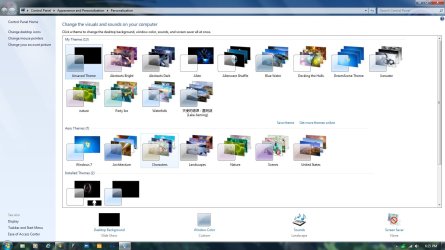
Here's the shot.

Ok, thanks. I'll try that tmr scan tmr.

How will the screen cap help? Btw, the desktop has now been set to the Aero windows 7 theme. The window color never changed from the high contrast.

Thank you.
 
Last edited:

My Computer My Computer

Computer type
PC/Desktop
Computer Manufacturer/Model Number
(1) Hitachi HDP725050GLA360 ATA Device (2) ST31000528AS ATA Device (3) Generic USB CF Reader USB
OS
Windows 7 Professional 64 bit
CPU
AMD Phenom(tm) II X4 955 Processor
Motherboard
ASUSTeK Computer INC. M3A78-CM
Memory
8 GB
Graphics Card(s)
XFX Radeon R7 260 X 1GB
Sound Card
AMD High Definition Audio Device
Monitor(s) Displays
Westinghouse TV 26"
Screen Resolution
1366x768
Hard Drives
1TB SATA
PSU
Corsair CX 750 ATX 80 Plus
Keyboard
Standard PS/2
Mouse
Standard
Internet Speed
80-100
Antivirus
Defender
Browser
Opera and Firefox
Here's the shot.

Ok, thanks. I'll try that tmr scan tmr.

How will the screen cap help? Btw, the desktop has now been set to the Aero windows 7 theme. The window color never changed from the high contrast.

Thank you.
have you created a new user account and see if the same problem happens there

Edit: try this click on the start orb and type the following in search and when the jpg image shows up right click on it and "open file location"

1 - Go to this folder: %USERPROFILE%\AppData\Roaming\Microsoft\Windows\Themes\
(copy and paste that into the Start/search or Run box).
2 - Delete the TranscodedWallpaper.jpg file.
3 - Try to set your wallpaper again.


and post back.
 

My Computer My Computer

Computer type
PC/Desktop
Computer Manufacturer/Model Number
Self assembled
OS
Windows 10 Home 64Bit
CPU
Intel Core i5 10400 @ 2.90GHz
Motherboard
Intel Corporation DG41WV (PROCESSOR)
Memory
8.00GB Single-Channel Unknown @ 1329MHz (16-20-20-38)
Sound Card
Realtek High Definition Audio
Monitor(s) Displays
DELL E170S
Screen Resolution
1280x1024 pixels
Hard Drives
931GB TOSHIBA DT01ACA100 (SATA)
238GB TEAM TM8PS7256G (SATA SSD)
Case
Nothing Fancy
Cooling
Fans
Keyboard
A4 Tech Co LTD
Mouse
A4 Tech Co Ltd/Logitech
Internet Speed
25 Mbps
THAT fixed everything. I deleted the transcodedwallpapre.jpg and now every theme will work. Thank you VERY much!
 

My Computer My Computer

Computer type
PC/Desktop
Computer Manufacturer/Model Number
(1) Hitachi HDP725050GLA360 ATA Device (2) ST31000528AS ATA Device (3) Generic USB CF Reader USB
OS
Windows 7 Professional 64 bit
CPU
AMD Phenom(tm) II X4 955 Processor
Motherboard
ASUSTeK Computer INC. M3A78-CM
Memory
8 GB
Graphics Card(s)
XFX Radeon R7 260 X 1GB
Sound Card
AMD High Definition Audio Device
Monitor(s) Displays
Westinghouse TV 26"
Screen Resolution
1366x768
Hard Drives
1TB SATA
PSU
Corsair CX 750 ATX 80 Plus
Keyboard
Standard PS/2
Mouse
Standard
Internet Speed
80-100
Antivirus
Defender
Browser
Opera and Firefox
glad it worked :). if you have any other problems, let us know.
 

My Computer My Computer

Computer type
PC/Desktop
Computer Manufacturer/Model Number
Self assembled
OS
Windows 10 Home 64Bit
CPU
Intel Core i5 10400 @ 2.90GHz
Motherboard
Intel Corporation DG41WV (PROCESSOR)
Memory
8.00GB Single-Channel Unknown @ 1329MHz (16-20-20-38)
Sound Card
Realtek High Definition Audio
Monitor(s) Displays
DELL E170S
Screen Resolution
1280x1024 pixels
Hard Drives
931GB TOSHIBA DT01ACA100 (SATA)
238GB TEAM TM8PS7256G (SATA SSD)
Case
Nothing Fancy
Cooling
Fans
Keyboard
A4 Tech Co LTD
Mouse
A4 Tech Co Ltd/Logitech
Internet Speed
25 Mbps
I have the same issue. I tried both of KoolKat's ideas with no help.

I select a theme and the personalization screen shows this (the desktop shows the initial picture of the theme):


After I close personalization and open it again (the theme slide show does not advance), I get a black picture at the bottom of the window at desktop background. Here is the screen shot of that. The desktop does not change to black, only stays at the initial photo of the theme and doesn't advance.
 

Attachments

  • pic 1.jpg
    pic 1.jpg
    116 KB · Views: 57
  • pic 2.jpg
    pic 2.jpg
    115.8 KB · Views: 44

My Computer My Computer

Computer Manufacturer/Model Number
alienware M17x R3
OS
windows 7 home premium 64 bit
Back
Top