
Remove Favorites / Libraries / Homegroup / My Folder

Markstar

New member
Local time
3:13 PM
Messages
27
Hi,
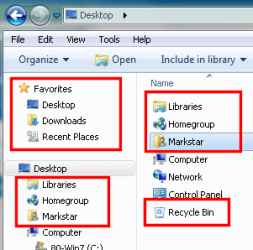
how do I remove all these extra folders from the Desktop/Navigation Pane? I don't even need to disable the functionality, just as long as I get rid of them in the explorer (in XP, there were those "My Places" folders, which could easily removed by deleting a registry key).

Thank you in advance!

BTW, I mean this:
 

Attachments
  • junk.PNG
    junk.PNG
    10.7 KB · Views: 104

My Computer My Computer

OS
Windows 7 RTM x64, Windows XP, Ubuntu 9.04
CPU
X2 4850e
Motherboard
Jetway HA06
Memory
2*takeMS 2048MB DDR2-800
Graphics Card(s)
Radeon 4870
Sound Card
Audigy 2 eX
Monitor(s) Displays
24", 17"
Screen Resolution
1920*1200, 1280*1024
Hard Drives
2*500GB, 2*1000GB
...sadly no SSD yet...
PSU
bequiet! Straight Power 350W
Case
Chieftec BA-02B-B-B
Keyboard
Logitech G11
Mouse
Logitech M518
Internet Speed
DSL8000
Other Info
Also:
Toshiba Portégé M400 (T7200, 3GB RAM)
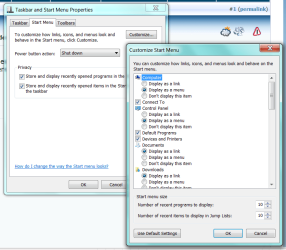
Start Menu Properties
 

Attachments

  • Capture.PNG
    Capture.PNG
    40.5 KB · Views: 891
Sorry. Need espresso...
Ahh, okay. I was really confused there because I did disable that stuff there.

So the question remains:
How do I remove those unwanted entries?
 

My Computer My Computer

OS
Windows 7 RTM x64, Windows XP, Ubuntu 9.04
CPU
X2 4850e
Motherboard
Jetway HA06
Memory
2*takeMS 2048MB DDR2-800
Graphics Card(s)
Radeon 4870
Sound Card
Audigy 2 eX
Monitor(s) Displays
24", 17"
Screen Resolution
1920*1200, 1280*1024
Hard Drives
2*500GB, 2*1000GB
...sadly no SSD yet...
PSU
bequiet! Straight Power 350W
Case
Chieftec BA-02B-B-B
Keyboard
Logitech G11
Mouse
Logitech M518
Internet Speed
DSL8000
Other Info
Also:
Toshiba Portégé M400 (T7200, 3GB RAM)
Two methods available to get rid of all those - use a different shell or a different file manager.
 
Two methods available to get rid of all those - use a different shell or a different file manager.
I am already using a different file manager (xplorer2 mostly, sometimes Total Commander) - Libraries, (Homegroup) and my user folder still show up. :(

@twig: Thanks, leaving the Homegroup did indeed remove the folder. However, the other two are still there.
 

My Computer My Computer

OS
Windows 7 RTM x64, Windows XP, Ubuntu 9.04
CPU
X2 4850e
Motherboard
Jetway HA06
Memory
2*takeMS 2048MB DDR2-800
Graphics Card(s)
Radeon 4870
Sound Card
Audigy 2 eX
Monitor(s) Displays
24", 17"
Screen Resolution
1920*1200, 1280*1024
Hard Drives
2*500GB, 2*1000GB
...sadly no SSD yet...
PSU
bequiet! Straight Power 350W
Case
Chieftec BA-02B-B-B
Keyboard
Logitech G11
Mouse
Logitech M518
Internet Speed
DSL8000
Other Info
Also:
Toshiba Portégé M400 (T7200, 3GB RAM)
Any chance anybody has figured this out by now?
 

My Computer My Computer

OS
Windows 7 RTM x64, Windows XP, Ubuntu 9.04
CPU
X2 4850e
Motherboard
Jetway HA06
Memory
2*takeMS 2048MB DDR2-800
Graphics Card(s)
Radeon 4870
Sound Card
Audigy 2 eX
Monitor(s) Displays
24", 17"
Screen Resolution
1920*1200, 1280*1024
Hard Drives
2*500GB, 2*1000GB
...sadly no SSD yet...
PSU
bequiet! Straight Power 350W
Case
Chieftec BA-02B-B-B
Keyboard
Logitech G11
Mouse
Logitech M518
Internet Speed
DSL8000
Other Info
Also:
Toshiba Portégé M400 (T7200, 3GB RAM)
No. No one at SevenForums has learned how to completely re-write the Windows Explorer shell.

But, be patient. Several members are working on it.
 
No. No one at SevenForums has learned how to completely re-write the Windows Explorer shell.

But, be patient. Several members are working on it.
Despite that sly remark, that you must obviously be very proud of, I do wonder why it takes a complete rewrite of the shell to remove a few icons.

Where is the difference to the .reg-entry of XP, where I can easily remove the annoying "My Documents" and other entries? It was easy there, so why is it so difficult here?
 

My Computer My Computer

OS
Windows 7 RTM x64, Windows XP, Ubuntu 9.04
CPU
X2 4850e
Motherboard
Jetway HA06
Memory
2*takeMS 2048MB DDR2-800
Graphics Card(s)
Radeon 4870
Sound Card
Audigy 2 eX
Monitor(s) Displays
24", 17"
Screen Resolution
1920*1200, 1280*1024
Hard Drives
2*500GB, 2*1000GB
...sadly no SSD yet...
PSU
bequiet! Straight Power 350W
Case
Chieftec BA-02B-B-B
Keyboard
Logitech G11
Mouse
Logitech M518
Internet Speed
DSL8000
Other Info
Also:
Toshiba Portégé M400 (T7200, 3GB RAM)
Actually Libraries seems to be one of the bigger selling points of Windows 7, so I guess it will be very hard to get rid of them in Explorer. I would be very happy to get rid of Favorites, since I do not use IE and have no Favorites set up, but I gave up on that already in XP having succeeded to remove them in Windows 2000. I think this has to do with the fact that IE and Windows Explorer are using the same code - or am I mistaken here?
 

My Computer My Computer

Computer Manufacturer/Model Number
Dell Inspiron 530
OS
Windows 7 Ultimate (x64)
CPU
Q6600
Memory
8 GB
Graphics Card(s)
ATI Radeon HD 2600 XT
Monitor(s) Displays
Samsung Syncmaster P2450
Screen Resolution
1920x1080
Hard Drives
Samsung HD103UJ
Samsung HD501LJ
Internet Speed
25 Mb/s
Well, the Favorites in Win7 also include data, so the functionality is a lot more extensive. However, we are only talking about a link in a program. :confused:
 

My Computer My Computer

OS
Windows 7 RTM x64, Windows XP, Ubuntu 9.04
CPU
X2 4850e
Motherboard
Jetway HA06
Memory
2*takeMS 2048MB DDR2-800
Graphics Card(s)
Radeon 4870
Sound Card
Audigy 2 eX
Monitor(s) Displays
24", 17"
Screen Resolution
1920*1200, 1280*1024
Hard Drives
2*500GB, 2*1000GB
...sadly no SSD yet...
PSU
bequiet! Straight Power 350W
Case
Chieftec BA-02B-B-B
Keyboard
Logitech G11
Mouse
Logitech M518
Internet Speed
DSL8000
Other Info
Also:
Toshiba Portégé M400 (T7200, 3GB RAM)

My Computer My Computer

Computer type
PC/Desktop
Computer Manufacturer/Model Number
Self built custom
OS
64-bit Windows 11 Pro for Workstations
CPU
Intel i7-8700K OC'd to 5 GHz
Motherboard
ASUS ROG Maximus XI Formula Z390
Memory
64 GB (4x16GB) G.SKILL TridentZ RGB DDR4 3600 MHz
Graphics Card(s)
ASUS ROG-STRIX-GTX1080TI-O11G-GAMING
Sound Card
Integrated
Monitor(s) Displays
2 x Samsung Odyssey G7 27"
Screen Resolution
2560x1440
Hard Drives
1TB Samsung 990 PRO M.2,
4TB Samsung 990 PRO PRO M.2,
TerraMaster F8 SSD Plus NAS
PSU
Seasonic Prime Titanium 850W
Case
Thermaltake Core P3
Cooling
Corsair Hydro H115i
Keyboard
Logitech wireless K800
Mouse
Logitech MX Master 4
Internet Speed
2 Gb/s Download and 100 Mb/s Upload
Antivirus
Malwarebyte Anti-Malware Premium
Browser
Google Chrome
Other Info
Logitech Z625 speaker system,
Logitech BRIO 4K Pro webcam,
HP Color LaserJet Pro MFP M477fdn,
APC SMART-UPS RT 1000 XL - SURT1000XLI,
Galaxy S23 Plus phone
Thank you Brink!!!
 

My Computer My Computer

OS
XP 64, Trying to make 7 64 work.
CPU
i7 920
Motherboard
Asus P6T Deluxe V2
Memory
6gb Corsair
Graphics Card(s)
XFX GTS 250, XFX 8800 GT
Monitor(s) Displays
3 x 1905FP
You're welcome HaloFX, and welcome to Seven Forums. :)
 

My Computer My Computer

Computer type
PC/Desktop
Computer Manufacturer/Model Number
Self built custom
OS
64-bit Windows 11 Pro for Workstations
CPU
Intel i7-8700K OC'd to 5 GHz
Motherboard
ASUS ROG Maximus XI Formula Z390
Memory
64 GB (4x16GB) G.SKILL TridentZ RGB DDR4 3600 MHz
Graphics Card(s)
ASUS ROG-STRIX-GTX1080TI-O11G-GAMING
Sound Card
Integrated
Monitor(s) Displays
2 x Samsung Odyssey G7 27"
Screen Resolution
2560x1440
Hard Drives
1TB Samsung 990 PRO M.2,
4TB Samsung 990 PRO PRO M.2,
TerraMaster F8 SSD Plus NAS
PSU
Seasonic Prime Titanium 850W
Case
Thermaltake Core P3
Cooling
Corsair Hydro H115i
Keyboard
Logitech wireless K800
Mouse
Logitech MX Master 4
Internet Speed
2 Gb/s Download and 100 Mb/s Upload
Antivirus
Malwarebyte Anti-Malware Premium
Browser
Google Chrome
Other Info
Logitech Z625 speaker system,
Logitech BRIO 4K Pro webcam,
HP Color LaserJet Pro MFP M477fdn,
APC SMART-UPS RT 1000 XL - SURT1000XLI,
Galaxy S23 Plus phone
I was browsing the 4 options you showed, but am having a few problems. One, is that Computer is my top, not Desktop, so the User thing, which I wanted to add under desktop, isn't even an option. Is there a way to change Computer to Desktop, as it was in Vista?

Also, when removing favorites, it won't let me change the registy value, it just says error, unable to change.

Thank you for any help!
 

My Computer My Computer

Computer Manufacturer/Model Number
Dell Inspiron 1720 Laptop
OS
Windows 7
Memory
4 GB
Monitor(s) Displays
17 in built in
Hard Drives
2 TB Western Digital External, 320 Internal.
Cooling
A fan + cut up pillo case directing airflow under the laptop
Hello Kelderic, and welcome to Seven Forums.

You will only be able to add items under Favorites in Windows Explorer. You cannot change them in Windows Explorer, but you can use your own in the smaller "Save as" or "Open" type windows.

http://www.sevenforums.com/tutorials/85487-common-file-dialog-box-customize-places-bar.html

To be able to remove Favorites, or any of them, you will need to be logged in as an administrator. If you are, then double check to make sure that you have done each step exactly. Especially steps 4 and 5.

Hope this helps for now,
Shawn
 

My Computer My Computer

Computer type
PC/Desktop
Computer Manufacturer/Model Number
Self built custom
OS
64-bit Windows 11 Pro for Workstations
CPU
Intel i7-8700K OC'd to 5 GHz
Motherboard
ASUS ROG Maximus XI Formula Z390
Memory
64 GB (4x16GB) G.SKILL TridentZ RGB DDR4 3600 MHz
Graphics Card(s)
ASUS ROG-STRIX-GTX1080TI-O11G-GAMING
Sound Card
Integrated
Monitor(s) Displays
2 x Samsung Odyssey G7 27"
Screen Resolution
2560x1440
Hard Drives
1TB Samsung 990 PRO M.2,
4TB Samsung 990 PRO PRO M.2,
TerraMaster F8 SSD Plus NAS
PSU
Seasonic Prime Titanium 850W
Case
Thermaltake Core P3
Cooling
Corsair Hydro H115i
Keyboard
Logitech wireless K800
Mouse
Logitech MX Master 4
Internet Speed
2 Gb/s Download and 100 Mb/s Upload
Antivirus
Malwarebyte Anti-Malware Premium
Browser
Google Chrome
Other Info
Logitech Z625 speaker system,
Logitech BRIO 4K Pro webcam,
HP Color LaserJet Pro MFP M477fdn,
APC SMART-UPS RT 1000 XL - SURT1000XLI,
Galaxy S23 Plus phone
Actually, in the few minutes since I originally posted, I have figured out both of my issues. Of the not letting me change registry values, it was because I messed up when adding the permission, I gave it to System instead of Admin. Of the other, it was because I didn't have Show All Folder check marked.

Thank you for the quick response though, and for the welcome! Very much appreciate it.
 

My Computer My Computer

Computer Manufacturer/Model Number
Dell Inspiron 1720 Laptop
OS
Windows 7
Memory
4 GB
Monitor(s) Displays
17 in built in
Hard Drives
2 TB Western Digital External, 320 Internal.
Cooling
A fan + cut up pillo case directing airflow under the laptop
Ak, ok. I'm happy to hear that you got it sorted. :)
 

My Computer My Computer

Computer type
PC/Desktop
Computer Manufacturer/Model Number
Self built custom
OS
64-bit Windows 11 Pro for Workstations
CPU
Intel i7-8700K OC'd to 5 GHz
Motherboard
ASUS ROG Maximus XI Formula Z390
Memory
64 GB (4x16GB) G.SKILL TridentZ RGB DDR4 3600 MHz
Graphics Card(s)
ASUS ROG-STRIX-GTX1080TI-O11G-GAMING
Sound Card
Integrated
Monitor(s) Displays
2 x Samsung Odyssey G7 27"
Screen Resolution
2560x1440
Hard Drives
1TB Samsung 990 PRO M.2,
4TB Samsung 990 PRO PRO M.2,
TerraMaster F8 SSD Plus NAS
PSU
Seasonic Prime Titanium 850W
Case
Thermaltake Core P3
Cooling
Corsair Hydro H115i
Keyboard
Logitech wireless K800
Mouse
Logitech MX Master 4
Internet Speed
2 Gb/s Download and 100 Mb/s Upload
Antivirus
Malwarebyte Anti-Malware Premium
Browser
Google Chrome
Other Info
Logitech Z625 speaker system,
Logitech BRIO 4K Pro webcam,
HP Color LaserJet Pro MFP M477fdn,
APC SMART-UPS RT 1000 XL - SURT1000XLI,
Galaxy S23 Plus phone
Back
Top