Hi,
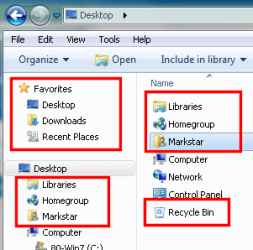
how do I remove all these extra folders from the Desktop/Navigation Pane? I don't even need to disable the functionality, just as long as I get rid of them in the explorer (in XP, there were those "My Places" folders, which could easily removed by deleting a registry key).
Thank you in advance!
BTW, I mean this:
how do I remove all these extra folders from the Desktop/Navigation Pane? I don't even need to disable the functionality, just as long as I get rid of them in the explorer (in XP, there were those "My Places" folders, which could easily removed by deleting a registry key).
Thank you in advance!
BTW, I mean this:
Attachments
My Computer
- OS
- Windows 7 RTM x64, Windows XP, Ubuntu 9.04
- CPU
- X2 4850e
- Motherboard
- Jetway HA06
- Memory
- 2*takeMS 2048MB DDR2-800
- Graphics Card(s)
- Radeon 4870
- Sound Card
- Audigy 2 eX
- Monitor(s) Displays
- 24", 17"
- Screen Resolution
- 1920*1200, 1280*1024
- Hard Drives
- 2*500GB, 2*1000GB
...sadly no SSD yet...
- PSU
- bequiet! Straight Power 350W
- Case
- Chieftec BA-02B-B-B
- Keyboard
- Logitech G11
- Mouse
- Logitech M518
- Internet Speed
- DSL8000
- Other Info
- Also:
Toshiba Portégé M400 (T7200, 3GB RAM)