Solved Invisible Recycle Bin on Desktop

bigred

New member
Local time
1:18 AM
Messages
7
I searched but didn't see anyone else asking this question, so here I go. I like a clean desktop, but like being able to drag and drop desktop files in the trash when I'm done with them. In Vista I made my Recycle Bin icon invisible by using a shortcut to the Recycle Bin and then using a transparent icon (along with a registry tweak to get rid of the shortcut icon).

In Windows 7, when I do this, a black square appears where the transparent icon should be.

Any idea why this happens, and if there's a way around it?

Thanks
 

My Computer

OS
Win7
This can be done with TweakUI.. Get it -=> Here Just remember that this is an XP program. so be sure to install it in XP compatibility mode.. ;)
 

My Computer

Computer type
PC/Desktop
Computer Manufacturer/Model Number
LENOVO K450 @3.0GHZ
OS
64-bit Windows 8.1 Pro
CPU
Core(TM) i5 CPU 4330 Haswell @ 3.20GHz
Motherboard
LENOVO
Memory
12.00 GB
Graphics Card(s)
Intel(R) HD Graphics
Sound Card
Intel HD integtrated
Monitor(s) Displays
HP 25' ISP Monitor
Screen Resolution
1900/1020
Hard Drives
(1) ST1000DM003-1CH162 (2) Generic STORAGE DEVICE USB Device (3) Generic STORAGE DEVICE USB Device
Internet Speed
100mb down/10mb up
Hmm....

Thanks for the reply. I might be doing this wrong, but I right-clicked on the installer and selected the compatibility tab, then chose XP, but it wouldn't run. I then unzipped the installer and did the same for the TweakUI executable...same thing. Am I doing something wrong?

Could it have anything to do with the fact I'm on Windows 7 64-bit?

Any other thoughts on what I'm doing wrong?

Thanks
 

My Computer

OS
Win7
Run as administrator ... In theory 64bit OS is backward compatible with 32bit programs, so we'll see...
 

My Computer

Computer type
PC/Desktop
Computer Manufacturer/Model Number
LENOVO K450 @3.0GHZ
OS
64-bit Windows 8.1 Pro
CPU
Core(TM) i5 CPU 4330 Haswell @ 3.20GHz
Motherboard
LENOVO
Memory
12.00 GB
Graphics Card(s)
Intel(R) HD Graphics
Sound Card
Intel HD integtrated
Monitor(s) Displays
HP 25' ISP Monitor
Screen Resolution
1900/1020
Hard Drives
(1) ST1000DM003-1CH162 (2) Generic STORAGE DEVICE USB Device (3) Generic STORAGE DEVICE USB Device
Internet Speed
100mb down/10mb up
Im sorry that it didnt work.. maybe someone else can help out...;)
 

My Computer

Computer type
PC/Desktop
Computer Manufacturer/Model Number
LENOVO K450 @3.0GHZ
OS
64-bit Windows 8.1 Pro
CPU
Core(TM) i5 CPU 4330 Haswell @ 3.20GHz
Motherboard
LENOVO
Memory
12.00 GB
Graphics Card(s)
Intel(R) HD Graphics
Sound Card
Intel HD integtrated
Monitor(s) Displays
HP 25' ISP Monitor
Screen Resolution
1900/1020
Hard Drives
(1) ST1000DM003-1CH162 (2) Generic STORAGE DEVICE USB Device (3) Generic STORAGE DEVICE USB Device
Internet Speed
100mb down/10mb up
Thanks for trying. I'll check back later to see if anyone else has any ideas.
 

My Computer

OS
Win7
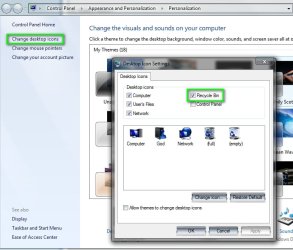
You can remove the Recycle Bin through your personalize menu, click on change desktop Icons and deselect it, no need to use 3rd party programs or hacks.

2009-10-20_192635.jpg
 

My Computer

Computer Manufacturer/Model Number
Home Brew
OS
Windows 7 Ultimate Vista Ultimate x64
CPU
Core 2 Duo E8500 3.16Ghz @ 3.8Ghz
Motherboard
eVGA 750i FTW
Memory
2x2Gigs Patriot PC2-6400 LL
Graphics Card(s)
Inno3D GeForce GTX260 216 SP
Monitor(s) Displays
ASUS VW222U 22" 2ms Response time
Screen Resolution
1680x1050
Hard Drives
SATA 150GB
SATA II 250GB
USB IDE 750GB Ext.
PSU
HYTEC 600W & Thermaltake 650W Toughpower Power Exp
Case
Thermaltake Armor LCS (Liquid Cooling System)
Cooling
Liquid Cooling System
Keyboard
Logitech G15 Gaming Keyboard
Mouse
Logitech G9 Gaming Mouse
What I would suggest is rather than making the Bin invisible you move it to the taskbar.

I have heard quite a few horror stories with short-cut arrow removal with windows 7 x64

This may not be exactly what you are looking for but will give you the clean desktop :) - with taskbar autohide, very clean ;).

http://www.sevenforums.com/tutorials/6687-recycle-bin-pin-taskbar.html

I use this and would not go back :D
 

My Computers

System One System Two

  • Computer type
    PC/Desktop
    Computer Manufacturer/Model Number
    ChillBlast - Custom to my design
    OS
    Windows 11 Pro x64 [Latest Release and Release Preview]
    CPU
    Ryzen 9 5950X, 3.8 - 5.2 MHz
    Motherboard
    Asus Prime X570-Pro
    Memory
    64GB [2 x 32GB] DDR4 3200MHz
    Graphics Card(s)
    4GB NVIDIA GEFORCE GTX 1650 Ti
    Sound Card
    On-board SPDIF to 5.1 System + HDMI [5.1 system]
    Monitor(s) Displays
    32" UHD 32 Bit HDR Monitor + 43" UHD 4K 32Bit HDR TV
    Screen Resolution
    2 x 3840 x 2160 @60Hz
    Hard Drives
    1TB M2 SSD OS, 500GB Fast Access SSD, 2 x 8TB Data + Various Externals from 1TB to 4TB, 10TB NAS
    PSU
    NZXT C750 80 PLUS Gold 750W Modular PSU
    Case
    Workstation Case [Matt Black]
    Cooling
    NZXT Kraken X63 280mm CPU Cooler +2x Quiet Case fans
    Keyboard
    Logitech Wireless MX Keys & K400 + others
    Mouse
    Logitech Wireless MX Master 3S
    Internet Speed
    920 MB Down 50 MB Up
    Antivirus
    BitDefender Total Security Pro
    Browser
    Chrome (always run latest Non-Beta)
    Other Info
    Also run ...
    Laptop - Quad 8GB - Windows 10 Pro x64
    Nexus 7 Android tablet x2
    Samsung 10.2" tablet
    Blackview TAB 8 4G Android Tablet c/w Keyboard
    Wacom Intuos Pro Medium Pen Pad
    Wacom Intuos Pro Small Pen Pad
    Wacom Expresskeys Remote
    Loopdeck+ Graphics Controller
    Shuttle Pro v2 Control
  • Computer type
    Laptop
    System Manufacturer/Model Number
    Dell XPS 17 10750H
    OS
    Windows 11 Pro x64 Latest RP
    CPU
    Intel I7 10750H 5.0GHz
    Motherboard
    Dell XPS
    Memory
    32GB [2x16GB] DDR4 2933 MHz
    Graphics Card(s)
    nVidia GTX1650Ti 4 GB GDDR6
    Sound Card
    Stock [Realtek] 4 Speaker
    Monitor(s) Displays
    17" IPS UHD+ Infinity Edge Touchscreen
    Screen Resolution
    3840 x 2400
    Hard Drives
    2TB M2 NVMe, 4TB External + various 500GB & 1TB External NVMe (also have access to spinner HDD from
    PSU
    Stock
    Case
    Stock XPS Aluminium & Carbon Fibre
    Cooling
    Stock - Active Fan Control
    Keyboard
    Backlit + Various Logitech
    Mouse
    Stock Track Pad + Logitech MX Trackball
    Internet Speed
    72 MB Down 18MB Up
    Browser
    Chrome
    Other Info
    Also run ...
    Laptop - Quad 8GB - Windows 10 Pro x64
    Nexus 7 Android tablet x2
    10.2" tablet
    Sony Z3 Android Smartphone
    Wacom Intuos Pro Medium Pen Pad
    Wacom Intuos Pro Small Pen Pad
    Wacom Expresskeys Remote
    Loopdeck+ Graphics Controller
    Shuttle Pro v2 Control Pad
    10TB NAS
I use these recycle bin registry hacks. They work for me in Windows 7.
 

Attachments

My Computer

Computer Manufacturer/Model Number
MSI
OS
Windows 7 Professional 64bit
CPU
Intel Celeron 2.4 GH
Memory
4 GB
Graphics Card(s)
NVidia GeForce 9800GT
Sound Card
ATI HDMI Audio
Monitor(s) Displays
Acer S231HL Dual Monitors
Hard Drives
Hitachi 300GB ATA
Maxtor 300GB USB
Cooling
Standard
Keyboard
Logitech wireless
Mouse
Logitech wireless
Internet Speed
Cable
Thanks for the suggestions. I do currently have the recycle bin on my taskbar, and if that's all I can do, then that's fine. Ideally I'd like to have it on the desktop, but it's not the end of the world if I can't.
Thanks for the suggestions.
 

My Computer

OS
Win7
I have heard quite a few horror stories with short-cut arrow removal with windows 7 x64

What kind of horror stories are you hearing? I didn't have any problems removing the shortcut arrow with the same exact registry edit for XP.

OP: I didn't have any problem making my recycle bin icon transparent. I made a 64x64 icon with IcoFX - The Free Icon Editor and replaced it through Personalize > Change Desktop Icons.
 

My Computer

OS
Windows 7
CPU
ADM Athlon 64 X2 4000+ 2.11GHz
Motherboard
Asus M2N-SLI
Memory
2gb
Graphics Card(s)
NVIDIA GeForce 9600 GSO 512mb
Sound Card
Creative Sounblaster Live! 5.1 (Ancient, I know...)
Monitor(s) Displays
Dual ASUS VW224U 22"
Hard Drives
Nothing special
PSU
Rosewill RP600V2-S-SL 600W
Hmm....when I go to change the icon for the recycle bin, and then choose the transparent icon that is part of the imageres.dll or shell32.dll files included with Windows 7, it originally works. But then once I've rebooted, the icon turns to a black square. The transparent portion of the icon doesn't stay transparent...

MSFunk, can you try using the transparent icon included in the imageres.dll file (C:\Windows\System32\imageres.dll) and then let me know if it works after a reboot?

Thanks :)
 

My Computer

OS
Win7
Got it. I created a transparent icon using the software you mentioned, and again, it turned black after a reboot.

So instead, I created a transparent icon and just made a dot on one pixel. Saved it, rebooted, and it works. I guess maybe Windows 7 won't allow a fully transparent icon on the desktop?

Anyway, glad to have it working the way I like it, and the way I've gotten used to working. Now I can drag files to the top corner of the screen and into the trash, while having an otherwise fully clean desktop.

Thanks to everyone who took the time to offer some help! :party:
 

My Computer

OS
Win7
Back
Top