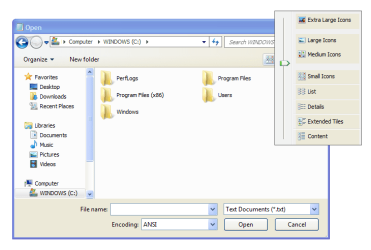
Refreshing the folder view will also revert the labels to the bottom. This is kind of an annoyance though.
Only from pull-down menu. From context menu does not work.
My Computer
At a glance
Windows 7
- Computer type
- PC/Desktop
- OS
- Windows 7

Refreshing the folder view will also revert the labels to the bottom. This is kind of an annoyance though.
I thought this would work for me but it didn't. I tried with 32px icon size. Even below 32px it still won't work.
Any help is much appreciated!
 Without using 3rd party software too!
Nobody knows how MS does change the icon size smoothly. All AHK scripts I have seen use emulation of mouse wheel for the purpose.Now I wish there was a javascript or something to set the icon size to 32x32. This would be useful for people like me who have the explorer command bar hidden, and rely on Classic Shell/CTRL + Mouse Wheel to set the icon size. It would be nice to just add a shortcut to whatever Javascript to Classic Shell's explorer toolbar, or even in the right-click menu (probably not in 'View' though, just because that seems to be more internal).
It looks like 3 lines or 1 line doesn't matter when you hold CTRL and scroll down in Windows Explorer. It works exactly the same either way.If you still want to use mouse wheel for this purpose, then change the scroll resolution in mouse properties (change scroll 3 lines to scroll 1 line).
It looks like 3 lines or 1 line doesn't matter when you hold CTRL and scroll down in Windows Explorer.
It skips 32px. You cannot set 32px using only mouce wheel.I set all icons to Medium and then hold CTRL and scroll down 6 times. The icons are blurry.
Then I tried to scroll down 7 times and the icons are blurry again. Desktop icons are crisper sharp.
Thanks, that explains everything! I will try to find out how to change the icon size via the registry.It skips 32px. You cannot set 32px using only mouce wheel.
OMG it works! Thanks a lot, Anixx! You're the best!In registry it is in bags, you have to change it for each folder separately. Then you can apply the setting to all folders. The ShellBagsView utility will tell you where in registry the settings for each folder are located.
Windows Registry Editor Version 5.00

[HKEY_CURRENT_USER\Control Panel\Desktop\WindowMetrics]
"IconFont"=hex:f5,ff,ff,ff,00,00,00,00,00,00,00,00,00,00,00,00,90,01,00,00,00,\
  00,00,cc,00,00,00,00,54,00,61,00,68,00,6f,00,6d,00,61,00,00,00,00,00,00,00,\
  00,00,00,00,00,00,00,00,00,00,00,00,00,00,00,00,00,00,00,00,00,00,00,00,00,\
  00,00,00,00,00,00,00,00,00,00,00,00,00,00,00,00,00,00,00,00,00
"CaptionFont"=hex:f3,ff,ff,ff,00,00,00,00,00,00,00,00,00,00,00,00,bc,02,00,00,\
  00,00,00,cc,00,00,00,00,54,00,72,00,65,00,62,00,75,00,63,00,68,00,65,00,74,\
  00,20,00,4d,00,53,00,00,00,00,00,00,00,00,00,00,00,00,00,00,00,00,00,00,00,\
  00,00,00,00,00,00,00,00,00,00,00,00,00,00,00,00,00,00,00,00,00,00
"MenuFont"=hex:f5,ff,ff,ff,00,00,00,00,00,00,00,00,00,00,00,00,90,01,00,00,00,\
  00,00,cc,00,00,00,00,54,00,61,00,68,00,6f,00,6d,00,61,00,00,00,00,00,00,00,\
  00,00,00,00,00,00,00,00,00,00,00,00,00,00,00,00,00,00,00,00,00,00,00,00,00,\
  00,00,00,00,00,00,00,00,00,00,00,00,00,00,00,00,00,00,00,00,00
"MessageFont"=hex:f5,ff,ff,ff,00,00,00,00,00,00,00,00,00,00,00,00,90,01,00,00,00,\
  00,00,cc,00,00,00,00,54,00,61,00,68,00,6f,00,6d,00,61,00,00,00,00,00,00,00,\
  00,00,00,00,00,00,00,00,00,00,00,00,00,00,00,00,00,00,00,00,00,00,00,00,00,\
  00,00,00,00,00,00,00,00,00,00,00,00,00,00,00,00,00,00,00,00,00
"SmCaptionFont"=hex:f5,ff,ff,ff,00,00,00,00,00,00,00,00,00,00,00,00,90,01,00,00,00,\
  00,00,cc,00,00,00,00,54,00,61,00,68,00,6f,00,6d,00,61,00,00,00,00,00,00,00,\
  00,00,00,00,00,00,00,00,00,00,00,00,00,00,00,00,00,00,00,00,00,00,00,00,00,\
  00,00,00,00,00,00,00,00,00,00,00,00,00,00,00,00,00,00,00,00,00
"StatusFont"=hex:f5,ff,ff,ff,00,00,00,00,00,00,00,00,00,00,00,00,90,01,00,00,00,\
  00,00,cc,00,00,00,00,54,00,61,00,68,00,6f,00,6d,00,61,00,00,00,00,00,00,00,\
  00,00,00,00,00,00,00,00,00,00,00,00,00,00,00,00,00,00,00,00,00,00,00,00,00,\
  00,00,00,00,00,00,00,00,00,00,00,00,00,00,00,00,00,00,00,00,00
Windows Registry Editor Version 5.00

;Remove Segoe UI
[HKEY_LOCAL_MACHINE\SOFTWARE\Microsoft\Windows NT\CurrentVersion\Fonts]

"Segoe UI (TrueType)"=""
"Segoe UI Bold (TrueType)"=""
"Segoe UI Italic (TrueType)"=""
"Segoe UI Bold Italic (TrueType)"=""
"Segoe UI Semibold (TrueType)"=""
"Segoe UI Light (TrueType)"=""


;Font Substitution
[HKEY_LOCAL_MACHINE\SOFTWARE\Microsoft\Windows NT\CurrentVersion\FontSubstitutes]

"Segoe UI"="Tahoma"