ANN: Classic Shell 1.0.0 -first official release is out

Ivo

New member
Local time
2:56 PM
Messages
398
Location
Washington
Finally, after 3 months of development and 7 betas, the version 1.0.0 of Classic Shell is ready. Thanks to everybody who tried the beta versions and reported bugs and feature requests.

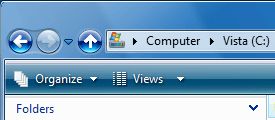
The main new feature is the addition of the Up button in the Explorer's title bar (see the screenshot). The rest is mostly bug-fixes, polishing the existing features, and improving the documentation.

Grab it from http://classicshell.sourceforge.net/

This will be it for a while. If some serious bug is found I will make a bug-fix release, but other than that, this is it. The features I have planned for the next major version will take a long time to develop, and there are also other projects that need my attention.

Of course I will continue to provide support in this forum and the Source Forge forums.

Note: This version cannot be installed on top of older versions. You need to uninstall the prior version first, then log off, then install this one.

Enjoy
Ivo
 

Attachments
  • titlebar.png
    titlebar.png
    7.1 KB · Views: 795

My Computer My Computer

At a glance

Windows 7 Home 64, Vista Ultimate 64

Computer Manufacturer/Model Number
Me :) I build all my PCs
OS
Windows 7 Home 64, Vista Ultimate 64
Thanks for your hard work Ivo. I will install later today.

Just curious but what are your tentative plans for the next version of Classic Shell?
 

My Computer My Computer

At a glance

Vista
OS
Vista
The big thing is replacing the toolbar in the start menu with custom code. The start menu currently uses a vertical toolbar because it already supports icons, text, drag/drop, without me having to write it. But I'm starting to hit some limitations that stop me from going further. The toolbar doesn't like it when it has transparent background, has problems with accessibility, and misbehaves when used in mirrored mode (for Arabic and Hebrew). So the toolbar has to go.

Once I have that I can add transparency to the start menu and implement proper accessibility. Also things like scrolling the top portion of the main menu when it is too tall (instead of scrolling the whole main menu) become a possibility. Maybe even 2-column menu similar to XP? Who knows :)
 

My Computer My Computer

At a glance

Windows 7 Home 64, Vista Ultimate 64
Computer Manufacturer/Model Number
Me :) I build all my PCs
OS
Windows 7 Home 64, Vista Ultimate 64
Hi Ivo, I finally have the version prior to this working smooth. No issues with the components that I've installed. I also like the up button where it is although the cool factor of the new location is inviting. Am I OK to stick with the prior version or do I need the bug fixes you mention?
 

My Computer My Computer

At a glance

Windows 7 Professional 32-bit (6.1, Build 7600)Intel(R) Pentium(R) 4 3.00 GHz HT2.0 GBATI Mobility Radeon 9600 64MB
Computer Manufacturer/Model Number
Averatec 6130HS-20
OS
Windows 7 Professional 32-bit (6.1, Build 7600)
CPU
Intel(R) Pentium(R) 4 3.00 GHz HT
Memory
2.0 GB
Graphics Card(s)
ATI Mobility Radeon 9600 64MB
Sound Card
Realtek AC'97 Audio
Screen Resolution
1280 x 800
Hard Drives
Seagate 96023A 60GB 7200RPM -
Seagate FreeAgentDesktop 250GB
Cooling
20 Inch Box Fan
Mouse
Targus PAWM10 Wireless Optical Laptop Mouse
If you don't need the new features you will be fine with 0.9.10. Besides the new Up button and some new setup features, the only thing you may be interested in is the fix for the folders jumping up and down when expanded. The problem is explained here: Strange folder behavior in left pane of Windows Explorer
The latest Classic Shell fixes that problem.
 

My Computer My Computer

At a glance

Windows 7 Home 64, Vista Ultimate 64
Computer Manufacturer/Model Number
Me :) I build all my PCs
OS
Windows 7 Home 64, Vista Ultimate 64
Classic Menu

I want to thank you immensely for this project. I am one who wanted the classic menu desparately as I really don't like the new menus at all. This project saved Windows 7 for me.

Now, if only I could figure out a way to rename Programs and Features to Add/Remove Programs in the control panel. I constantly look at the top of the list first when I want to remove something.

Once again. Thank you. Thank you. Thank you....well I guess that's 3 times, but still not enough in my opinion.

bruce
 

My Computer My Computer

At a glance

xp pro/vista businessi7 920
Computer Manufacturer/Model Number
self built
OS
xp pro/vista business
CPU
i7 920
Motherboard
evga xm58
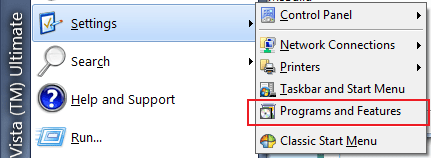
Well, that's why I have added Programs and Features to the Settings menu, so you don't have to look for it in the Control Panel :)
 

Attachments

  • Untitled.png
    Untitled.png
    9 KB · Views: 12

My Computer My Computer

At a glance

Windows 7 Home 64, Vista Ultimate 64
Computer Manufacturer/Model Number
Me :) I build all my PCs
OS
Windows 7 Home 64, Vista Ultimate 64
I loaded up the classic skin in resource hacker and didn't see any clear options to remove "Help and Support" (or Search) as I would have done via group policy previously. Also, I'd like to be able to expand out, or move "Administrative Tools" (like you did with "Programs and Features").

Any plans to add the ability to make such customizations?

I absolutely love this application. I tried some of the other ones and they either didn't support the arrow keys properly, or were generally clunky. Thank you for making it.
 

My Computer My Computer

At a glance

7x64
OS
7x64

My Computer My Computer

At a glance

Windows 7 Home 64, Vista Ultimate 64
Computer Manufacturer/Model Number
Me :) I build all my PCs
OS
Windows 7 Home 64, Vista Ultimate 64
Great, I was a perfect example of someone not reading the instructions sufficiently. You've clearly thought of everything. Thanks for the quick response, I'm all setup now.

In case anyone wants specifics:

Code:
[B]MAIN_MENU.Items=[/B]PROGRAMS, SettingsMenu, RunItem, SEPARATOR, LogOffItem, UndockItem, DisconnectItem, ShutdownItem

SettingsMenu.Items=CONTROL_PANEL, [B]AdminSettingsItem,[/B] SEPARATOR, NETWORK, PRINTERS, TaskbarSettingsItem, ProgramsSettingsItem, SEPARATOR, ClassicSettingsItem
SettingsMenu.Name=$Menu.Settings
SettingsMenu.Icon=shell32.dll,330

[B]AdminSettingsItem.Name=Administrative Settings
AdminSettingsItem.Link=C:\ProgramData\Microsoft\Windows\Start Menu\Programs\Administrative Tools
AdminSettingsItem.Icon=shell32.dll,137
[/B]
The skin controls the look of the start menu, nothing else. What you want is to change the structure of the menu. This is done via the StartMenuItems.ini file. Check out this link for a simple example how to customize the menu: https://sourceforge.net/projects/classicshell/forums/forum/1049756/topic/3523837
 

My Computer My Computer

At a glance

7x64
OS
7x64
ANN: New version 1.0.2

The latest version 1.0.2 adds few new features:
- disable the breadcrumbs in the address bar
- add caption and icon in the title bar of Explorer
- remove the search box from Explorer

Download it from here: http://classicshell.sourceforge.net/
 

Attachments

  • titlebar.png
    titlebar.png
    20.1 KB · Views: 28

My Computer My Computer

At a glance

Windows 7 Home 64, Vista Ultimate 64
Computer Manufacturer/Model Number
Me :) I build all my PCs
OS
Windows 7 Home 64, Vista Ultimate 64
Outstanding! The caption and icon feature replaces the AeroBarIco program I have used since Vista!
 

My Computer My Computer

At a glance

Vista
OS
Vista
I must say that this is really good work, great job IVO :)
 

My Computer My Computer

At a glance

Windows 7 Home Premium (64 bit)Intel I5 2500K 3.3Ghz Stock8Gig Kingston DDRIII HyperX Blue 1333 MhzAMD Sapphire 7870 2GB
Computer type
PC/Desktop
Computer Manufacturer/Model Number
Self Built
OS
Windows 7 Home Premium (64 bit)
CPU
Intel I5 2500K 3.3Ghz Stock
Motherboard
Asus P8H 61-M LE USB 3
Memory
8Gig Kingston DDRIII HyperX Blue 1333 Mhz
Graphics Card(s)
AMD Sapphire 7870 2GB
Sound Card
Creative Fatality Pro
Monitor(s) Displays
27" BENQ LED
Screen Resolution
1920X1080
Hard Drives
1 x OCZ Agility 3 120GB SSD
1 x Seagate 250GB
1 x Western Digital 1000GB
1 x HP 500GB
PSU
700W Coolermaster Stealth Pro etc
Case
Coolermaster Scout
Cooling
Some fans
Keyboard
Some Logitech type.
Mouse
Logitech MX518
Internet Speed
Wireless 8mb
Other Info
Canon Scanner
Epson Printer
Nikon DSLR 3000
Wacom Tablet
Back
Top