Can't Find Default Windows 7 Gadget

choralmusic

New member
Local time
3:13 PM
Messages
5
A few days ago I noticed my Weather gadget (the one that came with Win7) stopped showing the temperature. It would only show a dash ( - ). It would correct itself in an hour or so. Well, it began happening more and more until eventually it never corrected itself. I also suspect that it was pulling my computer out of the screensaver to to try to update.
I tried cleaning out the cache folder to no avail. I then read that uninstalling it then reinstalling it could help. I uninstalled the gadget from the gadget menu, and now I can't find where to download it again. I can see other author's remakes or variations of the gadget, but not the original one authored by Microsoft.

Can anyone help me? Am I better off without it? Thanks in advance.
 

My Computer

OS
Windows 7
It is a good gadget, I use it

Type gadget in search. To see the collection

Hope this works, good luck
 

My Computer

Computer type
PC/Desktop
Computer Manufacturer/Model Number
Dell XPS 420
OS
Windows 10, Home Clean Install
CPU
Intel Core2 processsor Q8200(2.33Ghz 1333FSB) Quad Core Tech
Motherboard
Dell
Memory
6 gb
Graphics Card(s)
ATI Radeon 256MB HD3650
Sound Card
Intergrated 7.1 Channel Audio
Monitor(s) Displays
Dell SP2009W 20"
Hard Drives
640 GB Serial ATA Hard drive
Cooling
Fan
Keyboard
Dell USB Keyboard
Mouse
Dell Premium Optical USB
Internet Speed
DSL 2.85

Attachments

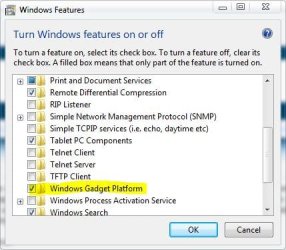
  • features.JPG
    features.JPG
    37.7 KB · Views: 34

My Computer

Computer type
PC/Desktop
Computer Manufacturer/Model Number
Self Built
OS
Win 10 Pro x64
CPU
Intel I5-2500K @3.3GHz
Motherboard
Asrock P67 Extreme4
Memory
16GB G.Skill Ripjaws X (4x4GB)
Graphics Card(s)
EVGA GeForce 750 Ti SC 2GB
Sound Card
ASUS Xonar DG 5.1 Channels 24-bit 96KHz PCI Interface Sound
Monitor(s) Displays
auria eq2367
Screen Resolution
1920 x 1080
Hard Drives
250GB Samsung 850 EVO SSD
1TB WD Blue
1TB Hitachi
PSU
SeaSonic X 650W 80 Plus Gold
Case
Corsair Obsidian 750D
Cooling
Corsair H60, Three 140mm case fans
Keyboard
Logitech Wireless Keyboard K520
Mouse
Logitech Wireless Mouse M310
Internet Speed
Wave Broadband ~ 100 dn 5 up
Antivirus
Windows Defender, Malwarebytes Premium
Browser
Edge, IE11, Chrome
Other Info
Laptop specs: HP g7-1365dx /
CPU: AMD A6-3420M APU with Radeon(tm) HD Graphics /
RAM: Crucial 8Gb (2x4Gb) /
SSD: Crucial M4-CT128M4SSD2 ATA Device/ FW 000F /
GFX: AMD Radeon HD 6520G /
OS: Windows 10 Pro x64
Thanks for the help all.

Ok, so I restored my default gadgets - (control panel > appearance > restore default gadgets), but I think I found the underlying problem. I couldn't connect to msn.com. I tried in multiple browsers (IE and FireFox) and it wouldn't go. I added the site in Internet Options of IE, and it still wouldn't load. Eventually, it magically loaded - but my weather gadget (the default Win7 one) won't update or automatically find my location. The option is grayed out. Also my RSS reader (also the default Win7 one) hasn't updated since Friday.

I ran a McAfee virus scan and an Malwarebytes Anti-Malware scan and both came back clean.
 

My Computer

OS
Windows 7

My Computer

Computer type
PC/Desktop
Computer Manufacturer/Model Number
Self Built
OS
Win 10 Pro x64
CPU
Intel I5-2500K @3.3GHz
Motherboard
Asrock P67 Extreme4
Memory
16GB G.Skill Ripjaws X (4x4GB)
Graphics Card(s)
EVGA GeForce 750 Ti SC 2GB
Sound Card
ASUS Xonar DG 5.1 Channels 24-bit 96KHz PCI Interface Sound
Monitor(s) Displays
auria eq2367
Screen Resolution
1920 x 1080
Hard Drives
250GB Samsung 850 EVO SSD
1TB WD Blue
1TB Hitachi
PSU
SeaSonic X 650W 80 Plus Gold
Case
Corsair Obsidian 750D
Cooling
Corsair H60, Three 140mm case fans
Keyboard
Logitech Wireless Keyboard K520
Mouse
Logitech Wireless Mouse M310
Internet Speed
Wave Broadband ~ 100 dn 5 up
Antivirus
Windows Defender, Malwarebytes Premium
Browser
Edge, IE11, Chrome
Other Info
Laptop specs: HP g7-1365dx /
CPU: AMD A6-3420M APU with Radeon(tm) HD Graphics /
RAM: Crucial 8Gb (2x4Gb) /
SSD: Crucial M4-CT128M4SSD2 ATA Device/ FW 000F /
GFX: AMD Radeon HD 6520G /
OS: Windows 10 Pro x64
Thanks Derek. I've tried those options to no avail. I seem to think that the culprit must have something to do with connecting to MSN. I also find it suspicious that it won't autdodetect my location.
 

My Computer

OS
Windows 7
Try malwarebytes and a good virus scan
http://www.malwarebytes.org/mbam.php

Often you cannot connect to msn and other sites with malware.

If these come up positive, it is more vital to correct it than to get the gadget.
 

My Computer

Computer type
PC/Desktop
Computer Manufacturer/Model Number
Dell XPS 420
OS
Windows 10, Home Clean Install
CPU
Intel Core2 processsor Q8200(2.33Ghz 1333FSB) Quad Core Tech
Motherboard
Dell
Memory
6 gb
Graphics Card(s)
ATI Radeon 256MB HD3650
Sound Card
Intergrated 7.1 Channel Audio
Monitor(s) Displays
Dell SP2009W 20"
Hard Drives
640 GB Serial ATA Hard drive
Cooling
Fan
Keyboard
Dell USB Keyboard
Mouse
Dell Premium Optical USB
Internet Speed
DSL 2.85
Try malwarebytes and a good virus scan
Malwarebytes' Anti-Malware: Malwarebytes

Often you cannot connect to msn and other sites with malware.

If these come up positive, it is more vital to correct it than to get the gadget.
I thought of that, too. But I can connect to MSN now.

I ran a quick scan with MBAM and my most recent virus scan (Friday morning) came back clean. I'm running a full scan with MBAM now.
 

My Computer

OS
Windows 7
Sounds more like malware than a virus. Malwarebytes will find it if it is there.
 

My Computer

Computer type
PC/Desktop
Computer Manufacturer/Model Number
Dell XPS 420
OS
Windows 10, Home Clean Install
CPU
Intel Core2 processsor Q8200(2.33Ghz 1333FSB) Quad Core Tech
Motherboard
Dell
Memory
6 gb
Graphics Card(s)
ATI Radeon 256MB HD3650
Sound Card
Intergrated 7.1 Channel Audio
Monitor(s) Displays
Dell SP2009W 20"
Hard Drives
640 GB Serial ATA Hard drive
Cooling
Fan
Keyboard
Dell USB Keyboard
Mouse
Dell Premium Optical USB
Internet Speed
DSL 2.85
There's a couple of options posted here you could try,

Weather gadget doesn't work
I did notice, however, that on a different user the RSS feeds updated (though the weather still didn't). When I switched back to my profile, they didn't update.


After Rich's excellent suggestion of running a malware scan, you may want to try

http://www.sevenforums.com/tutorials/1538-sfc-scannow-command-system-file-checker.html

To see if that will help, since you said the other profile was updating rss feeds.

By the way mine doesn't auto-detect my location either but it does work if I put

my zip code in there.
 

My Computer

Computer type
PC/Desktop
Computer Manufacturer/Model Number
Self Built
OS
Win 10 Pro x64
CPU
Intel I5-2500K @3.3GHz
Motherboard
Asrock P67 Extreme4
Memory
16GB G.Skill Ripjaws X (4x4GB)
Graphics Card(s)
EVGA GeForce 750 Ti SC 2GB
Sound Card
ASUS Xonar DG 5.1 Channels 24-bit 96KHz PCI Interface Sound
Monitor(s) Displays
auria eq2367
Screen Resolution
1920 x 1080
Hard Drives
250GB Samsung 850 EVO SSD
1TB WD Blue
1TB Hitachi
PSU
SeaSonic X 650W 80 Plus Gold
Case
Corsair Obsidian 750D
Cooling
Corsair H60, Three 140mm case fans
Keyboard
Logitech Wireless Keyboard K520
Mouse
Logitech Wireless Mouse M310
Internet Speed
Wave Broadband ~ 100 dn 5 up
Antivirus
Windows Defender, Malwarebytes Premium
Browser
Edge, IE11, Chrome
Other Info
Laptop specs: HP g7-1365dx /
CPU: AMD A6-3420M APU with Radeon(tm) HD Graphics /
RAM: Crucial 8Gb (2x4Gb) /
SSD: Crucial M4-CT128M4SSD2 ATA Device/ FW 000F /
GFX: AMD Radeon HD 6520G /
OS: Windows 10 Pro x64
Back
Top