CSR8510A10 Driver, here available!

umkar466

New member
Local time
5:59 AM
Messages
1
Hello guys,

After I had lost my CSR8510A10 driver cd I searched on the internet to download one.

I couldnt find it ANYWHERE, not even on the support website of CSR.

Then I thought, let me summon my old HDD from my older pc and user that one.

After I did that, I figured people may appreciate it if I upload it.

So here you go peeps, the links for the CSR8510A10 driver:

https://mega.co.nz/#F!A1AGyTLb!iJaWmxngvENpmBDEzc6jFw

If you need more help, I am pleased to help you further :D
 

My Computer

Computer type
PC/Desktop
Computer Manufacturer/Model Number
Custom build
OS
Windows Home Premium 64bit
CPU
Intel Core I3-4150
Motherboard
MSI H81M-E34
Memory
8GB RAM
Graphics Card(s)
AMD Radeon R7 260X 2GB
Hard Drives
2 portable HDD x 2 terabyte
1 internal HDD ST500DM0002
Antivirus
None
Browser
Chrome
Thanks a lot!

Thanks for posting the drivers! I downloaded the 64 bit setup.exe and installing went like a breeze.
After many days trying everything I could think of (I nearly gave up), my CRS Buetooth device works at last :-).
I had to restart my computer, and add a new bluetooth device via Controlpanel etc.
 

My Computer

Computer type
Laptop
Computer Manufacturer/Model Number
ASUS
OS
Windows 7 64 bit
CPU
SU7300
Antivirus
AVG
Browser
Chrome, Firefox
Hi Umkar466, recently bought the CSR8510A10 Bluetooth adapter which does not come with a driver cd. I tried your download link but there is an error. Can you kindly upload a new link where I can download the driver? I am having problem with no audio on my Bluetooth headphone after pairing with the adapter. a million thanks....
 

My Computer

OS
Windows 7 Ultimate x32
Help

im having a problem the CsrBtPort_Enumerated_Device_00 Driver keeps on saying it failed to download and i need help plz....
 

My Computer

Computer type
PC/Desktop
OS
64 windows 7 homepremium
I joined the forum just to say a big thanks! Got a cheap dongle from Amazon which just installed the generic BT driver through Windows 7, so my headset didn't work. Immediately after installing and pairing this, it works perfectly. Thanks again! :party:
 

My Computer

Computer type
PC/Desktop
OS
Windows 10
I joined the forum just to say a thank you.

I joined the forum just to say a big thanks! Got a cheap dongle from Amazon which just installed the generic BT driver through Windows 7, so my headset didn't work. Immediately after installing and pairing this, it works perfectly. Thanks again! :party:

+1
 

My Computer

Computer type
PC/Desktop
OS
Windows 7 Home Premium 64 bit
Hey, just wanted to join the other people here in saying - THANKS!!!

I bought this USB Bluetooth dongle today, and as people here said it doesn't come with a driver CD and it's really hard to find them online (especially for x64).

I tried making it work with some generic drivers, but other than some basic file transfer functionality I was getting a lot of connection problems.

The drivers you provided are an exact match 1:1 to the product model CSR 8510 A10, and it works perfectly now.

Thank you again for taking the time to share!! :)
 
Last edited:

My Computer

OS
Windows 7 Ultimate x64 (SP1)
CPU
Core i5 @ 4GHz
Graphics Card(s)
GTX 580
Screen Resolution
1080x1050
Hard Drives
Vertex 3 120GB SSD
Thank you!

Thank you umkar466 your a life saver. I bought this Blue tooth dongle (CSR V4.0 Bluetooth - CSR8510 A10) and couldn't use it on my windows 7 x64 machine. Now I can! :):):):)
 

My Computer

Computer type
PC/Desktop
Computer Manufacturer/Model Number
Lenovo
OS
Windows 10 x64 and Windows 7 x64
CPU
i7 core
Memory
32 GB
CSR8510A10 Install

Thanks for providing these umkar466. The dongle I purchased actually came with a driver CD and the installation went fine except that my computer will not recognize my Bluedio headphones which are the reason I purchased the dongle in the first place. My Sony VAIO AllInOne vpcl137fx comes with Bluetooth 2 with support for Bluetooth 3 if it is for a device using the A2DP profile. All my other Bluetooth devices were running much faster and I had actual control panels for some!

Then all my devices went away from the Devices and Printers window although they were still working. After following many suggestions from this site except doing a Clean Install (I don't have my Windows disks and am unable to obtain them without purchasing new ones) I was forced to do a System Recovery using VAIO Care.

Now my Broadcomm Bluetooth drivers are gone and I just updated to the most recent ones! Also, the installation of the CSR failed to install and headset or audio drivers.

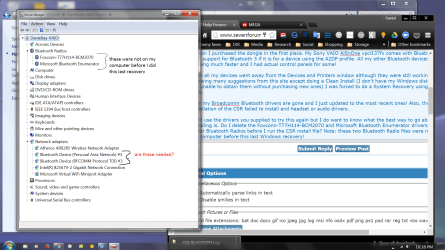
I will use the drivers you supplied to try this again but I do want to know what the best way to go about installing is. Do I delete the Foxconn-T77H114-BCM2070 and Microsoft Bluetooth Enumerator drivers listed under Bluetooth Radios before I run the CSR install file? Note: these two Bluetooth Radio files were not on my computer before this last Windows recovery!

any advice you can give will be appreciated. Since buying the Bluedio headphones i have only been able to use them with my phone and i bought them for my computer!

Thanks,

djrobison22
 

Attachments

  • device_mgr_vpcl137fx_djrobison22.png
    device_mgr_vpcl137fx_djrobison22.png
    195.4 KB · Views: 5

My Computer

Computer type
PC/Desktop
Computer Manufacturer/Model Number
Sony
OS
Microsoft Windows 7 Home Premium 64-bit 7601 Multiprocessor Free Service Pack 1
CPU
Intel(R) Core(TM)2 Quad CPU Q8400 @ 2.66GHz
Motherboard
Sony Corporation VAIO
Memory
8.00 GB
Graphics Card(s)
NVIDIA GeForce GT 330M
Sound Card
(1) Bluetooth Hands-free Audio (2) Realtek High Definition
Monitor(s) Displays
Digital Flat Panel (1920X1080 60Hz)
Screen Resolution
1920 x 1080 x 32 bits (4294967296 colors) @ 59 Hz
Hard Drives
ST31000528AS ATA Device
Keyboard
MS USB Dual Receiver Wireless Keyboard and Mouse
Mouse
MS USB Dual Receiver Wireless Keyboard and Mouse
Antivirus
ms security essentials, mbam 3.0 premium
Browser
Chrome
Thank you, umkar466, it works!!! :D
 

My Computer

Computer type
PC/Desktop
Computer Manufacturer/Model Number
Asus
OS
Win7 64 bit
CPU
AMD FX9370
Motherboard
Asus Sabertooth R2.0
Memory
Kingston 16GB (2x8GB) DDR3 1866MHz
Graphics Card(s)
Asus HD 7870
Hard Drives
Keyboard: Logitech K520
Mouse: Razer Orochi
Antivirus
AVG
Browser
G.Chrome
Make sure the Bluetooth device shows up under "Devices and Printers" in Windows 7. If it shows up under the Bluetooth icon for those who show it in their Windows Control Panel, even though it indicates all services are operational, it will still NOT work. It needs to show under "Devices and Printers." Even then, when you RIGHT-CLICK on the Bluetooth Device icon, and click on 'Properties' to show a 'Services' tab, do NOT click the 'Headset' option. Doing this will create a 'Trouble-shooting' yellow warning triangle on your Bluetooth icon, and your device will NOT work. Apparently, 'Headphones' are NOT the same as a 'Headset' as far as Windows 7 is concerned. Leave it unchecked and then assign your choice of listening/microphone device as normal under the Sound icon where your Bluetooth device should show if it is a headphones/microphone device.
 

My Computer

Computer type
PC/Desktop
Computer Manufacturer/Model Number
Custom Build
OS
Windows 7 Ultimate x64
CPU
QX9650 LGA 775
Motherboard
Intel DG45ID
Memory
G.Skill DDR2 4 x 4GB = 16GB Total
Graphics Card(s)
EVGA GTX 750Ti (2GB)
Hard Drives
Hitachi HGST 2TB (7200rpm)
Antivirus
Sophos
Browser
Chrome

Attachments

  • CSR_BT4.jpg
    CSR_BT4.jpg
    75 KB · Views: 5

My Computer

Computer type
PC/Desktop
Computer Manufacturer/Model Number
Custom Build
OS
Windows 7 Ultimate x64
CPU
QX9650 LGA 775
Motherboard
Intel DG45ID
Memory
G.Skill DDR2 4 x 4GB = 16GB Total
Graphics Card(s)
EVGA GTX 750Ti (2GB)
Hard Drives
Hitachi HGST 2TB (7200rpm)
Antivirus
Sophos
Browser
Chrome
I joined this forum JUST to say THANK YOU! -

My PH-BTH3 Bluetooth Headphones trouble began with a driver update that 3DP (a driver finder program that is free but sometimes buggy). It found a new Toshiba Bluetooth Driver Stack update. I thought since it found many, many other drivers I needed and it fixed many issues I had in the past. So I was shocked when the Toshiba driver made a horrible popping in and out of sound but loaded the headphones fine. Sadly my original pairing of the headphones using the Windows update drivers had worked fine since day one. I simply went to "show all devices" and then selected "Add Bluetooth Device" and everything just worked!

So of course I needed to rollback and get rid of the Toshiba update (which should have been hassle free). I uninstalled and rebooted and the horror began!

My Bluetooth dongle is the CSR 8510 A10 (CSR8510A10). It was now showing the PH-BTH3 headphones as paired (within the CSR 8510 driver settings as well as all bluetooth driver references. The Toshiba driver had altered the way Windows loaded my drivers regardless of how I installed/uninstalled the Toshiba driver as well as trying the broadcom and Intel drivers. So now the headphones were not paired (but reboot after reboot there the headphones appeared listed in Windows even though I had already uninstalled, unpaired.

In fact I searched for over 2 months online for help. This is the common reply you get on most sites -

I never received a driver for my headphones as others have mentioned. So I thought there never was a driver for the PH-BTH3's as my head hones were new off Amazon this last Christmas (and most devices shipped like this generally assume you will update via Windows update).

So to resolve my "newly created issue" I knew I needed to delete every registry entry for the bluetooth drivers entries and that took so much time. Windows seems to have a hard time releasing devices in general but with Bluetooth it is especially sticky.

I had to search "PH-BTH3" in the registry. I had over 16 entries in the registry alone. In many folders within REGEDIT I was stuck having to take ownership of the folders, then I learned some folders are "placeholders" and cannot be deleted but you need to delete each entry in the folder that it allows (all but the top most entry will be deleted). If you miss just one of the driver references it will fail again on reboot and you will have to continue your search and deleting process.

THEN.... I had to go to Device Manager and change "View Settings" to "Show Hidden Devices" and then go into each hardware item and delete anything related to Bluetooth (I was amazed at all the entries including several "unknown devices") and my headphones appearing in the system folder.
c04484522.jpg

So with all devices deleted from "Device Manager" and all "Registry Entries for the headphones and dongle" deleted.......

  1. - I rebooted and left the Bluetooth dongle unplugged.
  2. - Ran the driver installation (THANK YOU AGAIN!)
  3. - Rebooted the system
  4. - Plugged in the CSR 8510 A10 bluetooth dongle
  5. - Then rebooted (better to be safe, always).
  6. - Right clicked on the newly created bluetooth trayicon and selected "Enable" and added my headphones.

Things are perfect now and the headphones are sync'd like they had been before the Toshiba screw up. I certainly do hope that others with my problem find this post to aid them. I wish I could post this at the 25 or so sites with almost no good information I came across.

This issue exists for so many users and I noticed it is across all the platforms. I am on the Windows 10 LTSB OS and it seems about the process that you would use from 7 until 10.

Quick breakdown on registry editing, deleting, etc. When the basic removing device fails and uninstalling from device manager fails this is the process that WILL WORK! Be sure to read up on registry editing before jumping into it. You will need to run REGEDIT as an ADMIN (right click on REGEDIT icon and select "run as administrator" then you will heed to select "Edit, then Find now search for the headphone model number or the maker name as well as any other device that is giving you a lot of trouble (I mean after rebooting, after doing all the right things) and no other method is allowing proper functionality.

 
Last edited:

My Computer

Computer type
PC/Desktop
Computer Manufacturer/Model Number
Custom
OS
Both Windows 7 64 & Windows 10 LTSB
CPU
Intel 2.8Ghz,
Motherboard
Gigabyte
Memory
8GB DDR2
Graphics Card(s)
Nvidia 260+
Monitor(s) Displays
42" Samsung Plasma Display
Screen Resolution
1080
Hard Drives
Too many to list!
Case
Custom
Cooling
Custom
Keyboard
MS Sidewinder
Mouse
2 dollar ali-express mouse! It is the best ever!
Internet Speed
100MB
Antivirus
Avast
Browser
Firefox & Opera
Other Info
Helpdesk Technician
Thanks a million! I messed with this for hours until I found your post and another 15 min I was good. You made my day!!!!
 

My Computer

Computer type
Laptop
Computer Manufacturer/Model Number
HP 2000-314nr
OS
Windows 7 Home Premium ×64
CPU
AMDE-450APU
Motherboard
Radeon HE Graphics
Memory
4gig ram
Graphics Card(s)
No
Hard Drives
500 gig
Antivirus
Avira
Browser
IE
Thank you umkar466. This fixed my problem with an "unsigned driver" error resulting from corruption on my Register.
Really appreciated.
 

My Computer

Computer type
PC/Desktop
OS
Windows 10 Home 64 bit
Like many other I just get Bluetooth radio, Enumerator, some network stuff but NO SPP, NO COM ports.
It can't even see the maker of the dongle which is csr8510a10, sold by LAIRD. No Service is detected.
But it does connect to the slave using a BT730 which is csr-module again. So what is wrong?
HP 280 G1, x64 Win7 Pro SP1. 16GB SRAM.
I removed the previous detection and inserted the BT820 dongle. When searching it found my slave and requested pairing which went ok. Then it all stops meaning no more can be done with it.
Also, the same dongle in an XP XP3 works perfect. BUT, the W7 can't see the XP and vice versa, which is remarkable.
Solution anybody?
 

My Computer

Computer type
PC/Desktop
Computer Manufacturer/Model Number
HP 280 G1
OS
Win7 Pro SP1 x64
CPU
Core i5
Motherboard
hp
Memory
16GB
Hard Drives
2
Antivirus
MSE
Browser
firefox
Another success story! Finally, the headset is aliiiiiive! THANK YOU!! :D
 

My Computer

Computer type
PC/Desktop
OS
Windows 7 Ultimate x64
Just registered to say thanks, i had the CD but don't have the CD reader ( who uses those anymore ), after hours of trying how to block generic Bluetooth i came to this article. Finished in 10 mins.

Thanks a lot

Mihailo
 

My Computer

Computer type
PC/Desktop
OS
win 10 64 bit
Hi umkar466,

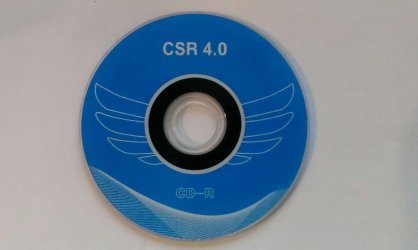
I got the CSR8510A10 BT dongle. I also got the CD but I dont have a CD reader. Is the driver on the CD the same that comes by default on the dongle?
 

My Computer

Computer type
PC/Desktop
Computer Manufacturer/Model Number
msi
OS
10
CPU
i5 6500
Motherboard
msi gaming
Memory
16
Antivirus
avast
Browser
ff
CSR8510-A10 w/ Windows 10 v1709

I just registered to this forum and want to Thank you so much for this. I'm a current ebay seller that needs to take pictures with my phone then upload them to my Windows 10 computer. Taking pictures with my phone then having to manually accept all files via Bluetooth on the PC was a headache. My business has been ramping up and I was at the verge of replacing my Bluetooth dongle due to this headache. I searched for an updated Bluetooth driver and came upon your post. and OMFG!!!!:shock: you saved me. I was so thankful that the mega link was still valid and I downloaded it and now i am at peace. The driver now allows for it to automatically accept all incoming pics from my phone via the new bluetooth settings.

FYI I am on a Windows 10 with v1709 (Fall Creators update) and this worked flawless. Once again thank you OP you saved my sanity. If anyone is curious I have the a USB dongle w/CSR8510-A10 then just downloaded the x64 folder as a zip via the mega link. WOW!:cool:
 

My Computer

Computer type
PC/Desktop
Computer Manufacturer/Model Number
Custom
OS
CA
CPU
Xeon 5680
Motherboard
Asus P6T
Memory
Team Group 48GB
Graphics Card(s)
Nvidia 980Ti
Hard Drives
Too Many
Browser
Chrome
Back
Top