
Reinstall driver "Microsoft ACPI Compliant Control Method Battery"
Hello all,
I've spent a good few days trying everything the internet has thrown up to fix my mistake but nothing has worked. I shall list my attempts to fix subsequently.
My problem is this: six days ago, I was using my laptop on its battery and I noticed that the battery icon in the notification bar still showed the mains plug and claimed it was at 100% charge, which it wouldn't be after at least 45 minutes of use.
Plugging my laptop back into the mains, restarting and running from the mains, then unplugging it did not change this icon at all. I searched for a way to fix this problem, and came across deleting and reinstalling the driver from Device Manager > Batteries and deleting "Microsoft ACPI Compliant Control Method Battery" then Action > Scan for hardware changes. Unfortunately, I closed the Device Manager window by mistake before I scanned for changes, so when I reopened it the hardware change was not registered, so there was no ability to reinstall the recently deleted driver.
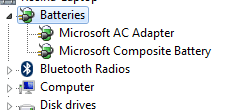
I have tried to:
My laptop will run fine on both mains and battery; if on the latter, it won't have any pop-ups of "10% battery remaining" etc., nor will the screen do its auto-dim function to increase battery life.
If I try to show the battery icon now [Right click task bar > properties > customise notification area > turn system icons on or off] the "Behaviours" on/off drop down for power is greyed out and unclickable.
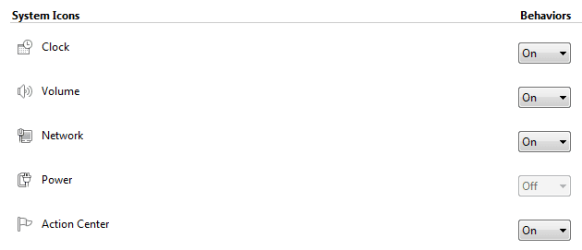
I've truly messed it up and I can't rectify it. Any suggestions that you can offer?
Hello all,
I've spent a good few days trying everything the internet has thrown up to fix my mistake but nothing has worked. I shall list my attempts to fix subsequently.
My problem is this: six days ago, I was using my laptop on its battery and I noticed that the battery icon in the notification bar still showed the mains plug and claimed it was at 100% charge, which it wouldn't be after at least 45 minutes of use.
Plugging my laptop back into the mains, restarting and running from the mains, then unplugging it did not change this icon at all. I searched for a way to fix this problem, and came across deleting and reinstalling the driver from Device Manager > Batteries and deleting "Microsoft ACPI Compliant Control Method Battery" then Action > Scan for hardware changes. Unfortunately, I closed the Device Manager window by mistake before I scanned for changes, so when I reopened it the hardware change was not registered, so there was no ability to reinstall the recently deleted driver.
I have tried to:
- find the driver itself on the Acer driver webpage: it is not there
- restarting laptop, removing battery and mains connections, de-charging capacitors, then rebooting to "register" the battery
- downloading various .exe files that claim to reinstall the missing driver (these have installed "Microsoft AC Adapter" drivers instead)
- do a system restore - nothing suitable and ones older than 3 months have been deleted
My laptop will run fine on both mains and battery; if on the latter, it won't have any pop-ups of "10% battery remaining" etc., nor will the screen do its auto-dim function to increase battery life.
If I try to show the battery icon now [Right click task bar > properties > customise notification area > turn system icons on or off] the "Behaviours" on/off drop down for power is greyed out and unclickable.
I've truly messed it up and I can't rectify it. Any suggestions that you can offer?
My Computer
At a glance
Windows 7 Home Premium 64bitIntel Core i7-3610QM CPU @ 2.30GHz8.00 GBIntel(R) HD Graphics 4000
- Computer type
- Laptop
- Computer Manufacturer/Model Number
- Acer Aspire V3-571G
- OS
- Windows 7 Home Premium 64bit
- CPU
- Intel Core i7-3610QM CPU @ 2.30GHz
- Memory
- 8.00 GB
- Graphics Card(s)
- Intel(R) HD Graphics 4000
- Antivirus
- Norton 360, Windows Defender
- Browser
- Google Chrome


