
Logitech Setpoint 4.8 x64 - VC8 Library

jrizzo

New member
Local time
3:00 AM
Messages
15
I can't install Logitech's Setpoint 4.8 software on my Win 7 x64 system. Tried installing in compatibility mode (Vista SP2) and running as Administrator, but no luck. Each time, I get an error that says the VC8 library was not installed correctly. Have searched and posted messages on Logitech's support forum - no help there as yet. Any ideas/solutions?
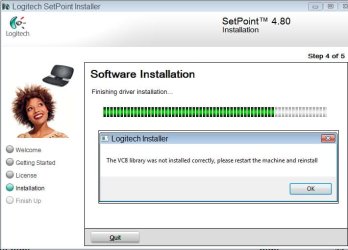
Setpoint_Install_Error.jpg
 

My Computer

Computer Manufacturer/Model Number
Gateway NV7802U
OS
Windows 7 Home Premium
CPU
Core 2 Duo 2.2GHz T6600
Memory
4gb

My Computer

Computer type
PC/Desktop
Computer Manufacturer/Model Number
Self built custom
OS
64-bit Windows 11 Pro for Workstations
CPU
Intel i7-8700K OC'd to 5 GHz
Motherboard
ASUS ROG Maximus XI Formula Z390
Memory
64 GB (4x16GB) G.SKILL TridentZ RGB DDR4 3600 MHz
Graphics Card(s)
ASUS ROG-STRIX-GTX1080TI-O11G-GAMING
Sound Card
Integrated
Monitor(s) Displays
2 x Samsung Odyssey G7 27"
Screen Resolution
2560x1440
Hard Drives
1TB Samsung 990 PRO M.2,
4TB Samsung 990 PRO PRO M.2,
TerraMaster F8 SSD Plus NAS
PSU
Seasonic Prime Titanium 850W
Case
Thermaltake Core P3
Cooling
Corsair Hydro H115i
Keyboard
Logitech wireless K800
Mouse
Logitech MX Master 4
Internet Speed
2 Gb/s Download and 100 Mb/s Upload
Antivirus
Malwarebyte Anti-Malware Premium
Browser
Google Chrome
Other Info
Logitech Z625 speaker system,
Logitech BRIO 4K Pro webcam,
HP Color LaserJet Pro MFP M477fdn,
APC SMART-UPS RT 1000 XL - SURT1000XLI,
Galaxy S23 Plus phone
Hi Brink.

Yes, I did download the 64 bit version. Made sure of that before my first attempt. Thanks for asking and replying though.
 

My Computer

Computer Manufacturer/Model Number
Gateway NV7802U
OS
Windows 7 Home Premium
CPU
Core 2 Duo 2.2GHz T6600
Memory
4gb

My Computer

Computer type
PC/Desktop
Computer Manufacturer/Model Number
Me
OS
Win 7 Ultimate x64
CPU
FX-8350 @ 4.6 GHz so far
Motherboard
Asus M5A97 EVO
Memory
ADATA XPG V1 Series Black 8GB DDR3 1600
Graphics Card(s)
Sapphire R9 270x Dual-X
Sound Card
Xonar DGX w/ Corsair Vengence 1300
Monitor(s) Displays
Acer S232HL Abid
Screen Resolution
1920x1080
Hard Drives
120 GB OCZ Vertex 3
500 GB Seagate 7200.12
PSU
Antec Earthwatts 650W Green
Case
Antec Three Hundred
Cooling
Cooler Master 212 EVO
Keyboard
Logitech G510
Mouse
Logitech G500s
Internet Speed
35000/3000
Those drivers can be a bit tricky to install, Right click to Install in Vista sp2 compatablity mode as you did before but when it puts out the error massage click if off then wait patiently appox. 1 minute or so "long wait" at which point you should see the Windows 7 auto "prompt" to install this program in compatablity mode, click yes, let it install then reboot. It should be working for you after that.
 

My Computer

Computer type
PC/Desktop
Computer Manufacturer/Model Number
Home built
OS
Windows 7 Ult, Windows 8.1 Pro,
CPU
Q9650-4.275GHz, E8600 4.5GHz, E6750-3.8GHz
Motherboard
Evga 780i FTW
Memory
G.Skill PC2 9600 1200Mhz 5 5 5 15 2T
Graphics Card(s)
GTX480
Sound Card
Asus Xonar D2
Monitor(s) Displays
HannsG
Screen Resolution
1680X1050
Hard Drives
GSkill Phoenix Pro 120GB SSD
PSU
ThermalTake Toughpower 1000Watt modular
Case
ThermalTake XaserV
Cooling
Xigmatek S1283
Keyboard
Logitech G15
Mouse
Logitech G9
Internet Speed
T1
You shouldn't need to install those drivers in compatibility mode. Something is wrong as the OP has found out.

I use the same drivers for my Logitech Mouse & Keyboard and didn't have to install them in compatibility mode.

I would suggest the OP do as stormy13 suggested and search the forums for a solution. However, trying to install them in compability mode doesn't hurt, its just not a requirement.

And Logitech does have Windows 7 64-bit drivers, which the OP has tried.
 

My Computer

Computer type
PC/Desktop
Computer Manufacturer/Model Number
Custom built by me.
OS
Windows 10 Pro
CPU
Intel Core i7-4770K (3.5Ghz)
Motherboard
Gigabyte G1 Sniper 5 (F10 Bios)
Memory
32 gig Corsair Dominator Platinum (4x8Gig)
Graphics Card(s)
Sapphire Tri-X R9 Fury
Sound Card
Soundblaster ZXR
Monitor(s) Displays
NEC PA242W 24" LCD Monitor
Screen Resolution
1920 x 1200
Hard Drives
Primary - Samsung 850 Pro (512gig), Samsung 840 Pro (256gig), 2TB WD Caviar Black.
PSU
EVGA Supernova 1000 G2
Case
Cooler Master HAF X
Cooling
Corsair H100i with Corsair Air Series SP120 Quiet Fans
Keyboard
Logitech Wireless Wave
Mouse
Logitech Performance MX
Internet Speed
High Speed Cable
Antivirus
Norton Security
Browser
IE11
Other Info
Memory Timings - 1866MHz @ 9-9-9-27-1T @ 1.5 volts
You shouldn't need to install those drivers in compatibility mode. Something is wrong as the OP has found out.

I use the same drivers for my Logitech Mouse & Keyboard and didn't have to install them in compatibility mode.

I would suggest the OP do as stormy13 suggested and search the forums for a solution. However, trying to install them in compability mode doesn't hurt, its just not a requirement.

And Logitech does have Windows 7 64-bit drivers, which the OP has tried.

I agree, something is amiss as my installation of Setpoint 4.8 Windows 7 64 went very quickly. I just thought of something, if you had the non 64 bit Setpoint installed I suggest completely uninstalling it, rebooting the PC and go to Logitech's website and download a fresh copy of it and try again.
 

My Computer

Computer Manufacturer/Model Number
DELL XPS Studio 435T
OS
Vista 64 Ultimate, Windows 7 64 Ultimate, Ubuntu 9.10
CPU
i7 975 3.3 GHz Extreme (Factory OC'd to 3.6 GHz)
Motherboard
DELL provided
Memory
18 Gb Tri-Channel 1066
Graphics Card(s)
ATI 5970 2048 Mb
Sound Card
X-Fi Extreme Gamer
Monitor(s) Displays
Vizio 37" HD-TV
Screen Resolution
1920 x 1080
Hard Drives
1.5 Tb HDD
1.5 Tb HDD
2.0 Tb Network Drive
512 Gb Crucial SSD
PSU
DELL Provided 475 watts
Case
DELL
Cooling
3 fans
Keyboard
Logitech Performance K350 Wireless
Mouse
Logitech Performance MX Wireless
Internet Speed
3 Mb up 750 Kb down
Other Info
Bamboo Fun Tablet, Belkin N+ Wireless router, Pioneer Dolby System Wireless Headphones, Bose 5.1 Dolby Surround Sound System, LifeCam VX 3000 Webcam, Blu-Ray/Hi Def DVD +RW combo and Blu-ray +RW,l 15 in 1 media card reader, Logitech Rumblepad 2, Hauppauge 2250 DTV Tuner with MS Media Center Remote

Laptop:Alienware M17x, Q9100 CPU, 8Gb RAM, 1920x1200 WUXGA LCD driven by 4870's in CrossFireX, Bl
Problem solved. I had reviewed previous posts on the Logictech site that didn't seem appropriate as they referred to Vista and earlier versions of Setpoint. Since I was trying to install Setpoint 4.8 on Windows 7, I ignored them. However in reviewing Chev65's post, I decided to try and install the MS Visual C++ redistributable package. I tried the 2008 version, as it was the newest. However, for some reason, it kept trying to install the software on my D drive - which would not have worked because my D drive is my DVD burner. Not being able to get this to work, I figured I'd try the older 2005 version of the package. This installed with ho problem and once installed, the Setpoint software also installed with no problem.

I think Logitech should do a little more work on their installer to address situations like this.
 

My Computer

Computer Manufacturer/Model Number
Gateway NV7802U
OS
Windows 7 Home Premium
CPU
Core 2 Duo 2.2GHz T6600
Memory
4gb
Jrizzo,

I'm happy to hear that you got it sorted. Thank you for posting back with your results. :)
 

My Computer

Computer type
PC/Desktop
Computer Manufacturer/Model Number
Self built custom
OS
64-bit Windows 11 Pro for Workstations
CPU
Intel i7-8700K OC'd to 5 GHz
Motherboard
ASUS ROG Maximus XI Formula Z390
Memory
64 GB (4x16GB) G.SKILL TridentZ RGB DDR4 3600 MHz
Graphics Card(s)
ASUS ROG-STRIX-GTX1080TI-O11G-GAMING
Sound Card
Integrated
Monitor(s) Displays
2 x Samsung Odyssey G7 27"
Screen Resolution
2560x1440
Hard Drives
1TB Samsung 990 PRO M.2,
4TB Samsung 990 PRO PRO M.2,
TerraMaster F8 SSD Plus NAS
PSU
Seasonic Prime Titanium 850W
Case
Thermaltake Core P3
Cooling
Corsair Hydro H115i
Keyboard
Logitech wireless K800
Mouse
Logitech MX Master 4
Internet Speed
2 Gb/s Download and 100 Mb/s Upload
Antivirus
Malwarebyte Anti-Malware Premium
Browser
Google Chrome
Other Info
Logitech Z625 speaker system,
Logitech BRIO 4K Pro webcam,
HP Color LaserJet Pro MFP M477fdn,
APC SMART-UPS RT 1000 XL - SURT1000XLI,
Galaxy S23 Plus phone
I have the same problem! I'll try to install Visual +++ file. THANKSSSSSSSSSSS!
 

My Computer

OS
Windows 7 professional x64
Back
Top