Solved Drivers laptop Killer Wireless-AC 1550 & USB 3 - Windows 7 64Bit Helps

Cris85

New member
Member
Local time
1:29 PM
Messages
90
Drivers laptop Killer Wireless-AC 1550 & USB 3 - Windows 7 64Bit Helps

Dear All,

I just registered in this forum and is my pleasure to be here.

Anyhow, after realizing that Microsoft is quitely aggressive from them Policy that they have "activated" to them final clients and undirectly force the installaton to windows 10 even in the "Toilet Bowl" ;), just to force the people to use them latest OS as a "must" (included all the continuos bugs that they have to fix). So, I have tried to force my self and change my mind about Windows 10 and leave Windows 7 definetly, but I cannot, because i found my laptop more faster with Windows 7 and less "thirsty" of the System (where even the RAM is so much less request)!!! I mean Windows 10 it's nice System Operative, with some questionable points like the double graphic of Setting/ Control Pannel and especially all the tracking of the Clients Privacy that they use by them OS that I especially hate this because even if you refuse they will activate again in some way. The point that let me to go back to Windows 7 again (and I have found the way to install on my MSI GT75 Titan, where was close to impossible to overpass all the blocks to install Windows 7 (included the bios) ) is the semplicity and the fast reaction in everything of W7 where Windows 10 with all the upgrades in the time it becomed more heavy as OS (once you are in the Desktop envarioment).


After these points, now in my machine I installed 3 OS that I use constantely and one of this is own Windows 7 64 Bit where I use more often than from the other two OS; can you help me to mod the Drivers of the Killer AC 1550 Wireless, because even the producers start to only support on Windows 10. So, the rest of the drivers I found, except all connection USB 3.0/ 3.1 that doesn't work at all, I suppose it is because the drivers are totally without supporting, as I suspect of Coffe Lake CPU 8 gen. that doesn't support Windows 7 at all (of course if I can found some modded drivers about, will be amazing as well). So, there is some one to help me how we can mod these drivers :cool:?
 

My Computer My Computer

At a glance

Windows 7 - Windows 10 Pro - Windows 11 Pro -...
Computer type
PC/Desktop
Computer Manufacturer/Model Number
MSI
OS
Windows 7 - Windows 10 Pro - Windows 11 Pro - Windows XP - Deepen OS - Zorin OS - Ubuntu OS
My Computer My Computer

At a glance

Windows 7 Ultimate x32 With Sp1 + Vista Ultim...Intel Mobile Core 2 Duo T5750 @ 2.00GHz Merom...2.00GB Dual-Channel DDR2 @ 332MHz (5-5-5-15)Mobile Intel(R) 965 Express Chipset Family
Computer type
Laptop
Computer Manufacturer/Model Number
hp compaq presario c795VU notebook pc
OS
Windows 7 Ultimate x32 With Sp1 + Vista Ultimate x32 with Sp1 & Sp2 !!
CPU
Intel Mobile Core 2 Duo T5750 @ 2.00GHz Merom 65nm Technolog
Motherboard
Hewlett-Packard 30D9 (CPU)
Memory
2.00GB Dual-Channel DDR2 @ 332MHz (5-5-5-15)
Graphics Card(s)
Mobile Intel(R) 965 Express Chipset Family
Sound Card
High Definition Audio Device
Monitor(s) Displays
LP154WX4-TLCB on Mobile Intel 965 Express Chipset Family
Screen Resolution
1280x800 @ 60Hz
Hard Drives
149GB Western Digital WDC WD1600BEVS-60VAT0 ATA Device (SATA)
Keyboard
Standard 101/102-Key or Microsoft Natural PS/2 Key + HP QLB
Mouse
ALPS pointing device
Antivirus
Kaspersky AV 2017(Win 7) & AVG AntiVirus Free 2016 (VISTA)
Browser
google chrome
Hi Vineet Garg,
thank you so much to came here to help me, I would like to give you a little breath of what I did till now:

1. Before install the OS to the Laptop, I have modified the official new iso Windows 7 by the software/CMD "GUI DISM" where I injected the compatible drivers for Windows 7 (drivers USB, extracted from Snappy Drivers Installer) of USB 3.0/ 3.1 and Intel Thunderbolt 3 from "Intel/nVidia/ASMedia/VIA" and the latest "970 NVMe modded by Fernando Forum" for Windows 7.

2. As you know this laptop as any new laptop, has not the USB 2 and for luck I'm using the Type C/ Thunderbolt 3 where allow me to connect an multi Hub USB 3.0 to connect mouse and external Hard Disk and so on.

3. I have 5 usb 3.1 type A connections from this laptop, but all of them are dead except 2 that give the electricity if you want charge your phone example but by system is not recognized at all. Probably, some driver that I injected let work in half way the two USB 3.1 ports.

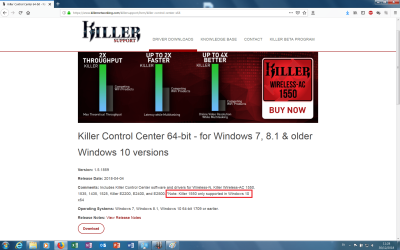
4. After the installation I used Sanppy Drivers Installer to find more fast all the drivers compatible, and where Snappy can't achieve, I went example to the official sites and some unofficial site like the Killer Wireless (as you attached the link as well) but as you can see, these drivers are supported to all old OSes and specifically they wrote that for the model AC 1550 is only supported in Windows 10 (anyway, without listen I tried to install as well, but the program blocks the installation because it said that is not compatible with this OS Windows 7 (as picture attached) )

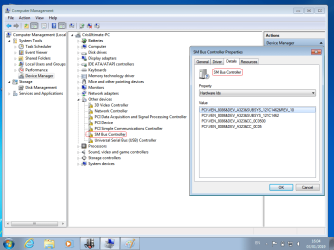
For this reason I cannot let them works, I need really some one to support me step by step on this because I don't have another idea of what can I do more. So I forgot that there is a more thing (even if less important but usefull) my problems are:

* Wireless AC Killer 1550 (the Ethernet connection is fine because for luck it is managment by Aquantia AQtion 10Gbit Network Adapter where I found the drivers).
** The all 5 Ports USB 3.1 doesn't work at all, and I don't know where to start honestly. To bring with me an adapter thunderbold it is really annoyng.
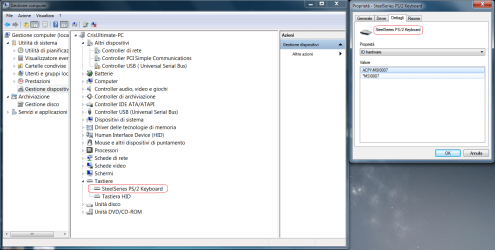
*** The Keyboard STEELSERIES is working everything but the back lights doesn't work even if I install the STEELSERIES Software. But when i turn on the Laptop, the lights works from the MSI logo till just before the Desktop Envorement of Windows 7, after that the Keyboard back lights will turn off totally.


Cris
 

Attachments

  • Killer support.png
    Killer support.png
    177.4 KB · Views: 2
  • Snappy Summary.png
    Snappy Summary.png
    38.3 KB · Views: 4

My Computer My Computer

At a glance

Windows 7 - Windows 10 Pro - Windows 11 Pro -...
Computer type
PC/Desktop
Computer Manufacturer/Model Number
MSI
OS
Windows 7 - Windows 10 Pro - Windows 11 Pro - Windows XP - Deepen OS - Zorin OS - Ubuntu OS
Hi,


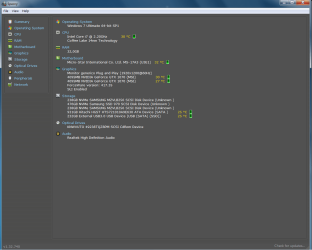
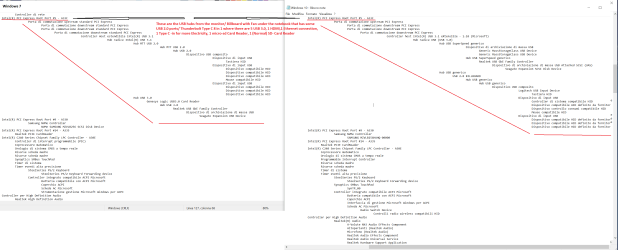
I post some results from HWinfo that is more detailed than Speccy, and I have found some differences on the drivers that I installed, from the native drivers Windows 10 vs Windows 7 drivers adapted from me, I hope is usefull these results...

The last line "Controller Host estendibile Intel(R) USB 3.1" should be the hub connected by USB Type C/ Thunderbolt, so don't pay attention about.

The rest of the lines should be all the info to start the searching on these hardware/compatible modded drivers.

I have found two lines interesting:

1.
Device Name: Killer Wireless-AC 1550 Wireless Network Adapter (9260NGW)
Original Device Name: Intel 9260NGW Wireless-AC Wireless Network Adapter

2. (Under) Intel Skylake/Kaby Lake/Coffee Lake/Whiskey Lake - Gaussian Mixture Model -
*Windows 7:
Driver Description: Intel(R) Xeon(R) E3 - 1200/1500 v5/6th Gen Intel(R) Core(TM) Gaussian Mixture Model - 1911.


*Windows 10 (Original drivers):
Driver Description: Intel(R) Gaussian Mixture Model - 1911.
-------------------------------------------------------------------------------------------------------------------


The rest I need to understand with you guys....


Cris
 

Attachments

Last edited:

My Computer My Computer

At a glance

Windows 7 - Windows 10 Pro - Windows 11 Pro -...
Computer type
PC/Desktop
Computer Manufacturer/Model Number
MSI
OS
Windows 7 - Windows 10 Pro - Windows 11 Pro - Windows XP - Deepen OS - Zorin OS - Ubuntu OS
Hi,
Greets,
Excellent stuff but the information is overwhelming for me!
I would like to say :

1) I feel this is a better option for integrating drivers : SkyLake\KabyLake\CoffeLake\Ryzen Threadripper with Win7 ? Look Here!
( I think the things are OK-OK in the Speccy & not very nice. You can still use it to search for missing/needed drivers. I would also take its help )

2) Your Win 10 installation may come handy to set up win 7.
Make Win 10 Device Manager self sufficient with all the devices installed well. Then run 'Speccy Portable' from it & update your specs. You can expand any section if you are not able to find some information.

3) I am Speccy addicted! Run Speccy Portable from win 10 & navigate from top menu bar to save the info as text file & share the file here.
To do so : launch Speccy. Once the information is loaded, click File from the top menu bar in the Speccy window & click 'Save as text file'

4) The first thing would be to install all the devices & make them work well.
From within win10, get the Hardware IDs & proper names for the devices which are missing and/or not working well in win7. Please put it clearly.
( To get the 'Hardware ID' from 'Device Manager', You may refer here :Device Manager - Finding Unknown Devices )

Let me know.

Thanks & Regards. ...
 

My Computer My Computer

At a glance

Windows 7 Ultimate x32 With Sp1 + Vista Ultim...Intel Mobile Core 2 Duo T5750 @ 2.00GHz Merom...2.00GB Dual-Channel DDR2 @ 332MHz (5-5-5-15)Mobile Intel(R) 965 Express Chipset Family
Computer type
Laptop
Computer Manufacturer/Model Number
hp compaq presario c795VU notebook pc
OS
Windows 7 Ultimate x32 With Sp1 + Vista Ultimate x32 with Sp1 & Sp2 !!
CPU
Intel Mobile Core 2 Duo T5750 @ 2.00GHz Merom 65nm Technolog
Motherboard
Hewlett-Packard 30D9 (CPU)
Memory
2.00GB Dual-Channel DDR2 @ 332MHz (5-5-5-15)
Graphics Card(s)
Mobile Intel(R) 965 Express Chipset Family
Sound Card
High Definition Audio Device
Monitor(s) Displays
LP154WX4-TLCB on Mobile Intel 965 Express Chipset Family
Screen Resolution
1280x800 @ 60Hz
Hard Drives
149GB Western Digital WDC WD1600BEVS-60VAT0 ATA Device (SATA)
Keyboard
Standard 101/102-Key or Microsoft Natural PS/2 Key + HP QLB
Mouse
ALPS pointing device
Antivirus
Kaspersky AV 2017(Win 7) & AVG AntiVirus Free 2016 (VISTA)
Browser
google chrome
Hi Vineet Garg,

First of all Happy new year!!!

Thanks for all the info because you teached me how to see the Hardware ID, finally I understand this. How to create an iso Windows 7 and the external link of the drievers I watched on it; I kept this as more infos about how to create an iso Windows with the new USB 3. Anyhow, congratulations for your Guide . In meanwhile I permit my self to give you a usefull page from a forum where I took the drivers for the RSTe AHCI RAID & NVMe as well, just to share it between us
(here: Forum - Recommended AHCI/RAID and NVMe Drivers ).

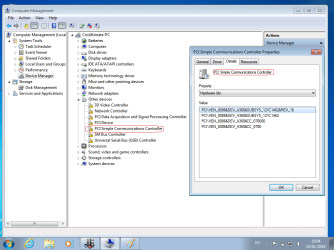
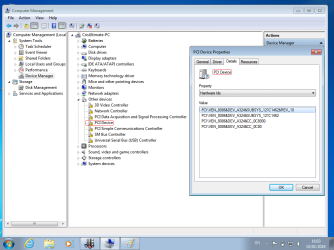
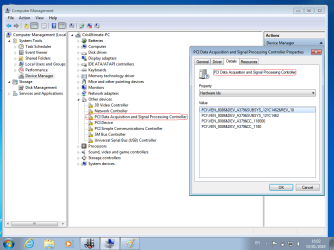
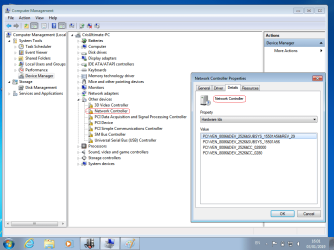
So, I tried to make you happy about Speccy and I attached the info in .txt as you need, I deleted my personal infos and some useless info to let you find more fast on the list. I don't know why some word are in Italian and not in English even if i choosed in English, but almost of them specs in the txt are in English. I hope is usefull to let you understand better the USB problems. I attached all the pictures of the unknow ID Hardware from Windows 7. And I attached the Screen shot comparison of Win 7 vs Win 10 where from my side I saw the differences in the Speccy txt files (you can consult anyway).

I list you out also all the external USB hubs that could create you the confusing, where you should not pay attention. The USB hubs, come from 3 external Devices installed/ connected :

1. The monitor with some USB 3.0.
2. The cooler Fan Billboard under the Notebook with some USB 2.0.
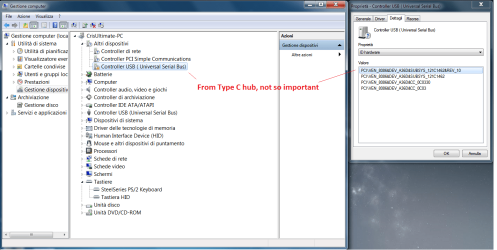
3. The Type-C 8 in ,1 where you will find some more drivers listed (in Controller host intel USB 3.1 eXtensible - 1. 10):
* 3 USB 3.0
* 1 HDMI
* 1 Ethernet connection
* 1 Type C - in for more Electricity to the HUB (in case need it)
* 1 Mocro-Sd Card Raeder
* 1 (Normal size) SD - Card Reader


If you need something else , please let me know.


Cris
 

Attachments

  • Fourth Win 7 SteelSeries.png
    Fourth Win 7 SteelSeries.png
    85.9 KB · Views: 5
  • Third Win 7- Come from the Hub that I attached from Type C (not so important).png
    Third Win 7- Come from the Hub that I attached from Type C (not so important).png
    85.4 KB · Views: 8
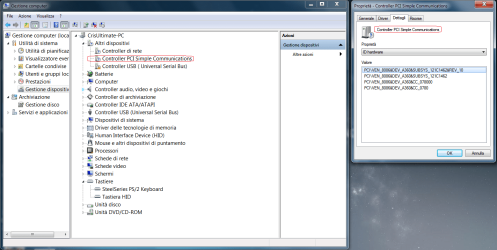
  • Second Win 7 - Uknow device PCI Simple Communications.png
    Second Win 7 - Uknow device PCI Simple Communications.png
    85.4 KB · Views: 4
  • First Win 7 - Uknow device Network Controller Killer 1550.png
    First Win 7 - Uknow device Network Controller Killer 1550.png
    84.8 KB · Views: 2
  • All the USB Hubs to don't pay attention..png
    All the USB Hubs to don't pay attention..png
    112.8 KB · Views: 4
  • Windows 7 USB hubs list by     Type C.png
    Windows 7 USB hubs list by Type C.png
    37.8 KB · Views: 1
  • Keyboard build-in SteelSeries.png
    Keyboard build-in SteelSeries.png
    81.3 KB · Views: 3
  • Killer Wireless AC 1550 not enabled.png
    Killer Wireless AC 1550 not enabled.png
    100.9 KB · Views: 3
  • Windows 7.txt
    Windows 7.txt
    16.8 KB · Views: 3
  • Windows 10.txt
    Windows 10.txt
    15.7 KB · Views: 1

My Computer My Computer

At a glance

Windows 7 - Windows 10 Pro - Windows 11 Pro -...
Computer type
PC/Desktop
Computer Manufacturer/Model Number
MSI
OS
Windows 7 - Windows 10 Pro - Windows 11 Pro - Windows XP - Deepen OS - Zorin OS - Ubuntu OS
Hi Cris85,
Happy New Year to you & your dear ones!
I really appreciate your reporting. I am going through it, just be a little patient.
I require you to :
1) Download 'Windows 7 Image Updater'. It will help me to point you towards the right drivers.
2) To avoid any confusions, please eject & detach all the external devices,card readers & hubs. Then snap Device Manager ( first & fifth Device manager photo).
First we should make sure that all the basic & internal devices are installed & working well. While installing drivers, keep external devices disconnected. Any queries about that ?
3) How many USB ports you are having originally & of what types ?
4) What software and/or drivers you installed for the SteelSeries Keyboard ? Where you got them ?
5) Keyboard problem seems to be chipset driver related. I would work on it.
6) If i am right the problem is with keyboard, Wireless adapter & USB ports/functionality. Anything else ?
7) You have attached 5 Device Manager photos.
(c) What's the purpose of 5th image ? Why you marked it ?
8) Thanks for sharing Storage Drivers link ( it will be helpful for my causes) .
Is it all well with those drivers @ your system ? I mean to say are you having any issue(s) with harddisks ?
9) It seems Bluetooth is also a problem. Is it a internal device only ?

Let me know.

Thanks & Regards. ...
 
Last edited:

My Computer My Computer

At a glance

Windows 7 Ultimate x32 With Sp1 + Vista Ultim...Intel Mobile Core 2 Duo T5750 @ 2.00GHz Merom...2.00GB Dual-Channel DDR2 @ 332MHz (5-5-5-15)Mobile Intel(R) 965 Express Chipset Family
Computer type
Laptop
Computer Manufacturer/Model Number
hp compaq presario c795VU notebook pc
OS
Windows 7 Ultimate x32 With Sp1 + Vista Ultimate x32 with Sp1 & Sp2 !!
CPU
Intel Mobile Core 2 Duo T5750 @ 2.00GHz Merom 65nm Technolog
Motherboard
Hewlett-Packard 30D9 (CPU)
Memory
2.00GB Dual-Channel DDR2 @ 332MHz (5-5-5-15)
Graphics Card(s)
Mobile Intel(R) 965 Express Chipset Family
Sound Card
High Definition Audio Device
Monitor(s) Displays
LP154WX4-TLCB on Mobile Intel 965 Express Chipset Family
Screen Resolution
1280x800 @ 60Hz
Hard Drives
149GB Western Digital WDC WD1600BEVS-60VAT0 ATA Device (SATA)
Keyboard
Standard 101/102-Key or Microsoft Natural PS/2 Key + HP QLB
Mouse
ALPS pointing device
Antivirus
Kaspersky AV 2017(Win 7) & AVG AntiVirus Free 2016 (VISTA)
Browser
google chrome
Hi Vineet Garg,

thank you so much, and excuse me if I did not get that I should download "Windows 7 Image Updater". Look, let me erase all the Windows 7 OS and I will try to remake from my Genuine Windows 7 .iso to upgrade it by the link "system/way" that you shared with me (by the way, at the beginning I didn't read the real context of that forum, because I wasn't registered and they did not allowed me to read what really was inside, but after your second suggestion on it; once I go back to the link and registered; it is opened a new world in front of me). This time I will not connect anything but use just the build in keyboard and the Touch pad; because I noticed that it is really messy inside the drivers managament with all the plugs USB Hubs drivers that I connected in these past days. If I install fresh OS, for sure will give us more easy way to understand the problems, because even if I unplugged all the keyboard/Mouse and all the general peripherals attached in the past days to the Laptop, that I found in the "Device Manager" (from Windows 7), still some drivers are not completed and registered there that was a problems from other peripherals related to the external hubs. So, I go back to you soon with the fresh installation with the hope to make more easy the situation. In meantime, below I replay you to all your points:


Vineet Garg: 1) Download 'Windows 7 Image Updater'. It will help me to point you towards the right drivers.
Cris: Ok did, and I'm making a new .iso by "Windows 7 Image Updater" to be ready to install it again.


Vineet Garg: 2) To avoid any confusions, please eject & detach all the external devices,card readers & hubs. Then snap Device Manager ( first & fifth Device manager photo).
First we should make sure that all the basic & internal devices are installed & working well. While installing drivers, keep external devices disconnected. Any queries about that ?
Cris:I did and tried but I stopped my self (as I said on the top), because still it's too messy; better that I install everything again.


Vineet Garg:3) How many USB ports you are having originally & of what types ?
Cris: In the laptop there are build-in 5 USB 3.1 Gen. 2 (SuperSpeed USB 10 Gbps type "A"- 3 ports on the left side and 2 ports on the right side) and 1 USB 3.1 Type-C Thunderbolt SuperSpeed 40 Gbps (to the back of the Laptop).

Vineet Garg:4) What software and/or drivers you installed for the SteelSeries Keyboard ? Where you got them ?

Cris: I installed the same version Software/included driver in the same .exe installation from Windows 10 ,because are compatible with Windows 7. But the back lights Keyboard, I think/ I suppose that these lights are managment from the bus Intel C240 that in Windows 7 is missing (as I showed you in the pics) or the Intel driver for C240 has some key position on this back lights functionality. Because this Steel Series Keyboard is somenting different from normal keyboard with the lights, except that the each every botton can be regulated by the "Aura RGB lights", they can be as a simulation of the "pixel" from the monitor to show you or create some effect of the imagine on it and playing by the individual back lights to do it or when you can example listen the Miusic and the back lights play has a "Audio Visualizer Effects", so the keyboard lights follow the music, plus other functions that you can turn on by them own Steels Apps. Now, because these functions are somenthing more sofisticated than just back lights in hte keyboard, I belive that some component where is missing the driver let comunicate or to interact between the screen/ System and the keyboard to react in such way. Anyhow, I don't ask to reactivate this because I need to do a "UFO Guy around" but it's because where I will not have enough light is alway nice to keep the white light behind.


Vineet Garg:5) Keyboard problem seems to be chipset driver related. I would work on it.
Cris:Yes, seems to be as I suspect as well.


Vineet Garg:6) If i am right the problem is with keyboard, Wireless adapter & USB ports/functionality. Anything else ?
Cris: The Problems are:
*The Build-in Keyboard back lights (the rest work perfectly even without hte driver installed)
**The Build-in Wireless Killer 1550
***The Build-in (I noticed now) The Bluetooth, I don't know if it's in the same drivers pack to the Killer 1550 to be activated.
****The Build-in 5 USB 3.1 Gen. 2 (SuperSpeed USB 10 Gbps type "A"- 3 ports on the left side and 2 ports on the right side).

Seems the rest is working fine.


Vineet Garg:7) You have attached 5 Device Manager photos.
(c) What's the purpose of 5th image ? Why you marked it ?

Cris: If you mean the Controller USB list from the "Device Manager"; I thought that can help you but I think is useless because are the attacched USB hubs from the Type C. If it's too messy for you, please don't pay attention on that.


Vineet Garg:8) Thanks for sharing Storage Drivers link ( it will be helpful for my causes) .
Is it all well with those drivers @ your system ? I mean to say are you having any issue(s) with harddisks ?

Cris: The bad problems not really till now, but I think if we can getting better them we don't mistake, because I can see in the Device Manager on the voice Controller IDE ATA/ATAPI where are connected the NVMe, are installed the drivers in ATA Channel, and if I don't mistake for the NVMe is not the best such configuration. Should be in AHCI configuration as the BIOS, am I right?
There are 3 NVMe installed inside the Laptop, where the Samsun 970 I bought and added after; but the other two Samsung that drived me crazy because I spent few weeks to understand wich "Animals" are the two that they were configured in Raid 0 and I discovered that such NVMe are not commercial NVME where some brand laptop call example the Samsung factory (in my case) and they agree to add inside them Laptops some industrial NVMe where is impossible to find on hte market the drivers. So, when I started to study on them, seems the codes of these 2 Samsung NVMe alredy installed by MSI can be compatible in the way with the drivers of the 970 but the Samsung Software cannot recognize them NVMe product because are not commercial product, so it's big paradox. I kept the codes inside the txt file of the 2 NVMe Samsung if you want.


Vineet Garg:9) It seems Bluetooth is also a problem. Is it a internal device only ?

Cris: Yes it's a problem, you have right I cannot see at all but i don't know if it's related to the Killer 1550 or somenthing else. The Bluetooth is Build-in the Laptop. So every hardware that doesn't work are from the Laptop.

Really, really big thanks for your help Vineet Garg.


Cris
 

My Computer My Computer

At a glance

Windows 7 - Windows 10 Pro - Windows 11 Pro -...
Computer type
PC/Desktop
Computer Manufacturer/Model Number
MSI
OS
Windows 7 - Windows 10 Pro - Windows 11 Pro - Windows XP - Deepen OS - Zorin OS - Ubuntu OS
Hi Cris,
It is always good to go through your reporting! I would be able to clear your doubts but my focus is practical problems exactly now. Actually, Theory & Practical both go hand in hand, Sometimes practical clears theory & sometimes theory comes to the rescue. I was just eyeing your 8th point & has something to say about it.

(a) Never make/intend any changes in BIOS settings or as directed by the physicians! We need not change anything there.
(b) The AHCI/RAID are settings from BIOS & have full control over the driver installation. For eg. if your BIOS is configured to use hard disk as AHCI, It will not install the drive as something else. It will keep on looking for AHCI driver & will not report the drive till it does not get the AHCI driver for it.
(c) You have bought a super computer & I am quite sure that the two internal disks would be configured for the best of them.
Don't know about the one you installed but we will see about it later.
(d) I like your talk about industrial & Commercial stuff. But we can't control those things & the drivers for in built hard disks are shipped under storage drivers. The only problem we may face is to find those drivers for win 7. It is possible that the drivers under win10 support win 7 as well but that we will look into a little later.
(e) The best to confirm & analize the things is your Win 10 installation.
(f) The AHCI & RAID are different from each other. The RAID is advance than AHCI but for SSDs AHCI seems working better.
(g) Theortically, i still have to work to make it crystal clear! I will take times in the middle to put my own queries & answer your questions/doubts.
(h) If you want to analize the disks in Win 10. Go to 'Disk Management'& work with 'View' menu options ( I will brief later ) Don't mess with partitions & disks.

So,
Good Luck for the new installation.

Let me know.

Thanks & Regards. ...
 

My Computer My Computer

At a glance

Windows 7 Ultimate x32 With Sp1 + Vista Ultim...Intel Mobile Core 2 Duo T5750 @ 2.00GHz Merom...2.00GB Dual-Channel DDR2 @ 332MHz (5-5-5-15)Mobile Intel(R) 965 Express Chipset Family
Computer type
Laptop
Computer Manufacturer/Model Number
hp compaq presario c795VU notebook pc
OS
Windows 7 Ultimate x32 With Sp1 + Vista Ultimate x32 with Sp1 & Sp2 !!
CPU
Intel Mobile Core 2 Duo T5750 @ 2.00GHz Merom 65nm Technolog
Motherboard
Hewlett-Packard 30D9 (CPU)
Memory
2.00GB Dual-Channel DDR2 @ 332MHz (5-5-5-15)
Graphics Card(s)
Mobile Intel(R) 965 Express Chipset Family
Sound Card
High Definition Audio Device
Monitor(s) Displays
LP154WX4-TLCB on Mobile Intel 965 Express Chipset Family
Screen Resolution
1280x800 @ 60Hz
Hard Drives
149GB Western Digital WDC WD1600BEVS-60VAT0 ATA Device (SATA)
Keyboard
Standard 101/102-Key or Microsoft Natural PS/2 Key + HP QLB
Mouse
ALPS pointing device
Antivirus
Kaspersky AV 2017(Win 7) & AVG AntiVirus Free 2016 (VISTA)
Browser
google chrome
Hi Vineet Garg,

no worries take your time, I just try from my side to help you as much as I can because I can understand that you are not in front of the Laptop and sometimes it's difficult. Because as you said Theory & Practical both go hand in hand. I come from the "school" of the Desktop PC where for the problems it's more flexible to find and solve, and I bought this Laptop because I was looking for a real Desktop replacement as I have to move myself often with my job. In front of the PC Desktop the Laptop has some limitation even in the Bios, but for luck I found the way how to install this Windows 7 OS, where I have to use the Lazesoft software as well to help me to resurrect the system, once I finished the installation by all differents errors appears during the installation (even If I will not find the way to install the OS, I have the extreme way to make an image of the OS and inject the Windows 7 by Reflect Macrium software in another SSD/HD, if I tell you what I did, you will understand that was really difficult to install from normal way the OS (and I don't talk only about the drivers). Now, about the Bios I have my experience from Overclocking with my Desktop, and I know where I should touch inside the voices of the BIOS and for what, but off course also me I prefer to don't touch so much these voices or to Flash the Bios, because anyway is expensive Laptop.

Anyhow, the BIOS Voices of where I already touched, and must to be to see the NVMe to let the Windows 7 to install and so on(as you know) are:


- SATA Mode Selection (2 selections Mode)-
* Intel RST Premium With Intel Optane System Acceleration (it has been selected this by default, but I changed in AHCI)
** AHCI (as I switched after)

- Boot mode Selection (3 selections Mode):
* UEFI with CSM (as I switched after)
** LEGACY
*** UEFI (it has been selected this by default, but I changed in UEFI with CSM)

- Trusted Computing: I Disable it because is a part of Secure Boot
- Secure Boot: Disable

On Thunderbolt USB/Boot Support voice I activated it because was disabled, to allow it to install the OS or allow to start any Os from this Port Channel as well.

The rest I kept as default.


Now, I give you the report of what I did with the amazing Software from Atak_Snajpera, this guy need that someone make for him a Statue of his job (even if for my case does't help me). So the "Windows 7 Image Updater" by Atak is not just a drivers pack software, but this software create an imagine .iso of Windows 7 on the base of all the drivers and software installed in your original Machine Windows 10, and make a transfer all this "package” to be the perfect match with the older Windows 7 OS matching for your hardware machine. But Unfortunately, as I said about the laptop, we have to overpass some block created by the machine (or some my mistake) and I tell you why and what I did:


1) At the beginning I got some problem, because by Rufus software I wasn’t able to make the USB in FAT32 and the system always forced me to make the USB in NTFS as the install.wim was over of 4 GB, so from the original processes of Atak software everything goes smoothly created me the new iso but the iso was too big for FAT 32(because I didn't pay attention that I kept selected to the software to make the modification to all the Genuine OS's versions Home, Pro and so on).
So, I tried anyway in NTFS by USB and by DVD but as I was expected I got the problems to let start the installation OS.


2) I tried in the same way and by "Unetbootin" allowed me to kept my partition in FAT32 because Unetbootin has another way "to copy/transcoding" of the files than from Rufus and everything goes fine; restart again I stop and get an error again on the installation starts because the boot was FAT32 and the Installation was NTFS even if it was FAT32 without double Partition installed inside the USB (by the way it I was able on the third time to make this because I added Thunderbolt driver by DISM.GUI installed by me , because by the normal USB 3.1 and Thunderbolt cannot see the drivers NVMe/HDD mounted if I leaved the installation as made from the Atak software).


3) I re-made all the job and install everything only in the Ultimate edition to decrease the .iso installation and the install.wim, Rufus software allowed to me to copy the .iso in the USB in FAT32. Once everything restart again by USB 3.1 or Thunderbolt in both ways cannot see the NVMe/HDD mounted. And once I search and choose my other driver from external disk, the NVMe/HDD comes out; before start the step of the OS installation (after selected "next" from the HDD section), the installation get an error and abort the installation.


4) After tried several time to install the OS in different way and always fail the Installation, I went back to Windows 10 and by DISM.GUI I tried to add my drivers inside the Atak .iso because mine are working well for the installation steps. So, the DISM.GUI allow me to mount and add all my drivers inside the boot.wim but once I finished with the boot.wim and everything was fine I went to install.wim as well and there the DISM.GUI get the error that the image.wim is not compatible as image to let mount to DISM.GUI, after tried in different ways to add the drivers inside the install.wim, I realized that "Windows 7 Image Updater" created an "image" file install.wim that cannot be compatible to modify once it is created.


5) I made in my way, I took the Genuine iso Windows 7 Ultimate, extracted the drivers packs from the folders created by Antak "Windows 7 Image Updater" (should be the drivers packs extracted on the base of my Windows 10) and added them inside boot.wim and install.wim, remade the USB and again after all the processes for the installation of the OS; the installation cannot continue because cannot see the HDD and NVMe, I restarted everything and I go back again to DISM.GUI and added all my drivers that these are working and added inside the genuine .iso with already inside the drivers added by me from the created folders by Windows 7 Image Updater. And everything is working for the installation. The unique thing that are missing from the Antak iso are all the Script folder installations shoudn't be a troubles because are all the software installed inside the Windows 10 and the latest updates from "Windows Update" that I install after (included the WuaCpuFix, that any case I installed once I was inside the Desktop environment, after the OS installation).


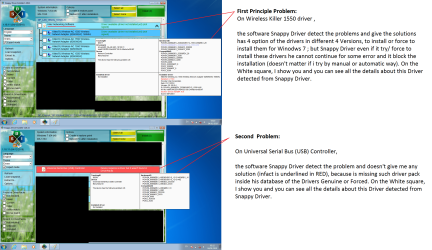
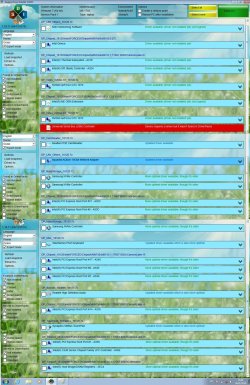
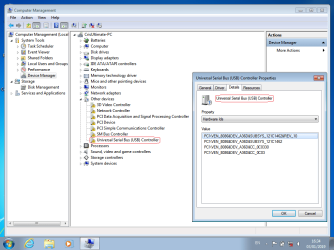
Below, I attached for you some interesting info from windows 7 "Naked" without any driver software or external peripheral installation that could create some confusing; and also some important info from "Snappy Drivers software" that should help you as well. As you can see, you can find the new report in txt file from "Speccy", and all the missing drivers detected from Snappy that it can find them out, but the two important drivers from the USB and the Killer Wireless 1550 cannot find/Install.
 

Attachments

  • 5.png
    5.png
    45.7 KB · Views: 1
  • 4.png
    4.png
    44.9 KB · Views: 1
  • 3.png
    3.png
    46.1 KB · Views: 1
  • 2.png
    2.png
    45.1 KB · Views: 1
  • 1.png
    1.png
    45.1 KB · Views: 1
  • 2 Sappy Driver Problems.png
    2 Sappy Driver Problems.png
    417.5 KB · Views: 4
  • Snappy Driver all.jpg
    Snappy Driver all.jpg
    406 KB · Views: 6
  • Windows 7.txt
    Windows 7.txt
    11.8 KB · Views: 3
  • 7.png
    7.png
    44.4 KB · Views: 1
  • 6.png
    6.png
    46.1 KB · Views: 1
Last edited:

My Computer My Computer

At a glance

Windows 7 - Windows 10 Pro - Windows 11 Pro -...
Computer type
PC/Desktop
Computer Manufacturer/Model Number
MSI
OS
Windows 7 - Windows 10 Pro - Windows 11 Pro - Windows XP - Deepen OS - Zorin OS - Ubuntu OS
Hi Cris,
Excellent Reporting & Brilliant Stuff!

Driver suggestions tomorrow.

Thanks & Regards. ...
 

My Computer My Computer

At a glance

Windows 7 Ultimate x32 With Sp1 + Vista Ultim...Intel Mobile Core 2 Duo T5750 @ 2.00GHz Merom...2.00GB Dual-Channel DDR2 @ 332MHz (5-5-5-15)Mobile Intel(R) 965 Express Chipset Family
Computer type
Laptop
Computer Manufacturer/Model Number
hp compaq presario c795VU notebook pc
OS
Windows 7 Ultimate x32 With Sp1 + Vista Ultimate x32 with Sp1 & Sp2 !!
CPU
Intel Mobile Core 2 Duo T5750 @ 2.00GHz Merom 65nm Technolog
Motherboard
Hewlett-Packard 30D9 (CPU)
Memory
2.00GB Dual-Channel DDR2 @ 332MHz (5-5-5-15)
Graphics Card(s)
Mobile Intel(R) 965 Express Chipset Family
Sound Card
High Definition Audio Device
Monitor(s) Displays
LP154WX4-TLCB on Mobile Intel 965 Express Chipset Family
Screen Resolution
1280x800 @ 60Hz
Hard Drives
149GB Western Digital WDC WD1600BEVS-60VAT0 ATA Device (SATA)
Keyboard
Standard 101/102-Key or Microsoft Natural PS/2 Key + HP QLB
Mouse
ALPS pointing device
Antivirus
Kaspersky AV 2017(Win 7) & AVG AntiVirus Free 2016 (VISTA)
Browser
google chrome
Hi,
This seems to be your product support page : Support For GT75 Titan 8RF | Laptops - The best gaming laptop provider | MSI Global
If yes, then
1. Install 'Intel Chipset Driver'. It should support win 7 x64.
2. If everything goes well, Just check & snap Device Manager & go for step 3
3. Then install 'Intel Management Engine Driver'. It supports win 7 x64
4. If everything goes well, Just check & snap Device Manager again.

Let me know.

Thanks & Regards. ...
 

My Computer My Computer

At a glance

Windows 7 Ultimate x32 With Sp1 + Vista Ultim...Intel Mobile Core 2 Duo T5750 @ 2.00GHz Merom...2.00GB Dual-Channel DDR2 @ 332MHz (5-5-5-15)Mobile Intel(R) 965 Express Chipset Family
Computer type
Laptop
Computer Manufacturer/Model Number
hp compaq presario c795VU notebook pc
OS
Windows 7 Ultimate x32 With Sp1 + Vista Ultimate x32 with Sp1 & Sp2 !!
CPU
Intel Mobile Core 2 Duo T5750 @ 2.00GHz Merom 65nm Technolog
Motherboard
Hewlett-Packard 30D9 (CPU)
Memory
2.00GB Dual-Channel DDR2 @ 332MHz (5-5-5-15)
Graphics Card(s)
Mobile Intel(R) 965 Express Chipset Family
Sound Card
High Definition Audio Device
Monitor(s) Displays
LP154WX4-TLCB on Mobile Intel 965 Express Chipset Family
Screen Resolution
1280x800 @ 60Hz
Hard Drives
149GB Western Digital WDC WD1600BEVS-60VAT0 ATA Device (SATA)
Keyboard
Standard 101/102-Key or Microsoft Natural PS/2 Key + HP QLB
Mouse
ALPS pointing device
Antivirus
Kaspersky AV 2017(Win 7) & AVG AntiVirus Free 2016 (VISTA)
Browser
google chrome
Hi Vineet Garg,

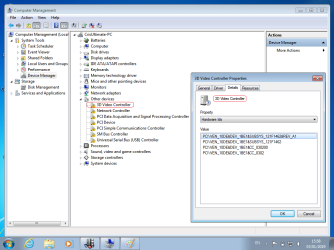
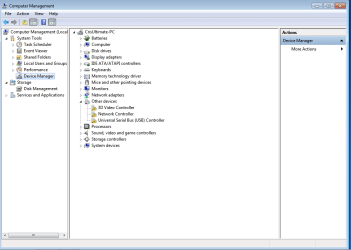
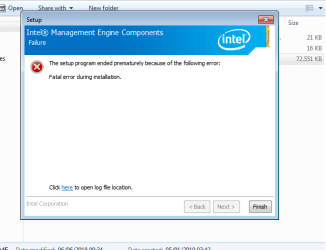
thanks, and from all this story seems that we are going to face where is the problem here. These files, that you suggested me now, I already downloaded from the beginning exactly the same as you found, anyway I tried to download them again and installs. So, the "Intel Chipset Driver" is fine and take out me few voices in "Device Manager" (as attached). We have the problems with the "Intel Management Engine Driver", in fact you are totally right because I read the log of the driver and inside there are more older versions that can be installed. After the installation blocked by the error, I went inside the log file of the error and I noticed that in the errors it comes out because the wizard processes cannot find some Intel Framework 4.0 version and so on. So, I go to Installed all the versions of Framework over of Framework 4.7. After I restarted the pc and I went back to installed it again, and now from the second errors log the Framework voices are fine, but the wizard still to get some errors somewhere; here I have to stand up my hands because I need your better experience about. After the error, I cleaned the file where was located the 2 error logs files and tried to install again to make for you the "fresh error log history", so I attached for you the "Error Picture" and the 2 logs txt files to consult because there are all the details of the error problems. I believe that some components doesn't work, it's because this driver should be the driver of the motherboard and communication where I was sure that Snappy installed for me.....


The voice in Device Manager "3D Video Controller" please, don't pay attention about that because I still to don't install the video drivers.


Cris
 

Attachments

  • Device Manager.png
    Device Manager.png
    20.4 KB · Views: 0
  • Error.png
    Error.png
    11.5 KB · Views: 30
  • IntelME.log
    IntelME.log
    34.6 KB · Views: 8
  • IntelME_MSI.log
    IntelME_MSI.log
    58.8 KB · Views: 4

My Computer My Computer

At a glance

Windows 7 - Windows 10 Pro - Windows 11 Pro -...
Computer type
PC/Desktop
Computer Manufacturer/Model Number
MSI
OS
Windows 7 - Windows 10 Pro - Windows 11 Pro - Windows XP - Deepen OS - Zorin OS - Ubuntu OS
Hi,
So,
Login as admin & Put your pc on AC power
1. Get rid off 'Intel Management Engine'
(a) If you have 'Intel Management Engine' in 'Installed Programs', uninstall it, then restart pc & check whether it comes back in the 'Installed Programs'. If it doesn't come back, Go to Step (b)
(b) In the 'Device Manager', Go to 'System devices', uninstall 'Intel Management Engine interface' driver & while uninstalling the driver, opt to 'Delete the driver' if the option is offered. Then restart the pc & check whether it comes back in the 'Device Manager' as installed.
(c) If it comes back in the Device manager, Repeat it for 3 times & check whether it comes back.

Let me know.

Thanks & Regards. ...
 

My Computer My Computer

At a glance

Windows 7 Ultimate x32 With Sp1 + Vista Ultim...Intel Mobile Core 2 Duo T5750 @ 2.00GHz Merom...2.00GB Dual-Channel DDR2 @ 332MHz (5-5-5-15)Mobile Intel(R) 965 Express Chipset Family
Computer type
Laptop
Computer Manufacturer/Model Number
hp compaq presario c795VU notebook pc
OS
Windows 7 Ultimate x32 With Sp1 + Vista Ultimate x32 with Sp1 & Sp2 !!
CPU
Intel Mobile Core 2 Duo T5750 @ 2.00GHz Merom 65nm Technolog
Motherboard
Hewlett-Packard 30D9 (CPU)
Memory
2.00GB Dual-Channel DDR2 @ 332MHz (5-5-5-15)
Graphics Card(s)
Mobile Intel(R) 965 Express Chipset Family
Sound Card
High Definition Audio Device
Monitor(s) Displays
LP154WX4-TLCB on Mobile Intel 965 Express Chipset Family
Screen Resolution
1280x800 @ 60Hz
Hard Drives
149GB Western Digital WDC WD1600BEVS-60VAT0 ATA Device (SATA)
Keyboard
Standard 101/102-Key or Microsoft Natural PS/2 Key + HP QLB
Mouse
ALPS pointing device
Antivirus
Kaspersky AV 2017(Win 7) & AVG AntiVirus Free 2016 (VISTA)
Browser
google chrome
Hi Vineet Garg,


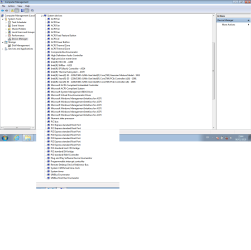
I searched everywhere and there are not signs of "Intel Management Engine" voice installed inside, I tried with AC power and Admin Installation but comes out the same problems. Inside the "Programs Files (86)" and "Programs Files" nothing.


I attached the pic of "Device Manager".....


Cris
 

Attachments

  • System devices.png
    System devices.png
    34.2 KB · Views: 2

My Computer My Computer

At a glance

Windows 7 - Windows 10 Pro - Windows 11 Pro -...
Computer type
PC/Desktop
Computer Manufacturer/Model Number
MSI
OS
Windows 7 - Windows 10 Pro - Windows 11 Pro - Windows XP - Deepen OS - Zorin OS - Ubuntu OS
Hi,
Thanks for attaching Device Manager snap!
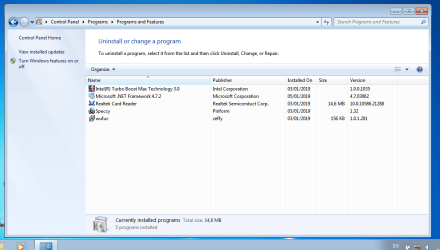
Get me a snap of 'Uninstall or install a program' as well.
 

My Computer My Computer

At a glance

Windows 7 Ultimate x32 With Sp1 + Vista Ultim...Intel Mobile Core 2 Duo T5750 @ 2.00GHz Merom...2.00GB Dual-Channel DDR2 @ 332MHz (5-5-5-15)Mobile Intel(R) 965 Express Chipset Family
Computer type
Laptop
Computer Manufacturer/Model Number
hp compaq presario c795VU notebook pc
OS
Windows 7 Ultimate x32 With Sp1 + Vista Ultimate x32 with Sp1 & Sp2 !!
CPU
Intel Mobile Core 2 Duo T5750 @ 2.00GHz Merom 65nm Technolog
Motherboard
Hewlett-Packard 30D9 (CPU)
Memory
2.00GB Dual-Channel DDR2 @ 332MHz (5-5-5-15)
Graphics Card(s)
Mobile Intel(R) 965 Express Chipset Family
Sound Card
High Definition Audio Device
Monitor(s) Displays
LP154WX4-TLCB on Mobile Intel 965 Express Chipset Family
Screen Resolution
1280x800 @ 60Hz
Hard Drives
149GB Western Digital WDC WD1600BEVS-60VAT0 ATA Device (SATA)
Keyboard
Standard 101/102-Key or Microsoft Natural PS/2 Key + HP QLB
Mouse
ALPS pointing device
Antivirus
Kaspersky AV 2017(Win 7) & AVG AntiVirus Free 2016 (VISTA)
Browser
google chrome
hi,


it's here..........
 

Attachments

  • 2.png
    2.png
    44.1 KB · Views: 2

My Computer My Computer

At a glance

Windows 7 - Windows 10 Pro - Windows 11 Pro -...
Computer type
PC/Desktop
Computer Manufacturer/Model Number
MSI
OS
Windows 7 - Windows 10 Pro - Windows 11 Pro - Windows XP - Deepen OS - Zorin OS - Ubuntu OS
Hi,
1. It's sitting in 'Device Manager' as 'Intel HECI'.
2. The driver was integrated by you in the win7 iso & was there, But it was recognized/ came into play after Chipset installation. That's the importance of Chipset drivers! Chipset guides OS to recognize the components & then only the other devices can be installed properly. So, as soon as you finish installation of an OS, the first drivers to check for is/are missing/uninstalled Chipset components. You did not do that!
3. So, I am in two minds now! because the driver is all well after chipset installation till now, but its certainly not the best. The three other devices which are still uninstalled, seems simple to be installed. But here i want to know your desire whether we should try for the best solution ? If you think about the best, the other drivers are also not the best! If you want to proceed with the best things, I would advise you to make a system image from here.

Take your time & let me know. Good night.

Thanks & Regards. ...
 

My Computer My Computer

At a glance

Windows 7 Ultimate x32 With Sp1 + Vista Ultim...Intel Mobile Core 2 Duo T5750 @ 2.00GHz Merom...2.00GB Dual-Channel DDR2 @ 332MHz (5-5-5-15)Mobile Intel(R) 965 Express Chipset Family
Computer type
Laptop
Computer Manufacturer/Model Number
hp compaq presario c795VU notebook pc
OS
Windows 7 Ultimate x32 With Sp1 + Vista Ultimate x32 with Sp1 & Sp2 !!
CPU
Intel Mobile Core 2 Duo T5750 @ 2.00GHz Merom 65nm Technolog
Motherboard
Hewlett-Packard 30D9 (CPU)
Memory
2.00GB Dual-Channel DDR2 @ 332MHz (5-5-5-15)
Graphics Card(s)
Mobile Intel(R) 965 Express Chipset Family
Sound Card
High Definition Audio Device
Monitor(s) Displays
LP154WX4-TLCB on Mobile Intel 965 Express Chipset Family
Screen Resolution
1280x800 @ 60Hz
Hard Drives
149GB Western Digital WDC WD1600BEVS-60VAT0 ATA Device (SATA)
Keyboard
Standard 101/102-Key or Microsoft Natural PS/2 Key + HP QLB
Mouse
ALPS pointing device
Antivirus
Kaspersky AV 2017(Win 7) & AVG AntiVirus Free 2016 (VISTA)
Browser
google chrome
Thanks Vineet Garg


Let's do it!!!!:-)


So I will start to unistall the HECI?
 

My Computer My Computer

At a glance

Windows 7 - Windows 10 Pro - Windows 11 Pro -...
Computer type
PC/Desktop
Computer Manufacturer/Model Number
MSI
OS
Windows 7 - Windows 10 Pro - Windows 11 Pro - Windows XP - Deepen OS - Zorin OS - Ubuntu OS
Hi Cris,
So,
1.Go ahead, get rid of it ( as told previously ) & Report.

2.Warning : It seems you don't have any Antivirus installed! Windows Defender does not cover Antivirus function in win 7 ( It covers Antivirus function in win 8 & win 10 ). In win7, it covers only 'Spyware & Unwanted Software protection'
You may use Bitdefender Free. It is a good & light 'Antivirus + Spyware & Unwanted Program Protection'. It will automatically take over all the responsibilities from Windows Defender & keep it to sleep.
( Free Antivirus Software - Download Bitdefender Antivirus Free )
As for 'Firewall', Win7 in built firewall does well.
You may check those things in 'Action Center' by expanding 'Security' tab.
Action Center Shortcut - Create
Make sure that Bitdefender is on & Win Defender is off.
( Running multiple security programs is more of danger than security )

Let me know.

Thanks & Regards. ...
 
Last edited:

My Computer My Computer

At a glance

Windows 7 Ultimate x32 With Sp1 + Vista Ultim...Intel Mobile Core 2 Duo T5750 @ 2.00GHz Merom...2.00GB Dual-Channel DDR2 @ 332MHz (5-5-5-15)Mobile Intel(R) 965 Express Chipset Family
Computer type
Laptop
Computer Manufacturer/Model Number
hp compaq presario c795VU notebook pc
OS
Windows 7 Ultimate x32 With Sp1 + Vista Ultimate x32 with Sp1 & Sp2 !!
CPU
Intel Mobile Core 2 Duo T5750 @ 2.00GHz Merom 65nm Technolog
Motherboard
Hewlett-Packard 30D9 (CPU)
Memory
2.00GB Dual-Channel DDR2 @ 332MHz (5-5-5-15)
Graphics Card(s)
Mobile Intel(R) 965 Express Chipset Family
Sound Card
High Definition Audio Device
Monitor(s) Displays
LP154WX4-TLCB on Mobile Intel 965 Express Chipset Family
Screen Resolution
1280x800 @ 60Hz
Hard Drives
149GB Western Digital WDC WD1600BEVS-60VAT0 ATA Device (SATA)
Keyboard
Standard 101/102-Key or Microsoft Natural PS/2 Key + HP QLB
Mouse
ALPS pointing device
Antivirus
Kaspersky AV 2017(Win 7) & AVG AntiVirus Free 2016 (VISTA)
Browser
google chrome
Back
Top