Panasonic NV-GS75 Camcorder driver

kimmey34

New member
Local time
8:15 AM
Messages
9
Hi Everyone, I have just tried to upload some video from my gs75 camcorder to my computer. The computer shows that the camera is connected but only for webcam. I tried installing the software but it is not comaptible. Is there a driver out there that I can get to make this camera work with win7?

I have win 7 Home Premium 64bit

Thanks in advance
Kim

*Problem solved, I used the compatability wizard and it worked perfect!!!
 
Last edited:

My Computer My Computer

OS
Windows 7 Home Premium 64 bit
Dear Kim,
I have exactly the same problem! With your hint I was at least able to get Motion Studio running but even this Sw is not detecting my camera as a camcorder. How do you connect your camcorder to the PC? Via USB? I only have a webcam in my device list.
Any help would be highly appreciated!
Cheers Gaba
 

My Computer My Computer

OS
Windows 7 Home Premium 64 bit
Hi Gaba,

Sorry for taking so long to get back to you. My camera shows up as a webcam too in My Computer, I connect my camera using the USB cable. But when I start Motion DV(after loading it in winXP Service pack 3 compatability mode) it detects my camera and I am able to upload my video that way. I emailed panasonic and they gave me a link to updated software which did not work for me. This is the easiest way.

Regards
Kim
 

My Computer My Computer

OS
Windows 7 Home Premium 64 bit
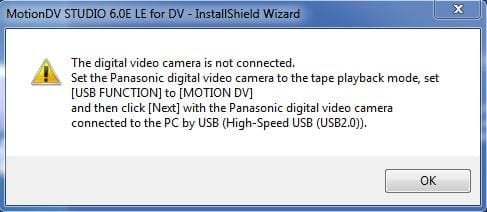
I’m trying to also get my Panasonic NV-GS75NV-working with my Windows 7 64 bit PC and am really struggling. To start with I can’t install MotionDV. The version that came with my camcorder is 5.3LE. I’ve downloaded version 6.0LE from the Panasonic web site but I can’t get that installed either because half way through the install I get an error message "the video camera is not connected" - see attached. When I plug in the camera it appears as a Web Cam in Devices and Printers and has the label DVC. I’ve tried installing the USB and video streaming drivers but again they won’t install. In device Manager it appears as 'Video Edit' under imaging devices.

Please can someone provide some thoughts on how best to proceed?
 

Attachments

  • Capture.JPG
    Capture.JPG
    24.2 KB · Views: 238

My Computer My Computer

Computer Manufacturer/Model Number
DELL INSPIRON
OS
Windows 7 Ultimate 64 bit
GoodJob,

Did you try using the compatability wizard when installing the Motion DV Studio 5.3E LE. If I can remember right I did not use the autorun but I went into the disk and found the Motion DV Studio setup and then I made it compatible with WinXP service pack 3 I think I did this with the camera drivers too. I got it to install no problems. When I connect my camcorder through usb without the motion dv software I get told it is a webcam too. But I just make sure that the program is running and then I plug the camera in. I have had no problems getting the video footage into my computer.

I hope this helps
Kim
 

My Computer My Computer

OS
Windows 7 Home Premium 64 bit
same issue

Hi Kim
Just wanted to know if there is any other way to get MotionDV to work on windows 7

Thanks
 

My Computer My Computer

OS
7 Home Premium 32bit.
Hi,

Just to let you know, I managed to get MotionDV to work on my Windows 7 x64, but only running inside a virtual XP! I know that’s not an option if you have a Home edition, but anyway.
 

My Computer My Computer

Computer Manufacturer/Model Number
Acer / Aspire 7740G
OS
Windows 7 Ultimate x64
CPU
Intel Core i3 processor 330M
Memory
4GB
Graphics Card(s)
ATI HD5650
Hard Drives
640GB
First of all sorry for my english.

You don´t explain very well the resolution of the problem. I connect the camcorder to pc and change in the camera to play tape. then with motion dv open i desconnect the cable and connect again and voila. Works perfect!
 

My Computer My Computer

OS
Windows 7 Ultimate x64
This is it, indeed, when installing the software and when he gives the error that the camera isn't connected, just unplug the cable, plug it right back in and voila: it works!
 

My Computer My Computer

OS
windows 7 Ultimate x64
Hi guys, I solved this problem by using a firewire cable NOT a USB

I used Adobes Premiere Pro to capture the movie, as I did not have Motion DV, but if you have a firewire port I suggest that you use this option.

hopes this helps.
 

My Computer My Computer

OS
Windows 7 64 bit
Back
Top