Sony Vaio drivers for VGN-NW265F

A F 1 G 3

New member
Local time
9:40 AM
Messages
23
Hey guys, I've been lurking these forums for a while but this is my first post. Basically I need help with this new laptop my girlfriend bought me on Black Friday.

It's a Sony VGN-NW265F/(B???) (Idk what the difference between the F and F/B is but on my laptop it is listed as just VGN-NW265F..I do have the Blu-ray player option though is that what the B stands for?) anyways

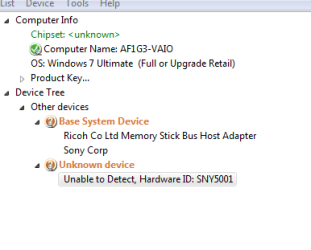
Device Manager is showing:

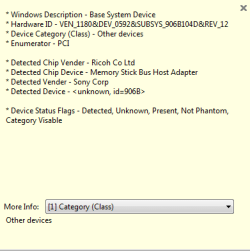
Base System Device

Device type: Other Devices
Manufacturer: Unknown
Location: PCI bus 11, device 3, function 2

Device status
The drivers for this device are not installed. (Code 28)

To find a driver for this device, click Update Driver.

---------

Unknown device

Device type: Other devices
Manufacturer: Unknown
Location: on Intel(R) ICH9M LPC Interface Controller-2919

Device Status
The drivers for this device are not installed. (Code 28)

To find a driver for this device, click Update Driver.


So I guess the first one is the FN keys for volume and brightness. I had the volume keys working when I downloaded drivers from Sony's website but the brightness keys didn't work. I have since done a clean install (with RTM disc, not Sony's recovery) and figured I'd come here for help.

The second device that is listed I guess I need Chipset drivers? Idk but I hope someone can help!

Thanks
 

My Computer My Computer

Computer Manufacturer/Model Number
Sony Vaio VGN-NW265F/B
OS
Windows 7 Ulimate (64-Bit)
CPU
Pentium Dual-Core CPU T4300 @ 2.10GHz (Penryn)
Memory
4.00 GB
Use the unknown devices app from Halfdone Development and then use the guide in my sig to update your drivers. Also, try right clicking, selecting update and then allowing windows to look online for drivers. Check Windows Update too.
 

My Computer My Computer

Computer Manufacturer/Model Number
Sony Vaio Z46GDU
OS
Windows 7 Ultimate x86-64
CPU
[email protected] 1066MHz FSB
Motherboard
Sony branded
Memory
6GB DDR3 1066MHz
Graphics Card(s)
9300M GS 256MB Dedicated (Speed) + Intel4500MHD (Stamina)
Sound Card
Realtek HD Audio
Monitor(s) Displays
13.1' WXGA
Screen Resolution
1600x900
Hard Drives
320GB 7200RPM w/ 16MB cache
Internet Speed
1MB/s

My Computer My Computer

Computer Manufacturer/Model Number
Cheap $399.00 E-Machine
OS
Windows 7 Pro & Vista Home Premium
CPU
Athlon 64 3800+ (Orleans) 2.40GHz
Motherboard
Winfast
Memory
2GB DDR2 RAM DIMM
Graphics Card(s)
NVIDIA GeForce 8500 GT 512 MB memory HDMI out
Sound Card
creative X-Fi Exteme 7..1 channel
Monitor(s) Displays
Acer V223W 22" widescreen DVI
Screen Resolution
1680x1050
Hard Drives
WDC WD5 500GB
WDC WD25 250GB
PSU
OCZ 550 watt
Case
Gateway
Cooling
2 fans
Keyboard
Dell
Mouse
Sony Vaio
Internet Speed
18MB/s down - .72MB /s up
This is what I got after installing all drivers recommended in your sig...sigh i hope i figure this out eventually

Capture.PNG

Capture1.PNG

Capture2.PNG

Capture4.PNG
 

My Computer My Computer

Computer Manufacturer/Model Number
Sony Vaio VGN-NW265F/B
OS
Windows 7 Ulimate (64-Bit)
CPU
Pentium Dual-Core CPU T4300 @ 2.10GHz (Penryn)
Memory
4.00 GB
They weren't links to 3 drivers, just the page with your exact model number. Did you see the Drivers and software link and look through there?
 

My Computer My Computer

Computer Manufacturer/Model Number
Cheap $399.00 E-Machine
OS
Windows 7 Pro & Vista Home Premium
CPU
Athlon 64 3800+ (Orleans) 2.40GHz
Motherboard
Winfast
Memory
2GB DDR2 RAM DIMM
Graphics Card(s)
NVIDIA GeForce 8500 GT 512 MB memory HDMI out
Sound Card
creative X-Fi Exteme 7..1 channel
Monitor(s) Displays
Acer V223W 22" widescreen DVI
Screen Resolution
1680x1050
Hard Drives
WDC WD5 500GB
WDC WD25 250GB
PSU
OCZ 550 watt
Case
Gateway
Cooling
2 fans
Keyboard
Dell
Mouse
Sony Vaio
Internet Speed
18MB/s down - .72MB /s up
The only driver I really care about is the FN drivers but if I download them from Sony's website it only works with the Volume keys not brightness keys...i havent downloaded those drivers again since i last clean installed..im holding out
 
Last edited:

My Computer My Computer

Computer Manufacturer/Model Number
Sony Vaio VGN-NW265F/B
OS
Windows 7 Ulimate (64-Bit)
CPU
Pentium Dual-Core CPU T4300 @ 2.10GHz (Penryn)
Memory
4.00 GB
Sorry I can't help you further.
 

My Computer My Computer

Computer Manufacturer/Model Number
Cheap $399.00 E-Machine
OS
Windows 7 Pro & Vista Home Premium
CPU
Athlon 64 3800+ (Orleans) 2.40GHz
Motherboard
Winfast
Memory
2GB DDR2 RAM DIMM
Graphics Card(s)
NVIDIA GeForce 8500 GT 512 MB memory HDMI out
Sound Card
creative X-Fi Exteme 7..1 channel
Monitor(s) Displays
Acer V223W 22" widescreen DVI
Screen Resolution
1680x1050
Hard Drives
WDC WD5 500GB
WDC WD25 250GB
PSU
OCZ 550 watt
Case
Gateway
Cooling
2 fans
Keyboard
Dell
Mouse
Sony Vaio
Internet Speed
18MB/s down - .72MB /s up
Thanks for the help, awesome avatar btw haha
 

My Computer My Computer

Computer Manufacturer/Model Number
Sony Vaio VGN-NW265F/B
OS
Windows 7 Ulimate (64-Bit)
CPU
Pentium Dual-Core CPU T4300 @ 2.10GHz (Penryn)
Memory
4.00 GB
No problem.
 

My Computer My Computer

Computer Manufacturer/Model Number
Cheap $399.00 E-Machine
OS
Windows 7 Pro & Vista Home Premium
CPU
Athlon 64 3800+ (Orleans) 2.40GHz
Motherboard
Winfast
Memory
2GB DDR2 RAM DIMM
Graphics Card(s)
NVIDIA GeForce 8500 GT 512 MB memory HDMI out
Sound Card
creative X-Fi Exteme 7..1 channel
Monitor(s) Displays
Acer V223W 22" widescreen DVI
Screen Resolution
1680x1050
Hard Drives
WDC WD5 500GB
WDC WD25 250GB
PSU
OCZ 550 watt
Case
Gateway
Cooling
2 fans
Keyboard
Dell
Mouse
Sony Vaio
Internet Speed
18MB/s down - .72MB /s up
Install the Shared Library, restart, and then install notebook utilities....that should get the FN keys fully functional...at least that what i did.... hope it helps
 

My Computer My Computer

Computer Manufacturer/Model Number
Sony Vaio VGN-NR360D
OS
Win 7 Professional x86
CPU
Intel(R) Pentium(R) Dual CPU T2370 @ 1.73GHz
Memory
2.00GB PC5300
Screen Resolution
1280 x 800
Hard Drives
200GB 5400rmp SATA
Internet Speed
15Mbps Cable Connected behind a Dovado Router
trying right now!

EDIT: that worked, thank you...warning though when you try to install the notebook utilities you will get a error telling you that the wrong battery is inserted into the laptop/force you to hibernate before you install the drivers.

Just start task manager and kill the process ISBMgr.exe *32 and/or make it stop from msconfig>starup services
 
Last edited:

My Computer My Computer

Computer Manufacturer/Model Number
Sony Vaio VGN-NW265F/B
OS
Windows 7 Ulimate (64-Bit)
CPU
Pentium Dual-Core CPU T4300 @ 2.10GHz (Penryn)
Memory
4.00 GB
Back
Top