Driver 64 bit for canoscan 4200f

Tullynally

New member
Member
Local time
6:47 AM
Messages
57
Location
Dublin Ireland now, Rockford Il USA before retirin
I have been going crazy trying to get my Canoscan 4200F to work with Win 7 64 bit Home Premium.

I downloaded the 64 bit driver from Canon & under "Device Manager" it says that it is working.

I try to use "TWAIN" in several photo editing programs & it says " cannot connect to device, Cable may be unplugged". When I select Device in the photo editing software it lists "canoscan 32-32"

Some times I get a notice that says "Must use WIA driver",

It works great under Win 7 RC-1 32 bit using paint shop pro 6.

Absolutly NO Help from Canon.
 

My Computer

Computer Manufacturer/Model Number
Home Built
OS
Win 7 Home Pro 64 Bit
CPU
I5 2.66 ghz quad
Motherboard
ASUS p7p55d
Memory
4GB III 1332 Kit
Graphics Card(s)
Gainward GTX260 896GB
Sound Card
onboard
Monitor(s) Displays
1- Samung SyncMaster 2333S 2- Samsung T200HD PC/TV
Screen Resolution
I 1920 X 1080 2 1024 X 720
Hard Drives
Segate 500GB SATA II (3)
PSU
FSP Group Inc.
Case
Generic Tower
Cooling
AIR
Keyboard
Microsoft Wireless Multimedia Keyboard 1.1
Mouse
Microsoft Wireless Optical 2.0
Internet Speed
2.0
Other Info
I am 81 years old & started with Radio Shack TRs 80
(Trash 80) 2 -5 1/4 " Floppies, 640 KB mem, cassette drive, basic language.

My first work desktop was a PDP 8E with high speed tape reader & punch. Teletype input, no monitor.
Hi, agus failte,;), go to Device Manager right click on the scanner and uninstall it. Then shut down your PC, don't press Restart,
Press Shutdown, and then restart it, we will see if there are any changes then.
 

My Computer

Computer Manufacturer/Model Number
Self Build 64bit
OS
Vista Ult64, Win7600
CPU
Intel Core 2 Quad Q6600 @ 2400 MHz 64bit OS
Motherboard
Asus P5E3 Deluxe WiFi @p 64 bit OS
Memory
4096 MB DDR3-SDRAM
Graphics Card(s)
ATI Radeon HD 3870 Series x2 Crossfired
Sound Card
Realtek on board
Monitor(s) Displays
Samsung SyncMaster - 23 inches
Screen Resolution
1680x1050 pixels at 60 Hz in True Colors
Hard Drives
Hitachi (250 GB)/Samsung 750 GB. /Barracuda 160 GB.
My Book 1 TB external..
PSU
Cooler Master 1000w
Case
Cooler Master Cosmos 1000.
Cooling
Fans and fresh air,
Keyboard
Wireless
Mouse
Wireless
Internet Speed
Never fast enough
Other Info
I use a Magnum.
Canoscan drivers

Thanx:

Tried that, no results. Reloaded the canon 64 bit driver & Device Manger said it is working.

I tried a different photo editing program & it came back with an error;

Found canoscan 4200F, but a 64 bit driver is loaded & this program uses only a 32 bit driver.

So it sounds like the driver is OK but the photo editing program does not support a 64 bit driver.

Do you know of a photo editing program that supports a 64 bit driver for twaim support.

Tullynally
 

My Computer

Computer Manufacturer/Model Number
Home Built
OS
Win 7 Home Pro 64 Bit
CPU
I5 2.66 ghz quad
Motherboard
ASUS p7p55d
Memory
4GB III 1332 Kit
Graphics Card(s)
Gainward GTX260 896GB
Sound Card
onboard
Monitor(s) Displays
1- Samung SyncMaster 2333S 2- Samsung T200HD PC/TV
Screen Resolution
I 1920 X 1080 2 1024 X 720
Hard Drives
Segate 500GB SATA II (3)
PSU
FSP Group Inc.
Case
Generic Tower
Cooling
AIR
Keyboard
Microsoft Wireless Multimedia Keyboard 1.1
Mouse
Microsoft Wireless Optical 2.0
Internet Speed
2.0
Other Info
I am 81 years old & started with Radio Shack TRs 80
(Trash 80) 2 -5 1/4 " Floppies, 640 KB mem, cassette drive, basic language.

My first work desktop was a PDP 8E with high speed tape reader & punch. Teletype input, no monitor.
Do you know of a photo editing program that supports a 64 bit driver for twaim support.

Since Photoshop CS4 supports 64-bit OS's I'd imagine that would be your answer. However I have a Nikon Coolscan 4000 that I got to work under Windows 7 using Nikon's supplied 32-bit Vista driver and a modiifed inf file that I posted about here http://www.sevenforums.com/drivers/44994-getting-your-nikon-coolscan-work-w7-x64.html. At any rate trying to get Photoshop CS4 to use the scanner results in basically the same error you mentioned, it doesn't see the scanner.

You on the other hand have a "64-bit" driver for your device, so I would download the trial version of CS4 and see if it'll work with your scanner.

Download here Adobe - Downloads. You'll need to create a user account to download the trial version.

Good luck.
 

My Computer

Computer type
PC/Desktop
Computer Manufacturer/Model Number
Custom built by me.
OS
Windows 10 Pro
CPU
Intel Core i7-4770K (3.5Ghz)
Motherboard
Gigabyte G1 Sniper 5 (F10 Bios)
Memory
32 gig Corsair Dominator Platinum (4x8Gig)
Graphics Card(s)
Sapphire Tri-X R9 Fury
Sound Card
Soundblaster ZXR
Monitor(s) Displays
NEC PA242W 24" LCD Monitor
Screen Resolution
1920 x 1200
Hard Drives
Primary - Samsung 850 Pro (512gig), Samsung 840 Pro (256gig), 2TB WD Caviar Black.
PSU
EVGA Supernova 1000 G2
Case
Cooler Master HAF X
Cooling
Corsair H100i with Corsair Air Series SP120 Quiet Fans
Keyboard
Logitech Wireless Wave
Mouse
Logitech Performance MX
Internet Speed
High Speed Cable
Antivirus
Norton Security
Browser
IE11
Other Info
Memory Timings - 1866MHz @ 9-9-9-27-1T @ 1.5 volts
Hello,
After a long try the Canon Scanner 4200F with Windows 7 64bit Professional is running.

I got it running in this way:

1. deldrvvst6424640ej.exe --> Remove Canon 4200F Driver
2. Unplug USB cable from scanner
3. CanonScan Setup CD-ROM v1.04--> Install Driver und Canon ScanGear CS
--> WinXP SP2 Compatibility Modus
4. Reboot
5. Install Canon 4200F Windows 7 64bit driver --> 4200fvst648620a_64en.exe
6. PlugIn USB Scanners cable.
7. Scanner was running afterwards :-) :-) :-)

Important: Without CanonScan Setup CD-ROM v1.04, I wasn't able to get it running !!! --> It shows you an error about 32bit driver. Don't care about.
 

My Computer

OS
Windows 7 64bit

My Computer

Computer type
PC/Desktop
Computer Manufacturer/Model Number
Custom Build
OS
Windows 7 Professional SP1 - x64 [Non-UEFI Boot]
CPU
Ivy Bridge Core i5 3570K (Delidded)
Motherboard
Asus P8Z77-V LE PLUS
Memory
G.Skill "Ares" DDR3 PC3-12800 - 1600MHz (16Gb)
Graphics Card(s)
Asus Dual-RX480-O4G
Sound Card
Creative Sound Blaster Z w/5.1 sound system
Monitor(s) Displays
Asus IPS 23"
Screen Resolution
16/9
Hard Drives
Internal:
500Go Sata 6Gb/s (x2)
500Go Sata 3Gb/s (x2)
SSD 60Go Sata 6Gb/s
PSU
In Win C 900W Series 80+ Platinum
Case
Thermaltake Chaser A71
Cooling
Custom Water Cooling Loop
Keyboard
Cooler Master QuickFire XTi
Mouse
Razer Imperator 2012 (4G)
Antivirus
MSE
Browser
IE 11.0.xxx Rtm
Other Info
"Raid0" with Intel Smart Response Technology (HDD/SSD)
Hello,
After a long try the Canon Scanner 4200F with Windows 7 64bit Professional is running.

I got it running in this way:

1. deldrvvst6424640ej.exe --> Remove Canon 4200F Driver
2. Unplug USB cable from scanner
3. CanonScan Setup CD-ROM v1.04--> Install Driver und Canon ScanGear CS
--> WinXP SP2 Compatibility Modus
4. Reboot
5. Install Canon 4200F Windows 7 64bit driver --> 4200fvst648620a_64en.exe
6. PlugIn USB Scanners cable.
7. Scanner was running afterwards :-) :-) :-)

Important: Without CanonScan Setup CD-ROM v1.04, I wasn't able to get it running !!! --> It shows you an error about 32bit driver. Don't care about.

Hi, my original CanonScan Setup CD-ROM v1.04 is probably dead or damaged by the years and I am not able to run it in my DVD drive. Could some pls make an image of that and upload somewhere? THANK YOU VERY MUCH, YOU ARE MY LAST CHANCE :o
 

My Computer

OS
Windows 7 Ultimate x64 SP1
Hi.
I need the CanonScan Setup CD-ROM v1.04.
Please anybody can upload somewhere? Thanks in advanced.
 

My Computer

Computer type
PC/Desktop
OS
Windows 8.1 professional x64
Welcome to Seven Forums ... I would try VueScan it is not free but has a 30 Day Trial ... I know this is not what you are looking for .. But might be your best option ..
 

My Computer

Computer Manufacturer/Model Number
W530-3630QM1
OS
windows 7 home 64bit
CPU
INTEL-CORE I7
Memory
16GB
Hard Drives
750GB
Browser
Chrome
Hi.
I need the CanonScan Setup CD-ROM v1.04.
Please anybody can upload somewhere? Thanks in advanced.

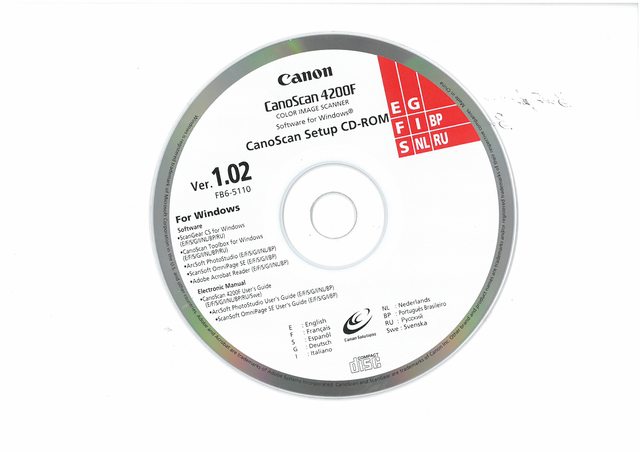
Hi! I make iso-image from original CanoScan Setup CD-ROM v1.02
You can download this image from here: https://yadi.sk/d/2FLFI3fNZcN7L

And i put the scan of this disk like a proof :D
 

My Computer

Computer type
PC/Desktop
OS
Windows 7 Home Basic
I found out something very interesting, that the driver will work with 32 bit programs. For example the scanner isn't found by the 9 64 bit version of ACDSEE, but when I installed an older version which is 32 bit it works like a charm. Even though the CanonToolbox doesn't find it. Hopefully this helps someone...
 

My Computer

Computer type
PC/Desktop
OS
windows 10 64 bit
Back
Top