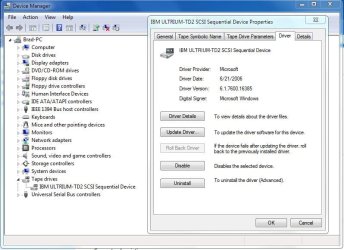
Dell PowerVault 110T Ultrium LTO-2 driver
Hi everyone:
I read this note:
http://www.sevenforums.com/hardware-devices/19200-tape-backup-support.html
about Microsoft taking out removeable storage manager from Windows Vista and 7.
I have a Dell PowerVault 110t Ultrium LTO-2. This is a full-height external U160 SCSI drive.
As I understand it, the drive needs drivers (even though it is a SCSI device) to work in Windows.
Since Dell has not published any drivers for later versions of Desktop Windows OSes, I wondered
if there were any other way to get the drive to
work in Windows 7.
I noticed that Quantum has drivers on their website for their own half-height LTO-2 drives.
Anyway, I wondered...Quantum has a driver on their site for half-height version drives for Windows XP,
Vista and Server 2008. It is Version 3.4.0.0 . In the .inf file of the driver, the description lists:
Comprehensive Ultrium Driver Installer for Windows 2000/XP/2003/Vista/2008 Later on, the driver mentions
the Certance variant of the drives, and they appear to be supported by it. I believe my PowerVault 110T LTO-2
is a Certance drive. Can anyone confirm this?
Anyone have any idea wow risky/safe would it be for me to try that Quantum driver for the other
Windows versions in Windows Vista or 7 for my (half-height/Certance?) drive. Has anyone tried it,
or found another way to use these drives in Windows 7?
Thanks in advance for any help
Brainer
Hi everyone:
I read this note:
http://www.sevenforums.com/hardware-devices/19200-tape-backup-support.html
about Microsoft taking out removeable storage manager from Windows Vista and 7.
I have a Dell PowerVault 110t Ultrium LTO-2. This is a full-height external U160 SCSI drive.
As I understand it, the drive needs drivers (even though it is a SCSI device) to work in Windows.
Since Dell has not published any drivers for later versions of Desktop Windows OSes, I wondered
if there were any other way to get the drive to
work in Windows 7.
I noticed that Quantum has drivers on their website for their own half-height LTO-2 drives.
Anyway, I wondered...Quantum has a driver on their site for half-height version drives for Windows XP,
Vista and Server 2008. It is Version 3.4.0.0 . In the .inf file of the driver, the description lists:
Comprehensive Ultrium Driver Installer for Windows 2000/XP/2003/Vista/2008 Later on, the driver mentions
the Certance variant of the drives, and they appear to be supported by it. I believe my PowerVault 110T LTO-2
is a Certance drive. Can anyone confirm this?
Anyone have any idea wow risky/safe would it be for me to try that Quantum driver for the other
Windows versions in Windows Vista or 7 for my (half-height/Certance?) drive. Has anyone tried it,
or found another way to use these drives in Windows 7?
Thanks in advance for any help
Brainer
My Computer
At a glance
Windows 7
- OS
- Windows 7