Lags in games on Windows 7 x64 pro.

raffael

New member
Local time
1:46 PM
Messages
11
Hi.

I'd like to say I find Windows 7 quite good OS but I have one really annoying problem caused by this system.

I have 2 PCs. One with Windows XP and second with Windows 7 x64 Pro. Few days ago I had Windows XP on both and everything was fine. Now I can't even play GTA2 on LAN (one PC through WiFi, one PC through cable) normally because of the lags. I've tried everything. Disabling the MMCSS, disabling sound devices (no influence), adding TcpAckFrequency like described here WoWAcker Main , disabling autotuning (netsh int tcp set global autotuninglevel=disable) and still nothing.

Ping is between 70 and 100+ (sometimes even 150). On Windows XP it was 30 maximum. And that's even before the game, in the network game manager. I think during the game it gets even worse because I get some serious game hang-ups which are obviously network based. If anyone else know different method please inform me. If I won't find any solution I going back to Windows XP.

I'm using ATI Catalyst 9.12 & Realtek HD 2.39 drivers.

Very similar situation occurs in Fifa 10 but besides lags I get disconnected after playing some time.

If the lag problem occured only in Fifa 10 I would think that the CPU is not powerful enough to handle this game on Windows 7 but GTA2 is far less demanding game and situation is very alike while playing it.

Is there any other solution for this situation?
 

My Computer My Computer

At a glance

Windows 7 + Windows XP + Linux Mint 8AMD Athlox x64 3200+2x2 GB G-Skill DDR2 800 MHzAsus EAH4670 1GB (Ati Radeon 4670)
OS
Windows 7 + Windows XP + Linux Mint 8
CPU
AMD Athlox x64 3200+
Motherboard
MSI K9N Platinum
Memory
2x2 GB G-Skill DDR2 800 MHz
Graphics Card(s)
Asus EAH4670 1GB (Ati Radeon 4670)
Sound Card
Integrated, Realtek 880
Hard Drives
SATA Seagate 7200.10 250GB
PSU
Topower 400P5 U12
Hi.

I'd like to say I find Windows 7 quite good OS but I have one really annoying problem caused by this system.

I have 2 PCs. One with Windows XP and second with Windows 7 x64 Pro. Few days ago I had Windows XP on both and everything was fine. Now I can't even play GTA2 on LAN (one PC through WiFi, one PC through cable) normally because of the lags. I've tried everything. Disabling the MMCSS, disabling sound devices (no influence), adding TcpAckFrequency like described here WoWAcker Main , disabling autotuning (netsh int tcp set global autotuninglevel=disable) and still nothing.

Ping is between 70 and 100+ (sometimes even 150). On Windows XP it was 30 maximum. And that's even before the game, in the network game manager. I think during the game it gets even worse because I get some serious game hang-ups which are obviously network based. If anyone else know different method please inform me. If I won't find any solution I going back to Windows XP.

I'm using ATI Catalyst 9.12 & Realtek HD 2.39 drivers.

Very similar situation occurs in Fifa 10 but besides lags I get disconnected after playing some time.

If the lag problem occured only in Fifa 10 I would think that the CPU is not powerful enough to handle this game on Windows 7 but GTA2 is far less demanding game and situation is very alike while playing it.

Is there any other solution for this situation?


Hi and welcome


I bet you are running homegroup and use IPv6. Homegroup is for win 7 only. IPv6 has been shown to casue random slowdowns drops, etc. You can verify it by creating a new network using the "workgoup" model. work group is for mixed environments and uses IPv4


Goor Luck]

Ken J+
 

My Computer My Computer

At a glance

Win 8 Release candidate 8400[email protected]4 gigsNvidia 9600M
Computer Manufacturer/Model Number
HP Pavillion dv-7 1005 Tx
OS
Win 8 Release candidate 8400
CPU
[email protected]
Memory
4 gigs
Graphics Card(s)
Nvidia 9600M
Sound Card
HD built-in
Monitor(s) Displays
17" Wxga
Screen Resolution
1440x900
Cooling
none
Internet Speed
45Mb down 5Mb up
Well, I've disabled IPv6 and it didn't change the situation at all.
We'll see if the homegroup's disabling will help.
 

My Computer My Computer

At a glance

Windows 7 + Windows XP + Linux Mint 8AMD Athlox x64 3200+2x2 GB G-Skill DDR2 800 MHzAsus EAH4670 1GB (Ati Radeon 4670)
OS
Windows 7 + Windows XP + Linux Mint 8
CPU
AMD Athlox x64 3200+
Motherboard
MSI K9N Platinum
Memory
2x2 GB G-Skill DDR2 800 MHz
Graphics Card(s)
Asus EAH4670 1GB (Ati Radeon 4670)
Sound Card
Integrated, Realtek 880
Hard Drives
SATA Seagate 7200.10 250GB
PSU
Topower 400P5 U12
I'm also using the "Realtek HD Audio 2.39" driver. But it was happening before I installed it. Maybe it's how Windows 7 64-bit uses R.A.M. for 32-bit programs or maybe it's Microsoft's Base Audio driver.

I am suffering from the same unplayable LAG.

I'm going to disable my audio device in Device manager and try "Left 4 Dead 2" without any sound. That way I can determine whether it's the sound that is causing it.

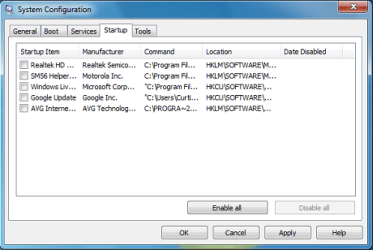
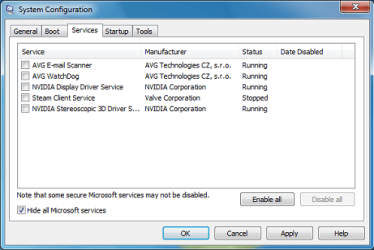
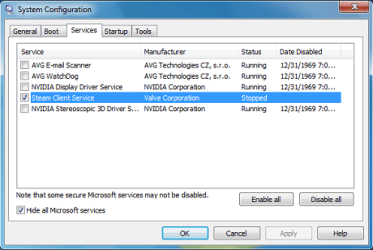
Or, even better open up, "msconfig.exe" and do a "Clean/Cold Boot" by disabling all Startup Programs and Third-Party Services except for the ones that are absolutely necessary to run the game.

MSCONFIG:
 

Attachments

  • Startup.png
    Startup.png
    22.2 KB · Views: 83
  • services.png
    services.png
    22.4 KB · Views: 64
  • required.png
    required.png
    23.7 KB · Views: 62
Last edited:

My Computer My Computer

At a glance

Windows 7 Home Premium 64-bitIntel Core i-5 2500 @ 3.3 GHz Quad Core8.192 GB DDR3 PC3-10700 (667 MHz)Sapphire ATI HD 6870
Computer type
PC/Desktop
Computer Manufacturer/Model Number
Custom Desktop
OS
Windows 7 Home Premium 64-bit
CPU
Intel Core i-5 2500 @ 3.3 GHz Quad Core
Motherboard
Gigabyte Z68M-D2H
Memory
8.192 GB DDR3 PC3-10700 (667 MHz)
Graphics Card(s)
Sapphire ATI HD 6870
Sound Card
Integrated - Realtek HD Audio ALC889
Monitor(s) Displays
LG Flatron Wide 19" LCD
Screen Resolution
1440 x 900
Hard Drives
250 GB Samsung SSD ( for OS )
250 GB Samsung SSD ( for Games )
1500 GB Sata HDD ( for pictures and Video )
PSU
Foxxconn 600 W
Case
Foxxconn
Keyboard
Logitech USB Keyboard
Mouse
Logitech Optical Mouse
Internet Speed
25 MB/s download 2 MB/s upload Rogers Telecommunications.
Antivirus
Microsoft Security Essentials
Browser
IE and Chrome

My Computer My Computer

At a glance

Windows 7 + Windows XP + Linux Mint 8AMD Athlox x64 3200+2x2 GB G-Skill DDR2 800 MHzAsus EAH4670 1GB (Ati Radeon 4670)
OS
Windows 7 + Windows XP + Linux Mint 8
CPU
AMD Athlox x64 3200+
Motherboard
MSI K9N Platinum
Memory
2x2 GB G-Skill DDR2 800 MHz
Graphics Card(s)
Asus EAH4670 1GB (Ati Radeon 4670)
Sound Card
Integrated, Realtek 880
Hard Drives
SATA Seagate 7200.10 250GB
PSU
Topower 400P5 U12
Do you have a PVR Card (Personal Video Recorder)? ie. Winfast, ATI TV Wonder, Haupepauge WinTV, etc.?

I have a Haupepauge WinTV-150 PVR card. I also have a Motorola Home Speakerphone device.

After disabling all devices in the "Sound, video and game controllers", and the Phone modem, webcam, PVR card, ...

... No LAG what so ever.
 
Last edited:

My Computer My Computer

At a glance

Windows 7 Home Premium 64-bitIntel Core i-5 2500 @ 3.3 GHz Quad Core8.192 GB DDR3 PC3-10700 (667 MHz)Sapphire ATI HD 6870
Computer type
PC/Desktop
Computer Manufacturer/Model Number
Custom Desktop
OS
Windows 7 Home Premium 64-bit
CPU
Intel Core i-5 2500 @ 3.3 GHz Quad Core
Motherboard
Gigabyte Z68M-D2H
Memory
8.192 GB DDR3 PC3-10700 (667 MHz)
Graphics Card(s)
Sapphire ATI HD 6870
Sound Card
Integrated - Realtek HD Audio ALC889
Monitor(s) Displays
LG Flatron Wide 19" LCD
Screen Resolution
1440 x 900
Hard Drives
250 GB Samsung SSD ( for OS )
250 GB Samsung SSD ( for Games )
1500 GB Sata HDD ( for pictures and Video )
PSU
Foxxconn 600 W
Case
Foxxconn
Keyboard
Logitech USB Keyboard
Mouse
Logitech Optical Mouse
Internet Speed
25 MB/s download 2 MB/s upload Rogers Telecommunications.
Antivirus
Microsoft Security Essentials
Browser
IE and Chrome
No, I don't have any additional cards. I will keep trying to find the cause.
 

My Computer My Computer

At a glance

Windows 7 + Windows XP + Linux Mint 8AMD Athlox x64 3200+2x2 GB G-Skill DDR2 800 MHzAsus EAH4670 1GB (Ati Radeon 4670)
OS
Windows 7 + Windows XP + Linux Mint 8
CPU
AMD Athlox x64 3200+
Motherboard
MSI K9N Platinum
Memory
2x2 GB G-Skill DDR2 800 MHz
Graphics Card(s)
Asus EAH4670 1GB (Ati Radeon 4670)
Sound Card
Integrated, Realtek 880
Hard Drives
SATA Seagate 7200.10 250GB
PSU
Topower 400P5 U12
I figured out what it is. After testing each device that I disabled, Realtek HD Audio was the cause.

With only Realtek enabled, I got LAG. With all enabled except Realtek, NO LAG.

It must be the Audio driver. Version R2.39
 

My Computer My Computer

At a glance

Windows 7 Home Premium 64-bitIntel Core i-5 2500 @ 3.3 GHz Quad Core8.192 GB DDR3 PC3-10700 (667 MHz)Sapphire ATI HD 6870
Computer type
PC/Desktop
Computer Manufacturer/Model Number
Custom Desktop
OS
Windows 7 Home Premium 64-bit
CPU
Intel Core i-5 2500 @ 3.3 GHz Quad Core
Motherboard
Gigabyte Z68M-D2H
Memory
8.192 GB DDR3 PC3-10700 (667 MHz)
Graphics Card(s)
Sapphire ATI HD 6870
Sound Card
Integrated - Realtek HD Audio ALC889
Monitor(s) Displays
LG Flatron Wide 19" LCD
Screen Resolution
1440 x 900
Hard Drives
250 GB Samsung SSD ( for OS )
250 GB Samsung SSD ( for Games )
1500 GB Sata HDD ( for pictures and Video )
PSU
Foxxconn 600 W
Case
Foxxconn
Keyboard
Logitech USB Keyboard
Mouse
Logitech Optical Mouse
Internet Speed
25 MB/s download 2 MB/s upload Rogers Telecommunications.
Antivirus
Microsoft Security Essentials
Browser
IE and Chrome
Wouldn't that mean that you'd have no sound on your computer?
 

My Computer My Computer

At a glance

Microsoft Windows 7 Home Premium3.00 GBnVidia Geforce 9400
Computer Manufacturer/Model Number
Dell Studio 1440/14z
OS
Microsoft Windows 7 Home Premium
Memory
3.00 GB
Graphics Card(s)
nVidia Geforce 9400
Sound Card
IDT Audio
Screen Resolution
1366 x 768
Mouse
Microsoft Wireless Notebook Optical Mouse 3000
Wouldn't that mean that you'd have no sound on your computer?

Exactly. Which kind of sucks. I think that it's probably not the fault of Microsoft or Realtek.

It has to be Valve. Either, they didn't make L4d 1 & 2 compatable with Window 7 64-bit, or with Realtek on a Windows 7 64 bit system.

The lag is the same with the Realtek driver as it is with the Microsoft audio driver.
 

My Computer My Computer

At a glance

Windows 7 Home Premium 64-bitIntel Core i-5 2500 @ 3.3 GHz Quad Core8.192 GB DDR3 PC3-10700 (667 MHz)Sapphire ATI HD 6870
Computer type
PC/Desktop
Computer Manufacturer/Model Number
Custom Desktop
OS
Windows 7 Home Premium 64-bit
CPU
Intel Core i-5 2500 @ 3.3 GHz Quad Core
Motherboard
Gigabyte Z68M-D2H
Memory
8.192 GB DDR3 PC3-10700 (667 MHz)
Graphics Card(s)
Sapphire ATI HD 6870
Sound Card
Integrated - Realtek HD Audio ALC889
Monitor(s) Displays
LG Flatron Wide 19" LCD
Screen Resolution
1440 x 900
Hard Drives
250 GB Samsung SSD ( for OS )
250 GB Samsung SSD ( for Games )
1500 GB Sata HDD ( for pictures and Video )
PSU
Foxxconn 600 W
Case
Foxxconn
Keyboard
Logitech USB Keyboard
Mouse
Logitech Optical Mouse
Internet Speed
25 MB/s download 2 MB/s upload Rogers Telecommunications.
Antivirus
Microsoft Security Essentials
Browser
IE and Chrome
Try Compatability Mode for VISTA (not sp1 or 2).
 

My Computer My Computer

At a glance

Windows 7 Home Premium 64-bitIntel Core i-5 2500 @ 3.3 GHz Quad Core8.192 GB DDR3 PC3-10700 (667 MHz)Sapphire ATI HD 6870
Computer type
PC/Desktop
Computer Manufacturer/Model Number
Custom Desktop
OS
Windows 7 Home Premium 64-bit
CPU
Intel Core i-5 2500 @ 3.3 GHz Quad Core
Motherboard
Gigabyte Z68M-D2H
Memory
8.192 GB DDR3 PC3-10700 (667 MHz)
Graphics Card(s)
Sapphire ATI HD 6870
Sound Card
Integrated - Realtek HD Audio ALC889
Monitor(s) Displays
LG Flatron Wide 19" LCD
Screen Resolution
1440 x 900
Hard Drives
250 GB Samsung SSD ( for OS )
250 GB Samsung SSD ( for Games )
1500 GB Sata HDD ( for pictures and Video )
PSU
Foxxconn 600 W
Case
Foxxconn
Keyboard
Logitech USB Keyboard
Mouse
Logitech Optical Mouse
Internet Speed
25 MB/s download 2 MB/s upload Rogers Telecommunications.
Antivirus
Microsoft Security Essentials
Browser
IE and Chrome
Ok, having the problem and no solution I got back to Windows XP x64. Guess what. The lag dissapeared. The ping is max 20ms now, this is sick situation. Quite old OS handles this situation quite well and new OS screws it totally. I guess I will have to wait till Windows 8...
 

My Computer My Computer

At a glance

Windows 7 + Windows XP + Linux Mint 8AMD Athlox x64 3200+2x2 GB G-Skill DDR2 800 MHzAsus EAH4670 1GB (Ati Radeon 4670)
OS
Windows 7 + Windows XP + Linux Mint 8
CPU
AMD Athlox x64 3200+
Motherboard
MSI K9N Platinum
Memory
2x2 GB G-Skill DDR2 800 MHz
Graphics Card(s)
Asus EAH4670 1GB (Ati Radeon 4670)
Sound Card
Integrated, Realtek 880
Hard Drives
SATA Seagate 7200.10 250GB
PSU
Topower 400P5 U12
Giving up on a whole wonderful OS just for a simple problem like that?

I don't know the solution but you should have tried harder before giving up like that..
 

My Computer My Computer

At a glance

Windows 7 Ultimate x64AMD Phenom II x4 B502x4 G.skill DDR3 CL9 @1600Powercolor HD 6950 2G GDDR5
Computer Manufacturer/Model Number
Custom
OS
Windows 7 Ultimate x64
CPU
AMD Phenom II x4 B50
Motherboard
GA-MA770T-UD3P
Memory
2x4 G.skill DDR3 CL9 @1600
Graphics Card(s)
Powercolor HD 6950 2G GDDR5
Sound Card
Built in + Creative T6200 5.1 sub system
Monitor(s) Displays
LG FLATRON W1934S
Screen Resolution
1440x900
Hard Drives
2 1T WD Blacks (No Raid), 1 2T WD Green
PSU
NZXT HALE90 1000W 80Gold+
Case
HAF 932
Cooling
5 Fans
Keyboard
Upgrading~
Mouse
Upgrading~
Internet Speed
ADSL 2mb
windows 7 and realtek seem to be having problems in a lot of games.
however as of the 30th of dec there was an update for the hd sound drivers so give them a try
 

My Computer My Computer

At a glance

win 7 x64/win xp x64intel 2.66 quad6g ddr39800gx2 quad sli
OS
win 7 x64/win xp x64
CPU
intel 2.66 quad
Motherboard
xfx 790i
Memory
6g ddr3
Graphics Card(s)
9800gx2 quad sli
Sound Card
realtec something
Monitor(s) Displays
22"
Screen Resolution
1680 1050
Hard Drives
150g 10000rpm sata (main)
1tb 7200rpm sata
PSU
kingwin gigawatt
Case
antec
Internet Speed
20/20
I have found a better Solution than the Compatability Mode (worked for my problem).

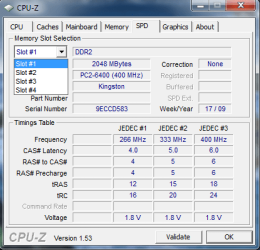
If any of you who are experiencing the same problem have upgraded your R.A.M., you may want to download CPU-Z from:

CPUID

When you run CPU-Z, click the "SPD" TAB. On the "SPD" TAB, you can look at each RAM Slot.

If each Stick of RAM does not have the same:

1) PC # (ie. PC2-6400 (400 MHz)

2) Matching Values in the "Timings Table" (on the SPD TAB).

,that could be the cause of your problem.
 

Attachments

  • CPU-Z.png
    CPU-Z.png
    15.5 KB · Views: 46

My Computer My Computer

At a glance

Windows 7 Home Premium 64-bitIntel Core i-5 2500 @ 3.3 GHz Quad Core8.192 GB DDR3 PC3-10700 (667 MHz)Sapphire ATI HD 6870
Computer type
PC/Desktop
Computer Manufacturer/Model Number
Custom Desktop
OS
Windows 7 Home Premium 64-bit
CPU
Intel Core i-5 2500 @ 3.3 GHz Quad Core
Motherboard
Gigabyte Z68M-D2H
Memory
8.192 GB DDR3 PC3-10700 (667 MHz)
Graphics Card(s)
Sapphire ATI HD 6870
Sound Card
Integrated - Realtek HD Audio ALC889
Monitor(s) Displays
LG Flatron Wide 19" LCD
Screen Resolution
1440 x 900
Hard Drives
250 GB Samsung SSD ( for OS )
250 GB Samsung SSD ( for Games )
1500 GB Sata HDD ( for pictures and Video )
PSU
Foxxconn 600 W
Case
Foxxconn
Keyboard
Logitech USB Keyboard
Mouse
Logitech Optical Mouse
Internet Speed
25 MB/s download 2 MB/s upload Rogers Telecommunications.
Antivirus
Microsoft Security Essentials
Browser
IE and Chrome
i have exact same sticks
 

My Computer My Computer

At a glance

windows 7 64bit ultimate
OS
windows 7 64bit ultimate
Giving up on a whole wonderful OS just for a simple problem like that?

I don't know the solution but you should have tried harder before giving up like that..
Believe me, if it was the only problem I wouldn't change it. I'm having some more serious problems for which there are no solution also (like 3ds Max 2009 throwing error and not working at all).

If each Stick of RAM does not have the same
It ain't possible in my case as I have a perfect matching pair bought especially for Dual Channel Mode.
 

My Computer My Computer

At a glance

Windows 7 + Windows XP + Linux Mint 8AMD Athlox x64 3200+2x2 GB G-Skill DDR2 800 MHzAsus EAH4670 1GB (Ati Radeon 4670)
OS
Windows 7 + Windows XP + Linux Mint 8
CPU
AMD Athlox x64 3200+
Motherboard
MSI K9N Platinum
Memory
2x2 GB G-Skill DDR2 800 MHz
Graphics Card(s)
Asus EAH4670 1GB (Ati Radeon 4670)
Sound Card
Integrated, Realtek 880
Hard Drives
SATA Seagate 7200.10 250GB
PSU
Topower 400P5 U12
So I have been messing with this problem for weeks now:
Think I did around 10 fresh win7 64 installs
I only tested HL2DM + UT2004 as it's all I really game
My ping never jumps. It's like the game pauses for 1 sec every 30sec or so.
Enjoy really nice ping always below 30.
Think I officially hate WIN7 64bit OS !

System specs:
System specs:
Asus p5k premium
C2D 6850
4GB Ballistix pc8500
ATI HD4870 1GB
Audigy2 value
Corsair 520w
windows 7 ultimate 64bit

I have a pal with almost identical hardware. Only difference is gfx= Nvidia 8800gts, different harddisks and different monitor. No lag on his end

  • Fiddled with different soundcards
  • Different network cards
  • Fiddled with different drivers and also microsofts own
  • Tried this supposed fix: Reduce game network latency in Windows 7 or Vista Life & Code worked crap
  • Tried this supposed fix:Stop and disable the "Multimedia Class Scheduler" service Run regedit and go to "HKEY_LOCAL_MACHINE\SYSTEM\CurrentControlSet\Services\Audiosrv"
    Double click on the entry "DependOnService" and delete the line with "MMCSS" from the text box
    worked crap
  • Tried this supposed fix: Open regedit
    Go to: HKEY_LOCAL_MACHINE\SOFTWARE\Microsoft\Windows NT\CurrentVersion\Multimedia\SystemProfile
    There will be an entry for network performance throttling, default value is 10; set it to FFFFFFFF hex (willl look like 0xFFFFFFFF to the right of the entry)
    Reboot Do I need to say. Worked crap
  • Fowarded ports in my router even though it suports UPnP port mapping and this have never been necessary
  • Disabled windows firewall completely
  • deleted my whole steam folder and redownloaded on a fresh win7 install

Discussed here:
http://www.sevenforums.com/gaming/49546-lags-games-windows-7-x64-pro.html
http://www.sevenforums.com/gaming/31980-lag-online-games-windows-7-a.html
Windows 7 Online lag (primarily in games) - [H]ard|Forum
Lag on Windows 7 - help - Steam Users' Forums
 

My Computer My Computer

At a glance

windows 7
OS
windows 7
Back
Top