

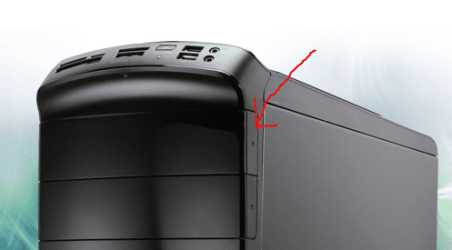
hi everyone thought i would post this thread for anyone having problems with the eject button the norm is to use the button manager software(Gateway Photo Frame Software Version 4.2.3.10) that only runs when windows is running after you log in. well i made a discovery after having one of these machines for 7 months! on the right hand side of the front case where the drive is there is a push button encased that ejects the drive it works if you are in the bios handy if you need to use a disc to boot the pc,system recovery. or reinstalling windows, made the discovery today after having the front panel off to fit a bay cooler
Attachments
Last edited:
My Computer
- Computer Manufacturer/Model Number
- packard bell IXTREME M5722
- OS
- Operating System : Windows 7 Home Premium Edition 6.01.7600 SP1 (x64)
- CPU
- Processor : Intel Core 2 Quad Q8300 @ 2500 MHz
- Motherboard
- Mainboard : Packard Bell (Acer EG43M )
- Memory
- Physical Memory :8GB Corsair4x 2GB 800MHz C5 DDR2
- Graphics Card(s)
- Video Card : XFX 6700 AMD
- Monitor(s) Displays
- Maestro 234DL - BenQ V2220 - BenQ VW2420H
- Screen Resolution
- Current Display :1920x1080p pixels at 60 Hz in HD LED
- Hard Drives
- Hard Disks : WDC (1000 GB)
Drive C: (Hard Disk) : 428 GB available on 491 GB
Drive D: (Hard Disk) : 426 GB available on 492 GB
SAMSUNG spinpoint HD103SJ 1000.2 GB
(X 2) KINGSTON SSD NOW V 30GB
- PSU
- XFX ProSeries 550W PSU
- Case
- PACKARD BELL IXTREME
- Cooling
- System Blower Current: 150mA Air Flow16CFM ;Akasa 90mm rear
- Keyboard
- Gigabyte Aivia K8100
- Mouse
- TRUST-Wireless Laser Mouse - Carbon edition MI-7770C
- Internet Speed
- TP-LINK > TL-WN951N / AV500 Gigabit Powerline Adapters
- Browser
- chrome dev
- Other Info
- EXTRA COOLING>(FAN CONTROLLER) PC Bay Cooler 3 x 40mm fans; Akasa AK-HD-BL Blue hard drive cooler 2 x 40 mm fan 4500 rpm 29.7 dBA
Bios> American Megatrends Inc.
Version : P01-A1
Date : 08/31/2009


