Size of Icons on Welcome Screen

greyoldchief

New member
Local time
12:53 AM
Messages
6
I've got multiple users and the icons on the welcome screen are small. I would like to increase their size, but I have not been able to find a way to do it. Can anyone give me a hand?
 

My Computer My Computer

At a glance

windows 7 home premium
OS
windows 7 home premium

My Computer My Computer

At a glance

XP / Win7 x64 ProIntel Quad-Core Q9450 @ 3.2GHz2x2GB GSkill DDR2NVIDIA GeForce 8600 GTS (EVGA)
OS
XP / Win7 x64 Pro
CPU
Intel Quad-Core Q9450 @ 3.2GHz
Motherboard
Asus P5-E
Memory
2x2GB GSkill DDR2
Graphics Card(s)
NVIDIA GeForce 8600 GTS (EVGA)
Monitor(s) Displays
Dell 2408WFP
Screen Resolution
1920x1200
Icon Size

I've tried both of those. They don't change the welcome screen icon size.
 

My Computer My Computer

At a glance

windows 7 home premium
OS
windows 7 home premium
Those are BMP pictures and are located at C:/ProgramData/Microsoft/User Account Pictures/Default Pictures

I have not tried it but MAYBE you can increase the size of one of the pictures and give that a try.

Jim :geek:
 

My Computer My Computer

At a glance

Windows 8.1 Pro w/Media Center 64bit, Windows...Phenom II X6 1100TCrucial Balistic 8gb DDR3-1866 CL9MSI R6850 Cyclone IGD5 PE
Computer type
PC/Desktop
Computer Manufacturer/Model Number
Home Built
OS
Windows 8.1 Pro w/Media Center 64bit, Windows 7 HP 64bit
CPU
Phenom II X6 1100T
Motherboard
ASUS M5A99X EVO
Memory
Crucial Balistic 8gb DDR3-1866 CL9
Graphics Card(s)
MSI R6850 Cyclone IGD5 PE
Sound Card
On Board
Monitor(s) Displays
ASUS VE258Q 25" LED with DVI-HDMI-DisplayPort
Screen Resolution
1920 x 1080
Hard Drives
Two WD Cavier Black 2TB Sata III, WD My Book Essential 2TB USB 3.0
PSU
Seasonic X650 80 Plus GOLD Modular
Case
Corsair 400R
Cooling
Antec Kuhler H2O 620, Two 120mm and four 140mm
Keyboard
Logitech K120
Mouse
Logitech Marble Mouse USB, Logitech Precision Game Pad
Internet Speed
15MB
Antivirus
Norton IS 2013, Malwarebytes Pro Beta 2
Browser
IE-11, FF-27
Other Info
APC UPS ES 750, Netgear WNR3500L Gigabit & Wireless N Router with SamKnows Test Program, Motorola SB6120 Gigabit Cable Modem. Brother HL-2170W Laser Printer, Epson V300 Scanner
I've tried both of those. They don't change the welcome screen icon size.

I don't think that's possible, as soon as you add a second (or more) user the user account picture resizes, if it's password protected, when you select a user it will enlarge.
Maybe someone will come along with a better answer or a way to do it, I've never seen it myself.
 

My Computer My Computer

At a glance

Win 10 Pro x64Intel I5-2500K @3.3GHz16GB G.Skill Ripjaws X (4x4GB)EVGA GeForce 750 Ti SC 2GB
Computer type
PC/Desktop
Computer Manufacturer/Model Number
Self Built
OS
Win 10 Pro x64
CPU
Intel I5-2500K @3.3GHz
Motherboard
Asrock P67 Extreme4
Memory
16GB G.Skill Ripjaws X (4x4GB)
Graphics Card(s)
EVGA GeForce 750 Ti SC 2GB
Sound Card
ASUS Xonar DG 5.1 Channels 24-bit 96KHz PCI Interface Sound
Monitor(s) Displays
auria eq2367
Screen Resolution
1920 x 1080
Hard Drives
250GB Samsung 850 EVO SSD
1TB WD Blue
1TB Hitachi
PSU
SeaSonic X 650W 80 Plus Gold
Case
Corsair Obsidian 750D
Cooling
Corsair H60, Three 140mm case fans
Keyboard
Logitech Wireless Keyboard K520
Mouse
Logitech Wireless Mouse M310
Internet Speed
Wave Broadband ~ 100 dn 5 up
Antivirus
Windows Defender, Malwarebytes Premium
Browser
Edge, IE11, Chrome
Other Info
Laptop specs: HP g7-1365dx /
CPU: AMD A6-3420M APU with Radeon(tm) HD Graphics /
RAM: Crucial 8Gb (2x4Gb) /
SSD: Crucial M4-CT128M4SSD2 ATA Device/ FW 000F /
GFX: AMD Radeon HD 6520G /
OS: Windows 10 Pro x64
Icons

Thanks everyone. I'll just have to live with it.
 

My Computer My Computer

At a glance

windows 7 home premium
OS
windows 7 home premium
Thanks everyone. I'll just have to live with it.

You're welcome, you can keep checking back in case someone does know how to do it, I know I will, I'd like to know too. ;)

Enjoy your stay here and welcome aboard. :D
 

My Computer My Computer

At a glance

Win 10 Pro x64Intel I5-2500K @3.3GHz16GB G.Skill Ripjaws X (4x4GB)EVGA GeForce 750 Ti SC 2GB
Computer type
PC/Desktop
Computer Manufacturer/Model Number
Self Built
OS
Win 10 Pro x64
CPU
Intel I5-2500K @3.3GHz
Motherboard
Asrock P67 Extreme4
Memory
16GB G.Skill Ripjaws X (4x4GB)
Graphics Card(s)
EVGA GeForce 750 Ti SC 2GB
Sound Card
ASUS Xonar DG 5.1 Channels 24-bit 96KHz PCI Interface Sound
Monitor(s) Displays
auria eq2367
Screen Resolution
1920 x 1080
Hard Drives
250GB Samsung 850 EVO SSD
1TB WD Blue
1TB Hitachi
PSU
SeaSonic X 650W 80 Plus Gold
Case
Corsair Obsidian 750D
Cooling
Corsair H60, Three 140mm case fans
Keyboard
Logitech Wireless Keyboard K520
Mouse
Logitech Wireless Mouse M310
Internet Speed
Wave Broadband ~ 100 dn 5 up
Antivirus
Windows Defender, Malwarebytes Premium
Browser
Edge, IE11, Chrome
Other Info
Laptop specs: HP g7-1365dx /
CPU: AMD A6-3420M APU with Radeon(tm) HD Graphics /
RAM: Crucial 8Gb (2x4Gb) /
SSD: Crucial M4-CT128M4SSD2 ATA Device/ FW 000F /
GFX: AMD Radeon HD 6520G /
OS: Windows 10 Pro x64

My Computer My Computer

At a glance

Windows 7 Home Premium x64AMD Phenom II X6 1600T16GB PC3-10700 (1342MHz)ATI Radeon 5770 HD (x2) CrossFire
Computer Manufacturer/Model Number
OEM - Me
OS
Windows 7 Home Premium x64
CPU
AMD Phenom II X6 1600T
Motherboard
GigaByte GZ-990FXA-UD3
Memory
16GB PC3-10700 (1342MHz)
Graphics Card(s)
ATI Radeon 5770 HD (x2) CrossFire
Sound Card
On-board RealTek chipset
Monitor(s) Displays
3x Hanns-G 1920x1080 Monitors
Screen Resolution
3x Hanns-G 1920x1080 Monitors
Hard Drives
Intel 25-V SSD 40GB: 218 MB/s AT: 0.1ms
Intel X-25M SSD 80GB: 230MB/s AT: 0.1ms
Seagate 750GB: 133 MB/s AT: 13ms (perpendicular storage)
Buffalo HD-PCTU3 1TB External drive
PSU
OCZ Stealth X Stream 750W
Case
Cheap (unknown)
Cooling
Stock
Keyboard
HP USB
Mouse
LogiTech USB
Internet Speed
1.5 Mbps - Slow - At the tail-end of a rural network
Other Info
Printer: Epson Stylus C-84
Scanner: HP 3500C Flatbed
DVD-RW: Plextor
DVD-ROM: Unknown
WEI: 7.4
I had the same problem, found this fix, hope it helps you

1. Click the Start button and type regedit in the Search box. In the Results, Right Click regedit and select the Run as Administrator option.
Navigate to the following key:

HKEY_CURRENT_CONFIG\Software\Fonts

2. Backup the value you will be changing.

Right click the Fonts key in the left pane, select Export. In the Save As dialog, select the Desktop as the save in location. In the File Name box type LogonBackup. Click the Save button.

If anything goes wrong, you can go to the Desktop, right click the LogonBackup.reg file and select Merge to restore the registry value.

3. In the right side pane, Double Click the LogPixels value. In the Edit dialog box, change the 2 digit value using the following guide.


60 -(100% Font Size) -Default size
78 -(125% Font Size)
90 -(150% Font Size)
4. Exit the Registry editor and restart the computer to test the results.

 

My Computer My Computer

At a glance

Windows 7 Ultimate x64
OS
Windows 7 Ultimate x64
So if I wanted 200%, 250%, 300%, etc, can you tell me what the respective two digit values should be?

And can you confirm that changing these values only changes the log on screen icon sizes and no other icons such as those on the desktop? This may seem obvious but there are some comments out there that suggest changing these settings affects more than just the logon screen icons.

Thanks
 

My Computer My Computer

At a glance

Win7 HP 64bit
Computer type
PC/Desktop
OS
Win7 HP 64bit
So if I wanted 200%, 250%, 300%, etc, can you tell me what the respective two digit values should be?

And can you confirm that changing these values only changes the log on screen icon sizes and no other icons such as those on the desktop? This may seem obvious but there are some comments out there that suggest changing these settings affects more than just the logon screen icons.

Thanks

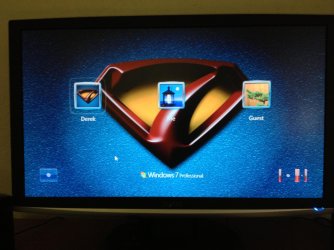
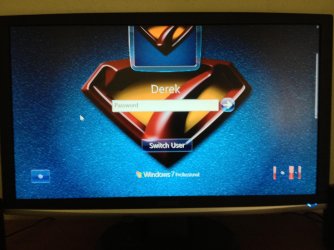
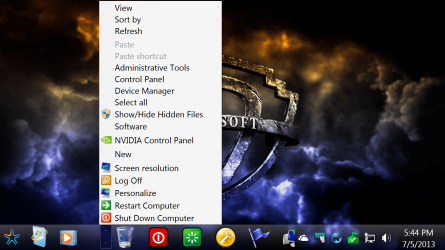
I wouldn't bother with that, it makes EVERYTHING huge, I just changed it to 120 to try it out.

Here's a couple pics and a screenshot,
 

Attachments

  • IMG_0141.jpg
    IMG_0141.jpg
    528.7 KB · Views: 0
  • IMG_0143.jpg
    IMG_0143.jpg
    562.3 KB · Views: 0
  • Untitled.png
    Untitled.png
    451.9 KB · Views: 0

My Computer My Computer

At a glance

Win 10 Pro x64Intel I5-2500K @3.3GHz16GB G.Skill Ripjaws X (4x4GB)EVGA GeForce 750 Ti SC 2GB
Computer type
PC/Desktop
Computer Manufacturer/Model Number
Self Built
OS
Win 10 Pro x64
CPU
Intel I5-2500K @3.3GHz
Motherboard
Asrock P67 Extreme4
Memory
16GB G.Skill Ripjaws X (4x4GB)
Graphics Card(s)
EVGA GeForce 750 Ti SC 2GB
Sound Card
ASUS Xonar DG 5.1 Channels 24-bit 96KHz PCI Interface Sound
Monitor(s) Displays
auria eq2367
Screen Resolution
1920 x 1080
Hard Drives
250GB Samsung 850 EVO SSD
1TB WD Blue
1TB Hitachi
PSU
SeaSonic X 650W 80 Plus Gold
Case
Corsair Obsidian 750D
Cooling
Corsair H60, Three 140mm case fans
Keyboard
Logitech Wireless Keyboard K520
Mouse
Logitech Wireless Mouse M310
Internet Speed
Wave Broadband ~ 100 dn 5 up
Antivirus
Windows Defender, Malwarebytes Premium
Browser
Edge, IE11, Chrome
Other Info
Laptop specs: HP g7-1365dx /
CPU: AMD A6-3420M APU with Radeon(tm) HD Graphics /
RAM: Crucial 8Gb (2x4Gb) /
SSD: Crucial M4-CT128M4SSD2 ATA Device/ FW 000F /
GFX: AMD Radeon HD 6520G /
OS: Windows 10 Pro x64
Back
Top