How to reinstall HELP-file?

Kari

An Angry Old Man
Guru
VIP
SF Team
Local time
10:37 AM
Messages
17,473
Location
A Finnish ex-pat in Leipzig, Germany
Can somebody tell me how to reinstall HELP-file/system?

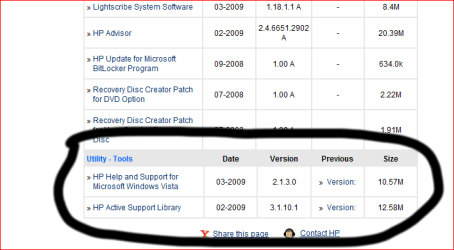
W7 64-bit is running smoothly, had no problems with installation. Then I did something stupid, went to HP´s product support website to download drivers and, idiot as I am, downloaded and installed also HP´s own HELP-system (image 1). It´s for Vista, normal Microsoft Vista´s HELP integrated with HP´s own stuff.

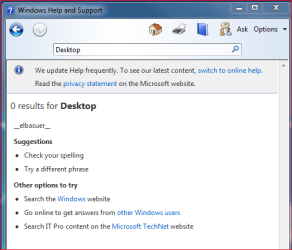
This HP Help and Support doesn´t work with w7, and now I have no HELP-file (image 2). I mean, years of using Windows and I still need to check HELP from time to time.

Please help me to get my HELP!

Kari

Image 1:
HP2.PNG

Image 2:
NoHelp.PNG
 

My Computer

Computer type
Laptop
Computer Manufacturer/Model Number
HP ENVY 17-1150eg
OS
Windows 10 Pro x64 EN-GB
CPU
1.6 GHz Intel Core i7-720QM Processor
Memory
6 GB
Graphics Card(s)
ATI Mobility Radeon HD 5850 Graphics
Sound Card
Beats sound system with integrated subwoofer
Monitor(s) Displays
17" laptop display, 22" LED and 32" Full HD TV through HDMI
Screen Resolution
1600*900 (1), 1920*1080 (2&3)
Hard Drives
Internal: 2 x 500 GB SATA Hard Disk Drive 7200 rpm
External: 2TB for backups, 3TB USB3 network drive for media
Cooling
As Envy runs a bit warm, I have it on a Cooler Master pad
Keyboard
Logitech diNovo Media Desktop Laser (bluetooth)
Mouse
Logitech Performance Mouse MX
Internet Speed
50/10 Mbps VDSL
Antivirus
Windows Defender 4.3.9431.0
Browser
Maxthon 3.5.2., IE11
Hi kari,

Did you try a system restore to a point before you installed the Hp stuff?
 

My Computers

System One System Two

  • Computer type
    PC/Desktop
    OS
    7 X64
    CPU
    i5 8400
    Motherboard
    gigabyte b365m ds3h
    Memory
    2x8gb 3200mhz
    Hard Drives
    various
    PSU
    pure power 11 400w cm
    Case
    Coolermaster
    Cooling
    cryorig m9i
  • Computer type
    PC/Desktop
    OS
    7x64
    CPU
    g5400
    Motherboard
    ga b365m ds3h
    Memory
    8gb ddr4 2400
    PSU
    xfx pro 450w
Hi kari,

Did you try a system restore to a point before you installed the Hp stuff?
I´ve installed so much software (Office 2007, Corel Suite etc.) since that, so if I do System Restore, I have to spend two days reinstalling everything ;)

Because of this, me not willing to reinstall everything, I am rather without HELP. But it would be nice to get it back...
 

My Computer

Computer type
Laptop
Computer Manufacturer/Model Number
HP ENVY 17-1150eg
OS
Windows 10 Pro x64 EN-GB
CPU
1.6 GHz Intel Core i7-720QM Processor
Memory
6 GB
Graphics Card(s)
ATI Mobility Radeon HD 5850 Graphics
Sound Card
Beats sound system with integrated subwoofer
Monitor(s) Displays
17" laptop display, 22" LED and 32" Full HD TV through HDMI
Screen Resolution
1600*900 (1), 1920*1080 (2&3)
Hard Drives
Internal: 2 x 500 GB SATA Hard Disk Drive 7200 rpm
External: 2TB for backups, 3TB USB3 network drive for media
Cooling
As Envy runs a bit warm, I have it on a Cooler Master pad
Keyboard
Logitech diNovo Media Desktop Laser (bluetooth)
Mouse
Logitech Performance Mouse MX
Internet Speed
50/10 Mbps VDSL
Antivirus
Windows Defender 4.3.9431.0
Browser
Maxthon 3.5.2., IE11
Hi Kari,

It's been a while since your original post. I was wondering if you ever found a solution? I also have an HP and did the exact same thing you did, and I am having the same issue...

Best,
Mike O.
 

My Computer

Computer Manufacturer/Model Number
HP G-60
OS
Windows 7
CPU
AMD Turion Dual-Core RM-72 2.1 GHz
Memory
4GB
Graphics Card(s)
nVidia GeForce 8200M G
Hi Mike, welcome to the Seven Forums.

The one and only solution I found was to do a repair install. I found out it was impossible to return only the help files without system restore to an earlier point or repair install.

Kari
 

My Computer

Computer type
Laptop
Computer Manufacturer/Model Number
HP ENVY 17-1150eg
OS
Windows 10 Pro x64 EN-GB
CPU
1.6 GHz Intel Core i7-720QM Processor
Memory
6 GB
Graphics Card(s)
ATI Mobility Radeon HD 5850 Graphics
Sound Card
Beats sound system with integrated subwoofer
Monitor(s) Displays
17" laptop display, 22" LED and 32" Full HD TV through HDMI
Screen Resolution
1600*900 (1), 1920*1080 (2&3)
Hard Drives
Internal: 2 x 500 GB SATA Hard Disk Drive 7200 rpm
External: 2TB for backups, 3TB USB3 network drive for media
Cooling
As Envy runs a bit warm, I have it on a Cooler Master pad
Keyboard
Logitech diNovo Media Desktop Laser (bluetooth)
Mouse
Logitech Performance Mouse MX
Internet Speed
50/10 Mbps VDSL
Antivirus
Windows Defender 4.3.9431.0
Browser
Maxthon 3.5.2., IE11
Thanks for the quick response (and the welcome to the forum), Kari!

Ugh... that's what I was afraid of...

Maybe I'll do without the help files for a while... :(
 

My Computer

Computer Manufacturer/Model Number
HP G-60
OS
Windows 7
CPU
AMD Turion Dual-Core RM-72 2.1 GHz
Memory
4GB
Graphics Card(s)
nVidia GeForce 8200M G

My Computer

Computer Manufacturer/Model Number
PCSpecialist.co.uk (custom build)
OS
Win7 (7600) Home Prem 64 bit
CPU
Intel Core i5-750
Motherboard
Asus P7H57D-EVO
Memory
8gb Corsair DDR3 1300MHz CMV4GX3M2A1333C9
Graphics Card(s)
Asus Nvidia GTX275
Sound Card
Asus Xonar D2X / Creative Inspire T7700 speakers
Monitor(s) Displays
Sharp Aquos 42" HDTV (via hdmi)
Screen Resolution
1920x1080
Hard Drives
Samsung SATA 1.5TB HD1541UI
PSU
Corsair TX850
Case
Antec 900
Cooling
Titan TTC-NK34TZ on CPU, 3x 120mm & 1x 200mm fans in case
Keyboard
Logitech Media Keyboard 600
Mouse
Logitech LX6 wireless
Internet Speed
4Mb/s landline, 7.2Mb/s mobile broadband (both Orange)
Other Info
Don't be fooled by the 'Junior' thing. I just don't post a lot.
I've been building/configuring/fault-finding PC's since Win3.11 and DOS6.2.2
I learned machine code on an 8086 & BASIC on a Commodore Pet, so I've been there from Early Days!
There's not much about PC's I'm unfamiliar with. I'm just here to find solutions to the problems Win7 presents. Not because I'm dumb or clueless.
i will find the exact solution, but i remember it is a registry mod in the bluetooth section. I know that sounds crazy, but i had the exact same problem of help just mentioning _elbauser_

"Here is the solution, I found after long time research.It`s caused by bluetooth software. I had the same "elbauser" corrupted help file. After you do this you`ll have windows original offline help files. If you have bluetooth in your pc, this is pretty much %100 problem causing help files to be corrupted.

Click on Start, type regedit.exe in the Search field, and press Enter.
Provide consent to User Account Control if prompted.
In the left hand navigation pane, expand each registry key until you are at HKEY_LOCAL_MACHINE\SOFTWARE\Microsoft\Assistance\Client\1.0\Namespaces\OEM\en-US\Topics.
Delete the "BCRM_Bluetooth_Help" string value (REG_SZ).
Close the Registry Editor and re-launch Windows Help and Support."
 

My Computer

Computer Manufacturer/Model Number
HP dv6519tx
OS
Windows 7 Ultimate x64
CPU
1.80 GHz Intel Core 2 Duo processor T7100
Memory
3 gig ddr2
Graphics Card(s)
NVIDIA GeForce 8400M GS
Sound Card
Realtek High Definition Audio
Monitor(s) Displays
15.4” WXGA High Definition BrightView Widescreen
Screen Resolution
1280 x 800
Hard Drives
Hitachi 320 GB (5400 rpm)
PSU
90 W AC Power Adapter
Cooling
Kitchen plate under the lappy
Keyboard
101 key compatible
Mouse
Touch Pad with On/Off button and dedicated vertical Scroll
Internet Speed
Three Wireless internet prepaid using E160G USB dongle
Back
Top