Solved Do I have to Reinstall ?

murihikukid

New member
Local time
3:46 AM
Messages
15
Location
Invercargill New Zealand
Hi...No matter what I do I am having problems ..Do I have to completely reinstall Windows 7......
When I originally installed W7 I nominated a Password ...After installation I manged to remove it but now I cannot open downloaded programs etc and its something to do with User Accounts and that when a window appears with YES ...NO on it the YES is grayed out ......Now I tried to fix this and 1/2 my desktop disappeared so I did a System Reinstore to get my Desktop back...
Then there is Skype ...I have lost my previous account when I went from XP to W7 so apparantly I need to start a new account BUT I do not have a mobile phone number (or a mobile phone) so cannot complete what is required......
Should I just put my Hard Drive with my XP on it back in and forget about W 7 ...This whole situation is getting me down..
Thanks Ron
 

My Computer My Computer

Computer type
PC/Desktop
Computer Manufacturer/Model Number
custom build
OS
Windows 7 Ultimate x32
CPU
intel i7
Motherboard
evga
Memory
8gb
Graphics Card(s)
G-force
Hard Drives
1 T Partitioned into 500gb drives with XP on one and Windows 7 on the other
Antivirus
AVG
Browser
Firefox
You have the option to try and fix the current, do a clean install, go back to xp which is insecure and no longer supported
 

My Computer My Computer

Computer type
PC/Desktop
OS
win 8 32 bit
I think a good start would be to start taking advice that others suggest, and getting back to them - keep them updated, and if it doesn't help, give them further information on what went wrong - so they can suggest other things. How can we help you, if you never respond back to us?

I don't believe you need a phone number to create a new Microsoft/Skype account. You can choose "Use your email address instead" option below the fields, and it should allow you to, well, use your email address instead.

Hope that helps
 

My Computer My Computer

OS
Windows 7 x64
Although not directly related to the topic, I suggest you to reinstall W7 but with 64 bit version. If your specs are right (W7 32 bit with 8 GB RAM), that means you are using only half of your RAM. XP is not secured and supported anymore, so clean reinstall with W7 64 bit would be good for your situation.
 
Hi...No matter what I do I am having problems ..Do I have to completely reinstall Windows 7......
When I originally installed W7 I nominated a Password ...After installation I manged to remove it but now I cannot open downloaded programs etc and its something to do with User Accounts and that when a window appears with YES ...NO on it the YES is grayed out ......Now I tried to fix this and 1/2 my desktop disappeared so I did a System Reinstore to get my Desktop back...
Then there is Skype ...I have lost my previous account when I went from XP to W7 so apparantly I need to start a new account BUT I do not have a mobile phone number (or a mobile phone) so cannot complete what is required......
Should I just put my Hard Drive with my XP on it back in and forget about W 7 ...This whole situation is getting me down..
Thanks Ron

Ron, bring it here and I'll fix it for you. Eh Mate? Florida is beautiful this time of year, and not too hot yet.

I run Windows 7 Ultimate x86 myself, and I prefer it over any other OS (and I have them all, on separate hard drives). But since I test a lot of software, much of which makes little changes to the registry, that no registry cleaner ever seems to fix..... I do back up all my 'stuff' and do a disk wipe and clean install about once a year. The only problem with installing Windows 7 (any version) is that Win-7 does NOT have an extensive Driver Package. So unless you have all your special hardware drivers on disk, doing a re-install can get pretty hairy. And, if you upgrade to the 64 bit version of Windows, you can forget ever running any of the older, and popular, 16 bit software. They WILL NOT run on any 64 bit OS.:cry:
And, unless you have a 64bit CPU, you Cannot run any 64 bit OS.

Cheers Mate!
TechnoMage :cool:
 

My Computer My Computer

Computer type
PC/Desktop
Computer Manufacturer/Model Number
Various
OS
Win 7 Pro, SP1, x86, Win-11/Pro/64
CPU
AMD
Motherboard
Various
Memory
8GB Crucial
Graphics Card(s)
Various
Sound Card
OnBoard
Monitor(s) Displays
Acer 21.5"
Hard Drives
Crucial SSD, 500 GB
PSU
OEM
Case
SFF Slim Line Case
Cooling
OEM
Keyboard
eMachines
Mouse
Logitech Wireless
Internet Speed
varies
Antivirus
Windows Defender/Super Anti-Spyware
Browser
Firefox
Hi..Thanks for your replies but I am no further ahead ...My computer is useless cause IT will not let me do anything ...due to the USER CONTROL PANEL panel that appears requiring a password (yet has nowhere to put it in ) and I have no Yes cause its greyed out ..I cannot install Skye or any other program I download ....I have been able to install the odd one from my old drive with XP on it..by copy/paste..When this panel appears thats it...while it is on screen my computer is useless/non active til I close the panel...I am sure you know what i mean ..

Now i have done a search of sevenforums files and tried various solutions? but all I get is a darkened screen with this user account panel which i cannot take a screenshot off because nothing works unless i take the panel off ......

If this is progress from XP I am scratching my head in dismay .....but how did it happen??? I do not know...was it something I did when i installed W7 cause if it was the only way I can see to get round it is perhaps make another partition on my 1T hard drive and do a reinstall correctly (by following the administration etc rules that hopefully somebody will give me....Then maybe i can transfer everything from my present W7 setup over to the new installation ....

I eageraly await any replies ..thanks Ron
 

My Computer My Computer

Computer type
PC/Desktop
Computer Manufacturer/Model Number
custom build
OS
Windows 7 Ultimate x32
CPU
intel i7
Motherboard
evga
Memory
8gb
Graphics Card(s)
G-force
Hard Drives
1 T Partitioned into 500gb drives with XP on one and Windows 7 on the other
Antivirus
AVG
Browser
Firefox
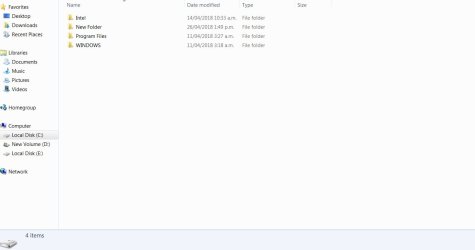
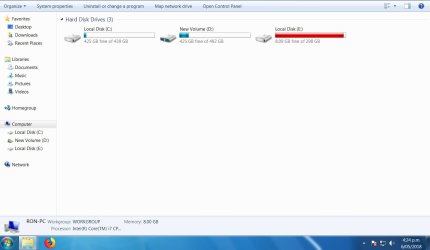
OK?? I got my secondary PC going overnight which allowed me to try and correct the problem on my main PC by googling instructions on it...If you get what I mean.....Now I am hoping I am within the rules here cause I have spent hours changing things in the User Accounts without success and during all of this I noted my D Drive was beng used as my OS Drive whereas I thought I put it on my C drive ...(my C and D drives are on the same 1T Hdd which is partitioned) Anyway I do not know or cannot recall why this is....but something is not right cause I cannot do a System Restore etc......
So I am wondering if I can do a complete reinstall from the DVD of W7 on my C drive ......and try and get the administrator problem sorted out.....
I have got some screen shots to show you.....The E drive is the original drive with XP on it
 

Attachments

  • DriveC_2018-05-06_162239.jpg
    DriveC_2018-05-06_162239.jpg
    28 KB · Views: 1
  • DriveD_2018-05-06_162403.jpg
    DriveD_2018-05-06_162403.jpg
    34.4 KB · Views: 0
  • PC_2018-05-06_162521.jpg
    PC_2018-05-06_162521.jpg
    52.3 KB · Views: 0

My Computer My Computer

Computer type
PC/Desktop
Computer Manufacturer/Model Number
custom build
OS
Windows 7 Ultimate x32
CPU
intel i7
Motherboard
evga
Memory
8gb
Graphics Card(s)
G-force
Hard Drives
1 T Partitioned into 500gb drives with XP on one and Windows 7 on the other
Antivirus
AVG
Browser
Firefox
Hi Ron,

Did you, by any chance, install your Windows 7, from within Windows XP? or did you shut down your computer, and boot from the CD/USB installer? (instead of loading Windows XP)

This is what can sometimes happen if you install Windows from, well, another Windows.

As far as I know, it should still work normally having a D: as its OS drive, but I would recommend that you perform a fresh, clean install, since you haven't been able to correct your UAC (the window asking for a password) problem, and the drive letter (as far as I know) is impossible to change without re-installation.

Also, if I may suggest - you could try unplugging the other drive that you are not installing Windows on, to prevent accidentally formatting it. Make sure you use "Custom (advanced)" type of installation and be very careful not to delete the other partition that you have your XP, or data on. Here is a tutorial with pictures that explains the process: Clean Install Windows 7 - Windows 7 Help Forums

Source: Windows 7 Installed to D Drive Letter - Super User
 

My Computer My Computer

OS
Windows 7 x64
Hi...First...I installed W7 Ultimate from a disk...the E drive with XP on it was disconnected ...the 1T HDD was put in and Using the W7 disk I formatted and partitioned it....
Yes a clean install to me is the ONLY way cause no matter what I do I get the same panel....EG I have tried several ways as found on Google to fix the problem but the instructions they give fall over at point ONE..EG use Elevated Command Prompt..(well I had never heard of it till recently but i know now what is it) so I went Start /Right Click Computer/Manage and I am immediately blocked by the User Account Panel (Do you want to allow the following program to make changes to this computer)......
Thats it ..no matter what i try to do I get this panel....Thank goodness I can get my email ....
For many years i have been blessed by "my friend" in Montreal teaching me computer skills and fixing my XP problems ..Using Skype and Team Viewer I was really fortunate.... I was advised by him to upgrade from XP and I expected help from him doing this but of course with no Skype he has not been able to get through to me and my emails went unanswered so I do not know what has happened ....He has probably tried to contact me on Skype and found me offline ...Apparantly I have to create a whole new Skype account and thats impossible....til I can do that as my computer blocks me...
As I see it..I will boot from my W7 disk ...and I will be able to ensure its the C drive I am looking at cause its basicly got nothing on it ...format it and install W7 on it ensuring i take care putting Administrator rights with Password in.....On completion I can check it out and if its OK .....HOPEFULLY I can get most of what I require from the D drive ....and if that goes well and I have control over the computer I can gradually delete from the D drive till it has nothing on it...

No doubt I will learn some new computer skills along the way ....Thanks Ron
 

My Computer My Computer

Computer type
PC/Desktop
Computer Manufacturer/Model Number
custom build
OS
Windows 7 Ultimate x32
CPU
intel i7
Motherboard
evga
Memory
8gb
Graphics Card(s)
G-force
Hard Drives
1 T Partitioned into 500gb drives with XP on one and Windows 7 on the other
Antivirus
AVG
Browser
Firefox
Maybe there is a way to fix the User Account Control (UAC, window asking for a password), but it's easier to perform a fresh install, and hopefully that will fix the OS drive letter issue, too.

It's nice to have someone there for you, who you trust, who knows their stuff. Hopefully you'll be able to contact your friend again soon. I posted in your other topic regarding Skype, how you can retrieve your Skype contacts and their usernames using Skyperious.

By default, when you perform a fresh install, when it's finished, it will ask you for a username, PC name and password (see steps 11, 12 in here ) - this will be your personal administrator account, that will have permissions to install programs and make changes to the computer (UAC will still ask if you are sure, but should not ask for a password, and if it does, type in your own)

Let us know how it goes, and keep a list of any changes you make after the installation - this will help us, shall the issue persist.

Thank you and good luck
 

My Computer My Computer

OS
Windows 7 x64
Disaster??

Hi..I set everything up to install W7 on my C drive (which incidently has a clean install of XP on it ) connected up my DVD drive and put the W7 disk in and rebooted ....
Now I thought it would give me the normal press a key to boot from the CD but it just booted back into W7.....so I did some checking and it is not seeing the DVD drive plus it no longer connects to my server..This is strange ...So first I will reconnect the DVD drive and see what happens...;
OK I have the DVD player going but still no internet connection ....however have booted up from the W7 disk....
On my secondary Acer PC I am writing this and have also loaded
Clean Install Windows 7 - Windows 7 Help Forums

I will use this guide to take me through the correct process .....I have ensured the new installation is going on my C Drive...I maybe should have formatted my C drive first but am presuming I can do that during the installation process..the expanding Window files is at 84% and should soon be completed..Its rebooting...and completing installation..It has now given me two Window 7 on the black screen so I just let it choose by timing it out...and I now have ...Set Up Windows so I am getting near the crucial stage if this is going to succeed...

I have finished but I do not like what I see ..it seems it still has XP files on it so I will Format C and do a new reinstall...
Oh No ???I had to reboot into W7 on my D Drive and when i went to format the C drive I was confronted by the same USER panel that this whole operation is to get rid of...

I really need some ideas ASAP ..Can I format C in Safe Mode??

OR can I just delete everything on the C Drive???

Hoping I can get a work around ..Thanks Ron
 

My Computer My Computer

Computer type
PC/Desktop
Computer Manufacturer/Model Number
custom build
OS
Windows 7 Ultimate x32
CPU
intel i7
Motherboard
evga
Memory
8gb
Graphics Card(s)
G-force
Hard Drives
1 T Partitioned into 500gb drives with XP on one and Windows 7 on the other
Antivirus
AVG
Browser
Firefox
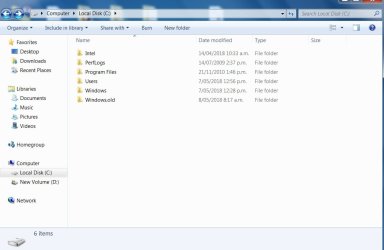
C Drive Screen Shot

Hi..Just in case its important here is a screenshot of my Cdrive...I know nothing about W7 but has it "picked up" the XP files and put them in a folder? IE Old Windows....Ron
 

Attachments

  • CDrive_2018-05-07_134658.jpg
    CDrive_2018-05-07_134658.jpg
    47.4 KB · Views: 0

My Computer My Computer

Computer type
PC/Desktop
Computer Manufacturer/Model Number
custom build
OS
Windows 7 Ultimate x32
CPU
intel i7
Motherboard
evga
Memory
8gb
Graphics Card(s)
G-force
Hard Drives
1 T Partitioned into 500gb drives with XP on one and Windows 7 on the other
Antivirus
AVG
Browser
Firefox
It only gets worse?

Hi...I found this when I did a troubleshoot....Apparantly “Local Area Connection” doesn’t have a valid IP configuration error may occur when you troubleshoot network on Windows.

But again I cannot try and fix it because W7 is blocking everything I do ....I am beginning to wonder about this IE maybe XP is king after all ...
How can experts write all these articles oh how to fix this UAC problem when anything one tries to do is blocked by the problem one is trying to fix ....
I wonder if one can fix what is apparantly an Administrators problem by doing a W7 Repair using the DVD ...Thanks Ron
PS Meanwhile my Acer XP computer is still online via the same Modem and giving me a life line...I just cannot figure this out...What could I have done to de validate my Local Area Connection..Thanks Ron
 

My Computer My Computer

Computer type
PC/Desktop
Computer Manufacturer/Model Number
custom build
OS
Windows 7 Ultimate x32
CPU
intel i7
Motherboard
evga
Memory
8gb
Graphics Card(s)
G-force
Hard Drives
1 T Partitioned into 500gb drives with XP on one and Windows 7 on the other
Antivirus
AVG
Browser
Firefox
Hi..I wonder if that is W7 installed on my C Drive ...If it is and if I can get Administrators rights to it would it allow me to get at W7 on my Drive..or am I only dreaming...Thanks
 

My Computer My Computer

Computer type
PC/Desktop
Computer Manufacturer/Model Number
custom build
OS
Windows 7 Ultimate x32
CPU
intel i7
Motherboard
evga
Memory
8gb
Graphics Card(s)
G-force
Hard Drives
1 T Partitioned into 500gb drives with XP on one and Windows 7 on the other
Antivirus
AVG
Browser
Firefox
Hi Ron,

You could have formatted the partition (or the whole drive) before it started copying files. See step 7 here

Because there was a previous installation of Windows on the drive/partition - Windows put it in the "Windows.old" folder. You can get rid of it by running Disk Cleanup (right click and "Run as Administrator") and make sure "Previous Windows Installations" item on the list is checked.

So, your new Windows 7 is still showing you UAC prompts, asking for a password? What happens if you type your password in?

Are there any steps/changes you've made that weren't in the tutorial you followed?

Could you please check for me that you have administrative rights on your account? To do this,

Open command prompt, type in
Code:
net user [B]USERNAME[/B]
replacing USERNAME with your own username that you chose during the installation. It should say "Local Group Memberships: Administrators"

Also, if I may ask, where did you get a hold of your installation CD? If it's not from a genuine source, that could be the problem
 

My Computer My Computer

OS
Windows 7 x64
Password

Hi...There is no place to type in a Password ....Thats what I have saying all along plus the Yes is grayed out..Everything i do I get the panel denieing me access...I found the W7 Ultimate x32 on the internet as an ISO and burnt it to a DVD....??? Ron
 

My Computer My Computer

Computer type
PC/Desktop
Computer Manufacturer/Model Number
custom build
OS
Windows 7 Ultimate x32
CPU
intel i7
Motherboard
evga
Memory
8gb
Graphics Card(s)
G-force
Hard Drives
1 T Partitioned into 500gb drives with XP on one and Windows 7 on the other
Antivirus
AVG
Browser
Firefox
Hi...There is no place to type in a Password ....Thats what I have saying all along plus the Yes is grayed out..Everything i do I get the panel denieing me access...I found the W7 Ultimate x32 on the internet as an ISO and burnt it to a DVD....??? Ron

Where abouts on the internet? It could be that you got a dodgy, unofficial copy.

I've done some quick looking around and it would really help me, if you checked if your user account is in the administrators group (see previous post) - because if it isn't, that could be the source of your problem with UAC "yes" button being greyed out
 

My Computer My Computer

OS
Windows 7 x64
Hi...What you require is impossible for me due to age...I can never recall passwords ...I am doing what seems to me as all I can do IE Installing XP back on the C Drive Partition ...Maybe I can get my computer back .....Later I will see if I can salvage anything from my D Drive?? ...I honestly cannot believe W7 ..Its completely rubbish when it can totally block everything including all attempts that i tried to fix it by reading instructions on Google ..Thanks Ron
 

My Computer My Computer

Computer type
PC/Desktop
Computer Manufacturer/Model Number
custom build
OS
Windows 7 Ultimate x32
CPU
intel i7
Motherboard
evga
Memory
8gb
Graphics Card(s)
G-force
Hard Drives
1 T Partitioned into 500gb drives with XP on one and Windows 7 on the other
Antivirus
AVG
Browser
Firefox
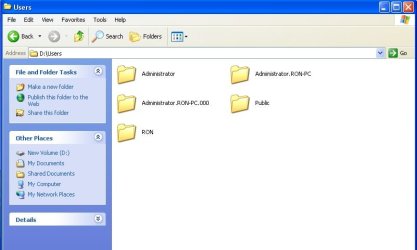
Hi..I tryed to get Command prompt to carry out your instructions and got nowhere ...As regards Command prompt i Require to know exactly what to write in...but going by what I have already encountered I do not think I can get what you want.....So far I cannot get the computer back online So it looks like I have had it .....I cannot get System Restore or anything that can help me as long as this UAC thing keeps blocking everything I try...I could try another install from another DVD???it looks like whatever knocked me offline is on the D Drive version of W7....and now I have a screen capture of my Users Folder on my D drive which shows what a mess I am in...
 

Attachments

  • USERS_2018-05-08_000738.jpg
    USERS_2018-05-08_000738.jpg
    33.7 KB · Views: 0

My Computer My Computer

Computer type
PC/Desktop
Computer Manufacturer/Model Number
custom build
OS
Windows 7 Ultimate x32
CPU
intel i7
Motherboard
evga
Memory
8gb
Graphics Card(s)
G-force
Hard Drives
1 T Partitioned into 500gb drives with XP on one and Windows 7 on the other
Antivirus
AVG
Browser
Firefox
Hi Ron,

I'm sorry you're still having trouble and appreciate you trying different things and going through the installation process again.

Unfortunately I'm not sure what else I can suggest, other than sourcing a known-good copy of Windows 7, formatting the hard drive before installation to remove previous windows installations (you can do this when you boot from the CD, to install Windows 7 - it won't deny you that way) and trying again.

Maybe someone else could share their thoughts and suggestions?
 

My Computer My Computer

OS
Windows 7 x64
Back
Top