Solved How to search for Explorer files that are read-only

KeithHoward

New member
Local time
4:27 PM
Messages
15
Hello,
I am trying to search for all Explorer files that have the read-only attribute set.
I can show the Attributes column in Explorer, and I can set Tools > Folder options... > View > Apply to Folders. This is helpful, but when I perform a search, the above options do not carry through to my search results view.
So I am hoping to use Advanced Query Syntax to find all read-only files.
Many thanks in advance for any suggestions.
Keith
 

My Computer My Computer

OS
Windows 7 Professional x64
You could do this from a command prompt using the dir /ar /s command. Pipe the output to a file for use later.

Start a command prompt.
Type dir /ar /s > ReadOnlyFIles.txt

Results will be in ReadOnlyFiles.txt when done.

Enter dir /? from a command prompt for usage.
 

My Computer My Computer

Computer type
PC/Desktop
Computer Manufacturer/Model Number
Lenovo IdeaCenter 450
OS
Windows 10 Pro X64
CPU
Intel Quad Core i7-4770 @ 3.4Ghz
Memory
16.0GB PC3-12800 DDR3 SDRAM 1600 MHz
Graphics Card(s)
Intel Integrated HD Graphics
Sound Card
Realtek HD Audio
Monitor(s) Displays
HP 22" LCD
Screen Resolution
1680 x 1050
Hard Drives
250GB Samsung EVO SATA-3 SSD
2TB Seagate ST2000DM001 SATA-2
1.5TB Seagate ST3150041AS SATA
Keyboard
Dell USB
Mouse
Lenovo USB
Internet Speed
Cable via Road Runner 3MB Upload, 30MB Download
Antivirus
Windows Defender, MBAM Pro, MBAE
Browser
Seamonkey
Other Info
UEFI/GPT
PLDS DVD-RW DH16AERSH
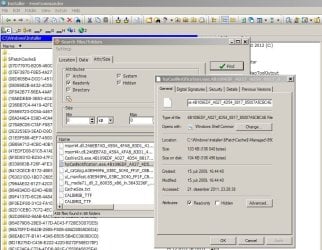
The search in (the excellent) Freecommander filemanager does the job.
For paid programs, try FileLocator Pro.

Hope this helps (and, am awaiting the usual flak for recommending anything else than the built-in w7 search).
 

Attachments

  • com search.JPG
    com search.JPG
    125.6 KB · Views: 16

My Computer My Computer

Computer type
Laptop
Computer Manufacturer/Model Number
Dell \ Lenovo\ HP \ Toshiba
OS
W7, W8.1
Antivirus
MSE, Malwarebytes
Browser
FF
Thanks Ztruker and 4wd.
No flak, but I am indeed trying to do this within Windows Explorer. I will keep your ideas in mind in case I cannot achieve this.
Many thanks.
Keith
 

My Computer My Computer

OS
Windows 7 Professional x64
I don't believe you can do what you want in Windows Explorer. Command Prompt or another app is needed.
 

My Computer My Computer

Computer type
PC/Desktop
Computer Manufacturer/Model Number
Lenovo IdeaCenter 450
OS
Windows 10 Pro X64
CPU
Intel Quad Core i7-4770 @ 3.4Ghz
Memory
16.0GB PC3-12800 DDR3 SDRAM 1600 MHz
Graphics Card(s)
Intel Integrated HD Graphics
Sound Card
Realtek HD Audio
Monitor(s) Displays
HP 22" LCD
Screen Resolution
1680 x 1050
Hard Drives
250GB Samsung EVO SATA-3 SSD
2TB Seagate ST2000DM001 SATA-2
1.5TB Seagate ST3150041AS SATA
Keyboard
Dell USB
Mouse
Lenovo USB
Internet Speed
Cable via Road Runner 3MB Upload, 30MB Download
Antivirus
Windows Defender, MBAM Pro, MBAE
Browser
Seamonkey
Other Info
UEFI/GPT
PLDS DVD-RW DH16AERSH
It is possible to search for readonly files from explorer itself, but its a bit complicated.

You can do the search in the search box for "attributes"
Code:
attributes:<attribute code>
The attribute code is the complicated part. The file attribute constants are as follows
Code:
FILE_ATTRIBUTE_READONLY = 1
FILE_ATTRIBUTE_HIDDEN = 2
FILE_ATTRIBUTE_SYSTEM = 4
FILE_ATTRIBUTE_DIRECTORY = 16
FILE_ATTRIBUTE_ARCHIVE = 32
FILE_ATTRIBUTE_ENCRYPTED = 64
FILE_ATTRIBUTE_NORMAL = 128
FILE_ATTRIBUTE_TEMPORARY = 256
FILE_ATTRIBUTE_SPARSE_FILE = 512
FILE_ATTRIBUTE_REPARSE_POINT = 1024
FILE_ATTRIBUTE_COMPRESSED = 2048
FILE_ATTRIBUTE_OFFLINE = 4096
FILE_ATTRIBUTE_NOT_CONTENT_INDEXED = 8192
For example, if a file has the attributes READONLY, HIDDEN and ARCHIVE, you will have to add the constants for the three.

1 + 2 + 32 = 35

Searching for "attributes:35" will list all the files with READONLY, HIDDEN and ARCHIVE attribute set.
Searching for "attributes:2081" will list all the files with READONLY, ARCHIVE and COMPRESSED attribute set.

You can also display the attributes in explorer as a column.
Right click on the column title, click on "More.." and select "Attributes"

This should give an idea about the attributes set for the files.

Source: Windows Search Advanced Query Syntax (AQS) and File Attributes
 

My Computer My Computer

Computer type
Laptop
Computer Manufacturer/Model Number
HP EliteBook 8530w Mobile Workstation
OS
Windows 7 Ultimate x64 (XP, 98SE, 95, 3.11, DOS 7.10 on VM) + Ubuntu 10.04 LTS Lucid Lynx
CPU
Intel Core 2 Duo Processor P8600 (2.40 GHz, 3 MB L2 cache)
Motherboard
Mobile Intel PM45 Express Chipset ICH9M-Enhanced
Memory
4GB 800 MHz DDR2 SDRAM
Graphics Card(s)
ATI Mobility FireGL V5700 with 256 MB
Sound Card
SoundMAX Integrated Digital HD Audio
Monitor(s) Displays
15.4-inch WXGA anti-glare (1280 x 800 resolution)
Screen Resolution
1280 x 800
Hard Drives
500GB + 1TB
Mouse
Synaptics PS/2 Port Touchpad, USB Mouse
Internet Speed
4 Mbps
Antivirus
MSE
Browser
Firefox, Chrome, IE
Other Info
Authentec AES2810 Fingerprint Reader
Hello gladson1976,
Thanks for your reply. I was able to show folder using "attributes:16", but, even though I manually in Explorer set a file to read-only, I could not find any read-only files using "attributes:1".
So I remain confused. I am still curious as to how to do this in Explorer, but I just purchased File Locator Pro (recommended by 4wd above), and that solves the problem.
Thanks again to everyone for your responses.
Cheers,
Keith
 

My Computer My Computer

OS
Windows 7 Professional x64
Hello gladson1976,
Thanks for your reply. I was able to show folder using "attributes:16[/SIZE][/SIZE]", but, even though I manually in Explorer set a file to read-only, I could not find any read-only files using "attributes:1".
So I remain confused. I am still curious as to how to do this in Explorer, but I just purchased File Locator Pro (recommended by 4wd above), and that solves the problem.
Thanks again to everyone for your responses.
Cheers,
Keith
Of course you did not find it because you used the attribute search wrong, not as Gladson explained. The search attributes:1 finds the files and folders where the Read Only attribute is set but no other attributes. As Windows default is to set Archive attribute on, you should have searched attributes:33 because 1 (Read Only) + 32 (Archive) = 33.

Look here: I set Read Only attribute to one file:
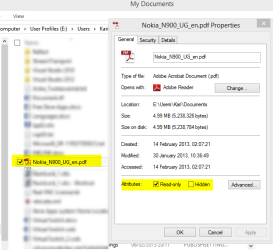
Attrib_search_1.png

Then I search attributes:33 i.e. files with both Archive and Read Only attributes set and of course Windows finds the file:

Attrib_search_2.png

Searching attributes:1 gives naturally nothing for I have no files in this folder where only the Read Only attribute is set, all have the Archive attribute on, too:

Attrib_search_3.png

OK, let's remove the Archive attribute from this file leaving only the Read Only:
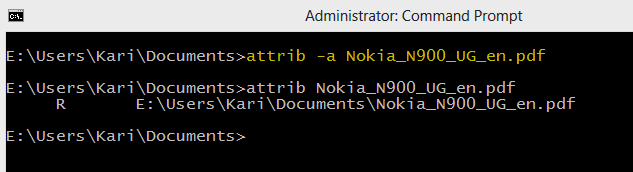
Attrib_search_4.png

And now, naturally, Windows Search finds my file using attributes:1 i.e searching the files and folders where only the Read Only attribute is set, all other attributes turned off:
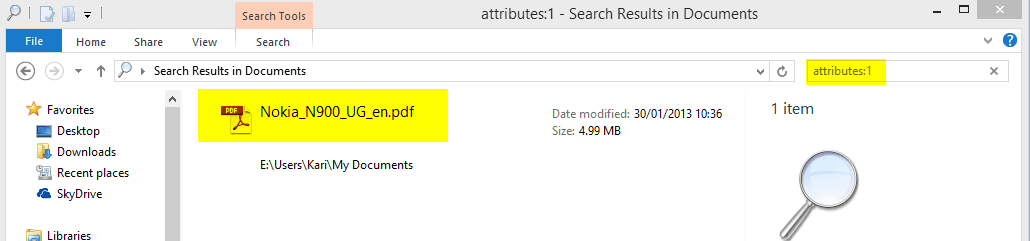
Attrib_search_5.png

You spent money for something that you could easily have done for free with native Windows Search, if you had just read the instructions given to you by Gladson instead of listening someone who very clearly knows next to nothing about Windows Search.

The search in (the excellent) Freecommander filemanager does the job.
For paid programs, try FileLocator Pro.

Hope this helps (and, am awaiting the usual flak for recommending anything else than the built-in w7 search).
I find these comments of yours really obnoxious and repulsive. Every time, every thread when we are talking about Search you come and show your total lack of knowledge and give misleading information. This time it went so far that the OP spend money on a third party toy because of your "expertise".

A gentleman would contact OP now to compensate costs caused by his misleading advice.

Kari

 

My Computer My Computer

Computer type
Laptop
Computer Manufacturer/Model Number
HP ENVY 17-1150eg
OS
Windows 10 Pro x64 EN-GB
CPU
1.6 GHz Intel Core i7-720QM Processor
Memory
6 GB
Graphics Card(s)
ATI Mobility Radeon HD 5850 Graphics
Sound Card
Beats sound system with integrated subwoofer
Monitor(s) Displays
17" laptop display, 22" LED and 32" Full HD TV through HDMI
Screen Resolution
1600*900 (1), 1920*1080 (2&3)
Hard Drives
Internal: 2 x 500 GB SATA Hard Disk Drive 7200 rpm
External: 2TB for backups, 3TB USB3 network drive for media
Cooling
As Envy runs a bit warm, I have it on a Cooler Master pad
Keyboard
Logitech diNovo Media Desktop Laser (bluetooth)
Mouse
Logitech Performance Mouse MX
Internet Speed
50/10 Mbps VDSL
Antivirus
Windows Defender 4.3.9431.0
Browser
Maxthon 3.5.2., IE11
Since I contributed to the "Nope, can't do that" slant, let me say in my own defense that I have never, ever seen any mention of the use of the attribute: search argument in explorer and I spend a lot of time on various forums reading and trying to help.

Google searches also did not turn up any useful suggestions.

So ... many thanks for an eye opening post. Time to do some research.

Thanks Kari and gladson1976, apologies Keith
 

My Computer My Computer

Computer type
PC/Desktop
Computer Manufacturer/Model Number
Lenovo IdeaCenter 450
OS
Windows 10 Pro X64
CPU
Intel Quad Core i7-4770 @ 3.4Ghz
Memory
16.0GB PC3-12800 DDR3 SDRAM 1600 MHz
Graphics Card(s)
Intel Integrated HD Graphics
Sound Card
Realtek HD Audio
Monitor(s) Displays
HP 22" LCD
Screen Resolution
1680 x 1050
Hard Drives
250GB Samsung EVO SATA-3 SSD
2TB Seagate ST2000DM001 SATA-2
1.5TB Seagate ST3150041AS SATA
Keyboard
Dell USB
Mouse
Lenovo USB
Internet Speed
Cable via Road Runner 3MB Upload, 30MB Download
Antivirus
Windows Defender, MBAM Pro, MBAE
Browser
Seamonkey
Other Info
UEFI/GPT
PLDS DVD-RW DH16AERSH
From my part, you are welcome ;).
 

My Computer My Computer

Computer type
Laptop
Computer Manufacturer/Model Number
HP ENVY 17-1150eg
OS
Windows 10 Pro x64 EN-GB
CPU
1.6 GHz Intel Core i7-720QM Processor
Memory
6 GB
Graphics Card(s)
ATI Mobility Radeon HD 5850 Graphics
Sound Card
Beats sound system with integrated subwoofer
Monitor(s) Displays
17" laptop display, 22" LED and 32" Full HD TV through HDMI
Screen Resolution
1600*900 (1), 1920*1080 (2&3)
Hard Drives
Internal: 2 x 500 GB SATA Hard Disk Drive 7200 rpm
External: 2TB for backups, 3TB USB3 network drive for media
Cooling
As Envy runs a bit warm, I have it on a Cooler Master pad
Keyboard
Logitech diNovo Media Desktop Laser (bluetooth)
Mouse
Logitech Performance Mouse MX
Internet Speed
50/10 Mbps VDSL
Antivirus
Windows Defender 4.3.9431.0
Browser
Maxthon 3.5.2., IE11
First question after trying this for a bit.

How do I find all files with the Read Only attribute set with or without any other attributes being set. From what I can see, you can't do it using just Windows Explorer and that is what Keith asked for:

I am trying to search for all Explorer files that have the read-only attribute set.

Willing to be proven wrong (again I hope).
 

My Computer My Computer

Computer type
PC/Desktop
Computer Manufacturer/Model Number
Lenovo IdeaCenter 450
OS
Windows 10 Pro X64
CPU
Intel Quad Core i7-4770 @ 3.4Ghz
Memory
16.0GB PC3-12800 DDR3 SDRAM 1600 MHz
Graphics Card(s)
Intel Integrated HD Graphics
Sound Card
Realtek HD Audio
Monitor(s) Displays
HP 22" LCD
Screen Resolution
1680 x 1050
Hard Drives
250GB Samsung EVO SATA-3 SSD
2TB Seagate ST2000DM001 SATA-2
1.5TB Seagate ST3150041AS SATA
Keyboard
Dell USB
Mouse
Lenovo USB
Internet Speed
Cable via Road Runner 3MB Upload, 30MB Download
Antivirus
Windows Defender, MBAM Pro, MBAE
Browser
Seamonkey
Other Info
UEFI/GPT
PLDS DVD-RW DH16AERSH
First question after trying this for a bit.

How do I find all files with the Read Only attribute set with or without any other attributes being set. From what I can see, you can't do it using just Windows Explorer and that is what Keith asked for:

I am trying to search for all Explorer files that have the read-only attribute set.

Willing to be proven wrong (again I hope).
OK, here we go:

Take the table from Gladson's earlier post:
Code:
READ ONLY = 1
HIDDEN = 2
SYSTEM = 4
DIRECTORY = 16
ARCHIVE = 32
ENCRYPTED = 64
NORMAL = 128
TEMPORARY = 256
SPARSE_FILE = 512
REPARSE_POINT = 1024
COMPRESSED = 2048
OFFLINE = 4096
Now combine, add. Searching files with Read Only attribute set, no other attributes:
Code:
attributes:1
(Read Only = 1)

Search files with both Read Only and Archive attributes set, no other attributes:
Code:
attributes:33
(Read Only 1 + Archive 32 = 33)

Search files with Hidden attribute set, no other attributes:
Code:
attributes:2
(Hidden = 2)

Search files with both Read Only, Hidden and Archive attributes set, no other attributes:
Code:
attributes:35
(Read Only 1 + Hidden 2 + Archive 32 = 35)

Search images with partial filename FIN with both Read Only and Archive attributes set , no other attributes:
Code:
kind:image name:FIN attributes:33

Kari
 

My Computer My Computer

Computer type
Laptop
Computer Manufacturer/Model Number
HP ENVY 17-1150eg
OS
Windows 10 Pro x64 EN-GB
CPU
1.6 GHz Intel Core i7-720QM Processor
Memory
6 GB
Graphics Card(s)
ATI Mobility Radeon HD 5850 Graphics
Sound Card
Beats sound system with integrated subwoofer
Monitor(s) Displays
17" laptop display, 22" LED and 32" Full HD TV through HDMI
Screen Resolution
1600*900 (1), 1920*1080 (2&3)
Hard Drives
Internal: 2 x 500 GB SATA Hard Disk Drive 7200 rpm
External: 2TB for backups, 3TB USB3 network drive for media
Cooling
As Envy runs a bit warm, I have it on a Cooler Master pad
Keyboard
Logitech diNovo Media Desktop Laser (bluetooth)
Mouse
Logitech Performance Mouse MX
Internet Speed
50/10 Mbps VDSL
Antivirus
Windows Defender 4.3.9431.0
Browser
Maxthon 3.5.2., IE11
Hello again.

Kari, Thanks for your very detailed and clear explanation, which I read carefully. If I understand you correctly, to find all occurrences of read-only files, you would need to do a number of searches, to cover each combination of read-only and other attributes being set. My goal is to be able to execute one search and find all read-only files.

Of course, I would love to avoid buying more software, but my current understanding is that that single search is not possible in Explorer. File Locator Pro achieves my goal well, and I am happy with the product so far. (By the way, I have no affiliation whatsoever with that company.)

Finally, thanks again to everyone for an enlightening (albeit slightly sparky at times...:) discussion.

Bye for now.

Keith
 

My Computer My Computer

OS
Windows 7 Professional x64
By the way, I just realised that I fell behind on the threads, and I wrote my immediately previous response before reading Ztruker's and Kari's latest two responses. Sorry about that. However, my understanding remains that you cannot do a single search in Explorer to find all read-only files. Having said that, I would love to be proven wrong.

Cheers,

Keith
 

My Computer My Computer

OS
Windows 7 Professional x64
A normal user usually uses only 4 attributes: Read Only, System, Hidden and Archive. You can search any combinations of these with attributes:X using logical operator OR.

An example:
Search for files with only Read Only attribute set, Read Only and Archive set, Read Only, Archive and Hidden set:
Code:
attributes:1 OR attributes:33 OR attributes:35

A logical operator (AND, OR, NOT) must always be in capital letters.

Kari
 

My Computer My Computer

Computer type
Laptop
Computer Manufacturer/Model Number
HP ENVY 17-1150eg
OS
Windows 10 Pro x64 EN-GB
CPU
1.6 GHz Intel Core i7-720QM Processor
Memory
6 GB
Graphics Card(s)
ATI Mobility Radeon HD 5850 Graphics
Sound Card
Beats sound system with integrated subwoofer
Monitor(s) Displays
17" laptop display, 22" LED and 32" Full HD TV through HDMI
Screen Resolution
1600*900 (1), 1920*1080 (2&3)
Hard Drives
Internal: 2 x 500 GB SATA Hard Disk Drive 7200 rpm
External: 2TB for backups, 3TB USB3 network drive for media
Cooling
As Envy runs a bit warm, I have it on a Cooler Master pad
Keyboard
Logitech diNovo Media Desktop Laser (bluetooth)
Mouse
Logitech Performance Mouse MX
Internet Speed
50/10 Mbps VDSL
Antivirus
Windows Defender 4.3.9431.0
Browser
Maxthon 3.5.2., IE11
Ahhh, of course! That does indeed answer the question.

Many thanks Kari! Happy Saturday.
 

My Computer My Computer

OS
Windows 7 Professional x64
You are welcome.
 

My Computer My Computer

Computer type
Laptop
Computer Manufacturer/Model Number
HP ENVY 17-1150eg
OS
Windows 10 Pro x64 EN-GB
CPU
1.6 GHz Intel Core i7-720QM Processor
Memory
6 GB
Graphics Card(s)
ATI Mobility Radeon HD 5850 Graphics
Sound Card
Beats sound system with integrated subwoofer
Monitor(s) Displays
17" laptop display, 22" LED and 32" Full HD TV through HDMI
Screen Resolution
1600*900 (1), 1920*1080 (2&3)
Hard Drives
Internal: 2 x 500 GB SATA Hard Disk Drive 7200 rpm
External: 2TB for backups, 3TB USB3 network drive for media
Cooling
As Envy runs a bit warm, I have it on a Cooler Master pad
Keyboard
Logitech diNovo Media Desktop Laser (bluetooth)
Mouse
Logitech Performance Mouse MX
Internet Speed
50/10 Mbps VDSL
Antivirus
Windows Defender 4.3.9431.0
Browser
Maxthon 3.5.2., IE11
A lot of great information in this thread. I learned a lot thanks everyone.
 

My Computer My Computer

OS
Windows 7 Ultimate x64
That's great Kari, thanks again.

(tried it and it works perfectly, very cool)
 

My Computer My Computer

Computer type
PC/Desktop
Computer Manufacturer/Model Number
Lenovo IdeaCenter 450
OS
Windows 10 Pro X64
CPU
Intel Quad Core i7-4770 @ 3.4Ghz
Memory
16.0GB PC3-12800 DDR3 SDRAM 1600 MHz
Graphics Card(s)
Intel Integrated HD Graphics
Sound Card
Realtek HD Audio
Monitor(s) Displays
HP 22" LCD
Screen Resolution
1680 x 1050
Hard Drives
250GB Samsung EVO SATA-3 SSD
2TB Seagate ST2000DM001 SATA-2
1.5TB Seagate ST3150041AS SATA
Keyboard
Dell USB
Mouse
Lenovo USB
Internet Speed
Cable via Road Runner 3MB Upload, 30MB Download
Antivirus
Windows Defender, MBAM Pro, MBAE
Browser
Seamonkey
Other Info
UEFI/GPT
PLDS DVD-RW DH16AERSH
Thread marked solved, issue handled. Just to finish this topic from my side, a few examples of AND, OR & NOT to complete our advanced search mini-tut ;).

Find all images and videos with partial filename Hawaii taken (filmed) on July 2012 but not those taken between July 14th and 21st 2012:
Code:
name:Hawaii kind:image OR kind:video datetaken:July 2007 NOT 14/07/2007 .. 21/07/2007
This would list all image and video files where Hawaii is a part of the filename and which are taken (filmed) in July 2012, leaving out those taken (filmed) between July 14th and July 21st.
(Notice: date format and separators must match your current input language settings.)

Find all files with extension .doc which are created 2011 and modified 2013:
Code:
ext:doc created:2011 AND modified:2013

That's about it!

Kari
 

My Computer My Computer

Computer type
Laptop
Computer Manufacturer/Model Number
HP ENVY 17-1150eg
OS
Windows 10 Pro x64 EN-GB
CPU
1.6 GHz Intel Core i7-720QM Processor
Memory
6 GB
Graphics Card(s)
ATI Mobility Radeon HD 5850 Graphics
Sound Card
Beats sound system with integrated subwoofer
Monitor(s) Displays
17" laptop display, 22" LED and 32" Full HD TV through HDMI
Screen Resolution
1600*900 (1), 1920*1080 (2&3)
Hard Drives
Internal: 2 x 500 GB SATA Hard Disk Drive 7200 rpm
External: 2TB for backups, 3TB USB3 network drive for media
Cooling
As Envy runs a bit warm, I have it on a Cooler Master pad
Keyboard
Logitech diNovo Media Desktop Laser (bluetooth)
Mouse
Logitech Performance Mouse MX
Internet Speed
50/10 Mbps VDSL
Antivirus
Windows Defender 4.3.9431.0
Browser
Maxthon 3.5.2., IE11
Back
Top