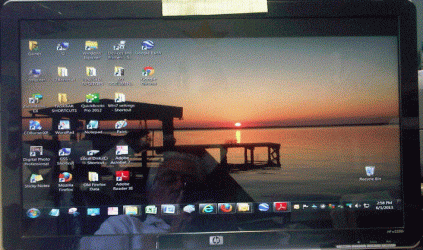
1" band at top and bottom of screen

GAINES

New member
Local time
3:59 PM
Messages
2
I am not getting the full screen use. The 1" black band at top and bottom is making my viewing area such that i have to scroll up to see what i could normally see before installing win 7.
Any suggestions as to how to make my viewing full screen?
 

My Computer My Computer

At a glance

WINDOWS 7 64
Computer type
PC/Desktop
Computer Manufacturer/Model Number
CUSTOM BUILD
OS
WINDOWS 7 64
Gaines, welcome to the windows 7 forum

Have you updated your video drivers and set the resolution to the best for your monitor?

that might be one area to look at.

Rich
 

My Computer My Computer

At a glance

Windows 7 Pro x64 SP1Intel Core I716 GigsNVIDIA GeForce GTX 670M
Computer type
Laptop
Computer Manufacturer/Model Number
Toshiba Laptop Qosimo X870
OS
Windows 7 Pro x64 SP1
CPU
Intel Core I7
Motherboard
Toshiba Qosmio
Memory
16 Gigs
Graphics Card(s)
NVIDIA GeForce GTX 670M
Monitor(s) Displays
17.7" laptop
Screen Resolution
1600 x 900
Hard Drives
256 Gig SanDisk SSD for C
256 Gig Intel SSD for D
Internet Speed
50/25 FIOS
Antivirus
Vipre (all you can eat for 10 machines)
Browser
IE and FF
Other Info
I have dos 6.22, wfwg 3.11, win98, 2000 and xp VHD's available for testing. MS's Virtual PC works great.
As you can see below, i am losing 1" above the icons at top and below the icons at bottom. This makes me have to cursor down to hit print or to view all of an item, that used to be full screen.
I am not very computer literate, i can work in the programs that i know, but don't know how to fix things.
ANY HELP WOULD BE APPRECIATED. I HAVE UPDATED MY DRIVERS AND SET THE RESOLUTION
MONITOR SCREEN.GIF
 
Last edited:

My Computer My Computer

At a glance

WINDOWS 7 64
Computer type
PC/Desktop
Computer Manufacturer/Model Number
CUSTOM BUILD
OS
WINDOWS 7 64
Back
Top