Solved New PC Build, Windows 7 doesn't want to install

ToiletNinja

New member
Member
Local time
9:07 AM
Messages
47
This is a new build I put together about a day ago (updated system specs) and I can't get Windows 7 Ultimate x64 to install. During the install, right after the first 'restart computer' prompt, it would restart and then just freeze at 'Starting Windows' with the shining windows logo.

I've tried a lot of different things and I've even gotten to the point where I take the disc out before it does the first restart and that seems to work and brings me all the way to the desktop, yet I can't get the Aero appearance (it's on the Win 7 starter-type theme). If I restart, I can't get back in, either it freezes at 'Starting Windows' again or goes straight to startup repair which tells me there is an issue with the hard drive. The hard drive is new, worst case scenario I could send it back, I received it yesterday, (newegg has a great 30-day RMA period). But I would prefer to fix the problem if possible. Any help would be greatly appreciated.
 

My Computer My Computer

At a glance

Windows 7 Ultimate 64-bitIntel i5-3570K Unlocked CPU [email protected]G.SKILL Ripjaws X - Series 8GB DDR3 RAM
Computer type
PC/Desktop
Computer Manufacturer/Model Number
Custom Build
OS
Windows 7 Ultimate 64-bit
CPU
Intel i5-3570K Unlocked CPU [email protected]
Motherboard
ASRock Z77 Extreme4
Memory
G.SKILL Ripjaws X - Series 8GB DDR3 RAM
Sound Card
Unknown
Monitor(s) Displays
LG Flatron Wide, 24 inches
Screen Resolution
1680x1050
Hard Drives
Western Digital Caviar Black 1TB 7200rpm SATA
PSU
PC Power and Cooling Silencer MK. III 600w PSU
Case
Thermaltake Commander MS-I Snow Edition
Cooling
Some fans
Keyboard
USB Keyboard, nothing fancy
Mouse
USB Mouse
Internet Speed
28MB/s DOWN 5.8MB/s UP
ToiletNinja (great name),
With the cost of ssd's down to very reasonable levels for 128gbs, you could invest in a nice Samsung Pro or Crucial M4 and give that a go. Then you can sort out the WD black drive with free tools available from WD's site and if failing then RMA.
 

My Computer My Computer

At a glance

Windows 7 Ultimate 64i7 3770k OC'd 4.6 @ 1.17v, also FX 8120 & i5 ...32 gb G.Skill Sniper DDR3 10-12-12-31 @ 2133XFX Radeon 7870 2GB DDR5
Computer type
PC/Desktop
Computer Manufacturer/Model Number
A blend of brains, brawn and dumb luck.
OS
Windows 7 Ultimate 64
CPU
i7 3770k OC'd 4.6 @ 1.17v, also FX 8120 & i5 miniITX
Motherboard
MSI P67A-GD80 b3
Memory
32 gb G.Skill Sniper DDR3 10-12-12-31 @ 2133
Graphics Card(s)
XFX Radeon 7870 2GB DDR5
Sound Card
Sound Blaster Z Series Card
Monitor(s) Displays
(2) LG LED 23" 1920 x 1080 2ms Monitors via mini d-port
Screen Resolution
1680 X 1050 p
Hard Drives
Samsung 256 gb 830 SSD sata III
(1) 1 tb WD Black
(2) 1 tb Hitachi deskmates/sata II
(2) 1 tb WD green/sata II
(2) 3 tb Seagate Barracuda
(1) 120 gb OCZ Vertex SS
(1) Drobo 5N w/5 Seagate 3tb
PSU
EVGA modular 1000G2 80% gold rating & APC 1200 RS
Case
CoolerMaster Storm Styker
Cooling
7 case fans 140mm & 120mm, NZXT Kraken X60
Keyboard
(2) Logitech Illuminated Keyboards (1) usb (1) wireless
Mouse
Logitech G700 & T-BC21 - nano nx for the laptop
Internet Speed
Basic 120mbps down
Antivirus
Trend Micro Titanium Max Security & Malwarebytes Premium
Browser
Chrome and IE 10
Other Info
5 Noctua case fans + 3 Noctua in p/p on NZXT cooler
Integrated hot swap drive bays for 2.5" Drives
(2) Lite-on dvd/cd/Blu Ray optical 22X
Integrated fan controller and led on/off
HP Officejet Pro 8630 all-n-one
Hot-swappable 3.5" hard drive bay
Netgear Nighthawk router
Asus USB 3 & sata 6 PCIe card
Vantec IDE to sata adptr./Ultra sata adptr
Lenovo L420 i5 lappy with m sata
Drobo 5N advanced NAS
ToiletNinja (great name),
With the cost of ssd's down to very reasonable levels for 128gbs, you could invest in a nice Samsung Pro or Crucial M4 and give that a go. Then you can sort out the WD black drive with free tools available from WD's site and if failing then RMA.

I don't have the funds right now to buy an SSD, or anything else for that matter. If you could point me to these free tools, I'd be very grateful.
 

My Computer My Computer

At a glance

Windows 7 Ultimate 64-bitIntel i5-3570K Unlocked CPU [email protected]G.SKILL Ripjaws X - Series 8GB DDR3 RAM
Computer type
PC/Desktop
Computer Manufacturer/Model Number
Custom Build
OS
Windows 7 Ultimate 64-bit
CPU
Intel i5-3570K Unlocked CPU [email protected]
Motherboard
ASRock Z77 Extreme4
Memory
G.SKILL Ripjaws X - Series 8GB DDR3 RAM
Sound Card
Unknown
Monitor(s) Displays
LG Flatron Wide, 24 inches
Screen Resolution
1680x1050
Hard Drives
Western Digital Caviar Black 1TB 7200rpm SATA
PSU
PC Power and Cooling Silencer MK. III 600w PSU
Case
Thermaltake Commander MS-I Snow Edition
Cooling
Some fans
Keyboard
USB Keyboard, nothing fancy
Mouse
USB Mouse
Internet Speed
28MB/s DOWN 5.8MB/s UP

My Computer My Computer

At a glance

Windows 7 Ultimate 64i7 3770k OC'd 4.6 @ 1.17v, also FX 8120 & i5 ...32 gb G.Skill Sniper DDR3 10-12-12-31 @ 2133XFX Radeon 7870 2GB DDR5
Computer type
PC/Desktop
Computer Manufacturer/Model Number
A blend of brains, brawn and dumb luck.
OS
Windows 7 Ultimate 64
CPU
i7 3770k OC'd 4.6 @ 1.17v, also FX 8120 & i5 miniITX
Motherboard
MSI P67A-GD80 b3
Memory
32 gb G.Skill Sniper DDR3 10-12-12-31 @ 2133
Graphics Card(s)
XFX Radeon 7870 2GB DDR5
Sound Card
Sound Blaster Z Series Card
Monitor(s) Displays
(2) LG LED 23" 1920 x 1080 2ms Monitors via mini d-port
Screen Resolution
1680 X 1050 p
Hard Drives
Samsung 256 gb 830 SSD sata III
(1) 1 tb WD Black
(2) 1 tb Hitachi deskmates/sata II
(2) 1 tb WD green/sata II
(2) 3 tb Seagate Barracuda
(1) 120 gb OCZ Vertex SS
(1) Drobo 5N w/5 Seagate 3tb
PSU
EVGA modular 1000G2 80% gold rating & APC 1200 RS
Case
CoolerMaster Storm Styker
Cooling
7 case fans 140mm & 120mm, NZXT Kraken X60
Keyboard
(2) Logitech Illuminated Keyboards (1) usb (1) wireless
Mouse
Logitech G700 & T-BC21 - nano nx for the laptop
Internet Speed
Basic 120mbps down
Antivirus
Trend Micro Titanium Max Security & Malwarebytes Premium
Browser
Chrome and IE 10
Other Info
5 Noctua case fans + 3 Noctua in p/p on NZXT cooler
Integrated hot swap drive bays for 2.5" Drives
(2) Lite-on dvd/cd/Blu Ray optical 22X
Integrated fan controller and led on/off
HP Officejet Pro 8630 all-n-one
Hot-swappable 3.5" hard drive bay
Netgear Nighthawk router
Asus USB 3 & sata 6 PCIe card
Vantec IDE to sata adptr./Ultra sata adptr
Lenovo L420 i5 lappy with m sata
Drobo 5N advanced NAS
Where did you get Win7? How is it burned to DVD or written to flash stick installer? How do you plan to activate it?

Is this a UEFI BIOS and if so did you follow the special steps for UEFI (Unified Extensible Firmware Interface) - Install Windows 7 with - Windows 7 Forums or UEFI Bootable USB Flash Drive - Create in Windows

rReset BIOS to defaults, set SATA controller to AHCI in BIOS setup.

Besides testing the HD with the DOS CD test Alan linked, try wiping the HD with Diskpart Clean Command from the installer's System Recovery Options Command Line, then define an Active partition for install using Step 2 in SSD - HDD Optimize for Windows Reinstallation.
 

It might be a UEFI BIOS, I can see the letters 'UEFI' everywhere on the BIOS, don't know if its obviously UEFI or not, but I have tried installing windows that way, but I can't remember what the outcome was. Giving it another shot might help.

As for what Alan said, I could give that a try as well. I would be performing the 'Extended Test', right?

Oh, and I've checked the SATA controller, it is set to AHCI.

Another detail, this might help or not; I get a little warning in the bottom left; 'Windows cannot be installed to this disk (Show Details)'
 

My Computer My Computer

At a glance

Windows 7 Ultimate 64-bitIntel i5-3570K Unlocked CPU [email protected]G.SKILL Ripjaws X - Series 8GB DDR3 RAM
Computer type
PC/Desktop
Computer Manufacturer/Model Number
Custom Build
OS
Windows 7 Ultimate 64-bit
CPU
Intel i5-3570K Unlocked CPU [email protected]
Motherboard
ASRock Z77 Extreme4
Memory
G.SKILL Ripjaws X - Series 8GB DDR3 RAM
Sound Card
Unknown
Monitor(s) Displays
LG Flatron Wide, 24 inches
Screen Resolution
1680x1050
Hard Drives
Western Digital Caviar Black 1TB 7200rpm SATA
PSU
PC Power and Cooling Silencer MK. III 600w PSU
Case
Thermaltake Commander MS-I Snow Edition
Cooling
Some fans
Keyboard
USB Keyboard, nothing fancy
Mouse
USB Mouse
Internet Speed
28MB/s DOWN 5.8MB/s UP
If you have a UEFI BIOS and you want to install in UEFI mode then it takes the special steps in the tutorial, including booting UEFI DVD choice and deleting all partitions in case HD is currently in MBR format - tho you should be warned of that.

Some users who have considered the benefits of UEFI BIOS vs. Legacy BIOS - YouTube
and are experiencing installation problems decide to Bypass UEFI to Install WIn7 to avoid the problems for now.
 
If you have a UEFI BIOS and you want to install in UEFI mode then it takes the special steps in the tutorial, including booting UEFI DVD choice and deleting all partitions in case HD is currently in MBR format - tho you should be warned of that.

Some users who have considered the benefits of UEFI BIOS vs. Legacy BIOS - YouTube
and are experiencing installation problems decide to Bypass UEFI to Install WIn7 to avoid the problems for now.

I'll try bypassing the UEFI and report back with my results.
 

My Computer My Computer

At a glance

Windows 7 Ultimate 64-bitIntel i5-3570K Unlocked CPU [email protected]G.SKILL Ripjaws X - Series 8GB DDR3 RAM
Computer type
PC/Desktop
Computer Manufacturer/Model Number
Custom Build
OS
Windows 7 Ultimate 64-bit
CPU
Intel i5-3570K Unlocked CPU [email protected]
Motherboard
ASRock Z77 Extreme4
Memory
G.SKILL Ripjaws X - Series 8GB DDR3 RAM
Sound Card
Unknown
Monitor(s) Displays
LG Flatron Wide, 24 inches
Screen Resolution
1680x1050
Hard Drives
Western Digital Caviar Black 1TB 7200rpm SATA
PSU
PC Power and Cooling Silencer MK. III 600w PSU
Case
Thermaltake Commander MS-I Snow Edition
Cooling
Some fans
Keyboard
USB Keyboard, nothing fancy
Mouse
USB Mouse
Internet Speed
28MB/s DOWN 5.8MB/s UP
Update: I got to

FORMAT FS=NTFS LABEL="WINDOWS 7"

and it gave me a

'DiskPart has encountered an error: The parameter is incorrect. See the System Event Log for more information.

DISKPART> JFJDJACDFJCMADFJECMIVMFJNDDDDDDD'

after getting 0 percent completed, then I came back and it was 15 percent completed, then this.
 

My Computer My Computer

At a glance

Windows 7 Ultimate 64-bitIntel i5-3570K Unlocked CPU [email protected]G.SKILL Ripjaws X - Series 8GB DDR3 RAM
Computer type
PC/Desktop
Computer Manufacturer/Model Number
Custom Build
OS
Windows 7 Ultimate 64-bit
CPU
Intel i5-3570K Unlocked CPU [email protected]
Motherboard
ASRock Z77 Extreme4
Memory
G.SKILL Ripjaws X - Series 8GB DDR3 RAM
Sound Card
Unknown
Monitor(s) Displays
LG Flatron Wide, 24 inches
Screen Resolution
1680x1050
Hard Drives
Western Digital Caviar Black 1TB 7200rpm SATA
PSU
PC Power and Cooling Silencer MK. III 600w PSU
Case
Thermaltake Commander MS-I Snow Edition
Cooling
Some fans
Keyboard
USB Keyboard, nothing fancy
Mouse
USB Mouse
Internet Speed
28MB/s DOWN 5.8MB/s UP
Did it successfully complete the Clean command first?

If so run it again, try just the format command. If it fails close the Command Box and click Install Now to see if you can begin the install since by completing Clean you've definitely cleared the formatting.

You can create and format your partitions using Drive options shown in Step 7 of Clean Install Windows 7 or just click Next and the installer will create and format for you to begin install.

If the fails test the HD with the tool Alan linked. Burn the DOS ISO download to CD using Windows Image Burner, boot it to run Extended Scan.
 
  • Like
Reactions: Dom
Did it successfully complete the Clean command first?

If so run it again, try just the format command. If it fails close the Command Box and click Install Now to see if you can begin the install since by completing Clean you've definitely cleared the formatting.

You can create and format your partitions using Drive options shown in Step 7 of Clean Install Windows 7 or just click Next and the installer will create and format for you to begin install.

If the fails test the HD with the tool Alan linked. Burn the DOS ISO download to CD using Windows Image Burner, boot it to run Extended Scan.

Yes, the Clean command was completed successfully.

I tried the format command but it says I need to select a disk.

I enter 'SEL DISK 0' and it says

'The disk you specified is not valid. There is no disk selected.'

I enter 'LIST DISK' and it says

'There are no fixed disks to show.'

I click Install now, and I get to where the disks are supposed to be listed, but it's blank. Why is this? Is this a problem? How do I fix it?
 

My Computer My Computer

At a glance

Windows 7 Ultimate 64-bitIntel i5-3570K Unlocked CPU [email protected]G.SKILL Ripjaws X - Series 8GB DDR3 RAM
Computer type
PC/Desktop
Computer Manufacturer/Model Number
Custom Build
OS
Windows 7 Ultimate 64-bit
CPU
Intel i5-3570K Unlocked CPU [email protected]
Motherboard
ASRock Z77 Extreme4
Memory
G.SKILL Ripjaws X - Series 8GB DDR3 RAM
Sound Card
Unknown
Monitor(s) Displays
LG Flatron Wide, 24 inches
Screen Resolution
1680x1050
Hard Drives
Western Digital Caviar Black 1TB 7200rpm SATA
PSU
PC Power and Cooling Silencer MK. III 600w PSU
Case
Thermaltake Commander MS-I Snow Edition
Cooling
Some fans
Keyboard
USB Keyboard, nothing fancy
Mouse
USB Mouse
Internet Speed
28MB/s DOWN 5.8MB/s UP
I'd run the HD Diagnostic extended CD scan for your make HD. Your drive may be failing.

I'd also check or change the cables.

You can plug the HD into another PC to see if it's seen, even run the diagnostics from there.

Try another HD to be sure.
 
I can't find the answer to these questions from Greg post #5.

Where did you get Windows 7? How is it burned to DVD or written to flash stick installer? How do you plan to activate it?
 

My Computer My Computer

At a glance

Windows 10 Pro. 64/ version 1709 Windows 7 Pr...Intel i7-6800K @ 4.3Corsair Platinum 16 gig @2400EVGA GTX 1070 OC
Computer type
PC/Desktop
Computer Manufacturer/Model Number
Home made Desktop
OS
Windows 10 Pro. 64/ version 1709 Windows 7 Pro/64
CPU
Intel i7-6800K @ 4.3
Motherboard
ASUS X-99 Deluxe II
Memory
Corsair Platinum 16 gig @2400
Graphics Card(s)
EVGA GTX 1070 OC
Monitor(s) Displays
Asus 27" LED LCD/VE278Q
Screen Resolution
1920-1080 or 1280-720 HDMI
Hard Drives
INTEL SSD 730-240 Gb Sata 3.0/
PSU
EVGA Platium 1200W
Case
Phanteks Luxe Tempered Glass 8 fans/ one radiator
Cooling
XSPC/ Water Cooled CPU
Keyboard
Das 4 Professional
Mouse
Logitech M705/MX Anywhere 2-S
Internet Speed
100 mbits
Antivirus
Microsoft Security Essentials/ Malwarebytes Premium 3.0/ SAS
Browser
I.E. 11 default/Firefox/ ISP Time Warner Cable/Spectrum
Other Info
LG BluRay Burner/
Sound system-KLipsch-THX/
Icy Dock ssd Hot Swap bays.
I can't find the answer to these questions from Greg post #5.

Where did you get Windows 7? How is it burned to DVD or written to flash stick installer? How do you plan to activate it?

I have an untouched copy burned to DVD. I can vouch for it because I've used the same exact DVD to install Win 7 on the computer I'm currently on and it works perfectly. I keep thinking this is a hard drive problem.
 

My Computer My Computer

At a glance

Windows 7 Ultimate 64-bitIntel i5-3570K Unlocked CPU [email protected]G.SKILL Ripjaws X - Series 8GB DDR3 RAM
Computer type
PC/Desktop
Computer Manufacturer/Model Number
Custom Build
OS
Windows 7 Ultimate 64-bit
CPU
Intel i5-3570K Unlocked CPU [email protected]
Motherboard
ASRock Z77 Extreme4
Memory
G.SKILL Ripjaws X - Series 8GB DDR3 RAM
Sound Card
Unknown
Monitor(s) Displays
LG Flatron Wide, 24 inches
Screen Resolution
1680x1050
Hard Drives
Western Digital Caviar Black 1TB 7200rpm SATA
PSU
PC Power and Cooling Silencer MK. III 600w PSU
Case
Thermaltake Commander MS-I Snow Edition
Cooling
Some fans
Keyboard
USB Keyboard, nothing fancy
Mouse
USB Mouse
Internet Speed
28MB/s DOWN 5.8MB/s UP
How to Run WD Data Lifeguard Diagnostic for DOS:

I am limiting myself to running the WD Diagnostic for DOS. It is not an ISO file but a DOS executable to be run on DOS.

Download the dlgdiag_5_20.zip. from http://support.wdc.com/product/download.asp?groupid=613&sid=2&lang=en


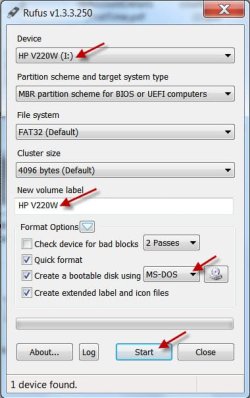
To create your DOS bootable flash drive, download the latest version of Rufus from http://rufus.akeo.ie/ and run.

Select your flash drive, give it a distinct Volume Label, say MSDOS, select MSDOS with the dropdown arrow in “Create a bootable disk using” and click on Start. On completion Close it.


08-07-2013 08-49-59.jpg

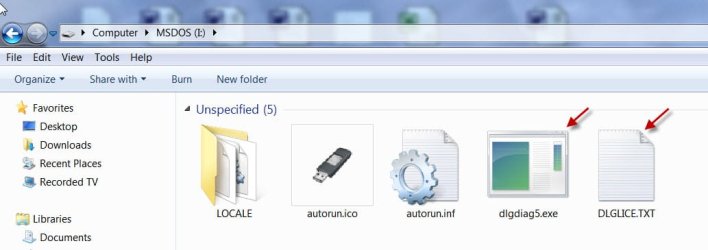
Extract the contents of the dlgdiag_5_20.zip directly into the DOS flash drive or extract to a folder and move the extracts to the DOS flash drive.


At the end of it your bootable flash drive should have the contents as shown below.


08-07-2013 09-01-31.jpg


You are now ready to run the Diagnostics.


Invoke the onetime boot menu and boot from this flash drive or change your boot order in your Bios to boot from the flash drive first.


At the DOS prompt type dlgdiag5.exe and press ENTER to run the program.
 

My Computer My Computer

At a glance

Windows 7 Home Premium 32 bit
OS
Windows 7 Home Premium 32 bit
Alright, update.

I can successfully enter the dlgdiag5.exe diagnostic system, doesn't matter if I select quick test, or extended test, after it runs for a bit, I get this;

n1c8.jpg


After hitting 'any key';

z34w.jpg


After hitting CTRL-ALT-DELETE, the computer restarts, Mobo logo, then this;

c0ji.jpg


At which point I again hit CTRL-ALT-DELETE, and it goes into a 'BOOTMGR is missing' reboot loop.

Don't know what to do at this point.
 

My Computer My Computer

At a glance

Windows 7 Ultimate 64-bitIntel i5-3570K Unlocked CPU [email protected]G.SKILL Ripjaws X - Series 8GB DDR3 RAM
Computer type
PC/Desktop
Computer Manufacturer/Model Number
Custom Build
OS
Windows 7 Ultimate 64-bit
CPU
Intel i5-3570K Unlocked CPU [email protected]
Motherboard
ASRock Z77 Extreme4
Memory
G.SKILL Ripjaws X - Series 8GB DDR3 RAM
Sound Card
Unknown
Monitor(s) Displays
LG Flatron Wide, 24 inches
Screen Resolution
1680x1050
Hard Drives
Western Digital Caviar Black 1TB 7200rpm SATA
PSU
PC Power and Cooling Silencer MK. III 600w PSU
Case
Thermaltake Commander MS-I Snow Edition
Cooling
Some fans
Keyboard
USB Keyboard, nothing fancy
Mouse
USB Mouse
Internet Speed
28MB/s DOWN 5.8MB/s UP
I'd get a second opinion from Seagate Seatools ISO written using Windows Image Burner to CD, or free Partition Wizard bootable CD Partition Wizard Partition surface test.

If you can pull the HD and put it in another PC you can run the Windows version of WD Data Lifeguard.

You can also burn Data Lifeguard to a CD which might work better to knock off the Extended Test this time: Western Digital Data Lifeguard CD ISO (extract first) http://support.wdc.com/product/download.asp?groupid=605&sid=2&lang=en
 
I'd get a second opinion from Seagate Seatools ISO written using Windows Image Burner to CD, or free Partition Wizard bootable CD Partition Wizard Partition surface test.

If you can pull the HD and put it in another PC you can run the Windows version of WD Data Lifeguard.

You can also burn Data Lifeguard to a CD which might work better to knock off the Extended Test this time: Western Digital Data Lifeguard CD ISO (extract first) http://support.wdc.com/product/download.asp?groupid=605&sid=2&lang=en

I was able to put it into this PC and am running WD Data Lifeguard. The quick test failed abruptly within ~10 seconds due to an error, then it shows a red X and 'FAIL' right next to 'Quick test'. The extended test seems to take way too long for me, as I'm writing this it's at '20 hours remaining'. Edit: Down to 13 hours. Still quite some time.

Oh, and Windows Explorer shows the drive, 'D:' as only 100GB, probably due to me making a 100GB partition as some other attempt at solving the problem earlier.
 

My Computer My Computer

At a glance

Windows 7 Ultimate 64-bitIntel i5-3570K Unlocked CPU [email protected]G.SKILL Ripjaws X - Series 8GB DDR3 RAM
Computer type
PC/Desktop
Computer Manufacturer/Model Number
Custom Build
OS
Windows 7 Ultimate 64-bit
CPU
Intel i5-3570K Unlocked CPU [email protected]
Motherboard
ASRock Z77 Extreme4
Memory
G.SKILL Ripjaws X - Series 8GB DDR3 RAM
Sound Card
Unknown
Monitor(s) Displays
LG Flatron Wide, 24 inches
Screen Resolution
1680x1050
Hard Drives
Western Digital Caviar Black 1TB 7200rpm SATA
PSU
PC Power and Cooling Silencer MK. III 600w PSU
Case
Thermaltake Commander MS-I Snow Edition
Cooling
Some fans
Keyboard
USB Keyboard, nothing fancy
Mouse
USB Mouse
Internet Speed
28MB/s DOWN 5.8MB/s UP
I always run the maker's Diagnostics followed by Disk Check, if necessary from the Win7 command line as shown in Option 2. Either test repeatedly failing really means the drive is unsalvageable. Most would not trust it even if repaired.
 
On a new HDD your RAW reallocated sector count should be zero. I'm not sure what your SMART readout mean but dlgdiag5 suggests problems. Check it further but consider returning the drive.
 

My Computer My Computer

At a glance

Windows 7x64 Home Premium SP1Intel i7 2600kG.Skill Ripjaws (DDR3-1600) 2x4GBNvidia GeForce GTS 450; Intel HD Graphics 300...
Computer type
PC/Desktop
Computer Manufacturer/Model Number
Own build
OS
Windows 7x64 Home Premium SP1
CPU
Intel i7 2600k
Motherboard
ASUS P8Z68 Deluxe
Memory
G.Skill Ripjaws (DDR3-1600) 2x4GB
Graphics Card(s)
Nvidia GeForce GTS 450; Intel HD Graphics 3000(GT2+)
Monitor(s) Displays
Dell Ultrasharp IPS panel U2311H, Samsung SyncMaster P2350
Screen Resolution
1920x1080
Hard Drives
Samsung 850 Pro SSD 256GB, Samsung SSD 840 120GB, Seagates 1TB Barracuda ST31000528AS x2
PSU
Seasonic M12II 520W
Case
Lian Li Lancool PC-K60
Cooling
Case: 1x120mm, 3x140mm CPU: Hyper 212+
Keyboard
Logitech MK520 (wireless)
Mouse
Logitech MK520
Internet Speed
6-7 Mbps
Antivirus
Norton Security Premium, Malwarebytes on 2 (MSE on 3rd PC)
Browser
FireFox
Other Info
Audio: Logitech Z523 2.1
Back
Top