
I am trying to remove empty folders using Remove Empty Directories. I know of a few that are empty, and just ran a test to see if RED would detect they were empty. Well, to my surprise, I am finding that RED shows 1 (or more) file in these folders (a JPG at 0.00 MB), but it's not showing up in the folder. Is there any way I can have these show up in folders so I can search for all JPG's and delete them? Example:
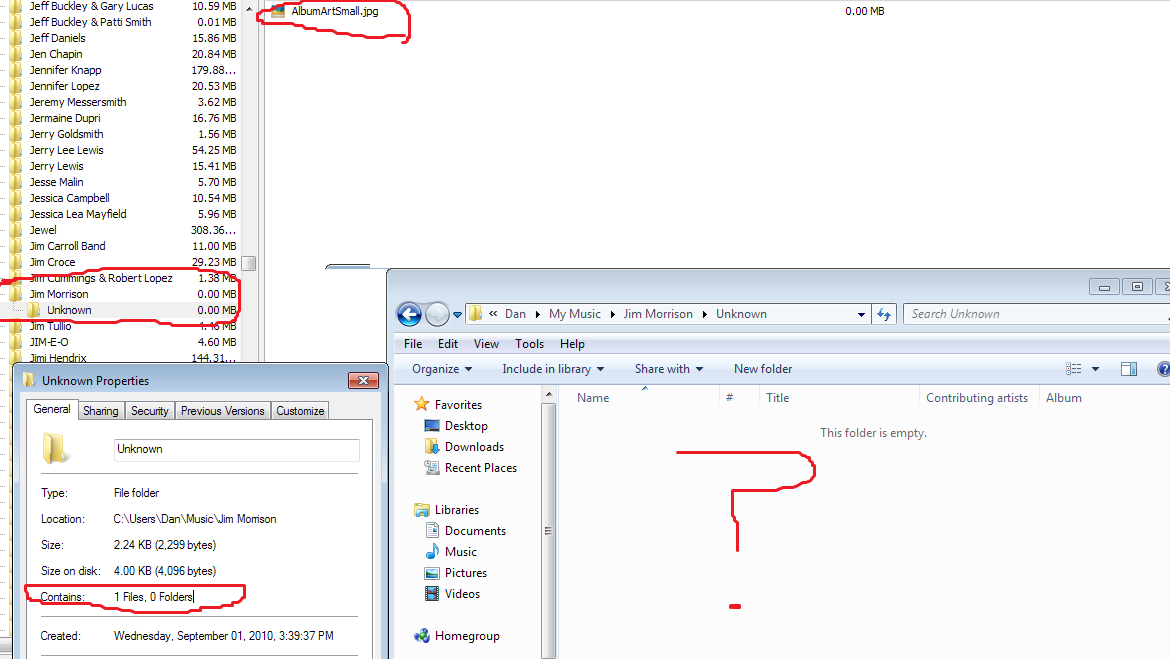
I do have "Show hidden files, folders and drives" checked under folder options as well.
I do have "Show hidden files, folders and drives" checked under folder options as well.
My Computer
At a glance
MS Windows 7 Home Premium SP 1 64-bitIntel (R) Celeron (R) CPU 900@ 2.20 GHz2 GB
- Computer Manufacturer/Model Number
- Compaq Presario CQ60 Notebook PC
- OS
- MS Windows 7 Home Premium SP 1 64-bit
- CPU
- Intel (R) Celeron (R) CPU 900@ 2.20 GHz
- Memory
- 2 GB
- Hard Drives
- Seagate ST9250410AS ATA 220 GB
- Other Info
- HP DVDRAM GT30L ATA
Synaptics Ps/2 port touchpad
Atheros AR9285 802.11b/g/n WiFi Adapter
Conexant Pebble High Definition Smart Audio
Total Recorder WDM Audio Driver
Generic PNP Monitor


