Solved AOC U4308V Monitor Not showing up in Playback Devices - No Sound

thinkbig

New member
Member
VIP
Local time
6:26 PM
Messages
118
Hi,

I have a new AOC U4308V Monitor with speakers and I cannot get the sound to work
on my Dell Inspiron running Win 7 (specs are in my profile).

I have it hooked up with an HDMI cable and also a sound cable going from the speaker
output on my PC into the sound plug on the monitor.

I can turn the volume up and down on the monitor itself, but still no sound.

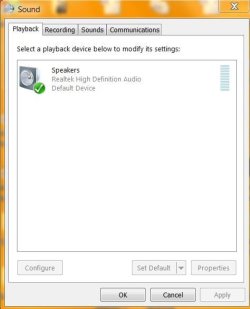
When I go into "Playback Devices" all I see is:

Speakers
Realtek High Definition Audio
Default Device

and that is it. No other choices so the monitor is not showing up.

Before this I was using a Philips BDM4065UC with the same setup (hdmi and sound cable)
and the sound was working fine??

Any help on this will be appreciated.

Thank you.
 

My Computer My Computer

At a glance

Microsoft Windows 7 Home Premium 64-bitIntel(R) Core(TM)2 Duo CPU E7600 @ 3.06GHz8.00 GB(1) Intel(R) G45/G43 Express Chipset (2) Inte...
Computer type
PC/Desktop
Computer Manufacturer/Model Number
Dell Inspiron
OS
Microsoft Windows 7 Home Premium 64-bit
CPU
Intel(R) Core(TM)2 Duo CPU E7600 @ 3.06GHz
Motherboard
Dell Inc. 0K83V0
Memory
8.00 GB
Graphics Card(s)
(1) Intel(R) G45/G43 Express Chipset (2) Intel(R) G45/G43
Sound Card
(1) Realtek High Definition Audio (2) Intel(R) High Defini
Monitor(s) Displays
Phillips BDM4065UC
Hard Drives
Samsung SSD 860 EVO 500G
Browser
IE 10
Hi thinkbig,

I have a new AOC U4308V Monitor with speakers and I cannot get the sound to work on my Dell Inspiron running Win 7 (specs are in my profile).

I have it hooked up with an HDMI cable and also a sound cable going from the speaker output on my PC into the sound plug on the monitor.

I can turn the volume up and down on the monitor itself, but still no sound.

When I go into "Playback Devices" all I see is:

Speakers
Realtek High Definition Audio
Default Device

and that is it. No other choices so the monitor is not showing up.

Under the heading msinfo32 [MS System Information] - Problem Devices . . ., please run MS_Info32_Find_Problem_Devices.bat, Option [2] and [x] from here => BATCH PROGRAMS [Standalone] and then upload the results using the tutorial at the bottom of the above link [Upload to SevenForums . . .] and someone will look at it for you.

I hope this helps!
 

My Computer My Computer

At a glance

Win 7 HP SP1 64-bit Vista HB SP2 32-bit Linux...Intel(R) Pentium(R) CPU P6200 @ 2.13GHz4.00 GBIntel(R) Graphics Media Accelerator HD
Computer type
Laptop
Computer Manufacturer/Model Number
Fujitsu LIFEBOOK
OS
Win 7 HP SP1 64-bit Vista HB SP2 32-bit Linux Mint 18.3
CPU
Intel(R) Pentium(R) CPU P6200 @ 2.13GHz
Motherboard
FUJITSU FJNBB06
Memory
4.00 GB
Graphics Card(s)
Intel(R) Graphics Media Accelerator HD
Sound Card
[1] Realtek High Definition Audio [2] Intel(R) Display Audio
Screen Resolution
1366 x 768 x 32 bits (4294967296 colors) @ 59 Hz
Hard Drives
TOSHIBA MK5076GSX
Antivirus
AVG FREE
Hi,

Thanks for your response.

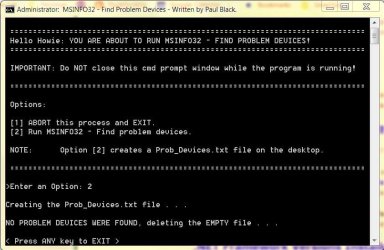
The results from the test are below.
 

Attachments

  • MSINFO32.JPG
    MSINFO32.JPG
    60.3 KB · Views: 0

My Computer My Computer

At a glance

Microsoft Windows 7 Home Premium 64-bitIntel(R) Core(TM)2 Duo CPU E7600 @ 3.06GHz8.00 GB(1) Intel(R) G45/G43 Express Chipset (2) Inte...
Computer type
PC/Desktop
Computer Manufacturer/Model Number
Dell Inspiron
OS
Microsoft Windows 7 Home Premium 64-bit
CPU
Intel(R) Core(TM)2 Duo CPU E7600 @ 3.06GHz
Motherboard
Dell Inc. 0K83V0
Memory
8.00 GB
Graphics Card(s)
(1) Intel(R) G45/G43 Express Chipset (2) Intel(R) G45/G43
Sound Card
(1) Realtek High Definition Audio (2) Intel(R) High Defini
Monitor(s) Displays
Phillips BDM4065UC
Hard Drives
Samsung SSD 860 EVO 500G
Browser
IE 10
Hi thinkbig,

[1] This shows that it is NOT an OS driver related problem!
[2] Is there not a setting on the AOC U4308V monitor itself?
[3] Does this PDF help => AOC U4308V Monitor.

I hope this helps!
 

My Computer My Computer

At a glance

Win 7 HP SP1 64-bit Vista HB SP2 32-bit Linux...Intel(R) Pentium(R) CPU P6200 @ 2.13GHz4.00 GBIntel(R) Graphics Media Accelerator HD
Computer type
Laptop
Computer Manufacturer/Model Number
Fujitsu LIFEBOOK
OS
Win 7 HP SP1 64-bit Vista HB SP2 32-bit Linux Mint 18.3
CPU
Intel(R) Pentium(R) CPU P6200 @ 2.13GHz
Motherboard
FUJITSU FJNBB06
Memory
4.00 GB
Graphics Card(s)
Intel(R) Graphics Media Accelerator HD
Sound Card
[1] Realtek High Definition Audio [2] Intel(R) Display Audio
Screen Resolution
1366 x 768 x 32 bits (4294967296 colors) @ 59 Hz
Hard Drives
TOSHIBA MK5076GSX
Antivirus
AVG FREE
Hi Paul,

I've read through the Manual several times.

There is a volume control on the back of the unit which
turns it up and down. That is working but no sound.

There's got to be a setting somewhere that I am missing
either on my PC or Monitor??
 

My Computer My Computer

At a glance

Microsoft Windows 7 Home Premium 64-bitIntel(R) Core(TM)2 Duo CPU E7600 @ 3.06GHz8.00 GB(1) Intel(R) G45/G43 Express Chipset (2) Inte...
Computer type
PC/Desktop
Computer Manufacturer/Model Number
Dell Inspiron
OS
Microsoft Windows 7 Home Premium 64-bit
CPU
Intel(R) Core(TM)2 Duo CPU E7600 @ 3.06GHz
Motherboard
Dell Inc. 0K83V0
Memory
8.00 GB
Graphics Card(s)
(1) Intel(R) G45/G43 Express Chipset (2) Intel(R) G45/G43
Sound Card
(1) Realtek High Definition Audio (2) Intel(R) High Defini
Monitor(s) Displays
Phillips BDM4065UC
Hard Drives
Samsung SSD 860 EVO 500G
Browser
IE 10
Hi thinkbig,

I've read through the Manual several times.

There is a volume control on the back of the unit which turns it up and down. That is working but no sound.

There's got to be a setting somewhere that I am missing either on my PC or Monitor?

[1] I am not being funny, but are you sure you have the cables plugged into the correct input slots?
[2] Have you got an on-board sound card?
 

My Computer My Computer

At a glance

Win 7 HP SP1 64-bit Vista HB SP2 32-bit Linux...Intel(R) Pentium(R) CPU P6200 @ 2.13GHz4.00 GBIntel(R) Graphics Media Accelerator HD
Computer type
Laptop
Computer Manufacturer/Model Number
Fujitsu LIFEBOOK
OS
Win 7 HP SP1 64-bit Vista HB SP2 32-bit Linux Mint 18.3
CPU
Intel(R) Pentium(R) CPU P6200 @ 2.13GHz
Motherboard
FUJITSU FJNBB06
Memory
4.00 GB
Graphics Card(s)
Intel(R) Graphics Media Accelerator HD
Sound Card
[1] Realtek High Definition Audio [2] Intel(R) Display Audio
Screen Resolution
1366 x 768 x 32 bits (4294967296 colors) @ 59 Hz
Hard Drives
TOSHIBA MK5076GSX
Antivirus
AVG FREE
Yes, I've checked the cables several times.

HDMI out on computer - HDMI1 in on the monitor.
I've also tried HDMI2 just to make sure. Each time
I've had to change the input on the monitor to HDMI1
or 2 respectively.

I am using the sound card that came with the computer,
not sure what it is or how to tell?

I've also checked all the connections on both ends to
make sure they are all tight and that the sound is in
the right place.
 

My Computer My Computer

At a glance

Microsoft Windows 7 Home Premium 64-bitIntel(R) Core(TM)2 Duo CPU E7600 @ 3.06GHz8.00 GB(1) Intel(R) G45/G43 Express Chipset (2) Inte...
Computer type
PC/Desktop
Computer Manufacturer/Model Number
Dell Inspiron
OS
Microsoft Windows 7 Home Premium 64-bit
CPU
Intel(R) Core(TM)2 Duo CPU E7600 @ 3.06GHz
Motherboard
Dell Inc. 0K83V0
Memory
8.00 GB
Graphics Card(s)
(1) Intel(R) G45/G43 Express Chipset (2) Intel(R) G45/G43
Sound Card
(1) Realtek High Definition Audio (2) Intel(R) High Defini
Monitor(s) Displays
Phillips BDM4065UC
Hard Drives
Samsung SSD 860 EVO 500G
Browser
IE 10
Hi thinkbig,

Yes, I've checked the cables several times.

HDMI out on computer - HDMI1 in on the monitor.
I've also tried HDMI2 just to make sure. Each time I've had to change the input on the monitor to HDMI1 or 2 respectively.

I've also checked all the connections on both ends to make sure they are all tight and that the sound is in the right place.

Have you got a pair of headphones that you could plug into the monitor and see if you get sound?
This will prove that the monitors sound works and that the problem is when connecting to the computer.

I hope this helps!
 

My Computer My Computer

At a glance

Win 7 HP SP1 64-bit Vista HB SP2 32-bit Linux...Intel(R) Pentium(R) CPU P6200 @ 2.13GHz4.00 GBIntel(R) Graphics Media Accelerator HD
Computer type
Laptop
Computer Manufacturer/Model Number
Fujitsu LIFEBOOK
OS
Win 7 HP SP1 64-bit Vista HB SP2 32-bit Linux Mint 18.3
CPU
Intel(R) Pentium(R) CPU P6200 @ 2.13GHz
Motherboard
FUJITSU FJNBB06
Memory
4.00 GB
Graphics Card(s)
Intel(R) Graphics Media Accelerator HD
Sound Card
[1] Realtek High Definition Audio [2] Intel(R) Display Audio
Screen Resolution
1366 x 768 x 32 bits (4294967296 colors) @ 59 Hz
Hard Drives
TOSHIBA MK5076GSX
Antivirus
AVG FREE
Great idea! Hooked up the headphones and no sound??

Is there a way to get the monitor to show up in "Playback Devices"?
 

My Computer My Computer

At a glance

Microsoft Windows 7 Home Premium 64-bitIntel(R) Core(TM)2 Duo CPU E7600 @ 3.06GHz8.00 GB(1) Intel(R) G45/G43 Express Chipset (2) Inte...
Computer type
PC/Desktop
Computer Manufacturer/Model Number
Dell Inspiron
OS
Microsoft Windows 7 Home Premium 64-bit
CPU
Intel(R) Core(TM)2 Duo CPU E7600 @ 3.06GHz
Motherboard
Dell Inc. 0K83V0
Memory
8.00 GB
Graphics Card(s)
(1) Intel(R) G45/G43 Express Chipset (2) Intel(R) G45/G43
Sound Card
(1) Realtek High Definition Audio (2) Intel(R) High Defini
Monitor(s) Displays
Phillips BDM4065UC
Hard Drives
Samsung SSD 860 EVO 500G
Browser
IE 10
Hi thinkbig,

Great idea! Hooked up the headphones and no sound??

Is there a way to get the monitor to show up in "Playback Devices"?

[1] If the headphones normally work, then it must be a setting!
[2] Is there a menu button or volume button on the monitor itself?
[3] Have you tried running WU [Windows Update] to see if it picks anything up for the monitor?
[4] Click Start => Control Panel => Sound and have a look.
 

My Computer My Computer

At a glance

Win 7 HP SP1 64-bit Vista HB SP2 32-bit Linux...Intel(R) Pentium(R) CPU P6200 @ 2.13GHz4.00 GBIntel(R) Graphics Media Accelerator HD
Computer type
Laptop
Computer Manufacturer/Model Number
Fujitsu LIFEBOOK
OS
Win 7 HP SP1 64-bit Vista HB SP2 32-bit Linux Mint 18.3
CPU
Intel(R) Pentium(R) CPU P6200 @ 2.13GHz
Motherboard
FUJITSU FJNBB06
Memory
4.00 GB
Graphics Card(s)
Intel(R) Graphics Media Accelerator HD
Sound Card
[1] Realtek High Definition Audio [2] Intel(R) Display Audio
Screen Resolution
1366 x 768 x 32 bits (4294967296 colors) @ 59 Hz
Hard Drives
TOSHIBA MK5076GSX
Antivirus
AVG FREE
Headphones do normally work.

There is a volume button on the back and the volume is turned up (60%).

I did run WU also did a disk check.

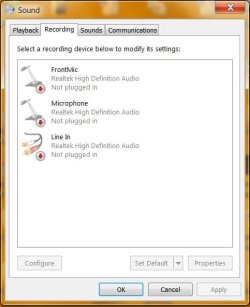
In sound, this is what I see:
 

Attachments

  • S2.JPG
    S2.JPG
    38.5 KB · Views: 2
  • S1.JPG
    S1.JPG
    31.3 KB · Views: 2

My Computer My Computer

At a glance

Microsoft Windows 7 Home Premium 64-bitIntel(R) Core(TM)2 Duo CPU E7600 @ 3.06GHz8.00 GB(1) Intel(R) G45/G43 Express Chipset (2) Inte...
Computer type
PC/Desktop
Computer Manufacturer/Model Number
Dell Inspiron
OS
Microsoft Windows 7 Home Premium 64-bit
CPU
Intel(R) Core(TM)2 Duo CPU E7600 @ 3.06GHz
Motherboard
Dell Inc. 0K83V0
Memory
8.00 GB
Graphics Card(s)
(1) Intel(R) G45/G43 Express Chipset (2) Intel(R) G45/G43
Sound Card
(1) Realtek High Definition Audio (2) Intel(R) High Defini
Monitor(s) Displays
Phillips BDM4065UC
Hard Drives
Samsung SSD 860 EVO 500G
Browser
IE 10
I tried disabling the speakers, Realtek disappeared and I couldn't figure out how to get it back.
Did a System Restore, then a check disk and it came back.
But nothing about the monitor??
 

My Computer My Computer

At a glance

Microsoft Windows 7 Home Premium 64-bitIntel(R) Core(TM)2 Duo CPU E7600 @ 3.06GHz8.00 GB(1) Intel(R) G45/G43 Express Chipset (2) Inte...
Computer type
PC/Desktop
Computer Manufacturer/Model Number
Dell Inspiron
OS
Microsoft Windows 7 Home Premium 64-bit
CPU
Intel(R) Core(TM)2 Duo CPU E7600 @ 3.06GHz
Motherboard
Dell Inc. 0K83V0
Memory
8.00 GB
Graphics Card(s)
(1) Intel(R) G45/G43 Express Chipset (2) Intel(R) G45/G43
Sound Card
(1) Realtek High Definition Audio (2) Intel(R) High Defini
Monitor(s) Displays
Phillips BDM4065UC
Hard Drives
Samsung SSD 860 EVO 500G
Browser
IE 10
Hi thinkbig,

Headphones do normally work.

There is a volume button on the back and the volume is turned up (60%).

I did run WU also did a disk check.

In sound, this is what I see:

What I would do is to goto the Dell website and download the latest Realtek High Definition Driver for your computer. It could be that the driver you have installed doesn't support the monitor!

I hope this helps!
 

My Computer My Computer

At a glance

Win 7 HP SP1 64-bit Vista HB SP2 32-bit Linux...Intel(R) Pentium(R) CPU P6200 @ 2.13GHz4.00 GBIntel(R) Graphics Media Accelerator HD
Computer type
Laptop
Computer Manufacturer/Model Number
Fujitsu LIFEBOOK
OS
Win 7 HP SP1 64-bit Vista HB SP2 32-bit Linux Mint 18.3
CPU
Intel(R) Pentium(R) CPU P6200 @ 2.13GHz
Motherboard
FUJITSU FJNBB06
Memory
4.00 GB
Graphics Card(s)
Intel(R) Graphics Media Accelerator HD
Sound Card
[1] Realtek High Definition Audio [2] Intel(R) Display Audio
Screen Resolution
1366 x 768 x 32 bits (4294967296 colors) @ 59 Hz
Hard Drives
TOSHIBA MK5076GSX
Antivirus
AVG FREE
Thanks for your help.

The issue wasn't with the driver.

My audio output needed to be set to HDMI.
The device was hidden and disabled??

Here are the instructions I followed for anyone reading this thread with similar issues:
Micro Center - How to enable an HDMI Device in Windows 7


Thank you again!

I am so glad I do not have to send this 43" Monitor back to Amazon!!
 

My Computer My Computer

At a glance

Microsoft Windows 7 Home Premium 64-bitIntel(R) Core(TM)2 Duo CPU E7600 @ 3.06GHz8.00 GB(1) Intel(R) G45/G43 Express Chipset (2) Inte...
Computer type
PC/Desktop
Computer Manufacturer/Model Number
Dell Inspiron
OS
Microsoft Windows 7 Home Premium 64-bit
CPU
Intel(R) Core(TM)2 Duo CPU E7600 @ 3.06GHz
Motherboard
Dell Inc. 0K83V0
Memory
8.00 GB
Graphics Card(s)
(1) Intel(R) G45/G43 Express Chipset (2) Intel(R) G45/G43
Sound Card
(1) Realtek High Definition Audio (2) Intel(R) High Defini
Monitor(s) Displays
Phillips BDM4065UC
Hard Drives
Samsung SSD 860 EVO 500G
Browser
IE 10

My Computer My Computer

At a glance

Win 7 HP SP1 64-bit Vista HB SP2 32-bit Linux...Intel(R) Pentium(R) CPU P6200 @ 2.13GHz4.00 GBIntel(R) Graphics Media Accelerator HD
Computer type
Laptop
Computer Manufacturer/Model Number
Fujitsu LIFEBOOK
OS
Win 7 HP SP1 64-bit Vista HB SP2 32-bit Linux Mint 18.3
CPU
Intel(R) Pentium(R) CPU P6200 @ 2.13GHz
Motherboard
FUJITSU FJNBB06
Memory
4.00 GB
Graphics Card(s)
Intel(R) Graphics Media Accelerator HD
Sound Card
[1] Realtek High Definition Audio [2] Intel(R) Display Audio
Screen Resolution
1366 x 768 x 32 bits (4294967296 colors) @ 59 Hz
Hard Drives
TOSHIBA MK5076GSX
Antivirus
AVG FREE
Back
Top