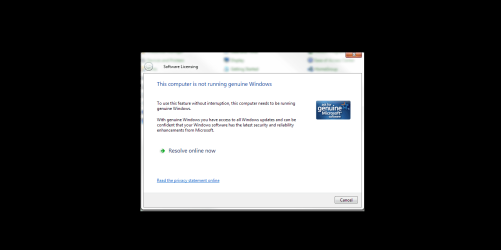
Solved How to get rid of this irritating message?!!

Bradley74

New member
Local time
9:15 PM
Messages
33
Greetings to everyone,

This window came outta no where today, when I clicked on a notepad or go into control panels, and this windows will show/pop up and say "The computer is not running genuine windows". But when I click on other place this window will not pop/show up. It'll only show this when mainly clicking on a notepad or control panel.

I am thinking would this be possible of any malware causing this or something inside the regedit is not right?

Can anyone help with this? Please help!!
 

My Computer My Computer

Computer type
PC/Desktop
OS
Windows 7 Ultimate X64 SP1
In order to completely troubleshoot Windows validation & activation issues, please perform the following:

1. Download and save this tool to your desktop:
http://go.microsoft.com/fwlink/?linkid=52012

2. Run the tool, and then click Copy - ignore any errors if they appear

3. Use CTRL+V to paste the unedited results of the tool here in your next reply
 

My Computer My Computer

Computer type
PC/Desktop
Computer Manufacturer/Model Number
Golden Mk. I.4
OS
Windows 10 Pro x64 ; Xubuntu x64
CPU
Intel i7 860 @ 2.80 GHz O/C'ed to 4.0GHz
Motherboard
Gigabyte P55A-UD3R Rev.1. Award BIOS F13
Memory
16GB Corsair Vengance DDR3 @ 661 MHz Dual Channel (9-9-9-24)
Graphics Card(s)
EVGA NVidia GTX 560 1024MB
Sound Card
Realtek Integrated
Monitor(s) Displays
Dual Samsung SyncMaster 2494HS
Screen Resolution
1920*1080 and 1920*1080
Hard Drives
1*Samsung 840 EVO 120GB SSD;
1*OCZ Vertex 2 60GB SSD;
2*Samsung F3 SpinPoint 1TB in RAID0;
1*Samsung F1 SpinPoint 1TB;
2*Western Digital 1TB External USB 3.0
1*Western Digital 500GB External USB 3.0
1*Seagate 500GB External USB 2.0
PSU
Thermaltake ToughPower QFan 750W
Case
Thermaltake Element S VK60001W2Z
Cooling
Corsair H60 Water Cooling, 2*230mm and 2*80mm case fans
Keyboard
Logitech G110
Mouse
Logitech MX518
in order to completely troubleshoot windows validation & activation issues, please perform the following:

1. Download and save this tool to your desktop:
http://go.microsoft.com/fwlink/?linkid=52012

2. Run the tool, and then click copy - ignore any errors if they appear

3. Use ctrl+v to paste the unedited results of the tool here in your next reply


A2.png

This is what happens when every time I click on a notepad or go into control panel or even calculator, it just automatically shows up every time.

How do we stop this happening?
 

My Computer My Computer

Computer type
PC/Desktop
OS
Windows 7 Ultimate X64 SP1

My Computer My Computer

Computer type
PC/Desktop
Computer Manufacturer/Model Number
Home made Desktop
OS
Windows 10 Pro. 64/ version 1709 Windows 7 Pro/64
CPU
Intel i7-6800K @ 4.3
Motherboard
ASUS X-99 Deluxe II
Memory
Corsair Platinum 16 gig @2400
Graphics Card(s)
EVGA GTX 1070 OC
Monitor(s) Displays
Asus 27" LED LCD/VE278Q
Screen Resolution
1920-1080 or 1280-720 HDMI
Hard Drives
INTEL SSD 730-240 Gb Sata 3.0/
PSU
EVGA Platium 1200W
Case
Phanteks Luxe Tempered Glass 8 fans/ one radiator
Cooling
XSPC/ Water Cooled CPU
Keyboard
Das 4 Professional
Mouse
Logitech M705/MX Anywhere 2-S
Internet Speed
100 mbits
Antivirus
Microsoft Security Essentials/ Malwarebytes Premium 3.0/ SAS
Browser
I.E. 11 default/Firefox/ ISP Time Warner Cable/Spectrum
Other Info
LG BluRay Burner/
Sound system-KLipsch-THX/
Icy Dock ssd Hot Swap bays.
Greetings to everyone,

Can anyone help with this? Please help!!
Here you can only request for help if the copy of Windows you are using is a original one. No one can help illegitimate copies here. This is one of the reputable forums online.
 

My Computer My Computer

Computer type
Laptop
Computer Manufacturer/Model Number
Acer 5733Z
OS
Windows 7 Professional 32bit
CPU
P6200 @ 2.13GHz
Memory
2043 MB
Graphics Card(s)
Intel HD graphics
Hard Drives
C: Total - 49899 MB; D: Total - 149999; E: Total - 149999 MB; F: Total - 123107 MB;
Antivirus
Microsoft Security Essentials, ESET NOD 32
Browser
Mozilla
To be clear....no one is saying the installation isnt5genuine. The non-genuine message can occur for a variety of technical reasons and they can almost all be fixed, but in order to do that you must follow the steps in post #2.....there is no other way of diagnosing the issue.
 

My Computer My Computer

Computer type
PC/Desktop
Computer Manufacturer/Model Number
Golden Mk. I.4
OS
Windows 10 Pro x64 ; Xubuntu x64
CPU
Intel i7 860 @ 2.80 GHz O/C'ed to 4.0GHz
Motherboard
Gigabyte P55A-UD3R Rev.1. Award BIOS F13
Memory
16GB Corsair Vengance DDR3 @ 661 MHz Dual Channel (9-9-9-24)
Graphics Card(s)
EVGA NVidia GTX 560 1024MB
Sound Card
Realtek Integrated
Monitor(s) Displays
Dual Samsung SyncMaster 2494HS
Screen Resolution
1920*1080 and 1920*1080
Hard Drives
1*Samsung 840 EVO 120GB SSD;
1*OCZ Vertex 2 60GB SSD;
2*Samsung F3 SpinPoint 1TB in RAID0;
1*Samsung F1 SpinPoint 1TB;
2*Western Digital 1TB External USB 3.0
1*Western Digital 500GB External USB 3.0
1*Seagate 500GB External USB 2.0
PSU
Thermaltake ToughPower QFan 750W
Case
Thermaltake Element S VK60001W2Z
Cooling
Corsair H60 Water Cooling, 2*230mm and 2*80mm case fans
Keyboard
Logitech G110
Mouse
Logitech MX518
To be clear....no one is saying the installation isnt5genuine. The non-genuine message can occur for a variety of technical reasons and they can almost all be fixed, but in order to do that you must follow the steps in post #2.....there is no other way of diagnosing the issue.

Are you sure theres no other way around this?

I think perhaps there are people having similar issues before, its just we need someone that knows how to do this that all.

So what are the variety of technical reasons?? Since you have mentioned about CAN OCCUR for a variety of technical reasons and they can almost ALL BE FIXED. I think you knew how to do this since you are so sure about your answers!!

And how you so sure about there is no any other way of diagnosing the issue??
 

My Computer My Computer

Computer type
PC/Desktop
OS
Windows 7 Ultimate X64 SP1
Look, its quite simple : if you want us to diagnose the exact problem and supply the exact steps to fix it, then follow the steps in post #2.

"Race conditions" can cause the non-genuine message to appear - there are many different types of race conditions, and each requires a specific fix. Until I've seen your MGADIAG report, I don't know what fix to suggest.

No one can fix your issue without having a look at the MGADIAG report - end of story. I know because I've solved quite a few of these here.
 

My Computer My Computer

Computer type
PC/Desktop
Computer Manufacturer/Model Number
Golden Mk. I.4
OS
Windows 10 Pro x64 ; Xubuntu x64
CPU
Intel i7 860 @ 2.80 GHz O/C'ed to 4.0GHz
Motherboard
Gigabyte P55A-UD3R Rev.1. Award BIOS F13
Memory
16GB Corsair Vengance DDR3 @ 661 MHz Dual Channel (9-9-9-24)
Graphics Card(s)
EVGA NVidia GTX 560 1024MB
Sound Card
Realtek Integrated
Monitor(s) Displays
Dual Samsung SyncMaster 2494HS
Screen Resolution
1920*1080 and 1920*1080
Hard Drives
1*Samsung 840 EVO 120GB SSD;
1*OCZ Vertex 2 60GB SSD;
2*Samsung F3 SpinPoint 1TB in RAID0;
1*Samsung F1 SpinPoint 1TB;
2*Western Digital 1TB External USB 3.0
1*Western Digital 500GB External USB 3.0
1*Seagate 500GB External USB 2.0
PSU
Thermaltake ToughPower QFan 750W
Case
Thermaltake Element S VK60001W2Z
Cooling
Corsair H60 Water Cooling, 2*230mm and 2*80mm case fans
Keyboard
Logitech G110
Mouse
Logitech MX518
To be clear....no one is saying the installation isnt5genuine. The non-genuine message can occur for a variety of technical reasons and they can almost all be fixed, but in order to do that you must follow the steps in post #2.....there is no other way of diagnosing the issue.

Are you sure theres no other way around this?

I think perhaps there are people having similar issues before, its just we need someone that knows how to do this that all.

So what are the variety of technical reasons?? Since you have mentioned about CAN OCCUR for a variety of technical reasons and they can almost ALL BE FIXED. I think you knew how to do this since you are so sure about your answers!!

And how you so sure about there is no any other way of diagnosing the issue??

In response to your question "Are you sure there's no other way around this?" there is another way. Check the following link;

http://www.sevenforums.com/tutorials/18715-activate-windows-7-phone.html

Since you seem reluctant to do what Golden suggested for some reason, try the solutions provided in the link.

HTH
 

My Computer My Computer

Computer type
PC/Desktop
Computer Manufacturer/Model Number
Custom Built
OS
Windows 7 Professional x64
CPU
Intel i5 quad processor
Motherboard
DP67BG
Memory
16 GB
Graphics Card(s)
Radeon HD 5770
Sound Card
Realtek High Definition Audio
Monitor(s) Displays
Samsung SyncMaster
Screen Resolution
1920X1080
Hard Drives
WD 2TB (SATA Internal)
WD 1TB (USB External)
PSU
Corsair GS800
Case
Tower (Generic)
Cooling
3 Internal Fans
Keyboard
MS Wireless
Mouse
MS Optical Wired
Internet Speed
54 mbps
Antivirus
Emsisoft
Browser
IE-Version 9, Palemoon-Version 24.2.0
Press the Windows Logo key and the pause/break key. What does it say under "Windows Activation" at the bottom of the System screen?
 

My Computer My Computer

Computer type
PC/Desktop
Computer Manufacturer/Model Number
Home Built
OS
Windows 10 Education 64 bit
CPU
AMD Phenom II X4 980 Black Edition Deneb 3.7GHz
Motherboard
Asus M4N68T-M V2 µATX Motherboard
Memory
8GB 4GBx2 Kingston PC10600 DDR3 1333 Memory
Graphics Card(s)
Zotac NVIDIA Geforce GT640 2 Gig DDR3 PCIe
Sound Card
VIA VT1708s High Definition Audio 8-channel Onboard
Monitor(s) Displays
22" LG E2242 1080p and 2 19" I-INC AG191D
Screen Resolution
1280x1024 - 1920x1080 - 1280x1024
Hard Drives
Crucial M100 256 GB SSD and 500 GB WD Blue SATA
PSU
Thermaltake TR 620
Case
Power Up Black ATX Mid-Tower Case
Cooling
Stock heatsink and fan
Keyboard
Logitech Wireless K350 Wave
Mouse
Logitech Wireless M570 Trackman Wheel
Internet Speed
80 Mbps Down 30 Mbps Up
Antivirus
Windows Defender
Browser
Internet Explorer 11
Other Info
HP DVD1040e Lightscribe - External USB2
Look, its quite simple : if you want us to diagnose the exact problem and supply the exact steps to fix it, then follow the steps in post #2.

"Race conditions" can cause the non-genuine message to appear - there are many different types of race conditions, and each requires a specific fix. Until I've seen your MGADIAG report, I don't know what fix to suggest.

No one can fix your issue without having a look at the MGADIAG report - end of story. I know because I've solved quite a few of these here.

With the Non-genuine message, it still appears, so what I'll do is post you information inside the MGADIAG. Which section exactly do you need to have look at?? All or specific ones only??
 

My Computer My Computer

Computer type
PC/Desktop
OS
Windows 7 Ultimate X64 SP1
The whole report is needed.
 

My Computer My Computer

Computer type
PC/Desktop
Computer Manufacturer/Model Number
Self Built
OS
Win 10 Pro x64
CPU
Intel I5-2500K @3.3GHz
Motherboard
Asrock P67 Extreme4
Memory
16GB G.Skill Ripjaws X (4x4GB)
Graphics Card(s)
EVGA GeForce 750 Ti SC 2GB
Sound Card
ASUS Xonar DG 5.1 Channels 24-bit 96KHz PCI Interface Sound
Monitor(s) Displays
auria eq2367
Screen Resolution
1920 x 1080
Hard Drives
250GB Samsung 850 EVO SSD
1TB WD Blue
1TB Hitachi
PSU
SeaSonic X 650W 80 Plus Gold
Case
Corsair Obsidian 750D
Cooling
Corsair H60, Three 140mm case fans
Keyboard
Logitech Wireless Keyboard K520
Mouse
Logitech Wireless Mouse M310
Internet Speed
Wave Broadband ~ 100 dn 5 up
Antivirus
Windows Defender, Malwarebytes Premium
Browser
Edge, IE11, Chrome
Other Info
Laptop specs: HP g7-1365dx /
CPU: AMD A6-3420M APU with Radeon(tm) HD Graphics /
RAM: Crucial 8Gb (2x4Gb) /
SSD: Crucial M4-CT128M4SSD2 ATA Device/ FW 000F /
GFX: AMD Radeon HD 6520G /
OS: Windows 10 Pro x64
To be clear....no one is saying the installation isnt5genuine. The non-genuine message can occur for a variety of technical reasons and they can almost all be fixed, but in order to do that you must follow the steps in post #2.....there is no other way of diagnosing the issue.

Are you sure theres no other way around this?

I think perhaps there are people having similar issues before, its just we need someone that knows how to do this that all.

So what are the variety of technical reasons?? Since you have mentioned about CAN OCCUR for a variety of technical reasons and they can almost ALL BE FIXED. I think you knew how to do this since you are so sure about your answers!!

And how you so sure about there is no any other way of diagnosing the issue??

In response to your question "Are you sure there's no other way around this?" there is another way. Check the following link;

http://www.sevenforums.com/tutorials/18715-activate-windows-7-phone.html

Since you seem reluctant to do what Golden suggested for some reason, try the solutions provided in the link.

HTH

"Race conditions" can cause the non-genuine message to appear, and that sounds more like it.
 

My Computer My Computer

Computer type
PC/Desktop
OS
Windows 7 Ultimate X64 SP1
Are you sure theres no other way around this?

I think perhaps there are people having similar issues before, its just we need someone that knows how to do this that all.

So what are the variety of technical reasons?? Since you have mentioned about CAN OCCUR for a variety of technical reasons and they can almost ALL BE FIXED. I think you knew how to do this since you are so sure about your answers!!

And how you so sure about there is no any other way of diagnosing the issue??

In response to your question "Are you sure there's no other way around this?" there is another way. Check the following link;

http://www.sevenforums.com/tutorials/18715-activate-windows-7-phone.html

Since you seem reluctant to do what Golden suggested for some reason, try the solutions provided in the link.

HTH

"Race conditions" can cause the non-genuine message to appear, and that sounds more like it.

Up until the time I posted, the OP was looking for an alternate method of attempting to address/solve the issue as s/he stated "Are you sure there's no other way around this?". I provided an answer to that question, regardless of the cause.
 

My Computer My Computer

Computer type
PC/Desktop
Computer Manufacturer/Model Number
Custom Built
OS
Windows 7 Professional x64
CPU
Intel i5 quad processor
Motherboard
DP67BG
Memory
16 GB
Graphics Card(s)
Radeon HD 5770
Sound Card
Realtek High Definition Audio
Monitor(s) Displays
Samsung SyncMaster
Screen Resolution
1920X1080
Hard Drives
WD 2TB (SATA Internal)
WD 1TB (USB External)
PSU
Corsair GS800
Case
Tower (Generic)
Cooling
3 Internal Fans
Keyboard
MS Wireless
Mouse
MS Optical Wired
Internet Speed
54 mbps
Antivirus
Emsisoft
Browser
IE-Version 9, Palemoon-Version 24.2.0
Sir George,

Unfortunately the race conditions may still cause Windows to show the non-genuine message at random times, even if he performs a successful phone activation

The detail in the MGA report will provide the clues to determine a fix for the issue..
 

My Computer My Computer

Computer type
PC/Desktop
Computer Manufacturer/Model Number
Golden Mk. I.4
OS
Windows 10 Pro x64 ; Xubuntu x64
CPU
Intel i7 860 @ 2.80 GHz O/C'ed to 4.0GHz
Motherboard
Gigabyte P55A-UD3R Rev.1. Award BIOS F13
Memory
16GB Corsair Vengance DDR3 @ 661 MHz Dual Channel (9-9-9-24)
Graphics Card(s)
EVGA NVidia GTX 560 1024MB
Sound Card
Realtek Integrated
Monitor(s) Displays
Dual Samsung SyncMaster 2494HS
Screen Resolution
1920*1080 and 1920*1080
Hard Drives
1*Samsung 840 EVO 120GB SSD;
1*OCZ Vertex 2 60GB SSD;
2*Samsung F3 SpinPoint 1TB in RAID0;
1*Samsung F1 SpinPoint 1TB;
2*Western Digital 1TB External USB 3.0
1*Western Digital 500GB External USB 3.0
1*Seagate 500GB External USB 2.0
PSU
Thermaltake ToughPower QFan 750W
Case
Thermaltake Element S VK60001W2Z
Cooling
Corsair H60 Water Cooling, 2*230mm and 2*80mm case fans
Keyboard
Logitech G110
Mouse
Logitech MX518
Press the Windows Logo key and the pause/break key. What does it say under "Windows Activation" at the bottom of the System screen?


It says windows is activated.
 

My Computer My Computer

Computer type
PC/Desktop
OS
Windows 7 Ultimate X64 SP1
:rolleyes:

The only way to get to the bottom of this, is with an MGADIAG report.
 

My Computer My Computer

Computer type
PC/Desktop
Computer Manufacturer/Model Number
Golden Mk. I.4
OS
Windows 10 Pro x64 ; Xubuntu x64
CPU
Intel i7 860 @ 2.80 GHz O/C'ed to 4.0GHz
Motherboard
Gigabyte P55A-UD3R Rev.1. Award BIOS F13
Memory
16GB Corsair Vengance DDR3 @ 661 MHz Dual Channel (9-9-9-24)
Graphics Card(s)
EVGA NVidia GTX 560 1024MB
Sound Card
Realtek Integrated
Monitor(s) Displays
Dual Samsung SyncMaster 2494HS
Screen Resolution
1920*1080 and 1920*1080
Hard Drives
1*Samsung 840 EVO 120GB SSD;
1*OCZ Vertex 2 60GB SSD;
2*Samsung F3 SpinPoint 1TB in RAID0;
1*Samsung F1 SpinPoint 1TB;
2*Western Digital 1TB External USB 3.0
1*Western Digital 500GB External USB 3.0
1*Seagate 500GB External USB 2.0
PSU
Thermaltake ToughPower QFan 750W
Case
Thermaltake Element S VK60001W2Z
Cooling
Corsair H60 Water Cooling, 2*230mm and 2*80mm case fans
Keyboard
Logitech G110
Mouse
Logitech MX518
Back
Top