Hi fellow forum members
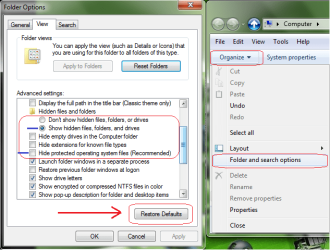
I have an issue with my desktop, I logged in today and seem to have all of the system
file icons as well as my normal desktop icons on my screen?
I`m not sure what I have pressed or how to get rid of them and just go back to my normal desktop shortcuts rather than all these system files?
Could someone please help
I`m running Windows 7 64bit
Thank you in advance
I have an issue with my desktop, I logged in today and seem to have all of the system
file icons as well as my normal desktop icons on my screen?
I`m not sure what I have pressed or how to get rid of them and just go back to my normal desktop shortcuts rather than all these system files?
Could someone please help
I`m running Windows 7 64bit
Thank you in advance
My Computer
At a glance
Windows 7 64 Bit
- Computer type
- PC/Desktop
- OS
- Windows 7 64 Bit