JavaScript is disabled. For a better experience, please enable JavaScript in your browser before proceeding.
You are using an out of date browser. It may not display this or other websites correctly.
You should upgrade or use an
alternative browser .
Always getting log in screen
This has been bugging me for some time now so I finally decided to post. When I start my computer up it always stops at the login screen asking for a password and I do not have a password so all I do is click enter on my keyboard and it finishes booting me into Windows 7 so how can I get rid of this and have it boot right into Windows 7??
Computer type PC/Desktop OS Windows 7 Ultimate x64
Run (Win+R): netplwiz
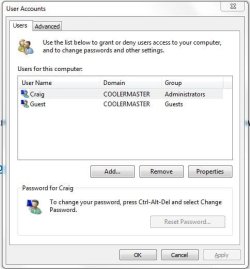
Then uncheck "Users must enter a user name and password to use this computer"
See if this helps
Computer type PC/Desktop Computer Manufacturer/Model Number Custom Build OS Windows 7 Ultimate x64 SP1 CPU AMD Phenom 2 1090T Motherboard Gigabyte GA-890FXA-UD5 Memory 2x8GB Kingston HyperX Fury Black 1600Mhz Unganged Graphics Card(s) MSI GTX 970 Gaming 4G Sound Card Realtek On-Board HD 7.1 Audio / Logitech G35 Monitor(s) Displays 3xAcer GD245HQ Screen Resolution 1920x1080 Hard Drives Samsung 850 Pro 512GB SSD - OS /
WD Caviar Black SATA 3 - 1 TBx2 - Dynamic RAID 0 /
WD Caviar Green SATA 2 - 640GBx2 - Dynamic RAID 0 /
WD Caviar Green SATA 2 - 640GB - Internal Backup /
Seagate Barracude SATA 3 - 3TB - External Backup/ Sync PSU HighPower 1000W Case Cooler Master HAF 932 Cooling Noctua NH-D14 Keyboard Logitech G19 Mouse Logitech G500 Internet Speed 100/4 Mbit Cable (100GB quota) Antivirus ZoneAlarm Extreme Security / MBAM Pro / MBAE Free / SAS Free Browser IE 11 - Firefox - Chrome Other Info Logitech F710/ G27/ G940/ Z5500 // TrackIR 5 // Nvidia 3D Surround Vision
New member
Thread Starter
I do not see where to uncheck.
Capture.JPG
47.9 KB
· Views: 11
Computer type PC/Desktop OS Windows 7 Ultimate x64
Computer type PC/Desktop Computer Manufacturer/Model Number Custom Build OS Windows 7 Ultimate x64 SP1 CPU AMD Phenom 2 1090T Motherboard Gigabyte GA-890FXA-UD5 Memory 2x8GB Kingston HyperX Fury Black 1600Mhz Unganged Graphics Card(s) MSI GTX 970 Gaming 4G Sound Card Realtek On-Board HD 7.1 Audio / Logitech G35 Monitor(s) Displays 3xAcer GD245HQ Screen Resolution 1920x1080 Hard Drives Samsung 850 Pro 512GB SSD - OS /
WD Caviar Black SATA 3 - 1 TBx2 - Dynamic RAID 0 /
WD Caviar Green SATA 2 - 640GBx2 - Dynamic RAID 0 /
WD Caviar Green SATA 2 - 640GB - Internal Backup /
Seagate Barracude SATA 3 - 3TB - External Backup/ Sync PSU HighPower 1000W Case Cooler Master HAF 932 Cooling Noctua NH-D14 Keyboard Logitech G19 Mouse Logitech G500 Internet Speed 100/4 Mbit Cable (100GB quota) Antivirus ZoneAlarm Extreme Security / MBAM Pro / MBAE Free / SAS Free Browser IE 11 - Firefox - Chrome Other Info Logitech F710/ G27/ G940/ Z5500 // TrackIR 5 // Nvidia 3D Surround Vision
New member
Thread Starter
No help. All that did is add another box I had to enter computername\user to log in.
Computer type PC/Desktop OS Windows 7 Ultimate x64
I wonder if it's the Guest account interfering, are you using it for anything? Do you mind disabling it?
Computer type PC/Desktop Computer Manufacturer/Model Number Custom Build OS Windows 7 Ultimate x64 SP1 CPU AMD Phenom 2 1090T Motherboard Gigabyte GA-890FXA-UD5 Memory 2x8GB Kingston HyperX Fury Black 1600Mhz Unganged Graphics Card(s) MSI GTX 970 Gaming 4G Sound Card Realtek On-Board HD 7.1 Audio / Logitech G35 Monitor(s) Displays 3xAcer GD245HQ Screen Resolution 1920x1080 Hard Drives Samsung 850 Pro 512GB SSD - OS /
WD Caviar Black SATA 3 - 1 TBx2 - Dynamic RAID 0 /
WD Caviar Green SATA 2 - 640GBx2 - Dynamic RAID 0 /
WD Caviar Green SATA 2 - 640GB - Internal Backup /
Seagate Barracude SATA 3 - 3TB - External Backup/ Sync PSU HighPower 1000W Case Cooler Master HAF 932 Cooling Noctua NH-D14 Keyboard Logitech G19 Mouse Logitech G500 Internet Speed 100/4 Mbit Cable (100GB quota) Antivirus ZoneAlarm Extreme Security / MBAM Pro / MBAE Free / SAS Free Browser IE 11 - Firefox - Chrome Other Info Logitech F710/ G27/ G940/ Z5500 // TrackIR 5 // Nvidia 3D Surround Vision
New member
Thread Starter
I looked up how to do that and after right click on my computer then properties I seen my computer was part of a network workgroup so I changed that to home computer and it works now. Thanks GokAy for helping me figure it out.
Computer type PC/Desktop OS Windows 7 Ultimate x64
Interesting, thanks for sharing
Good job, I wasn't aware such setting would affect the availability of the checkbox.
Can you elaborate on what you did please?
- Was it set as Public and you changed it to Home?
- or changed it to Homegroup?
Computer type PC/Desktop Computer Manufacturer/Model Number Custom Build OS Windows 7 Ultimate x64 SP1 CPU AMD Phenom 2 1090T Motherboard Gigabyte GA-890FXA-UD5 Memory 2x8GB Kingston HyperX Fury Black 1600Mhz Unganged Graphics Card(s) MSI GTX 970 Gaming 4G Sound Card Realtek On-Board HD 7.1 Audio / Logitech G35 Monitor(s) Displays 3xAcer GD245HQ Screen Resolution 1920x1080 Hard Drives Samsung 850 Pro 512GB SSD - OS /
WD Caviar Black SATA 3 - 1 TBx2 - Dynamic RAID 0 /
WD Caviar Green SATA 2 - 640GBx2 - Dynamic RAID 0 /
WD Caviar Green SATA 2 - 640GB - Internal Backup /
Seagate Barracude SATA 3 - 3TB - External Backup/ Sync PSU HighPower 1000W Case Cooler Master HAF 932 Cooling Noctua NH-D14 Keyboard Logitech G19 Mouse Logitech G500 Internet Speed 100/4 Mbit Cable (100GB quota) Antivirus ZoneAlarm Extreme Security / MBAM Pro / MBAE Free / SAS Free Browser IE 11 - Firefox - Chrome Other Info Logitech F710/ G27/ G940/ Z5500 // TrackIR 5 // Nvidia 3D Surround Vision