Windows Explorer crashes whenever I try to resize/snap the window

NilmFoir

New member
Local time
6:20 AM
Messages
8
I'm using Windows 7 Professional 64bit on a Toshiba Satellite L50-A. Windows Explorer was working perfectly until now, in which whenever I resize Windows Explorer so that the window is smaller and doesn't fill the entire screen, the window flickers and then crashes. I have tried terminating and restarting Windows Explorer and even tried restarting my computer but it's still the same. I am up to date on my windows updates (except for the Windows 10 upgrade), but I have not done anything with the Toshiba Service Station updates. I also ran Microsoft Security Essentials and it said that there were no viruses and such. How do I fix this problem with windows explorer? Will upgrading to Windows 10 help? (my last resort)
 

My Computer My Computer

At a glance

Windows 7 Professional x64 SP1Intel(R) Core(TM) i3-3217U
Computer type
Laptop
Computer Manufacturer/Model Number
Toshiba Satellite L50-A
OS
Windows 7 Professional x64 SP1
CPU
Intel(R) Core(TM) i3-3217U
Screen Resolution
1366x768
Antivirus
Microsoft Security Essentials
Browser
Google Chrome
Other Info
Blu-Ray disc drive
I would start with two things. Do a SFC /SCANNOW in an elevated command window. Search this site for a tutorial on it if you need help, or ask here. Meanwhile find and download the latest video driver at Toshiba's site. When the SFC is done, uninstall the existing video driver and install the new one.
 

My Computer My Computer

At a glance

Linux Lite 3.2 x64; Windows 7, 8.1Core2Duo 2.46GB ddr2nVidia
Computer type
PC/Desktop
Computer Manufacturer/Model Number
dell precision t3400 tower
OS
Linux Lite 3.2 x64; Windows 7, 8.1
CPU
Core2Duo 2.4
Memory
6GB ddr2
Graphics Card(s)
nVidia
Hard Drives
120gb SSD, 1TB HD, 2TB HD; sata II
Internet Speed
12/2
Browser
Vivaldi, Slimjet (Chromium) x64
I would start with two things. Do a SFC /SCANNOW in an elevated command window. Search this site for a tutorial on it if you need help, or ask here. Meanwhile find and download the latest video driver at Toshiba's site. When the SFC is done, uninstall the existing video driver and install the new one.

Thank you for the advice. I finished running scannow and it said that there were a few corrupted files some of which the system was unable to fix. Then I quickly skimmed through the CBS.log file it generated. I also found the link in the Toshiba website to the updated Intel video drivers I need.

However, my Intel driver is version 9.17.10.3062, but there are multiple Intel drivers available from the toshiba website whose versions include 9.17.10.3223 and 10.18.10.4061. Am I supposed to pick 9.17.10.3223 (is it a better fit because it also begins with 9. ?), or is the 10.18.10.4061 version the most up-to-date driver and therefore the better choice for me?
EDIT: The major source of confusion for me is that both versions were released on the same date, so they might be for different purposes instead of the 10.18.10.4061 version being an upgrade of the 9.17.10.3223 version.
 

My Computer My Computer

At a glance

Windows 7 Professional x64 SP1Intel(R) Core(TM) i3-3217U
Computer type
Laptop
Computer Manufacturer/Model Number
Toshiba Satellite L50-A
OS
Windows 7 Professional x64 SP1
CPU
Intel(R) Core(TM) i3-3217U
Screen Resolution
1366x768
Antivirus
Microsoft Security Essentials
Browser
Google Chrome
Other Info
Blu-Ray disc drive

My Computer My Computer

At a glance

Windows 7 Ultimate x64 SP1AMD Phenom 2 1090T2x8GB Kingston HyperX Fury Black 1600Mhz Unga...MSI GTX 970 Gaming 4G
Computer type
PC/Desktop
Computer Manufacturer/Model Number
Custom Build
OS
Windows 7 Ultimate x64 SP1
CPU
AMD Phenom 2 1090T
Motherboard
Gigabyte GA-890FXA-UD5
Memory
2x8GB Kingston HyperX Fury Black 1600Mhz Unganged
Graphics Card(s)
MSI GTX 970 Gaming 4G
Sound Card
Realtek On-Board HD 7.1 Audio / Logitech G35
Monitor(s) Displays
3xAcer GD245HQ
Screen Resolution
1920x1080
Hard Drives
Samsung 850 Pro 512GB SSD - OS /
WD Caviar Black SATA 3 - 1 TBx2 - Dynamic RAID 0 /
WD Caviar Green SATA 2 - 640GBx2 - Dynamic RAID 0 /
WD Caviar Green SATA 2 - 640GB - Internal Backup /
Seagate Barracude SATA 3 - 3TB - External Backup/ Sync
PSU
HighPower 1000W
Case
Cooler Master HAF 932
Cooling
Noctua NH-D14
Keyboard
Logitech G19
Mouse
Logitech G500
Internet Speed
100/4 Mbit Cable (100GB quota)
Antivirus
ZoneAlarm Extreme Security / MBAM Pro / MBAE Free / SAS Free
Browser
IE 11 - Firefox - Chrome
Other Info
Logitech F710/ G27/ G940/ Z5500 // TrackIR 5 // Nvidia 3D Surround Vision
Gokay's SR advice is good. If it doesn't work then in general the latest driver is usually the best choice.
 

My Computer My Computer

At a glance

Linux Lite 3.2 x64; Windows 7, 8.1Core2Duo 2.46GB ddr2nVidia
Computer type
PC/Desktop
Computer Manufacturer/Model Number
dell precision t3400 tower
OS
Linux Lite 3.2 x64; Windows 7, 8.1
CPU
Core2Duo 2.4
Memory
6GB ddr2
Graphics Card(s)
nVidia
Hard Drives
120gb SSD, 1TB HD, 2TB HD; sata II
Internet Speed
12/2
Browser
Vivaldi, Slimjet (Chromium) x64
Sorry for the late response but I just tried to update my Intel Display Driver and it refused to do so because it said "Windows has determined the driver software for your device is up to date." Maybe my video driver isn't part of the problem? Or is Windows lying to me?

Here is my sfcdetails.txt for your reference
 

Attachments

My Computer My Computer

At a glance

Windows 7 Professional x64 SP1Intel(R) Core(TM) i3-3217U
Computer type
Laptop
Computer Manufacturer/Model Number
Toshiba Satellite L50-A
OS
Windows 7 Professional x64 SP1
CPU
Intel(R) Core(TM) i3-3217U
Screen Resolution
1366x768
Antivirus
Microsoft Security Essentials
Browser
Google Chrome
Other Info
Blu-Ray disc drive

My Computer My Computer

At a glance

Windows 7 Ultimate x64 SP1AMD Phenom 2 1090T2x8GB Kingston HyperX Fury Black 1600Mhz Unga...MSI GTX 970 Gaming 4G
Computer type
PC/Desktop
Computer Manufacturer/Model Number
Custom Build
OS
Windows 7 Ultimate x64 SP1
CPU
AMD Phenom 2 1090T
Motherboard
Gigabyte GA-890FXA-UD5
Memory
2x8GB Kingston HyperX Fury Black 1600Mhz Unganged
Graphics Card(s)
MSI GTX 970 Gaming 4G
Sound Card
Realtek On-Board HD 7.1 Audio / Logitech G35
Monitor(s) Displays
3xAcer GD245HQ
Screen Resolution
1920x1080
Hard Drives
Samsung 850 Pro 512GB SSD - OS /
WD Caviar Black SATA 3 - 1 TBx2 - Dynamic RAID 0 /
WD Caviar Green SATA 2 - 640GBx2 - Dynamic RAID 0 /
WD Caviar Green SATA 2 - 640GB - Internal Backup /
Seagate Barracude SATA 3 - 3TB - External Backup/ Sync
PSU
HighPower 1000W
Case
Cooler Master HAF 932
Cooling
Noctua NH-D14
Keyboard
Logitech G19
Mouse
Logitech G500
Internet Speed
100/4 Mbit Cable (100GB quota)
Antivirus
ZoneAlarm Extreme Security / MBAM Pro / MBAE Free / SAS Free
Browser
IE 11 - Firefox - Chrome
Other Info
Logitech F710/ G27/ G940/ Z5500 // TrackIR 5 // Nvidia 3D Surround Vision
My explorer problem is still there (I apologize for my hiatus).

I tried uninstalling those two updates GokAy mentioned, but that didn't do anything so I reinstalled back the two updates.

Then I tried the clean boot method, but when I ran msconfig and selected Selective Startup, unchecked Load startup items, and disabled ALL the Services (except for the Microsoft services) and restarted, the problem was still there. So I reverted all that back to normal.

In safe mode, the problem wasn't there. I'm still not sure what thing Safe Mode disabled that must have been causing my explorer.exe problem.

I opened up Windows Log Viewer and deliberately crashed and restarted Windows Explorer, and I have attached the .txt versions of the resulting log files as well as a txt version of the file they point to, for your reference. However, in the log files I replaced all instances of my name and my computer's name with [removed].
 

Attachments

My Computer My Computer

At a glance

Windows 7 Professional x64 SP1Intel(R) Core(TM) i3-3217U
Computer type
Laptop
Computer Manufacturer/Model Number
Toshiba Satellite L50-A
OS
Windows 7 Professional x64 SP1
CPU
Intel(R) Core(TM) i3-3217U
Screen Resolution
1366x768
Antivirus
Microsoft Security Essentials
Browser
Google Chrome
Other Info
Blu-Ray disc drive
I can't make anything from the txt files, however, there is 1 more thing (for now) we can try. Disable context menu items (Explorer hooks). CCleaner will be enough for now (hopefully). When you run it, switch to Tools - Startup - Context Menu. Save to text file or take a screenshot, so you will know which ones are currently enabled. Then disable all, restart just in case. See if this helps.
 

My Computer My Computer

At a glance

Windows 7 Ultimate x64 SP1AMD Phenom 2 1090T2x8GB Kingston HyperX Fury Black 1600Mhz Unga...MSI GTX 970 Gaming 4G
Computer type
PC/Desktop
Computer Manufacturer/Model Number
Custom Build
OS
Windows 7 Ultimate x64 SP1
CPU
AMD Phenom 2 1090T
Motherboard
Gigabyte GA-890FXA-UD5
Memory
2x8GB Kingston HyperX Fury Black 1600Mhz Unganged
Graphics Card(s)
MSI GTX 970 Gaming 4G
Sound Card
Realtek On-Board HD 7.1 Audio / Logitech G35
Monitor(s) Displays
3xAcer GD245HQ
Screen Resolution
1920x1080
Hard Drives
Samsung 850 Pro 512GB SSD - OS /
WD Caviar Black SATA 3 - 1 TBx2 - Dynamic RAID 0 /
WD Caviar Green SATA 2 - 640GBx2 - Dynamic RAID 0 /
WD Caviar Green SATA 2 - 640GB - Internal Backup /
Seagate Barracude SATA 3 - 3TB - External Backup/ Sync
PSU
HighPower 1000W
Case
Cooler Master HAF 932
Cooling
Noctua NH-D14
Keyboard
Logitech G19
Mouse
Logitech G500
Internet Speed
100/4 Mbit Cable (100GB quota)
Antivirus
ZoneAlarm Extreme Security / MBAM Pro / MBAE Free / SAS Free
Browser
IE 11 - Firefox - Chrome
Other Info
Logitech F710/ G27/ G940/ Z5500 // TrackIR 5 // Nvidia 3D Surround Vision
Gokay's advice re: Ccleaner - disable context menu items is good. I could suggest a few troubleshooting steps.

Try downloading Explorer++ - you need the 64bit version and it is a portable application so will run without installation.

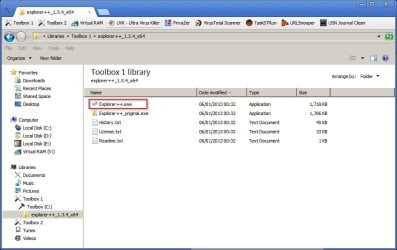
Extract the files from the downloaded zipped folder to another folder and place it somewhere handy. You can either click the executable to run it or right click it and pin it to your taskbar and run it from there. Note: I'm not using the default Explorer++ icon so yours will look different but the file name is the same as the one highlighted in the screenshot.

explorer++.jpg

So run Explorer++ and attempt to resize the window or make it crash. If it doesn't crash then it means that you have a software problem rather than a system file problem.

Those logs you provided don't help much. What you need is an explorer crash dump but you'll need to download a reg file to create it. Will post details if you want to try it. The idea is that it could identify the shell extension responsible - if that's the issue. If it isn't then it won't help. In the meantime just test Explorer++ and continue to follow Gokay's advice on disabling context menu items.
 

My Computer My Computer

At a glance

Microsoft Windows 7 Home Premium 64-bit 7601 ...AMD C-60 APU with Radeon(tm) HD Graphics4.00 GBAMD Radeon HD 6290 Graphics
Computer type
Laptop
Computer Manufacturer/Model Number
ASUS
OS
Microsoft Windows 7 Home Premium 64-bit 7601 Multiprocessor Free Service Pack 1
CPU
AMD C-60 APU with Radeon(tm) HD Graphics
Motherboard
ASUSTeK COMPUTER INC. X501U
Memory
4.00 GB
Graphics Card(s)
AMD Radeon HD 6290 Graphics
Sound Card
(1) AMD High Definition Audio Device (2) Realtek High Defi
Screen Resolution
1366 x 768 x 32 bits (4294967296 colors) @ 60 Hz
Hard Drives
Hitachi HTS545050A7E380 SATA Disk Device
Antivirus
Comodo CIS & FW, SecureAplus App Whitelisting, Threatfire
Browser
Cyberfox 64bit, Opera 64bit, Airfox
Other Info
Spy-The-Spy, HitmanPro.Alert, Norton Connect Safe, MJRegWatcher, BitDefender TrafficLight, Voodoo Shield, Zemana AntiMalware
Disabling the context menu items didn't really do much, sorry.

I now have Explorer++ and when I resized and snapped that window, the problem wasn't there so it's probably a software problem. If it's a software problem is there anything I can still do about it?
 

My Computer My Computer

At a glance

Windows 7 Professional x64 SP1Intel(R) Core(TM) i3-3217U
Computer type
Laptop
Computer Manufacturer/Model Number
Toshiba Satellite L50-A
OS
Windows 7 Professional x64 SP1
CPU
Intel(R) Core(TM) i3-3217U
Screen Resolution
1366x768
Antivirus
Microsoft Security Essentials
Browser
Google Chrome
Other Info
Blu-Ray disc drive
Enable Explorer crash dumps

Here's what you can try for now. Download the attached file:

View attachment WER_Explorer.reg

Save it to your desktop.

Then go to:

Start > Run

then type:

regedit.exe

press Enter

Navigate to:

HKEY_LOCAL_MACHINE\SOFTWARE\Microsoft\Windows\Windows Error Reporting

Right click on the registry key named Windows Error Reporting and choose Export

Give the file a name like WER_Backup.reg and save it somewhere so that you can easily find it again.

Then exit Registry Editor.

Double click on the file you downloaded (WER_Explorer.reg) and choose Yes when asked if you want to add it into the registry.

Reboot when done. Wait a few minutes after the reboot then try to crash Explorer. Once it has crashed have a look here and check to see if you have a dump file:

C:\Localdump

Zip the crash dump and upload it and attach it to a new post for us to look at.

   Note
Until the probem is fixed there's a handy utility that can restart Explorer with a single click.

Sordum's Small Tools

Rexplorer is part of Sordum's Small Tools package. If you extract the files and copy rexplorer.exe to somewhere handy you can run it when needed.


Let us know if you need help with extracting the file (Restart Explorer Utility) and running it.
 
Last edited:

My Computer My Computer

At a glance

Microsoft Windows 7 Home Premium 64-bit 7601 ...AMD C-60 APU with Radeon(tm) HD Graphics4.00 GBAMD Radeon HD 6290 Graphics
Computer type
Laptop
Computer Manufacturer/Model Number
ASUS
OS
Microsoft Windows 7 Home Premium 64-bit 7601 Multiprocessor Free Service Pack 1
CPU
AMD C-60 APU with Radeon(tm) HD Graphics
Motherboard
ASUSTeK COMPUTER INC. X501U
Memory
4.00 GB
Graphics Card(s)
AMD Radeon HD 6290 Graphics
Sound Card
(1) AMD High Definition Audio Device (2) Realtek High Defi
Screen Resolution
1366 x 768 x 32 bits (4294967296 colors) @ 60 Hz
Hard Drives
Hitachi HTS545050A7E380 SATA Disk Device
Antivirus
Comodo CIS & FW, SecureAplus App Whitelisting, Threatfire
Browser
Cyberfox 64bit, Opera 64bit, Airfox
Other Info
Spy-The-Spy, HitmanPro.Alert, Norton Connect Safe, MJRegWatcher, BitDefender TrafficLight, Voodoo Shield, Zemana AntiMalware
Callender: I just did all those steps up until when I crashed Explorer. I checked C:\ and there's no Localdump directory or any new directory created. When I crashed Windows Explorer right before looking for C:\Localdump, I opened Task Manager, terminated Windows Explorer, and when it the popup said "Windows Explorer is not responding," I clicked "Restart the program" and not "Close the program."

In the control panel I selected "show hidden files" and unchecked "hide operating system files" and I still can't find C:\Localdump
 

My Computer My Computer

At a glance

Windows 7 Professional x64 SP1Intel(R) Core(TM) i3-3217U
Computer type
Laptop
Computer Manufacturer/Model Number
Toshiba Satellite L50-A
OS
Windows 7 Professional x64 SP1
CPU
Intel(R) Core(TM) i3-3217U
Screen Resolution
1366x768
Antivirus
Microsoft Security Essentials
Browser
Google Chrome
Other Info
Blu-Ray disc drive
Okay try this:

Start> Run then type services.msc - press Enter

Scroll down to Windows Error Reporting Service and if it's disabled - right click and set startup type to Manual. Then start the service. If it's set to Manual already but not running - start the service.

Then try this method of merging WER_Explorer.reg

Make sure that you are using an account with admin rights and that UAC is switched on.

Right click on the WER_Explorer.reg file and click on Merge.
Click on the Run button in the Security Warning pop-up.
Click on Continue (UAC), Yes, and OK when prompted.

Reboot.

The location you need to look for Explorer crash dumps is C:\Localdumps and not C:\Localdump

I just mention LocalDumps vs Localdump in case you tried to copy and paste the location instead of manually browsing to it!

If the above doesn't work - I have no idea why. It's never failed to work in the past!

There are other steps to try. Here is one of them:

Do you have Autoruns ?

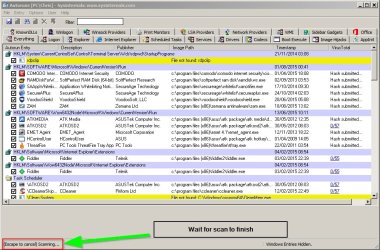
If not - download it and run it. Wait for the scan to finish:

Autoruns.jpg

Once the scan is complete choose File > Save and save as a text file. Upload the text file and attach it to your next post. It will show Explorer Shell Extensions and we can see if any are currently known to be a problem.

Save AutoRuns Output to File.jpg
 
Last edited:

My Computer My Computer

At a glance

Microsoft Windows 7 Home Premium 64-bit 7601 ...AMD C-60 APU with Radeon(tm) HD Graphics4.00 GBAMD Radeon HD 6290 Graphics
Computer type
Laptop
Computer Manufacturer/Model Number
ASUS
OS
Microsoft Windows 7 Home Premium 64-bit 7601 Multiprocessor Free Service Pack 1
CPU
AMD C-60 APU with Radeon(tm) HD Graphics
Motherboard
ASUSTeK COMPUTER INC. X501U
Memory
4.00 GB
Graphics Card(s)
AMD Radeon HD 6290 Graphics
Sound Card
(1) AMD High Definition Audio Device (2) Realtek High Defi
Screen Resolution
1366 x 768 x 32 bits (4294967296 colors) @ 60 Hz
Hard Drives
Hitachi HTS545050A7E380 SATA Disk Device
Antivirus
Comodo CIS & FW, SecureAplus App Whitelisting, Threatfire
Browser
Cyberfox 64bit, Opera 64bit, Airfox
Other Info
Spy-The-Spy, HitmanPro.Alert, Norton Connect Safe, MJRegWatcher, BitDefender TrafficLight, Voodoo Shield, Zemana AntiMalware
What I meant to explain in the above post was - make sure Windows Error Reporting service is actually running before crashing explorer.
 

My Computer My Computer

At a glance

Microsoft Windows 7 Home Premium 64-bit 7601 ...AMD C-60 APU with Radeon(tm) HD Graphics4.00 GBAMD Radeon HD 6290 Graphics
Computer type
Laptop
Computer Manufacturer/Model Number
ASUS
OS
Microsoft Windows 7 Home Premium 64-bit 7601 Multiprocessor Free Service Pack 1
CPU
AMD C-60 APU with Radeon(tm) HD Graphics
Motherboard
ASUSTeK COMPUTER INC. X501U
Memory
4.00 GB
Graphics Card(s)
AMD Radeon HD 6290 Graphics
Sound Card
(1) AMD High Definition Audio Device (2) Realtek High Defi
Screen Resolution
1366 x 768 x 32 bits (4294967296 colors) @ 60 Hz
Hard Drives
Hitachi HTS545050A7E380 SATA Disk Device
Antivirus
Comodo CIS & FW, SecureAplus App Whitelisting, Threatfire
Browser
Cyberfox 64bit, Opera 64bit, Airfox
Other Info
Spy-The-Spy, HitmanPro.Alert, Norton Connect Safe, MJRegWatcher, BitDefender TrafficLight, Voodoo Shield, Zemana AntiMalware
Hi Callender, as I'm going through these steps, I would like to ask: When you say "Reboot." you mean restarting the computer, right?

EDIT:
I uploaded the txt file that resulted from the scanning from AutoRuns.

Also, would changing to Win10 get rid of the problem? Will Windows 10 have a different explorer.exe program?
 

Attachments

Last edited:

My Computer My Computer

At a glance

Windows 7 Professional x64 SP1Intel(R) Core(TM) i3-3217U
Computer type
Laptop
Computer Manufacturer/Model Number
Toshiba Satellite L50-A
OS
Windows 7 Professional x64 SP1
CPU
Intel(R) Core(TM) i3-3217U
Screen Resolution
1366x768
Antivirus
Microsoft Security Essentials
Browser
Google Chrome
Other Info
Blu-Ray disc drive
Reboot does indeed mean restart. I'll look at your uploaded file later as I'm at work at the moment.

Re: Windows 10. Unless you are a confident user who knows how to make a system image backup I'd say it's early days for Windows 10. Personally I will wait for at least 6 - 12 months before deciding if I want to upgrade.

Other members could better answer your questions on Windows 10 but why not read through posts on Ten Forums?
 

My Computer My Computer

At a glance

Microsoft Windows 7 Home Premium 64-bit 7601 ...AMD C-60 APU with Radeon(tm) HD Graphics4.00 GBAMD Radeon HD 6290 Graphics
Computer type
Laptop
Computer Manufacturer/Model Number
ASUS
OS
Microsoft Windows 7 Home Premium 64-bit 7601 Multiprocessor Free Service Pack 1
CPU
AMD C-60 APU with Radeon(tm) HD Graphics
Motherboard
ASUSTeK COMPUTER INC. X501U
Memory
4.00 GB
Graphics Card(s)
AMD Radeon HD 6290 Graphics
Sound Card
(1) AMD High Definition Audio Device (2) Realtek High Defi
Screen Resolution
1366 x 768 x 32 bits (4294967296 colors) @ 60 Hz
Hard Drives
Hitachi HTS545050A7E380 SATA Disk Device
Antivirus
Comodo CIS & FW, SecureAplus App Whitelisting, Threatfire
Browser
Cyberfox 64bit, Opera 64bit, Airfox
Other Info
Spy-The-Spy, HitmanPro.Alert, Norton Connect Safe, MJRegWatcher, BitDefender TrafficLight, Voodoo Shield, Zemana AntiMalware
Okay - any luck with crash dumps after starting Windows Error Reporting service?

From your uploaded file check version numbers then check for updates for:

7Zip
Google Drive
Notepad++
VMware Workstation
Microsoft Security Essentials
WinSCP from Martin Prikryl
Libre Office
Adobe Acrobat

Norton Anti Theft is out of date and no longer supported and should be removed.

See: https://support.norton.com/sp/en/us/home/current/solutions/v102512147_EndUserProfile_en_us

Install any available updates or uninstall anything in the list that you don't use.

If the problem isn't resolved then it will mean downloading and scanning more thouroughly with some other software.
 

My Computer My Computer

At a glance

Microsoft Windows 7 Home Premium 64-bit 7601 ...AMD C-60 APU with Radeon(tm) HD Graphics4.00 GBAMD Radeon HD 6290 Graphics
Computer type
Laptop
Computer Manufacturer/Model Number
ASUS
OS
Microsoft Windows 7 Home Premium 64-bit 7601 Multiprocessor Free Service Pack 1
CPU
AMD C-60 APU with Radeon(tm) HD Graphics
Motherboard
ASUSTeK COMPUTER INC. X501U
Memory
4.00 GB
Graphics Card(s)
AMD Radeon HD 6290 Graphics
Sound Card
(1) AMD High Definition Audio Device (2) Realtek High Defi
Screen Resolution
1366 x 768 x 32 bits (4294967296 colors) @ 60 Hz
Hard Drives
Hitachi HTS545050A7E380 SATA Disk Device
Antivirus
Comodo CIS & FW, SecureAplus App Whitelisting, Threatfire
Browser
Cyberfox 64bit, Opera 64bit, Airfox
Other Info
Spy-The-Spy, HitmanPro.Alert, Norton Connect Safe, MJRegWatcher, BitDefender TrafficLight, Voodoo Shield, Zemana AntiMalware
I think I just solved this problem 2-3 days ago (That's why I forgot to post here for a few days) However there might or might not be one caveat to my current blissful situation, which I will describe later in this post.

Whenever WinExplorer would crash on me, it happened whenever the window was in a maximized state and I would drag the top bar downward to resize it. An important detail I forgot to tell everyone was that the window would be the smallest dimensions a Windows Explorer window could be. And it would crash. :\

I was wondering if something was attempting to make the window smaller than its minimum possible dimensions, contributing to its crashing? But I'm not sure about that.

The way I solved this problem was that I used a program in which you can right-click the corner of a non-maximized window and select among three dimensions to resize the window to, instead of stretching the window manually with your mouse. After the trillionth time I crashed and restarted Explorer, I opened it up again and it was conveniently in a non-maximized state (the vast majority of the times when I open explorer, it starts out maximized). Then I right-clicked the corner of the window and set the non-maximized window to a certain width+height that was small yet greater than the minimum dimensions a winexplorer window can be. And it doesn’t crash anymore when I resize or snap it.

But I haven’t marked this thread as solved yet because there may or may not be one potential problem: If I were to (with my touchpad) stretch the window to its minimum possible dimensions, would the problem come back? I don’t wish to attempt this, but in the future I might forget and accidentally do this.
 

My Computer My Computer

At a glance

Windows 7 Professional x64 SP1Intel(R) Core(TM) i3-3217U
Computer type
Laptop
Computer Manufacturer/Model Number
Toshiba Satellite L50-A
OS
Windows 7 Professional x64 SP1
CPU
Intel(R) Core(TM) i3-3217U
Screen Resolution
1366x768
Antivirus
Microsoft Security Essentials
Browser
Google Chrome
Other Info
Blu-Ray disc drive
Thanks for letting us know. Setting specific window sizes isn't something I know much about. My explorer windows always open the same size as when the last used setting (all explorer windows)
 

My Computer My Computer

At a glance

Microsoft Windows 7 Home Premium 64-bit 7601 ...AMD C-60 APU with Radeon(tm) HD Graphics4.00 GBAMD Radeon HD 6290 Graphics
Computer type
Laptop
Computer Manufacturer/Model Number
ASUS
OS
Microsoft Windows 7 Home Premium 64-bit 7601 Multiprocessor Free Service Pack 1
CPU
AMD C-60 APU with Radeon(tm) HD Graphics
Motherboard
ASUSTeK COMPUTER INC. X501U
Memory
4.00 GB
Graphics Card(s)
AMD Radeon HD 6290 Graphics
Sound Card
(1) AMD High Definition Audio Device (2) Realtek High Defi
Screen Resolution
1366 x 768 x 32 bits (4294967296 colors) @ 60 Hz
Hard Drives
Hitachi HTS545050A7E380 SATA Disk Device
Antivirus
Comodo CIS & FW, SecureAplus App Whitelisting, Threatfire
Browser
Cyberfox 64bit, Opera 64bit, Airfox
Other Info
Spy-The-Spy, HitmanPro.Alert, Norton Connect Safe, MJRegWatcher, BitDefender TrafficLight, Voodoo Shield, Zemana AntiMalware
Back
Top