Solved How to hide the volume control icon in system tray?

OldGrantonian

New member
Member
Local time
10:54 AM
Messages
52
Location
Scotland
[Solved] How to hide the volume control icon in system tray?

.
I want to hide the volume icon in the system tray, so that my grandson can only use the volume control in the YouTube videos.

I tried the following:

- Right-click on taskbar
- Select "Properties"
- Click "Customize"
- For Volume, select "Hide icon and notifications".

But nothing happens. The icon is still present on my Toshiba, and on my Dell. Reboot does not help.

Please advise.
.
 
Last edited:

My Computer My Computer

At a glance

Win 7 64-bit Home Premium4 GB
Computer type
Laptop
Computer Manufacturer/Model Number
Dell Inspiron 17R
OS
Win 7 64-bit Home Premium
Memory
4 GB
Last edited by a moderator:

My Computer My Computer

At a glance

Windows 10 Pro x64Intel Core i7 6700KGSkill TridentZ RGB 16GB 3600 16-16-16-36EVGA GTX 980 Ti SC x2
Computer type
PC/Desktop
Computer Manufacturer/Model Number
Skylake Special #666
OS
Windows 10 Pro x64
CPU
Intel Core i7 6700K
Motherboard
Asus Sabertooth Z170 Mark 1
Memory
GSkill TridentZ RGB 16GB 3600 16-16-16-36
Graphics Card(s)
EVGA GTX 980 Ti SC x2
Sound Card
Realtek High Definition
Monitor(s) Displays
AOC G2460PG
Screen Resolution
1920 x 1080 144Hz
Hard Drives
Samsung 860 Pro 256GB, Seagate Barracuda 4TB x2
PSU
EVGA 1000 P2, EVGA White Custom Braided Cables
Case
Corsair Vengeance C70 Gunmetal Black
Cooling
Corsair H100i v2, Corsair ML120 x2, Thermal Grizzly Kryonaut
Keyboard
Logitech G910 Orion Spectrum
Mouse
Logitech G700s
Internet Speed
Verizon Fios Quantum Gateway 75/75
Antivirus
Windows Defender, Malwarebytes Free 3.8.3
Browser
Chrome
Other Info
Corsair SP120 x4, LG Blu-ray Drive, Durabrand HT-395 100 Watt Dolby Digital Amp, Corsair H2100 Wireless 7.1 Headset
.
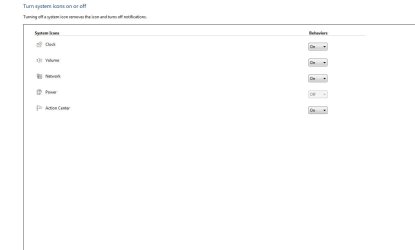
Right click the taskbar>properties>Notification Area>Customize>Turn System Icons on or off :)

Your response solved my issue. Now all is OK :-)

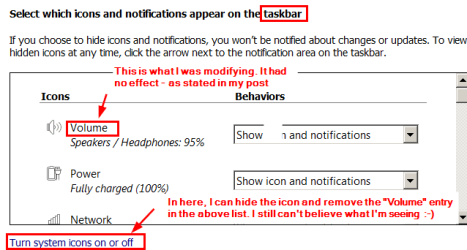
Pls see the crazy screendshot.

I made modifications in "Select which icons and notifications...."

I had no reason to look further down, and see "Turn system icons on or off". (OK, to be fair, maybe they used "taskbar", whereas I was interested in "System Tray". But further down, they don't say "System Tray", they say "System".

Bill at his very best :-)
.
 

Attachments

  • 2016-07-31 19_05_23-2016-07-31 18_57_12-.png
    2016-07-31 19_05_23-2016-07-31 18_57_12-.png
    10.9 KB · Views: 16

My Computer My Computer

At a glance

Win 7 64-bit Home Premium4 GB
Computer type
Laptop
Computer Manufacturer/Model Number
Dell Inspiron 17R
OS
Win 7 64-bit Home Premium
Memory
4 GB
Back
Top