I really could cry! Random shutdowns of clean install W7 Ultimate SP1

Rhothgar

New member
Local time
3:48 PM
Messages
61
Hi all,

Think I'm on the brink of having a nervous breakdown. I'll try not to swear in my post but I did read the forum rules and it's not disallowed,

Where to start?

Performed a clean install of W7 using double install method with an upgrade disc. Used Anytime Upgrade Key to activate. This saved me having to find and install my full retail version of Windows XP Pro followed by vista Upgrade then W7 Home Premium upgrade then Windows Anytime Upgrade.

All seemed well. Then went through nightmare Windows Update issues. All good or so I thought!!!

Crashed and kept saying Bootmgr is missing.

So I reinstalled again. Same issues.

So I thought the hard drive was at fault. Spoke with Western Digital. They told me to write zeros and reinstall. Did that. No change!

It's no fun anymore. I haven't reinstalled the Windows Updates yet because it's just more of a waste of my time. Time better spent reading up and learning.

So here I am.

I have also changed power plan to never sleep, never turn off hard drive and altered dump file to mini now.

No dump file was being created and I am waiting for it to crash now (which it just f@*king has! AAARRRRGHH,)

I'll check for file in a minute.

Event Viewer this morning revealed that there was a power failure as it seems to every time. No bugcheck enumeration! Event 41 (63).

This is driving me totally nuts. Something has to give. Hopefully not my sanity. Do you think this is somehow Microsoft playing a game with people who use upgrade keys and double installs and use installation ID to get confirmation ID?

EDIT:

Updated BIOS today to v1.34
 

My Computer My Computer

At a glance

Windows 7 Ultimate x64 SP1Intel Q9550 from memory8192MbMatrox Millenium
Computer type
PC/Desktop
Computer Manufacturer/Model Number
HP xw4600 Workstation
OS
Windows 7 Ultimate x64 SP1
CPU
Intel Q9550 from memory
Motherboard
HP
Memory
8192Mb
Graphics Card(s)
Matrox Millenium
Hard Drives
Western Digital WD5000-AAKS (Blue Caviar?)
Antivirus
None
Browser
Firefox 48
Hi and welcome to SevenForums,
It has been a common problem so don't cry :)

It's a lot easier to clean install these days with the unofficial sp2
There are essentially 3 updates needed for a clean install of windows that will get you updated through April of 2016

KB3020369 & KB3125574 & KB3172605 all can be downloaded from the catalog using internet explorer
Microsoft Update Catalog

https://blogs.technet.microsoft.com...17/simplifying-updates-for-windows-7-and-8-1/
When manually installing updates you need to switch your update settings to Never check for updates and restart the machine first.

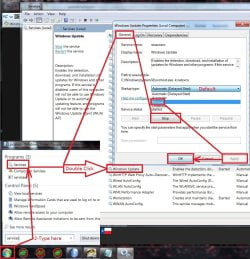
After restart you will need to ensure the built in windows update service is stopped and set to manual first too or it will conflict with the stand alone installer.
service stop windows update.jpg
Afterwards reset the windows updates service to what it was before and update settings to your preference and check for updates
Should be only 50 or so updates left to install.

I also have all 3 needed updates on my OneDrive to make it easier for people to get them :)
https://1drv.ms/f/s!AsjD7o6P3KLKj2TjShn8-SumV1rr
 

My Computer My Computer

At a glance

Win-7-Pro64bit 7-H-Prem-64biti7-5930K 2nd i9-9940x both water blocked VRM'...Trident-z 3200C14 2nd Trident-z 3600C16EVGA 1080ti ftw3 2nd Titan Xp both water blocked
Computer type
PC/Desktop
Computer Manufacturer/Model Number
Custom assembled by me :}
OS
Win-7-Pro64bit 7-H-Prem-64bit
CPU
i7-5930K 2nd i9-9940x both water blocked VRM's too
Motherboard
ASUS SABERTOOTH X99 2nd ASUS x299 Apex
Memory
Trident-z 3200C14 2nd Trident-z 3600C16
Graphics Card(s)
EVGA 1080ti ftw3 2nd Titan Xp both water blocked
Sound Card
Built-in Realtek
Monitor(s) Displays
1-AOC G2460PG 24"G-Sync 144Hz/ 2nd 1-ASUS VG248QE 24" 144Hz
Screen Resolution
1920 x 1080 144Hz
Hard Drives
2-Samsung M.2 Evo & Evo Plus
2-Samsung 850 EVO 500GB SSD's/ 3-2.5 W.D. Black 1tb-&3-1tb/3-3.5 WD Black 1tb hdd's
PSU
EVGA SuperNOVA 1000-P2 2nd 1200-P2
Case
2-Corsair Obsidian Series 450D Black ATX Mid Tower
Cooling
Custom water loops
Keyboard
Logitech G710+/ 2nd Logitech G910
Mouse
2-RedDragon M901 Perdition 16400 dpi Gaming mouse = wired
Internet Speed
Comcast Ping 19ms 89.31mbps download speed 6.12mbps upload
Antivirus
Malwarebytes Pro/ Superantispyware Pro
Browser
FireFox & Pale moon
Other Info
2nd ASUS X299 Apex/Intel i9-9940x with Custom water loop/7H-Prem-x64/Corsair 450D case/Ram Trident-z 3600C16 4x8gb / Samsung970Evo plus 500gb SSD/Dual ssd EZ swap evo/PSU EVGA SuperNova 1200w-P2 80+Platinum/GPU Titan Xp /8-ML-140 on push-pull on 2-280GTX rads
Hi Thrashzone

Glad to be onboard.

A mini dump still wasn't produced. Only a bootsqm.dat appeared in root.

I've done updates before. Surely that won't cure it now, will it?
 

My Computer My Computer

At a glance

Windows 7 Ultimate x64 SP1Intel Q9550 from memory8192MbMatrox Millenium
Computer type
PC/Desktop
Computer Manufacturer/Model Number
HP xw4600 Workstation
OS
Windows 7 Ultimate x64 SP1
CPU
Intel Q9550 from memory
Motherboard
HP
Memory
8192Mb
Graphics Card(s)
Matrox Millenium
Hard Drives
Western Digital WD5000-AAKS (Blue Caviar?)
Antivirus
None
Browser
Firefox 48

My Computer My Computer

At a glance

Win-7-Pro64bit 7-H-Prem-64biti7-5930K 2nd i9-9940x both water blocked VRM'...Trident-z 3200C14 2nd Trident-z 3600C16EVGA 1080ti ftw3 2nd Titan Xp both water blocked
Computer type
PC/Desktop
Computer Manufacturer/Model Number
Custom assembled by me :}
OS
Win-7-Pro64bit 7-H-Prem-64bit
CPU
i7-5930K 2nd i9-9940x both water blocked VRM's too
Motherboard
ASUS SABERTOOTH X99 2nd ASUS x299 Apex
Memory
Trident-z 3200C14 2nd Trident-z 3600C16
Graphics Card(s)
EVGA 1080ti ftw3 2nd Titan Xp both water blocked
Sound Card
Built-in Realtek
Monitor(s) Displays
1-AOC G2460PG 24"G-Sync 144Hz/ 2nd 1-ASUS VG248QE 24" 144Hz
Screen Resolution
1920 x 1080 144Hz
Hard Drives
2-Samsung M.2 Evo & Evo Plus
2-Samsung 850 EVO 500GB SSD's/ 3-2.5 W.D. Black 1tb-&3-1tb/3-3.5 WD Black 1tb hdd's
PSU
EVGA SuperNOVA 1000-P2 2nd 1200-P2
Case
2-Corsair Obsidian Series 450D Black ATX Mid Tower
Cooling
Custom water loops
Keyboard
Logitech G710+/ 2nd Logitech G910
Mouse
2-RedDragon M901 Perdition 16400 dpi Gaming mouse = wired
Internet Speed
Comcast Ping 19ms 89.31mbps download speed 6.12mbps upload
Antivirus
Malwarebytes Pro/ Superantispyware Pro
Browser
FireFox & Pale moon
Other Info
2nd ASUS X299 Apex/Intel i9-9940x with Custom water loop/7H-Prem-x64/Corsair 450D case/Ram Trident-z 3600C16 4x8gb / Samsung970Evo plus 500gb SSD/Dual ssd EZ swap evo/PSU EVGA SuperNova 1200w-P2 80+Platinum/GPU Titan Xp /8-ML-140 on push-pull on 2-280GTX rads
Thanks for that. Just doing the updates again. Let's rule that out even though I'm sure it was up-to-date before I ended up zeroing out the drive.

Last time it crashed tonight, I had set Display to 1 minute. It didn't sleep. I was out of the room typing my first post but it crashed within 20 minutes.
 

My Computer My Computer

At a glance

Windows 7 Ultimate x64 SP1Intel Q9550 from memory8192MbMatrox Millenium
Computer type
PC/Desktop
Computer Manufacturer/Model Number
HP xw4600 Workstation
OS
Windows 7 Ultimate x64 SP1
CPU
Intel Q9550 from memory
Motherboard
HP
Memory
8192Mb
Graphics Card(s)
Matrox Millenium
Hard Drives
Western Digital WD5000-AAKS (Blue Caviar?)
Antivirus
None
Browser
Firefox 48

My Computer My Computer

At a glance

Win-7-Pro64bit 7-H-Prem-64biti7-5930K 2nd i9-9940x both water blocked VRM'...Trident-z 3200C14 2nd Trident-z 3600C16EVGA 1080ti ftw3 2nd Titan Xp both water blocked
Computer type
PC/Desktop
Computer Manufacturer/Model Number
Custom assembled by me :}
OS
Win-7-Pro64bit 7-H-Prem-64bit
CPU
i7-5930K 2nd i9-9940x both water blocked VRM's too
Motherboard
ASUS SABERTOOTH X99 2nd ASUS x299 Apex
Memory
Trident-z 3200C14 2nd Trident-z 3600C16
Graphics Card(s)
EVGA 1080ti ftw3 2nd Titan Xp both water blocked
Sound Card
Built-in Realtek
Monitor(s) Displays
1-AOC G2460PG 24"G-Sync 144Hz/ 2nd 1-ASUS VG248QE 24" 144Hz
Screen Resolution
1920 x 1080 144Hz
Hard Drives
2-Samsung M.2 Evo & Evo Plus
2-Samsung 850 EVO 500GB SSD's/ 3-2.5 W.D. Black 1tb-&3-1tb/3-3.5 WD Black 1tb hdd's
PSU
EVGA SuperNOVA 1000-P2 2nd 1200-P2
Case
2-Corsair Obsidian Series 450D Black ATX Mid Tower
Cooling
Custom water loops
Keyboard
Logitech G710+/ 2nd Logitech G910
Mouse
2-RedDragon M901 Perdition 16400 dpi Gaming mouse = wired
Internet Speed
Comcast Ping 19ms 89.31mbps download speed 6.12mbps upload
Antivirus
Malwarebytes Pro/ Superantispyware Pro
Browser
FireFox & Pale moon
Other Info
2nd ASUS X299 Apex/Intel i9-9940x with Custom water loop/7H-Prem-x64/Corsair 450D case/Ram Trident-z 3600C16 4x8gb / Samsung970Evo plus 500gb SSD/Dual ssd EZ swap evo/PSU EVGA SuperNova 1200w-P2 80+Platinum/GPU Titan Xp /8-ML-140 on push-pull on 2-280GTX rads
I have had some proper BSOD's but it was coupled with a hard hang with no dump.
 

My Computer My Computer

At a glance

Windows 7 Ultimate x64 SP1Intel Q9550 from memory8192MbMatrox Millenium
Computer type
PC/Desktop
Computer Manufacturer/Model Number
HP xw4600 Workstation
OS
Windows 7 Ultimate x64 SP1
CPU
Intel Q9550 from memory
Motherboard
HP
Memory
8192Mb
Graphics Card(s)
Matrox Millenium
Hard Drives
Western Digital WD5000-AAKS (Blue Caviar?)
Antivirus
None
Browser
Firefox 48
Just seen an optional update KB2685811 which mentions kernel-mode. I wonder if this has anything to do with the issues?

I'm not going to install at present. I am leaving PC on all night with display set to Never as I have a sneaking suspicion.

I actually have the correct Matrox drivers also installed now. I noticed that after

(Bast@rd just crashed!) sh1t. I really cannot believe this. AT ALL!

Back to where I was, I notice that after installing Matrox drivers the 1 minute display sleep worked. Anyway, it's obviously NOT that.
 

My Computer My Computer

At a glance

Windows 7 Ultimate x64 SP1Intel Q9550 from memory8192MbMatrox Millenium
Computer type
PC/Desktop
Computer Manufacturer/Model Number
HP xw4600 Workstation
OS
Windows 7 Ultimate x64 SP1
CPU
Intel Q9550 from memory
Motherboard
HP
Memory
8192Mb
Graphics Card(s)
Matrox Millenium
Hard Drives
Western Digital WD5000-AAKS (Blue Caviar?)
Antivirus
None
Browser
Firefox 48
Looking at this thread, I'm starting to suspect bad or flaky hardware.

Rothgar, have you opened the computer and had a look at the power connections recently? Are they all snug and tight? Perhaps one is loose and causing your crashes with resulting ill effects on your installation.

Or your PSU or motherboard might be on the verge of going south on you. Another possibility is that the processor is getting too hot and crashing or rebooting the system to automatically get the temp down.

These are just some of the things that need to be considered, IMHO.
 

My Computer My Computer

At a glance

Win 7 Pro x64/Win 10 Pro x64 dual bootAMD FX 8350 Vishera @ 420016 GB Mushkin Blackline DDR3-2400 @ 1866 (9-1...XFX Radeon R9 280 Double D Black Edition
Computer type
PC/Desktop
Computer Manufacturer/Model Number
Mellon Labs (custom build)
OS
Win 7 Pro x64/Win 10 Pro x64 dual boot
CPU
AMD FX 8350 Vishera @ 4200
Motherboard
ASUS M5A97 R2.0
Memory
16 GB Mushkin Blackline DDR3-2400 @ 1866 (9-10-10-10-31)
Graphics Card(s)
XFX Radeon R9 280 Double D Black Edition
Sound Card
Realtek HD Audio on MB. Sounds great.
Monitor(s) Displays
Acer 24", Acer 22"
Screen Resolution
3840 x 1080
Hard Drives
1 x Mushkin Chronos 120 GB SSD (Win 10)
1 x Samsung 850 EVO 250 GB SSD (Win 7)
1 x WD 1TB SATA Blue
1 x WD 1TB SATA Green
PSU
Corsair TX-750
Case
CoolerMaster HAF 912+
Cooling
Coolermaster Seidon 240M Liquid AIO. 6 case fans
Keyboard
Logitech G710+
Mouse
Logitech G500s
Internet Speed
Much better since I got fiber, but still way overpriced.
Antivirus
MSE, Malware Bytes for scanning
Browser
Firefox
Other Info
Corsair VOID USB headphones.

A Mellon Labs X-1 - LCD Smartie driven system status display.

Brought to you by the letter E
That's strange. Could have sworn I posted this morning.

Overnight the PC had crashed and welcomed me back to the land of the living with a Bootmgr is missing message.

I removed 4Gb of RAM earlier and rebooted. I came back to it at 4pm and it was still working so could possibly be a RAM issue even though it tests as fine.

Think I set up Memtester and got it doing a few loops on individual sticks.

Unless anyone has any better suggestions for Memory Testing software (that is free).
 

My Computer My Computer

At a glance

Windows 7 Ultimate x64 SP1Intel Q9550 from memory8192MbMatrox Millenium
Computer type
PC/Desktop
Computer Manufacturer/Model Number
HP xw4600 Workstation
OS
Windows 7 Ultimate x64 SP1
CPU
Intel Q9550 from memory
Motherboard
HP
Memory
8192Mb
Graphics Card(s)
Matrox Millenium
Hard Drives
Western Digital WD5000-AAKS (Blue Caviar?)
Antivirus
None
Browser
Firefox 48

My Computer My Computer

At a glance

Windows 10 Pro. 64/ version 1709 Windows 7 Pr...Intel i7-6800K @ 4.3Corsair Platinum 16 gig @2400EVGA GTX 1070 OC
Computer type
PC/Desktop
Computer Manufacturer/Model Number
Home made Desktop
OS
Windows 10 Pro. 64/ version 1709 Windows 7 Pro/64
CPU
Intel i7-6800K @ 4.3
Motherboard
ASUS X-99 Deluxe II
Memory
Corsair Platinum 16 gig @2400
Graphics Card(s)
EVGA GTX 1070 OC
Monitor(s) Displays
Asus 27" LED LCD/VE278Q
Screen Resolution
1920-1080 or 1280-720 HDMI
Hard Drives
INTEL SSD 730-240 Gb Sata 3.0/
PSU
EVGA Platium 1200W
Case
Phanteks Luxe Tempered Glass 8 fans/ one radiator
Cooling
XSPC/ Water Cooled CPU
Keyboard
Das 4 Professional
Mouse
Logitech M705/MX Anywhere 2-S
Internet Speed
100 mbits
Antivirus
Microsoft Security Essentials/ Malwarebytes Premium 3.0/ SAS
Browser
I.E. 11 default/Firefox/ ISP Time Warner Cable/Spectrum
Other Info
LG BluRay Burner/
Sound system-KLipsch-THX/
Icy Dock ssd Hot Swap bays.
Looking at this thread, I'm starting to suspect bad or flaky hardware.

Rothgar, have you opened the computer and had a look at the power connections recently? Are they all snug and tight? Perhaps one is loose and causing your crashes with resulting ill effects on your installation.

Or your PSU or motherboard might be on the verge of going south on you. Another possibility is that the processor is getting too hot and crashing or rebooting the system to automatically get the temp down.

These are just some of the things that need to be considered, IMHO.

I've copied and pasted the thread title you suggested but nothing comes up with that title.

Would you mind copy and pasting the link to the thread you are referring to please?
 

My Computer My Computer

At a glance

Windows 7 Ultimate x64 SP1Intel Q9550 from memory8192MbMatrox Millenium
Computer type
PC/Desktop
Computer Manufacturer/Model Number
HP xw4600 Workstation
OS
Windows 7 Ultimate x64 SP1
CPU
Intel Q9550 from memory
Motherboard
HP
Memory
8192Mb
Graphics Card(s)
Matrox Millenium
Hard Drives
Western Digital WD5000-AAKS (Blue Caviar?)
Antivirus
None
Browser
Firefox 48

My Computer My Computer

At a glance

Windows 7 Ultimate x64 SP1Intel Q9550 from memory8192MbMatrox Millenium
Computer type
PC/Desktop
Computer Manufacturer/Model Number
HP xw4600 Workstation
OS
Windows 7 Ultimate x64 SP1
CPU
Intel Q9550 from memory
Motherboard
HP
Memory
8192Mb
Graphics Card(s)
Matrox Millenium
Hard Drives
Western Digital WD5000-AAKS (Blue Caviar?)
Antivirus
None
Browser
Firefox 48
Looking at this thread, I'm starting to suspect bad or flaky hardware.

Rothgar, have you opened the computer and had a look at the power connections recently? Are they all snug and tight? Perhaps one is loose and causing your crashes with resulting ill effects on your installation.

Or your PSU or motherboard might be on the verge of going south on you. Another possibility is that the processor is getting too hot and crashing or rebooting the system to automatically get the temp down.

These are just some of the things that need to be considered, IMHO.

I've copied and pasted the thread title you suggested but nothing comes up with that title.

Would you mind copy and pasting the link to the thread you are referring to please?
I'm looking at this thread, actually. Your thread and what you describe here. The thread we're talking in right now is the thread I'm talking about.
 

My Computer My Computer

At a glance

Win 7 Pro x64/Win 10 Pro x64 dual bootAMD FX 8350 Vishera @ 420016 GB Mushkin Blackline DDR3-2400 @ 1866 (9-1...XFX Radeon R9 280 Double D Black Edition
Computer type
PC/Desktop
Computer Manufacturer/Model Number
Mellon Labs (custom build)
OS
Win 7 Pro x64/Win 10 Pro x64 dual boot
CPU
AMD FX 8350 Vishera @ 4200
Motherboard
ASUS M5A97 R2.0
Memory
16 GB Mushkin Blackline DDR3-2400 @ 1866 (9-10-10-10-31)
Graphics Card(s)
XFX Radeon R9 280 Double D Black Edition
Sound Card
Realtek HD Audio on MB. Sounds great.
Monitor(s) Displays
Acer 24", Acer 22"
Screen Resolution
3840 x 1080
Hard Drives
1 x Mushkin Chronos 120 GB SSD (Win 10)
1 x Samsung 850 EVO 250 GB SSD (Win 7)
1 x WD 1TB SATA Blue
1 x WD 1TB SATA Green
PSU
Corsair TX-750
Case
CoolerMaster HAF 912+
Cooling
Coolermaster Seidon 240M Liquid AIO. 6 case fans
Keyboard
Logitech G710+
Mouse
Logitech G500s
Internet Speed
Much better since I got fiber, but still way overpriced.
Antivirus
MSE, Malware Bytes for scanning
Browser
Firefox
Other Info
Corsair VOID USB headphones.

A Mellon Labs X-1 - LCD Smartie driven system status display.

Brought to you by the letter E
Sorry. My fault. I thought you'd said, "Look at this thread" so I searched for term after!

My misunderstanding.

I stripped the PSU down and looked for bad capacitors. None. Also, HP system has LED troubleshooting codes and it does not display any signs of issues. Issues shuts itself down and reports overheating via LED codes. Again, none are displayed.

I cannot find any suggested BIOS settings on HP website. I don't know if I should be running IDE, AHCI or RAID.

One thread I read probably on here was that if you set Sata Emulation type then install OS and change Sata Emulation that that can cause issues.
 

My Computer My Computer

At a glance

Windows 7 Ultimate x64 SP1Intel Q9550 from memory8192MbMatrox Millenium
Computer type
PC/Desktop
Computer Manufacturer/Model Number
HP xw4600 Workstation
OS
Windows 7 Ultimate x64 SP1
CPU
Intel Q9550 from memory
Motherboard
HP
Memory
8192Mb
Graphics Card(s)
Matrox Millenium
Hard Drives
Western Digital WD5000-AAKS (Blue Caviar?)
Antivirus
None
Browser
Firefox 48
Hi and welcome to SevenForums,
It has been a common problem so don't cry :)

It's a lot easier to clean install these days with the unofficial sp2
There are essentially 3 updates needed for a clean install of windows that will get you updated through April of 2016

KB3020369 & KB3125574 & KB3172605 all can be downloaded from the catalog using internet explorer
Microsoft Update Catalog

https://blogs.technet.microsoft.com...17/simplifying-updates-for-windows-7-and-8-1/
When manually installing updates you need to switch your update settings to Never check for updates and restart the machine first.

After restart you will need to ensure the built in windows update service is stopped and set to manual first too or it will conflict with the stand alone installer.
View attachment 391768
Afterwards reset the windows updates service to what it was before and update settings to your preference and check for updates
Should be only 50 or so updates left to install.

I also have all 3 needed updates on my OneDrive to make it easier for people to get them :)
https://1drv.ms/f/s!AsjD7o6P3KLKj2TjShn8-SumV1rr

Have now reinstalled after using DISKPART to create one partition. I feel a lot more comfortable seeing bootmgr in the same partition as OS rather than in a System Reserved partition. The 100Mb partition is correct. I borrowed a working drive from my brother and that has 100Mb partition on.

Now for backup. How reliable is the Windows System Image option?
 

My Computer My Computer

At a glance

Windows 7 Ultimate x64 SP1Intel Q9550 from memory8192MbMatrox Millenium
Computer type
PC/Desktop
Computer Manufacturer/Model Number
HP xw4600 Workstation
OS
Windows 7 Ultimate x64 SP1
CPU
Intel Q9550 from memory
Motherboard
HP
Memory
8192Mb
Graphics Card(s)
Matrox Millenium
Hard Drives
Western Digital WD5000-AAKS (Blue Caviar?)
Antivirus
None
Browser
Firefox 48
Hi,
Not very dependable most of us use free macrium reflect instead and turn system protection off but mostly because we also use ssd's = solid state drives and it stops some unnesesary writes for a feature that rarely works if you disconnect a dedicated system image drive from the system.

Saying goes a drive that is connected to the system is at risk just as much as the operating system's drive is :)
https://www.youtube.com/watch?v=KQA7NlLvxg8
 

My Computer My Computer

At a glance

Win-7-Pro64bit 7-H-Prem-64biti7-5930K 2nd i9-9940x both water blocked VRM'...Trident-z 3200C14 2nd Trident-z 3600C16EVGA 1080ti ftw3 2nd Titan Xp both water blocked
Computer type
PC/Desktop
Computer Manufacturer/Model Number
Custom assembled by me :}
OS
Win-7-Pro64bit 7-H-Prem-64bit
CPU
i7-5930K 2nd i9-9940x both water blocked VRM's too
Motherboard
ASUS SABERTOOTH X99 2nd ASUS x299 Apex
Memory
Trident-z 3200C14 2nd Trident-z 3600C16
Graphics Card(s)
EVGA 1080ti ftw3 2nd Titan Xp both water blocked
Sound Card
Built-in Realtek
Monitor(s) Displays
1-AOC G2460PG 24"G-Sync 144Hz/ 2nd 1-ASUS VG248QE 24" 144Hz
Screen Resolution
1920 x 1080 144Hz
Hard Drives
2-Samsung M.2 Evo & Evo Plus
2-Samsung 850 EVO 500GB SSD's/ 3-2.5 W.D. Black 1tb-&3-1tb/3-3.5 WD Black 1tb hdd's
PSU
EVGA SuperNOVA 1000-P2 2nd 1200-P2
Case
2-Corsair Obsidian Series 450D Black ATX Mid Tower
Cooling
Custom water loops
Keyboard
Logitech G710+/ 2nd Logitech G910
Mouse
2-RedDragon M901 Perdition 16400 dpi Gaming mouse = wired
Internet Speed
Comcast Ping 19ms 89.31mbps download speed 6.12mbps upload
Antivirus
Malwarebytes Pro/ Superantispyware Pro
Browser
FireFox & Pale moon
Other Info
2nd ASUS X299 Apex/Intel i9-9940x with Custom water loop/7H-Prem-x64/Corsair 450D case/Ram Trident-z 3600C16 4x8gb / Samsung970Evo plus 500gb SSD/Dual ssd EZ swap evo/PSU EVGA SuperNova 1200w-P2 80+Platinum/GPU Titan Xp /8-ML-140 on push-pull on 2-280GTX rads
Oh my days!

Everything was going swimmingly after today's reinstall.

I've actually been working in it. It's been fine for the best part of the day. I knew it couldn't last.

I'll upload photo tomorrow.

I went away from the PC. 2nd time today and letter a program running. Came back. All looked fine. Decided to end process I was doing and save file. Go to save file. NO C DRIVE! Just not there in My Computer.
 

My Computer My Computer

At a glance

Windows 7 Ultimate x64 SP1Intel Q9550 from memory8192MbMatrox Millenium
Computer type
PC/Desktop
Computer Manufacturer/Model Number
HP xw4600 Workstation
OS
Windows 7 Ultimate x64 SP1
CPU
Intel Q9550 from memory
Motherboard
HP
Memory
8192Mb
Graphics Card(s)
Matrox Millenium
Hard Drives
Western Digital WD5000-AAKS (Blue Caviar?)
Antivirus
None
Browser
Firefox 48
Hi :cool:
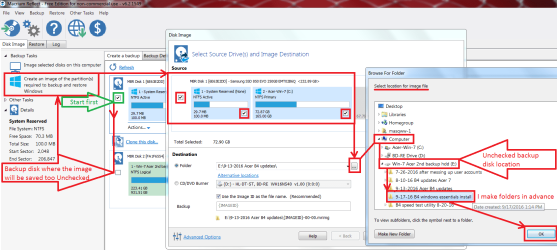
I made screen shot using reflect to point reflect to another connected drive with a already made folder on it for the new system image :)
Reflect create image search to folder already created.png

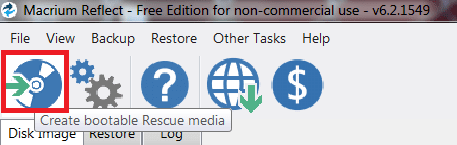
Most importantly to create the recovery media cd or flash drive to use to restore the system image and or use startup repair...

reflect create recue media.png
 

My Computer My Computer

At a glance

Win-7-Pro64bit 7-H-Prem-64biti7-5930K 2nd i9-9940x both water blocked VRM'...Trident-z 3200C14 2nd Trident-z 3600C16EVGA 1080ti ftw3 2nd Titan Xp both water blocked
Computer type
PC/Desktop
Computer Manufacturer/Model Number
Custom assembled by me :}
OS
Win-7-Pro64bit 7-H-Prem-64bit
CPU
i7-5930K 2nd i9-9940x both water blocked VRM's too
Motherboard
ASUS SABERTOOTH X99 2nd ASUS x299 Apex
Memory
Trident-z 3200C14 2nd Trident-z 3600C16
Graphics Card(s)
EVGA 1080ti ftw3 2nd Titan Xp both water blocked
Sound Card
Built-in Realtek
Monitor(s) Displays
1-AOC G2460PG 24"G-Sync 144Hz/ 2nd 1-ASUS VG248QE 24" 144Hz
Screen Resolution
1920 x 1080 144Hz
Hard Drives
2-Samsung M.2 Evo & Evo Plus
2-Samsung 850 EVO 500GB SSD's/ 3-2.5 W.D. Black 1tb-&3-1tb/3-3.5 WD Black 1tb hdd's
PSU
EVGA SuperNOVA 1000-P2 2nd 1200-P2
Case
2-Corsair Obsidian Series 450D Black ATX Mid Tower
Cooling
Custom water loops
Keyboard
Logitech G710+/ 2nd Logitech G910
Mouse
2-RedDragon M901 Perdition 16400 dpi Gaming mouse = wired
Internet Speed
Comcast Ping 19ms 89.31mbps download speed 6.12mbps upload
Antivirus
Malwarebytes Pro/ Superantispyware Pro
Browser
FireFox & Pale moon
Other Info
2nd ASUS X299 Apex/Intel i9-9940x with Custom water loop/7H-Prem-x64/Corsair 450D case/Ram Trident-z 3600C16 4x8gb / Samsung970Evo plus 500gb SSD/Dual ssd EZ swap evo/PSU EVGA SuperNova 1200w-P2 80+Platinum/GPU Titan Xp /8-ML-140 on push-pull on 2-280GTX rads
That's a very good idea Thrashzone.

I often forget where I put things even though I tend to be very thorough.

Think I am going to do one of the installs in Audit mode on a dummy drive then I can transfer it whenever I like.

I spent the day yesterday, after the PC crashed again on Sunday night and corrupted some files and perhaps registry, on a drive my brother lent to me. Ran 100% fine.

I even swapped the power supply from the known good workstation but, even now, I can't recall when I did that. I think I did it yesterday morning early on to see if that resolved the issue but got Bootmgr again.

I am going to do a spare drive today and see how that goes. Then once I am happy that it can survive a day without crashing I will out the original PSU back in and finalise my thoughts on it.

The HP PSU's have a green LED which can be seen through the rear fan. It was flickering from time to time on the one I used when I was having problems. HP advise that it should be changed.

I wonder if anyone knows a fix. It's not capacitors. They all look good.
 

My Computer My Computer

At a glance

Windows 7 Ultimate x64 SP1Intel Q9550 from memory8192MbMatrox Millenium
Computer type
PC/Desktop
Computer Manufacturer/Model Number
HP xw4600 Workstation
OS
Windows 7 Ultimate x64 SP1
CPU
Intel Q9550 from memory
Motherboard
HP
Memory
8192Mb
Graphics Card(s)
Matrox Millenium
Hard Drives
Western Digital WD5000-AAKS (Blue Caviar?)
Antivirus
None
Browser
Firefox 48
Back
Top