Have to keep rebuilding my indexing - Search stops working

lindalo5032

New member
Local time
4:17 PM
Messages
26
In my work I have to pull up previous Word files to access information, amend the file, etc.

To do this, I go to the Start button and type in the file name. It then pulls up my document list and I can select the document I need. Lately, about once every couple of weeks when I do this, the search comes up blank, showing no files.

I then have to rebuild the index by typing "Search" in the start menu box. I select "Change How Windows Searches" and then "Indexing Options", then "Advanced" button. From there I click on "Rebuild". After I go through that process, it all works fine for a couple of weeks, and then the Search stops working again.

Could this be caused by my Bitdefender which scans every morning? If it was that, I would think it would mess up the search function every day.

How can I discover what's causing this, and hopefully prevent it in the future?
 

My Computer My Computer

At a glance

Microsoft Windows 7 Home Premium 64-bit 7601 ...Intel(R) Core(TM) i7-4790 CPU @ 3.60GHz8.00 GBNVIDIA GeForce GT 720
Computer type
PC/Desktop
Computer Manufacturer/Model Number
Dell Studio
OS
Microsoft Windows 7 Home Premium 64-bit 7601 Multiprocessor Free Service Pack 1
CPU
Intel(R) Core(TM) i7-4790 CPU @ 3.60GHz
Motherboard
Dell Inc. 0KWVT8
Memory
8.00 GB
Graphics Card(s)
NVIDIA GeForce GT 720
Sound Card
(1) Bluetooth Hands-free Audio (2) NVIDIA High Definition
Screen Resolution
1920 x 1080 x 32 bits (4294967296 colors) @ 60 Hz
Hard Drives
(1) ATA ST1000DM003-1ER1 SCSI Disk Device (2) CF/MD Card (3) MS/Pro/Duo Card (4) SD/mini-MMC/RS Card (5) SM/xD Card (6) HP OfficeJet Pro 69 USB Device (7) Seagate BUP Slim BL USB Device
Keyboard
Logitech K800
Mouse
Logitech M705
Antivirus
Bitdefender Anti-Virus Plus 2018
Browser
IE 11
Hi,

There are some reports that BD (bitdefender) can interfere with indexing. What version do you use? If you would of had your system specs filled out I could of searched further but I did find this: Windows 7 Indexing Is Not Working In Bitdefender 2011 it may offer some insight.

There are other threads that full system scans aren't working. Go here: BD search and type or copy/paste windows indexing into the search box.
 

My Computer My Computer

At a glance

Originally Win 7 Hm Prem x64 Ver 6.1.7600 Bui...Intel i3 530 2.93GHz, 2933MHz 2 Cores 4 Logic...6GB of 1,333MHz DDR3 SDRAM32MB Intel Graphics Media Accelerator HD IGChip
Computer type
PC/Desktop
Computer Manufacturer/Model Number
Gateway DX4831-01e (Mid-Tower Desktop)
OS
Originally Win 7 Hm Prem x64 Ver 6.1.7600 Build 7601-SP1 | Upgraded to Windows 10 December 14, 2019
CPU
Intel i3 530 2.93GHz, 2933MHz 2 Cores 4 Logical Processors
Motherboard
Gateway H57M01 133 megahertz
Memory
6GB of 1,333MHz DDR3 SDRAM
Graphics Card(s)
32MB Intel Graphics Media Accelerator HD IGChip
Sound Card
Realtek High Definition Audio
Monitor(s) Displays
Gateway HX2000 20inch TFT active matrix TN
Screen Resolution
1600 x 900 x 59 hertz
Hard Drives
WDC WD10EADS-00M2B0 [HDD] (1000.20 GB) -- drive 0,
HL-DT-ST DVDRAM GH41N [CD-ROM dr]
Four card readers, and Four USB 2.0
PSU
300watts.
Case
Mid-Tower Desktop
Cooling
Stock from Gateway
Keyboard
Natural Ergonomic Keyboard 4000, see Other Info
Mouse
Orig. Gateway wore out now using Insignia USB wired optical
Internet Speed
Vz FIOS 10ms png 57.64Mbps down 65.53Mbps up Speedtest.org
Antivirus
Zamana Anti-logger with Anti-malware, MSE, Windows Firewall,
Browser
IE11.0.9600.19399-Upd ver11.0.135, Firefox 68.0.1 x64
Other Info
System Specs by Belarc.

BIOS: American Megatrends Inc. P01-A0 11/17/2009

Replaced the MS 'Natural' Standard PS/2 Enhanced 101-102 Keyboard with a new Natural Ergonomic Keyboard 4000 on August 1st 2014.

Canon Pixma MG3222 Printer.

Updated to IE11 on 12102015 | Fios Quantum Router g1100

Additional AV: SpywareBlaster, manual Mbam, SAS
Thank you for your response. I have gone back in and entered what information I knew how to find on my System Specs. I tried searching but all the info I found referred to earlier versions of Bitdefender. I'm using Bitdefender AntiVirus Plus 2018. Today I had to rebuild my index AGAIN, and I turned the Bitdefender off first. So we will see if it happens again. Any further suggestions would be appreciated.
 

My Computer My Computer

At a glance

Microsoft Windows 7 Home Premium 64-bit 7601 ...Intel(R) Core(TM) i7-4790 CPU @ 3.60GHz8.00 GBNVIDIA GeForce GT 720
Computer type
PC/Desktop
Computer Manufacturer/Model Number
Dell Studio
OS
Microsoft Windows 7 Home Premium 64-bit 7601 Multiprocessor Free Service Pack 1
CPU
Intel(R) Core(TM) i7-4790 CPU @ 3.60GHz
Motherboard
Dell Inc. 0KWVT8
Memory
8.00 GB
Graphics Card(s)
NVIDIA GeForce GT 720
Sound Card
(1) Bluetooth Hands-free Audio (2) NVIDIA High Definition
Screen Resolution
1920 x 1080 x 32 bits (4294967296 colors) @ 60 Hz
Hard Drives
(1) ATA ST1000DM003-1ER1 SCSI Disk Device (2) CF/MD Card (3) MS/Pro/Duo Card (4) SD/mini-MMC/RS Card (5) SM/xD Card (6) HP OfficeJet Pro 69 USB Device (7) Seagate BUP Slim BL USB Device
Keyboard
Logitech K800
Mouse
Logitech M705
Antivirus
Bitdefender Anti-Virus Plus 2018
Browser
IE 11
Perhaps check out the program called Everything. Once it creates its file index it is blinding fast. And does not carry the excess problems associated with Windows Indexing. Just a thought.
 

My Computer My Computer

At a glance

Windows 7 Pro 64
Computer type
PC/Desktop
OS
Windows 7 Pro 64
Hi lindalo, I should of mentioned this earlier.

If you want to eliminate BD2018 as the cause you will have to uninstall it then depend on MSE and the windows firewall to secure your machine until the "couple of weeks" go by to see if your indexing is working.

  • Have you used BD before or is this the first time?

  • Are you seeing any pop-ups from BD warning of any intrusions to your files?

There are two features of BD2018 that might be causing problems Advanced Threat Defense and Safe Files

  • With ATD you will only see pop-ups if autopilot is off
    If Autopilot is off, you will be notified through a pop-up window about the blocked application. Otherwise, the application will be blocked without any notification. You can check which applications have been detected by Advanced Threat Defense in the Notifications window

  • With SF
    Each time an application will try to access one of the protected file, a Bitdefender pop-up is displayed.Quotes are borrowed from linked pages.
In BD's eyes Windows Indexing can certainly be called an intrusion.

  • Check that notifications window to see if anything is listed there.
p.s..About those system specs; You can use the tool included in the Tutorial here: System Info - See Your System Specs just read through the tutorial, use one of the downloads, and it will automagically fill them in for you since I see you use Internet Explorer.


Hi Jo, While Everything is a fine program and is used by many members here including me I believe lindalo would like to get to the bottom of why the indexing is not working, but it would be a viable work-around.
 

My Computer My Computer

At a glance

Originally Win 7 Hm Prem x64 Ver 6.1.7600 Bui...Intel i3 530 2.93GHz, 2933MHz 2 Cores 4 Logic...6GB of 1,333MHz DDR3 SDRAM32MB Intel Graphics Media Accelerator HD IGChip
Computer type
PC/Desktop
Computer Manufacturer/Model Number
Gateway DX4831-01e (Mid-Tower Desktop)
OS
Originally Win 7 Hm Prem x64 Ver 6.1.7600 Build 7601-SP1 | Upgraded to Windows 10 December 14, 2019
CPU
Intel i3 530 2.93GHz, 2933MHz 2 Cores 4 Logical Processors
Motherboard
Gateway H57M01 133 megahertz
Memory
6GB of 1,333MHz DDR3 SDRAM
Graphics Card(s)
32MB Intel Graphics Media Accelerator HD IGChip
Sound Card
Realtek High Definition Audio
Monitor(s) Displays
Gateway HX2000 20inch TFT active matrix TN
Screen Resolution
1600 x 900 x 59 hertz
Hard Drives
WDC WD10EADS-00M2B0 [HDD] (1000.20 GB) -- drive 0,
HL-DT-ST DVDRAM GH41N [CD-ROM dr]
Four card readers, and Four USB 2.0
PSU
300watts.
Case
Mid-Tower Desktop
Cooling
Stock from Gateway
Keyboard
Natural Ergonomic Keyboard 4000, see Other Info
Mouse
Orig. Gateway wore out now using Insignia USB wired optical
Internet Speed
Vz FIOS 10ms png 57.64Mbps down 65.53Mbps up Speedtest.org
Antivirus
Zamana Anti-logger with Anti-malware, MSE, Windows Firewall,
Browser
IE11.0.9600.19399-Upd ver11.0.135, Firefox 68.0.1 x64
Other Info
System Specs by Belarc.

BIOS: American Megatrends Inc. P01-A0 11/17/2009

Replaced the MS 'Natural' Standard PS/2 Enhanced 101-102 Keyboard with a new Natural Ergonomic Keyboard 4000 on August 1st 2014.

Canon Pixma MG3222 Printer.

Updated to IE11 on 12102015 | Fios Quantum Router g1100

Additional AV: SpywareBlaster, manual Mbam, SAS
Anak,

Thanks again for taking the time to respond. I have now updated my System Specs info--thanks for that info!

I have used Bitdefender for several years now. But only recently have I been searching for files I need to pull up, so I don't know if this has been an issue in the past. I have now turned off Auto Pilot, but I had no popups or notifications in the past several weeks. I may resort to uninstalling Bitdefender as you suggested to see if that has any effect. Today the indexing is working, but we'll see for how long.

If Bitdefender is not causing the problem, can you think of anything else that might cause the indexing to stop working?
 

My Computer My Computer

At a glance

Microsoft Windows 7 Home Premium 64-bit 7601 ...Intel(R) Core(TM) i7-4790 CPU @ 3.60GHz8.00 GBNVIDIA GeForce GT 720
Computer type
PC/Desktop
Computer Manufacturer/Model Number
Dell Studio
OS
Microsoft Windows 7 Home Premium 64-bit 7601 Multiprocessor Free Service Pack 1
CPU
Intel(R) Core(TM) i7-4790 CPU @ 3.60GHz
Motherboard
Dell Inc. 0KWVT8
Memory
8.00 GB
Graphics Card(s)
NVIDIA GeForce GT 720
Sound Card
(1) Bluetooth Hands-free Audio (2) NVIDIA High Definition
Screen Resolution
1920 x 1080 x 32 bits (4294967296 colors) @ 60 Hz
Hard Drives
(1) ATA ST1000DM003-1ER1 SCSI Disk Device (2) CF/MD Card (3) MS/Pro/Duo Card (4) SD/mini-MMC/RS Card (5) SM/xD Card (6) HP OfficeJet Pro 69 USB Device (7) Seagate BUP Slim BL USB Device
Keyboard
Logitech K800
Mouse
Logitech M705
Antivirus
Bitdefender Anti-Virus Plus 2018
Browser
IE 11
Workin' on it, will get back to you.
 

My Computer My Computer

At a glance

Originally Win 7 Hm Prem x64 Ver 6.1.7600 Bui...Intel i3 530 2.93GHz, 2933MHz 2 Cores 4 Logic...6GB of 1,333MHz DDR3 SDRAM32MB Intel Graphics Media Accelerator HD IGChip
Computer type
PC/Desktop
Computer Manufacturer/Model Number
Gateway DX4831-01e (Mid-Tower Desktop)
OS
Originally Win 7 Hm Prem x64 Ver 6.1.7600 Build 7601-SP1 | Upgraded to Windows 10 December 14, 2019
CPU
Intel i3 530 2.93GHz, 2933MHz 2 Cores 4 Logical Processors
Motherboard
Gateway H57M01 133 megahertz
Memory
6GB of 1,333MHz DDR3 SDRAM
Graphics Card(s)
32MB Intel Graphics Media Accelerator HD IGChip
Sound Card
Realtek High Definition Audio
Monitor(s) Displays
Gateway HX2000 20inch TFT active matrix TN
Screen Resolution
1600 x 900 x 59 hertz
Hard Drives
WDC WD10EADS-00M2B0 [HDD] (1000.20 GB) -- drive 0,
HL-DT-ST DVDRAM GH41N [CD-ROM dr]
Four card readers, and Four USB 2.0
PSU
300watts.
Case
Mid-Tower Desktop
Cooling
Stock from Gateway
Keyboard
Natural Ergonomic Keyboard 4000, see Other Info
Mouse
Orig. Gateway wore out now using Insignia USB wired optical
Internet Speed
Vz FIOS 10ms png 57.64Mbps down 65.53Mbps up Speedtest.org
Antivirus
Zamana Anti-logger with Anti-malware, MSE, Windows Firewall,
Browser
IE11.0.9600.19399-Upd ver11.0.135, Firefox 68.0.1 x64
Other Info
System Specs by Belarc.

BIOS: American Megatrends Inc. P01-A0 11/17/2009

Replaced the MS 'Natural' Standard PS/2 Enhanced 101-102 Keyboard with a new Natural Ergonomic Keyboard 4000 on August 1st 2014.

Canon Pixma MG3222 Printer.

Updated to IE11 on 12102015 | Fios Quantum Router g1100

Additional AV: SpywareBlaster, manual Mbam, SAS
System Cleaner

If Bitdefender is not causing the problem, can you think of anything else that might cause the indexing to stop working?
Do you use a System Cleaner (like CCleaner)?

If yes, check which options are selected.
 

My Computer My Computer

At a glance

W7 Ultimate SP1, LM19.2 MATE, W10 Home 1703, ...AMD Phenom II x6 1100T, 3.3 GHz12GB DDR3 1333 G-Skill (4GB x 2), G-Skill (2G...NVIDIA GeForce GTX 660
Computer type
PC/Desktop
Computer Manufacturer/Model Number
n/a
OS
W7 Ultimate SP1, LM19.2 MATE, W10 Home 1703, W10 Pro 1703 VM, #All 64 bit
CPU
AMD Phenom II x6 1100T, 3.3 GHz
Motherboard
ASUS M4A88T-M/USB3 (AM3)
Memory
12GB DDR3 1333 G-Skill (4GB x 2), G-Skill (2GB x 2)
Graphics Card(s)
NVIDIA GeForce GTX 660
Sound Card
Realtek?
Monitor(s) Displays
Samsung S23B350
Screen Resolution
1920x1080
Hard Drives
WD Green 2TB (SATA), WD Green 3TB (SATA), WD Blue 4TB (SATA), WD Blue 6TB (SATA)
PSU
Cooler Master
Case
Antec GX300 Tower
Cooling
3x Antec TRICOOL 120mm Fans
Mouse
Wired Optical
Internet Speed
DSL
Antivirus
Avast
Browser
Pale Moon (64 bit)
Other Info
2018-12-27 Upgraded HDDs
2015-12-10 Upgraded case, graphics card, storage
2015-08-15 Upgraded motherboard & RAM
2015-07-15 Upgraded LM17.1 to LM17.2
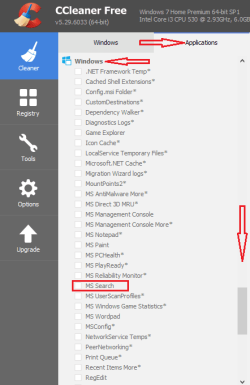
Do you use any disk cleaners, optimization tools like ccleaner and do you have them on a schedule or do a manual cleaning every two weeks? When Ccleaner is opened and you click on the applications tab scroll down to the windows section to MS Search make sure that's unchecked.

cc.png


Check your service setting for windows search, go to the start orb in the lower left corner and type services into the search box >Click on the one that has the gear icon under Programs at the top and the Services window will open, does it look like mine? It has the light grey highlight at the very bottom.

index.PNG


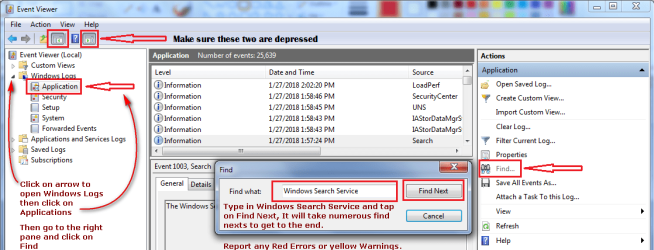
Go back to the search box and enter eventvwr.msc >Click on eventvwr at the top under programs another window will open called surprisingly Event Viewer and follow my prompts on the attachment. You should be able to click on the attachment to make it bigger, my apologies for mixing two different programs to make the attachment I did try to make it as confusing as possible :p .

EV.png
 

My Computer My Computer

At a glance

Originally Win 7 Hm Prem x64 Ver 6.1.7600 Bui...Intel i3 530 2.93GHz, 2933MHz 2 Cores 4 Logic...6GB of 1,333MHz DDR3 SDRAM32MB Intel Graphics Media Accelerator HD IGChip
Computer type
PC/Desktop
Computer Manufacturer/Model Number
Gateway DX4831-01e (Mid-Tower Desktop)
OS
Originally Win 7 Hm Prem x64 Ver 6.1.7600 Build 7601-SP1 | Upgraded to Windows 10 December 14, 2019
CPU
Intel i3 530 2.93GHz, 2933MHz 2 Cores 4 Logical Processors
Motherboard
Gateway H57M01 133 megahertz
Memory
6GB of 1,333MHz DDR3 SDRAM
Graphics Card(s)
32MB Intel Graphics Media Accelerator HD IGChip
Sound Card
Realtek High Definition Audio
Monitor(s) Displays
Gateway HX2000 20inch TFT active matrix TN
Screen Resolution
1600 x 900 x 59 hertz
Hard Drives
WDC WD10EADS-00M2B0 [HDD] (1000.20 GB) -- drive 0,
HL-DT-ST DVDRAM GH41N [CD-ROM dr]
Four card readers, and Four USB 2.0
PSU
300watts.
Case
Mid-Tower Desktop
Cooling
Stock from Gateway
Keyboard
Natural Ergonomic Keyboard 4000, see Other Info
Mouse
Orig. Gateway wore out now using Insignia USB wired optical
Internet Speed
Vz FIOS 10ms png 57.64Mbps down 65.53Mbps up Speedtest.org
Antivirus
Zamana Anti-logger with Anti-malware, MSE, Windows Firewall,
Browser
IE11.0.9600.19399-Upd ver11.0.135, Firefox 68.0.1 x64
Other Info
System Specs by Belarc.

BIOS: American Megatrends Inc. P01-A0 11/17/2009

Replaced the MS 'Natural' Standard PS/2 Enhanced 101-102 Keyboard with a new Natural Ergonomic Keyboard 4000 on August 1st 2014.

Canon Pixma MG3222 Printer.

Updated to IE11 on 12102015 | Fios Quantum Router g1100

Additional AV: SpywareBlaster, manual Mbam, SAS
Aw shucks ya bet me to it! Thanks lehnerus!
 

My Computer My Computer

At a glance

Originally Win 7 Hm Prem x64 Ver 6.1.7600 Bui...Intel i3 530 2.93GHz, 2933MHz 2 Cores 4 Logic...6GB of 1,333MHz DDR3 SDRAM32MB Intel Graphics Media Accelerator HD IGChip
Computer type
PC/Desktop
Computer Manufacturer/Model Number
Gateway DX4831-01e (Mid-Tower Desktop)
OS
Originally Win 7 Hm Prem x64 Ver 6.1.7600 Build 7601-SP1 | Upgraded to Windows 10 December 14, 2019
CPU
Intel i3 530 2.93GHz, 2933MHz 2 Cores 4 Logical Processors
Motherboard
Gateway H57M01 133 megahertz
Memory
6GB of 1,333MHz DDR3 SDRAM
Graphics Card(s)
32MB Intel Graphics Media Accelerator HD IGChip
Sound Card
Realtek High Definition Audio
Monitor(s) Displays
Gateway HX2000 20inch TFT active matrix TN
Screen Resolution
1600 x 900 x 59 hertz
Hard Drives
WDC WD10EADS-00M2B0 [HDD] (1000.20 GB) -- drive 0,
HL-DT-ST DVDRAM GH41N [CD-ROM dr]
Four card readers, and Four USB 2.0
PSU
300watts.
Case
Mid-Tower Desktop
Cooling
Stock from Gateway
Keyboard
Natural Ergonomic Keyboard 4000, see Other Info
Mouse
Orig. Gateway wore out now using Insignia USB wired optical
Internet Speed
Vz FIOS 10ms png 57.64Mbps down 65.53Mbps up Speedtest.org
Antivirus
Zamana Anti-logger with Anti-malware, MSE, Windows Firewall,
Browser
IE11.0.9600.19399-Upd ver11.0.135, Firefox 68.0.1 x64
Other Info
System Specs by Belarc.

BIOS: American Megatrends Inc. P01-A0 11/17/2009

Replaced the MS 'Natural' Standard PS/2 Enhanced 101-102 Keyboard with a new Natural Ergonomic Keyboard 4000 on August 1st 2014.

Canon Pixma MG3222 Printer.

Updated to IE11 on 12102015 | Fios Quantum Router g1100

Additional AV: SpywareBlaster, manual Mbam, SAS
Anak,

Thank you again for your detailed response. BTW, my indexing was not working again this morning (1/31/18). It worked fine yesterday (1/30/18) I ran the event finder and there were over 25,000 entries. I didn't go all the way to the end, but I did find a few red and yellow warnings. None on 1/30/18 except for referring to a new program (Audacity/sound editor) I used and the indexing problem started way before I ever had that program.

On 1/28/18, there was a (yellow) warning: "The windows search service is starting up and attempting to remove the old search index. Reason: Used Requested" Event ID: 1008
Maybe this was when I did a rebuild of the index? Not sure what date I last did the rebuild.

Details:

Log Name: Application
Source: Microsoft-Windows-Search
Date: 1/28/2018 5:28:33 PM
Event ID: 1008
Task Category: Search service
Level: Warning
Keywords: Classic
User: N/A
Computer: LINDA-PC
Description:
The Windows Search Service is starting up and attempting to remove the old search index {Reason: User Requested}.

Event Xml:
<Event xmlns="http://schemas.microsoft.com/win/2004/08/events/event">
<System>
<Provider Name="Microsoft-Windows-Search" Guid="{CA4E628D-8567-4896-AB6B-835B221F373F}" EventSourceName="Windows Search Service" />
<EventID Qualifiers="32768">1008</EventID>
<Version>0</Version>
<Level>3</Level>
<Task>1</Task>
<Opcode>0</Opcode>
<Keywords>0x80000000000000</Keywords>
<TimeCreated SystemTime="2018-01-28T23:28:33.000000000Z" />
<EventRecordID>1479802</EventRecordID>
<Correlation />
<Execution ProcessID="0" ThreadID="0" />
<Channel>Application</Channel>
<Computer>LINDA-PC</Computer>
<Security />
</System>
<EventData>
<Data Name="ExtraInfo">
</Data>
<Data Name="Reason">User Requested</Data>
</EventData>
</Event>

On 1/27/18, I had the following (red) warning: Source: WMI Event ID 10
//./root/CIMV2
SELECT * FROM __InstanceModificationEvent WITHIN 60 WHERE TargetInstance ISA "Win32_Processor" AND TargetInstance.LoadPercentage > 99
0x80041003

On 1/25/18, I had the following (red)

TOASTER.EXE
2.8.0.31
5664aae2
clr.dll
4.7.2563.0
5a334e14
80131506
002d4353
214c
01d394f684534722
C:\Program Files (x86)\Dell Backup and Recovery\TOASTER.EXE
C:\Windows\Microsoft.NET\Framework\v4.0.30319\clr.dll
9ee696c3-01f1-11e8-8055-9cad97d543e6


On 1/24/18:

Log Name: Application
Source: DbxSvc
Date: 1/24/2018 1:59:38 PM
Event ID: 328
Task Category: (2)
Level: Warning
Keywords: Classic
User: N/A
Computer: LINDA-PC
Description:
We have a long running thread, command type: 3, time: 38150637
Event Xml:
<Event xmlns="http://schemas.microsoft.com/win/2004/08/events/event">
<System>
<Provider Name="DbxSvc" />
<EventID Qualifiers="32770">328</EventID>
<Level>3</Level>
<Task>2</Task>
<Keywords>0x80000000000000</Keywords>
<TimeCreated SystemTime="2018-01-24T19:59:38.000000000Z" />
<EventRecordID>1478636</EventRecordID>
<Channel>Application</Channel>
<Computer>LINDA-PC</Computer>
<Security />
</System>
<EventData>
<Data>3</Data>
<Data>38150637</Data>
</EventData>
</Event>


1/24/18:

Log Name: Application
Source: Microsoft-Windows-WMI
Date: 1/24/2018 3:25:50 AM
Event ID: 10
Task Category: None
Level: Error
Keywords: Classic
User: N/A
Computer: LINDA-PC
Description:
Event filter with query "SELECT * FROM __InstanceModificationEvent WITHIN 60 WHERE TargetInstance ISA "Win32_Processor" AND TargetInstance.LoadPercentage > 99" could not be reactivated in namespace "//./root/CIMV2" because of error 0x80041003. Events cannot be delivered through this filter until the problem is corrected.
Event Xml:
<Event xmlns="http://schemas.microsoft.com/win/2004/08/events/event">
<System>
<Provider Name="Microsoft-Windows-WMI" Guid="{1edeee53-0afe-4609-b846-d8c0b2075b1f}" EventSourceName="WinMgmt" />
<EventID Qualifiers="49152">10</EventID>
<Version>0</Version>
<Level>2</Level>
<Task>0</Task>
<Opcode>0</Opcode>
<Keywords>0x80000000000000</Keywords>
<TimeCreated SystemTime="2018-01-24T09:25:50.000000000Z" />
<EventRecordID>1478444</EventRecordID>
<Correlation />
<Execution ProcessID="0" ThreadID="0" />
<Channel>Application</Channel>
<Computer>LINDA-PC</Computer>
<Security />
</System>
<EventData>
<Data>//./root/CIMV2</Data>
<Data>SELECT * FROM __InstanceModificationEvent WITHIN 60 WHERE TargetInstance ISA "Win32_Processor" AND TargetInstance.LoadPercentage > 99</Data>
<Data>0x80041003</Data>
</EventData>
</Event>

Does any of this tell you anything? Should I keep going with the event viewer? Again, thank you very, very much for your help.
 

My Computer My Computer

At a glance

Microsoft Windows 7 Home Premium 64-bit 7601 ...Intel(R) Core(TM) i7-4790 CPU @ 3.60GHz8.00 GBNVIDIA GeForce GT 720
Computer type
PC/Desktop
Computer Manufacturer/Model Number
Dell Studio
OS
Microsoft Windows 7 Home Premium 64-bit 7601 Multiprocessor Free Service Pack 1
CPU
Intel(R) Core(TM) i7-4790 CPU @ 3.60GHz
Motherboard
Dell Inc. 0KWVT8
Memory
8.00 GB
Graphics Card(s)
NVIDIA GeForce GT 720
Sound Card
(1) Bluetooth Hands-free Audio (2) NVIDIA High Definition
Screen Resolution
1920 x 1080 x 32 bits (4294967296 colors) @ 60 Hz
Hard Drives
(1) ATA ST1000DM003-1ER1 SCSI Disk Device (2) CF/MD Card (3) MS/Pro/Duo Card (4) SD/mini-MMC/RS Card (5) SM/xD Card (6) HP OfficeJet Pro 69 USB Device (7) Seagate BUP Slim BL USB Device
Keyboard
Logitech K800
Mouse
Logitech M705
Antivirus
Bitdefender Anti-Virus Plus 2018
Browser
IE 11
lehnerus (thank you for your response!) and anak,

No, I don't have CCleaner or anything like that. But thanks for the suggestion!
 

My Computer My Computer

At a glance

Microsoft Windows 7 Home Premium 64-bit 7601 ...Intel(R) Core(TM) i7-4790 CPU @ 3.60GHz8.00 GBNVIDIA GeForce GT 720
Computer type
PC/Desktop
Computer Manufacturer/Model Number
Dell Studio
OS
Microsoft Windows 7 Home Premium 64-bit 7601 Multiprocessor Free Service Pack 1
CPU
Intel(R) Core(TM) i7-4790 CPU @ 3.60GHz
Motherboard
Dell Inc. 0KWVT8
Memory
8.00 GB
Graphics Card(s)
NVIDIA GeForce GT 720
Sound Card
(1) Bluetooth Hands-free Audio (2) NVIDIA High Definition
Screen Resolution
1920 x 1080 x 32 bits (4294967296 colors) @ 60 Hz
Hard Drives
(1) ATA ST1000DM003-1ER1 SCSI Disk Device (2) CF/MD Card (3) MS/Pro/Duo Card (4) SD/mini-MMC/RS Card (5) SM/xD Card (6) HP OfficeJet Pro 69 USB Device (7) Seagate BUP Slim BL USB Device
Keyboard
Logitech K800
Mouse
Logitech M705
Antivirus
Bitdefender Anti-Virus Plus 2018
Browser
IE 11
You're welcome Linda,

No you don't have to go any deeper, the ones you have posted, (thanks,) will keep me busy for awhile, but until we get this solved go back to eventviewer when search fails and post if you see any that are different.

The one entry that grabs my attention is TOASTER.EXE it is part of a Dell program called Dell Datasafe Local Backup and Recovery and is controlled by the SoftThinks Agent since Dell decided to create an affiliate soft thinks and toaster has been causing problems.

  • Do you have a dedicated third-party backup procedure or do you let Dell and soft-thinks handle it?
What this boils down to is a test; Go back to Services and turn off the STAS (SoftThinks Agent Service) by changing the Startup type for this service from Automatic (Delayed Start) to Manual. To reach the properties window for it just double-click on it or right-click then properties >About half way down the window where it says Startup Type click on the down arrow to the right and select manual.

Since you have probably taken the initiative and started rebuilding your index go ahead and set the STAS after the rebuilding, I'm not sure if it would make a difference if the change to manual was made before or after the rebuilding. If this new rebuild does fail go back to the STAS and check if there was any change in the service startup if there wasn't, change the setting to disable, then rebuild, use your machine as usual and wait.

How are you with working in the registry?
 

My Computer My Computer

At a glance

Originally Win 7 Hm Prem x64 Ver 6.1.7600 Bui...Intel i3 530 2.93GHz, 2933MHz 2 Cores 4 Logic...6GB of 1,333MHz DDR3 SDRAM32MB Intel Graphics Media Accelerator HD IGChip
Computer type
PC/Desktop
Computer Manufacturer/Model Number
Gateway DX4831-01e (Mid-Tower Desktop)
OS
Originally Win 7 Hm Prem x64 Ver 6.1.7600 Build 7601-SP1 | Upgraded to Windows 10 December 14, 2019
CPU
Intel i3 530 2.93GHz, 2933MHz 2 Cores 4 Logical Processors
Motherboard
Gateway H57M01 133 megahertz
Memory
6GB of 1,333MHz DDR3 SDRAM
Graphics Card(s)
32MB Intel Graphics Media Accelerator HD IGChip
Sound Card
Realtek High Definition Audio
Monitor(s) Displays
Gateway HX2000 20inch TFT active matrix TN
Screen Resolution
1600 x 900 x 59 hertz
Hard Drives
WDC WD10EADS-00M2B0 [HDD] (1000.20 GB) -- drive 0,
HL-DT-ST DVDRAM GH41N [CD-ROM dr]
Four card readers, and Four USB 2.0
PSU
300watts.
Case
Mid-Tower Desktop
Cooling
Stock from Gateway
Keyboard
Natural Ergonomic Keyboard 4000, see Other Info
Mouse
Orig. Gateway wore out now using Insignia USB wired optical
Internet Speed
Vz FIOS 10ms png 57.64Mbps down 65.53Mbps up Speedtest.org
Antivirus
Zamana Anti-logger with Anti-malware, MSE, Windows Firewall,
Browser
IE11.0.9600.19399-Upd ver11.0.135, Firefox 68.0.1 x64
Other Info
System Specs by Belarc.

BIOS: American Megatrends Inc. P01-A0 11/17/2009

Replaced the MS 'Natural' Standard PS/2 Enhanced 101-102 Keyboard with a new Natural Ergonomic Keyboard 4000 on August 1st 2014.

Canon Pixma MG3222 Printer.

Updated to IE11 on 12102015 | Fios Quantum Router g1100

Additional AV: SpywareBlaster, manual Mbam, SAS

My Computer My Computer

At a glance

W7 Ultimate SP1, LM19.2 MATE, W10 Home 1703, ...AMD Phenom II x6 1100T, 3.3 GHz12GB DDR3 1333 G-Skill (4GB x 2), G-Skill (2G...NVIDIA GeForce GTX 660
Computer type
PC/Desktop
Computer Manufacturer/Model Number
n/a
OS
W7 Ultimate SP1, LM19.2 MATE, W10 Home 1703, W10 Pro 1703 VM, #All 64 bit
CPU
AMD Phenom II x6 1100T, 3.3 GHz
Motherboard
ASUS M4A88T-M/USB3 (AM3)
Memory
12GB DDR3 1333 G-Skill (4GB x 2), G-Skill (2GB x 2)
Graphics Card(s)
NVIDIA GeForce GTX 660
Sound Card
Realtek?
Monitor(s) Displays
Samsung S23B350
Screen Resolution
1920x1080
Hard Drives
WD Green 2TB (SATA), WD Green 3TB (SATA), WD Blue 4TB (SATA), WD Blue 6TB (SATA)
PSU
Cooler Master
Case
Antec GX300 Tower
Cooling
3x Antec TRICOOL 120mm Fans
Mouse
Wired Optical
Internet Speed
DSL
Antivirus
Avast
Browser
Pale Moon (64 bit)
Other Info
2018-12-27 Upgraded HDDs
2015-12-10 Upgraded case, graphics card, storage
2015-08-15 Upgraded motherboard & RAM
2015-07-15 Upgraded LM17.1 to LM17.2
Screenshots are always welcome.
:thumbsup:
Thanks!
Yea, I enjoy doing them when I'm unsure of the experience of who I'm trying to help especially if there's no tutorials.

Here's one that lindalo might use for a refresher on windows search: Windows Search - Configure and Use Don't forget to check the external resources and related tutorials at the bottom of Dzomlija's tutorial.
 

My Computer My Computer

At a glance

Originally Win 7 Hm Prem x64 Ver 6.1.7600 Bui...Intel i3 530 2.93GHz, 2933MHz 2 Cores 4 Logic...6GB of 1,333MHz DDR3 SDRAM32MB Intel Graphics Media Accelerator HD IGChip
Computer type
PC/Desktop
Computer Manufacturer/Model Number
Gateway DX4831-01e (Mid-Tower Desktop)
OS
Originally Win 7 Hm Prem x64 Ver 6.1.7600 Build 7601-SP1 | Upgraded to Windows 10 December 14, 2019
CPU
Intel i3 530 2.93GHz, 2933MHz 2 Cores 4 Logical Processors
Motherboard
Gateway H57M01 133 megahertz
Memory
6GB of 1,333MHz DDR3 SDRAM
Graphics Card(s)
32MB Intel Graphics Media Accelerator HD IGChip
Sound Card
Realtek High Definition Audio
Monitor(s) Displays
Gateway HX2000 20inch TFT active matrix TN
Screen Resolution
1600 x 900 x 59 hertz
Hard Drives
WDC WD10EADS-00M2B0 [HDD] (1000.20 GB) -- drive 0,
HL-DT-ST DVDRAM GH41N [CD-ROM dr]
Four card readers, and Four USB 2.0
PSU
300watts.
Case
Mid-Tower Desktop
Cooling
Stock from Gateway
Keyboard
Natural Ergonomic Keyboard 4000, see Other Info
Mouse
Orig. Gateway wore out now using Insignia USB wired optical
Internet Speed
Vz FIOS 10ms png 57.64Mbps down 65.53Mbps up Speedtest.org
Antivirus
Zamana Anti-logger with Anti-malware, MSE, Windows Firewall,
Browser
IE11.0.9600.19399-Upd ver11.0.135, Firefox 68.0.1 x64
Other Info
System Specs by Belarc.

BIOS: American Megatrends Inc. P01-A0 11/17/2009

Replaced the MS 'Natural' Standard PS/2 Enhanced 101-102 Keyboard with a new Natural Ergonomic Keyboard 4000 on August 1st 2014.

Canon Pixma MG3222 Printer.

Updated to IE11 on 12102015 | Fios Quantum Router g1100

Additional AV: SpywareBlaster, manual Mbam, SAS
Do you have a dedicated third-party backup procedure or do you let Dell and soft-thinks handle it?

How are you with working in the registry?

I have a Seagate Backup Plus Drive but it is almost full and needs to be replaced. When I go into the Dell backup program, they want me to purchase an upgrade before it will do any more backup. Guess I need to decide which way to go on that.

Sorry, I have no experience working with the registry.
 

My Computer My Computer

At a glance

Microsoft Windows 7 Home Premium 64-bit 7601 ...Intel(R) Core(TM) i7-4790 CPU @ 3.60GHz8.00 GBNVIDIA GeForce GT 720
Computer type
PC/Desktop
Computer Manufacturer/Model Number
Dell Studio
OS
Microsoft Windows 7 Home Premium 64-bit 7601 Multiprocessor Free Service Pack 1
CPU
Intel(R) Core(TM) i7-4790 CPU @ 3.60GHz
Motherboard
Dell Inc. 0KWVT8
Memory
8.00 GB
Graphics Card(s)
NVIDIA GeForce GT 720
Sound Card
(1) Bluetooth Hands-free Audio (2) NVIDIA High Definition
Screen Resolution
1920 x 1080 x 32 bits (4294967296 colors) @ 60 Hz
Hard Drives
(1) ATA ST1000DM003-1ER1 SCSI Disk Device (2) CF/MD Card (3) MS/Pro/Duo Card (4) SD/mini-MMC/RS Card (5) SM/xD Card (6) HP OfficeJet Pro 69 USB Device (7) Seagate BUP Slim BL USB Device
Keyboard
Logitech K800
Mouse
Logitech M705
Antivirus
Bitdefender Anti-Virus Plus 2018
Browser
IE 11
Thanks!
Yea, I enjoy doing them when I'm unsure of the experience of who I'm trying to help especially if there's no tutorials.

Here's one that lindalo might use for a refresher on windows search: Windows Search - Configure and Use Don't forget to check the external resources and related tutorials at the bottom of Dzomlija's tutorial.

Thanks for this link! I narrowed my search parameters so that when I have to rebuild the index, at least it shouldn't take as long. Sorry if I bombarded you with TMI! But I do appreciate your help! :):
Wish I could send you some cinnamon rolls or a pie!
 

My Computer My Computer

At a glance

Microsoft Windows 7 Home Premium 64-bit 7601 ...Intel(R) Core(TM) i7-4790 CPU @ 3.60GHz8.00 GBNVIDIA GeForce GT 720
Computer type
PC/Desktop
Computer Manufacturer/Model Number
Dell Studio
OS
Microsoft Windows 7 Home Premium 64-bit 7601 Multiprocessor Free Service Pack 1
CPU
Intel(R) Core(TM) i7-4790 CPU @ 3.60GHz
Motherboard
Dell Inc. 0KWVT8
Memory
8.00 GB
Graphics Card(s)
NVIDIA GeForce GT 720
Sound Card
(1) Bluetooth Hands-free Audio (2) NVIDIA High Definition
Screen Resolution
1920 x 1080 x 32 bits (4294967296 colors) @ 60 Hz
Hard Drives
(1) ATA ST1000DM003-1ER1 SCSI Disk Device (2) CF/MD Card (3) MS/Pro/Duo Card (4) SD/mini-MMC/RS Card (5) SM/xD Card (6) HP OfficeJet Pro 69 USB Device (7) Seagate BUP Slim BL USB Device
Keyboard
Logitech K800
Mouse
Logitech M705
Antivirus
Bitdefender Anti-Virus Plus 2018
Browser
IE 11
You could delete some of the older backups but you mentioned you need a replacement so it sounds like you want to save those and deletion is out, looks like you'll be getting a new one.

Working with the registry is not hard you just have to be careful with selecting the keys you need to adjust.
Registry - Backup and Restore

Are you using the new index with STAS on manual?
 

My Computer My Computer

At a glance

Originally Win 7 Hm Prem x64 Ver 6.1.7600 Bui...Intel i3 530 2.93GHz, 2933MHz 2 Cores 4 Logic...6GB of 1,333MHz DDR3 SDRAM32MB Intel Graphics Media Accelerator HD IGChip
Computer type
PC/Desktop
Computer Manufacturer/Model Number
Gateway DX4831-01e (Mid-Tower Desktop)
OS
Originally Win 7 Hm Prem x64 Ver 6.1.7600 Build 7601-SP1 | Upgraded to Windows 10 December 14, 2019
CPU
Intel i3 530 2.93GHz, 2933MHz 2 Cores 4 Logical Processors
Motherboard
Gateway H57M01 133 megahertz
Memory
6GB of 1,333MHz DDR3 SDRAM
Graphics Card(s)
32MB Intel Graphics Media Accelerator HD IGChip
Sound Card
Realtek High Definition Audio
Monitor(s) Displays
Gateway HX2000 20inch TFT active matrix TN
Screen Resolution
1600 x 900 x 59 hertz
Hard Drives
WDC WD10EADS-00M2B0 [HDD] (1000.20 GB) -- drive 0,
HL-DT-ST DVDRAM GH41N [CD-ROM dr]
Four card readers, and Four USB 2.0
PSU
300watts.
Case
Mid-Tower Desktop
Cooling
Stock from Gateway
Keyboard
Natural Ergonomic Keyboard 4000, see Other Info
Mouse
Orig. Gateway wore out now using Insignia USB wired optical
Internet Speed
Vz FIOS 10ms png 57.64Mbps down 65.53Mbps up Speedtest.org
Antivirus
Zamana Anti-logger with Anti-malware, MSE, Windows Firewall,
Browser
IE11.0.9600.19399-Upd ver11.0.135, Firefox 68.0.1 x64
Other Info
System Specs by Belarc.

BIOS: American Megatrends Inc. P01-A0 11/17/2009

Replaced the MS 'Natural' Standard PS/2 Enhanced 101-102 Keyboard with a new Natural Ergonomic Keyboard 4000 on August 1st 2014.

Canon Pixma MG3222 Printer.

Updated to IE11 on 12102015 | Fios Quantum Router g1100

Additional AV: SpywareBlaster, manual Mbam, SAS
You're welcome, Ahh pie!:drool:
 

My Computer My Computer

At a glance

Originally Win 7 Hm Prem x64 Ver 6.1.7600 Bui...Intel i3 530 2.93GHz, 2933MHz 2 Cores 4 Logic...6GB of 1,333MHz DDR3 SDRAM32MB Intel Graphics Media Accelerator HD IGChip
Computer type
PC/Desktop
Computer Manufacturer/Model Number
Gateway DX4831-01e (Mid-Tower Desktop)
OS
Originally Win 7 Hm Prem x64 Ver 6.1.7600 Build 7601-SP1 | Upgraded to Windows 10 December 14, 2019
CPU
Intel i3 530 2.93GHz, 2933MHz 2 Cores 4 Logical Processors
Motherboard
Gateway H57M01 133 megahertz
Memory
6GB of 1,333MHz DDR3 SDRAM
Graphics Card(s)
32MB Intel Graphics Media Accelerator HD IGChip
Sound Card
Realtek High Definition Audio
Monitor(s) Displays
Gateway HX2000 20inch TFT active matrix TN
Screen Resolution
1600 x 900 x 59 hertz
Hard Drives
WDC WD10EADS-00M2B0 [HDD] (1000.20 GB) -- drive 0,
HL-DT-ST DVDRAM GH41N [CD-ROM dr]
Four card readers, and Four USB 2.0
PSU
300watts.
Case
Mid-Tower Desktop
Cooling
Stock from Gateway
Keyboard
Natural Ergonomic Keyboard 4000, see Other Info
Mouse
Orig. Gateway wore out now using Insignia USB wired optical
Internet Speed
Vz FIOS 10ms png 57.64Mbps down 65.53Mbps up Speedtest.org
Antivirus
Zamana Anti-logger with Anti-malware, MSE, Windows Firewall,
Browser
IE11.0.9600.19399-Upd ver11.0.135, Firefox 68.0.1 x64
Other Info
System Specs by Belarc.

BIOS: American Megatrends Inc. P01-A0 11/17/2009

Replaced the MS 'Natural' Standard PS/2 Enhanced 101-102 Keyboard with a new Natural Ergonomic Keyboard 4000 on August 1st 2014.

Canon Pixma MG3222 Printer.

Updated to IE11 on 12102015 | Fios Quantum Router g1100

Additional AV: SpywareBlaster, manual Mbam, SAS
Are you using the new index with STAS on manual?[/QUOTE]

Yes, I changed it to manual. Indexing is working today, so . . . we shall see!

Thanks again!
 

My Computer My Computer

At a glance

Microsoft Windows 7 Home Premium 64-bit 7601 ...Intel(R) Core(TM) i7-4790 CPU @ 3.60GHz8.00 GBNVIDIA GeForce GT 720
Computer type
PC/Desktop
Computer Manufacturer/Model Number
Dell Studio
OS
Microsoft Windows 7 Home Premium 64-bit 7601 Multiprocessor Free Service Pack 1
CPU
Intel(R) Core(TM) i7-4790 CPU @ 3.60GHz
Motherboard
Dell Inc. 0KWVT8
Memory
8.00 GB
Graphics Card(s)
NVIDIA GeForce GT 720
Sound Card
(1) Bluetooth Hands-free Audio (2) NVIDIA High Definition
Screen Resolution
1920 x 1080 x 32 bits (4294967296 colors) @ 60 Hz
Hard Drives
(1) ATA ST1000DM003-1ER1 SCSI Disk Device (2) CF/MD Card (3) MS/Pro/Duo Card (4) SD/mini-MMC/RS Card (5) SM/xD Card (6) HP OfficeJet Pro 69 USB Device (7) Seagate BUP Slim BL USB Device
Keyboard
Logitech K800
Mouse
Logitech M705
Antivirus
Bitdefender Anti-Virus Plus 2018
Browser
IE 11
Back
Top