
Installation Problems

jackdelamare

Member
Power User
Local time
9:53 AM
Messages
104
Location
Guernsey, Channel Islands, UK
I've been trying to install Windows 7, and so far I've got right to the final stage of actually installing but I've faced some problems.

After waiting for the installation menu to actually appear, I went through the normal setup just like Vista, where I selected my new empty 320GB hard drive and it continued to install. After finally getting to the end, it then came back to the start of the setup, where it asked me what hard drive to install it onto, and there were now 2, from the same hard drive but one was only 195MB free space, but it was the size of the whole drive.

I didn't go through the setup again, so I tried to boot from the hard drive, but it said "no boot manager" or something along those lines. I booted into the DVD again, but it said the same thing, and told me to press Ctrl+Alt+Del to restart.

So basically, no Windows 7. Maybe there was something wrong with the ISO?
 

My Computer

Computer Manufacturer/Model Number
Custom
OS
Windows 7 Ultimate 64-bit
CPU
Intel Core 2 Quad 3.00GHz
Motherboard
ASUSTeK P5Q SE2
Memory
4.00GB DDR2
Graphics Card(s)
ATI Radeon HD 4670
Monitor(s) Displays
24"
Screen Resolution
1920x1080
Hard Drives
500GB internal
1TB external
1TB external
320GB external
Hello Jack,

Could be a bad ISO. You might see if you can run a Startup Repair on the partition that Windows 7 did install on to see if it can fix the MBR boot file.

Hope this helps,
Shawn
 

My Computer

Computer type
PC/Desktop
Computer Manufacturer/Model Number
Self built custom
OS
64-bit Windows 11 Pro for Workstations
CPU
Intel i7-8700K OC'd to 5 GHz
Motherboard
ASUS ROG Maximus XI Formula Z390
Memory
64 GB (4x16GB) G.SKILL TridentZ RGB DDR4 3600 MHz
Graphics Card(s)
ASUS ROG-STRIX-GTX1080TI-O11G-GAMING
Sound Card
Integrated
Monitor(s) Displays
2 x Samsung Odyssey G7 27"
Screen Resolution
2560x1440
Hard Drives
1TB Samsung 990 PRO M.2,
4TB Samsung 990 PRO PRO M.2,
TerraMaster F8 SSD Plus NAS
PSU
Seasonic Prime Titanium 850W
Case
Thermaltake Core P3
Cooling
Corsair Hydro H115i
Keyboard
Logitech wireless K800
Mouse
Logitech MX Master 4
Internet Speed
2 Gb/s Download and 100 Mb/s Upload
Antivirus
Malwarebyte Anti-Malware Premium
Browser
Google Chrome
Other Info
Logitech Z625 speaker system,
Logitech BRIO 4K Pro webcam,
HP Color LaserJet Pro MFP M477fdn,
APC SMART-UPS RT 1000 XL - SURT1000XLI,
Galaxy S23 Plus phone
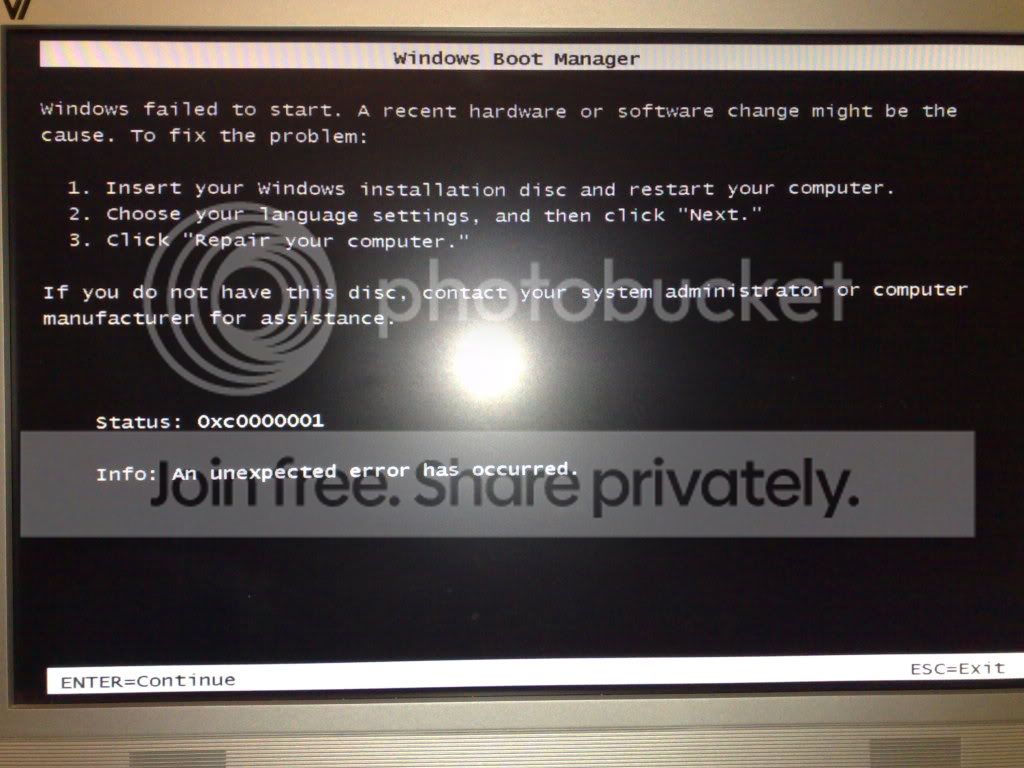
This is the message I generally got when booting from the hard drive that I installed Windows 7 on:
27112008223.jpg


And then when I did repair it through the system repair thing, I got this in a loop basically:
27112008224.jpg


Now, it mentioned something about having everything unplugged, and I know this sounds stupid, but I didn't unplug any of my external hard drives, webcam or DVD drives as when I do for whatever reason and then boot back into Vista, it always does that "searching for drivers" thing, which bugs me. So should I unplug everything that's not going to be recognise with Windows 7, and then repair again? Or do a fresh install?
 

My Computer

Computer Manufacturer/Model Number
Custom
OS
Windows 7 Ultimate 64-bit
CPU
Intel Core 2 Quad 3.00GHz
Motherboard
ASUSTeK P5Q SE2
Memory
4.00GB DDR2
Graphics Card(s)
ATI Radeon HD 4670
Monitor(s) Displays
24"
Screen Resolution
1920x1080
Hard Drives
500GB internal
1TB external
1TB external
320GB external
I'd recommend to unplug everything, check bios for boot record virus protection to be disabled and do a fresh install (re-create NTFS partition)
 

My Computer

OS
Microsoft Windows 6.1 (Build 6801)
Hello Jack.

It all depends how bad you want to install Windows 7; is all the extra trouble worth it to you?
Were I you, I'd go for it; isn't experimentation what it's all about? You can almost bet money all the extra hardware is what's causing the trouble.

Keep us informed!


Later :shock: Ted
 

My Computer

Computer Manufacturer/Model Number
* BFK Customs *
OS
W 7 64-bit Ultimate
CPU
Intel Q9550 Yorkfield
Motherboard
ASUS P5Q Pro
Memory
8GB Dominator 8500C5D
Graphics Card(s)
ATI : XFX 5870
Sound Card
Realtek HD Audio 7-1
Monitor(s) Displays
1x 47" LCD HDMI & 3x 26" LCD HDMI
Screen Resolution
1920x1080P & 1920x1200
Hard Drives
1x 80GB Intel X25-M G2 SSD : 1x 500GB & 1x 640GB WD Caviar Black(s)
PSU
Corsair 620HX
Case
Cooler Master RC-690
Cooling
Tuniq Tower 120, 2x 140mm and 3x 120mm case fans
Keyboard
Microsoft 500
Mouse
Razer Diamondback 3G
Internet Speed
14 Mb/s
Other Info
1x Koutech 3Gb/s SATA HDD Hot Swap Rack
Hello Jack.

It all depends how bad you want to install Windows 7; is all the extra trouble worth it to you?
Were I you, I'd go for it; isn't experimentation what it's all about? You can almost bet money all the extra hardware is what's causing the trouble.

Keep us informed!

That's the idea, I want to test it, I want to be a part of the whole beta thing. I find it quite fun. I was too young to do it with Vista, but I don't want to miss out of 7.

I will attempt to re-install it tomorrow after school hopefully, with everything that is not needed unplugged, and hopefully it'll work. It's definately on there as it gives me the menu shown in the second picture. Oh and should it be taking up 30GB or so? I believe I saw that the install was taking up that much - I was shocked.
 

My Computer

Computer Manufacturer/Model Number
Custom
OS
Windows 7 Ultimate 64-bit
CPU
Intel Core 2 Quad 3.00GHz
Motherboard
ASUSTeK P5Q SE2
Memory
4.00GB DDR2
Graphics Card(s)
ATI Radeon HD 4670
Monitor(s) Displays
24"
Screen Resolution
1920x1080
Hard Drives
500GB internal
1TB external
1TB external
320GB external
Jack,

I think you may have an infested Windows 7 ISO. That funny looking coding at the bottom of your first (bootmgr missing) image looks a lot like the works of a virus. I would recommend getting another ISO and formatting the computer to wipe it clean.
 

My Computer

Computer type
PC/Desktop
Computer Manufacturer/Model Number
Self built custom
OS
64-bit Windows 11 Pro for Workstations
CPU
Intel i7-8700K OC'd to 5 GHz
Motherboard
ASUS ROG Maximus XI Formula Z390
Memory
64 GB (4x16GB) G.SKILL TridentZ RGB DDR4 3600 MHz
Graphics Card(s)
ASUS ROG-STRIX-GTX1080TI-O11G-GAMING
Sound Card
Integrated
Monitor(s) Displays
2 x Samsung Odyssey G7 27"
Screen Resolution
2560x1440
Hard Drives
1TB Samsung 990 PRO M.2,
4TB Samsung 990 PRO PRO M.2,
TerraMaster F8 SSD Plus NAS
PSU
Seasonic Prime Titanium 850W
Case
Thermaltake Core P3
Cooling
Corsair Hydro H115i
Keyboard
Logitech wireless K800
Mouse
Logitech MX Master 4
Internet Speed
2 Gb/s Download and 100 Mb/s Upload
Antivirus
Malwarebyte Anti-Malware Premium
Browser
Google Chrome
Other Info
Logitech Z625 speaker system,
Logitech BRIO 4K Pro webcam,
HP Color LaserJet Pro MFP M477fdn,
APC SMART-UPS RT 1000 XL - SURT1000XLI,
Galaxy S23 Plus phone
Jack,

I think you may have an infested Windows 7 ISO. That funny looking coding at the bottom of your first (bootmgr missing) image looks a lot like the works of a virus. I would recommend getting another ISO and formatting the computer to wipe it clean.

Yeah I did think the smiley face was a bit random. PM sent.
 

My Computer

Computer Manufacturer/Model Number
Custom
OS
Windows 7 Ultimate 64-bit
CPU
Intel Core 2 Quad 3.00GHz
Motherboard
ASUSTeK P5Q SE2
Memory
4.00GB DDR2
Graphics Card(s)
ATI Radeon HD 4670
Monitor(s) Displays
24"
Screen Resolution
1920x1080
Hard Drives
500GB internal
1TB external
1TB external
320GB external
where it asked me what hard drive to install it onto, and there were now 2, from the same hard drive but one was only 195MB free space, but it was the size of the whole drive.

Seven creates a 200MB partition at the start of drive for the boot data. (If it's a fresh drive, with no other OS installed / connected)

And yeah, those symbols under CTRL-ALT-Delete do look sus simply because they are there, not from what they are:huh:

(Some look like Wingdings / webdings symbols ?)
 

My Computer

Computer type
PC/Desktop
Computer Manufacturer/Model Number
Systems by SmartEyeball
OS
8 Pro x64
CPU
i7 3770K 4.6GHz
Motherboard
ASUS P8Z77 WS
Memory
16GB G.Skill Trident X 2666mhz
Graphics Card(s)
x2 EVGA 780 Ti Superclocked SLI
Sound Card
SB X-FI Surround 5.1 PRO USB / ATH-AD900 Headphones
Monitor(s) Displays
x3 Dell U2410 / 58" Samsung
Screen Resolution
5760*1200/ 1920*1200
Hard Drives
2x Intel 520 240GB (RAID 0) * 2x WD Caviar Blacks 2TB (RAID 0) * 2TB WD Caviar Black * Sony Optirac DVD
PSU
Silverstone Strider Evolution 1200W
Case
Thermaltake Level 10 GT Snow Edition
Cooling
Noctua NH-D14
Keyboard
Topre Realforce // Ducky Shine MX Black // Filco Ninja TKL
Mouse
Thermaltake Theron (Highly Recommended) + Razer Imperator
Antivirus
MSE
Browser
IE, FF, WaterFox
Other Info
GT Extreme V2 Sim Racing Cockpit + 40" LCD and K/B Mouse stand ▼
Fanatec CSR Elite Wheel + Clubsport V1 Pedals + CSR shifter/7G-H ▼Saitek X52 Pro ▼ TrackIR 5 Pro
Buttkicker v2 Seat Rumbler with Dedicated 5.1 and Sub Woofer attached to frame ▼
=
Bloody Big Grin
Hi Smartey,

That's strange. Windows 7 did not create any other partitions with me. It only installed on the partitoin that I installed it on.
 

My Computer

Computer type
PC/Desktop
Computer Manufacturer/Model Number
Self built custom
OS
64-bit Windows 11 Pro for Workstations
CPU
Intel i7-8700K OC'd to 5 GHz
Motherboard
ASUS ROG Maximus XI Formula Z390
Memory
64 GB (4x16GB) G.SKILL TridentZ RGB DDR4 3600 MHz
Graphics Card(s)
ASUS ROG-STRIX-GTX1080TI-O11G-GAMING
Sound Card
Integrated
Monitor(s) Displays
2 x Samsung Odyssey G7 27"
Screen Resolution
2560x1440
Hard Drives
1TB Samsung 990 PRO M.2,
4TB Samsung 990 PRO PRO M.2,
TerraMaster F8 SSD Plus NAS
PSU
Seasonic Prime Titanium 850W
Case
Thermaltake Core P3
Cooling
Corsair Hydro H115i
Keyboard
Logitech wireless K800
Mouse
Logitech MX Master 4
Internet Speed
2 Gb/s Download and 100 Mb/s Upload
Antivirus
Malwarebyte Anti-Malware Premium
Browser
Google Chrome
Other Info
Logitech Z625 speaker system,
Logitech BRIO 4K Pro webcam,
HP Color LaserJet Pro MFP M477fdn,
APC SMART-UPS RT 1000 XL - SURT1000XLI,
Galaxy S23 Plus phone
Hi Shawn,

Yes, it is interesting.

From Smarteyball's other posts, he used a brand new HD , which he partitioned with Win7 during the Install.

Seems that as he hadn't already created an Active (System) partition, Win7 automatically made a 200mb one as the first partition.

Looks like Smarteyeball is the only person to have done this so far.

It has it's advantages, but surprising we haven't seen this anywhere else - MS have been quiet about it.

SIW2
 

My Computers

System One System Two

  • Computer type
    PC/Desktop
    OS
    7 X64
    CPU
    i5 8400
    Motherboard
    gigabyte b365m ds3h
    Memory
    2x8gb 3200mhz
    Hard Drives
    various
    PSU
    pure power 11 400w cm
    Case
    Coolermaster
    Cooling
    cryorig m9i
  • Computer type
    PC/Desktop
    OS
    7x64
    CPU
    g5400
    Motherboard
    ga b365m ds3h
    Memory
    8gb ddr4 2400
    PSU
    xfx pro 450w
That could be why then SIW2. I installed Windows 7 on a partition that I created from Vista.

I tried this in Virtual PC, but it did not create the other partition in it either. However, it may be just because it was a VHD to.
 

My Computer

Computer type
PC/Desktop
Computer Manufacturer/Model Number
Self built custom
OS
64-bit Windows 11 Pro for Workstations
CPU
Intel i7-8700K OC'd to 5 GHz
Motherboard
ASUS ROG Maximus XI Formula Z390
Memory
64 GB (4x16GB) G.SKILL TridentZ RGB DDR4 3600 MHz
Graphics Card(s)
ASUS ROG-STRIX-GTX1080TI-O11G-GAMING
Sound Card
Integrated
Monitor(s) Displays
2 x Samsung Odyssey G7 27"
Screen Resolution
2560x1440
Hard Drives
1TB Samsung 990 PRO M.2,
4TB Samsung 990 PRO PRO M.2,
TerraMaster F8 SSD Plus NAS
PSU
Seasonic Prime Titanium 850W
Case
Thermaltake Core P3
Cooling
Corsair Hydro H115i
Keyboard
Logitech wireless K800
Mouse
Logitech MX Master 4
Internet Speed
2 Gb/s Download and 100 Mb/s Upload
Antivirus
Malwarebyte Anti-Malware Premium
Browser
Google Chrome
Other Info
Logitech Z625 speaker system,
Logitech BRIO 4K Pro webcam,
HP Color LaserJet Pro MFP M477fdn,
APC SMART-UPS RT 1000 XL - SURT1000XLI,
Galaxy S23 Plus phone
I am working on clearing out a 250 GB HD (I have over 400 GB free on my primary drive - I can use that for storage for now) so I can try W7 on that 250GB HD. Of course, with the news that I got today, I might just buy a pair, because TigerDirect/CompUSA is selling the big brother of my HDs, the 1 TB 32mb Cache drives, for $99.99 and *its* bigger brother the 1.5 TB 32MB Cache HDs for a scant $119.99 each. And with $1.99 shipping to the US....

Either way, though, I need to get a hold of W7 x64 - no sense in going a mere 32 bit, now is there? :P
 

My Computers

System One System Two

  • Computer type
    PC/Desktop
    Computer Manufacturer/Model Number
    The Beast Model A (homebrew)
    OS
    Windows 11 21H2 Current build
    CPU
    AMD Ryzen 9 3950X
    Motherboard
    MSI MEG X570 GODLIKE
    Memory
    4 * 32 GB - Corsair Vengeance 3600 MHz
    Graphics Card(s)
    EVGA GeForce RTX 3080 Ti XC3 ULTRA GAMING (12G-P5-3955-KR)
    Sound Card
    Realtek® ALC1220 Codec
    Monitor(s) Displays
    2x Eve Spectrum ES07D03 4K Gaming Monitor (Matte) | Eve Spec
    Screen Resolution
    3x 3840 x 2160
    Hard Drives
    3x Samsung 980 Pro NVMe PCIe 4 M.2 2 TB SSD (MZ-V8P2T0B/AM) } 3x Sabrent Rocket NVMe 4.0 1 TB SSD
    PSU
    PC Power & Cooling’s Silencer Series 1050 Watt, 80 Plus Plat
    Case
    Fractal Design Define 7 XL Dark ATX Full Tower Case
    Cooling
    SteelSeries Apex Pro Wired Gaming Keyboard
    Keyboard
    SteelSeries Apex Pro
    Mouse
    Logitech MX Master 3S | MX Master 3 for business
    Internet Speed
    AT&T LightSpeed Gigabit Duplex Ftth
    Antivirus
    Windows Defender + MB 3
    Browser
    Nightly (default) + Firefox (stable),Chrome, Edge
  • Computer type
    PC/Desktop
    System Manufacturer/Model Number
    Dell Latitude E5470
    OS
    ChromeOS Flex Dev Channel (current)
    CPU
    Intel(R) Core(TM) i5-6300U CPU @ 2.40GHz, 2501 Mhz, 2 Core(s), 4 Logical Processor(s)
    Motherboard
    Dell
    Memory
    16 GB
    Graphics Card(s)
    Intel(R) HD Graphics 520
    Sound Card
    Intel(R) HD Graphics 520 + RealTek Audio
    Monitor(s) Displays
    Dell laptop display 15"
    Screen Resolution
    1920 * 1080
    Hard Drives
    Toshiba 128GB M.2 22300 drive
    INTEL Cherryville 520 Series SSDSC2CW180A 180 GB SATA III SSD
    PSU
    Dell
    Case
    Dell
    Cooling
    Dell
    Keyboard
    Dell
    Mouse
    Logitech MX Master 3S (shared w. Sys 1) | Dell TouchPad
    Internet Speed
    AT&T LightSpeed Gigabit Duplex Ftth
Why not do both, I find 32 is slightly better than 64.


drives.jpg
 

My Computer

Computer Manufacturer/Model Number
Home build.
OS
Vista Ultimate 32 bit, Win 7 Pro 32 bit, Win 7 Pro 64 bit
CPU
Intel i5 CPU 750 @ 2.67 GHZ, OC 3.7 GHZ
Motherboard
Asus P7P55D
Memory
4 Gig
Graphics Card(s)
Nvidia GeForce GTS450
Monitor(s) Displays
Acer 24"
Screen Resolution
1440 x 900
Hard Drives
1000 GIG
1000 GIG
PSU
650
Case
Antec Nine Hundred Two
Internet Speed
14 MB (APPROX)
No. I agree. It didn't install any extra partitions for me either. I think I have tried the whole monty. Separate partition. Separate HD etc. Never had that happen!
But Jack, where exactly is your Linus installation sitting, or is it not on that particular computer at all?
It looks suspiciously to me like the linux boot manager is interfering with that of the Windows boot manager??
 
Last edited:

My Computer

Computer Manufacturer/Model Number
Three desktops and one laptop with good specs..
OS
Vista and now 7 in 32 and 64 bit.
Linux boot manager? This is a brand new 320GB hard drive, which I just connect to my current PC and unplug the Vista hard drive (also 320GB). I didn't want to destroy my Vista.

How do I wipe the current 7 installation? Boot from XP install XP and delete partition completely? Any suggestions?
 

My Computer

Computer Manufacturer/Model Number
Custom
OS
Windows 7 Ultimate 64-bit
CPU
Intel Core 2 Quad 3.00GHz
Motherboard
ASUSTeK P5Q SE2
Memory
4.00GB DDR2
Graphics Card(s)
ATI Radeon HD 4670
Monitor(s) Displays
24"
Screen Resolution
1920x1080
Hard Drives
500GB internal
1TB external
1TB external
320GB external

My Computer

Computer Manufacturer/Model Number
* BFK Customs *
OS
W 7 64-bit Ultimate
CPU
Intel Q9550 Yorkfield
Motherboard
ASUS P5Q Pro
Memory
8GB Dominator 8500C5D
Graphics Card(s)
ATI : XFX 5870
Sound Card
Realtek HD Audio 7-1
Monitor(s) Displays
1x 47" LCD HDMI & 3x 26" LCD HDMI
Screen Resolution
1920x1080P & 1920x1200
Hard Drives
1x 80GB Intel X25-M G2 SSD : 1x 500GB & 1x 640GB WD Caviar Black(s)
PSU
Corsair 620HX
Case
Cooler Master RC-690
Cooling
Tuniq Tower 120, 2x 140mm and 3x 120mm case fans
Keyboard
Microsoft 500
Mouse
Razer Diamondback 3G
Internet Speed
14 Mb/s
Other Info
1x Koutech 3Gb/s SATA HDD Hot Swap Rack
Linux boot manager? This is a brand new 320GB hard drive, which I just connect to my current PC and unplug the Vista hard drive (also 320GB). I didn't want to destroy my Vista.

How do I wipe the current 7 installation? Boot from XP install XP and delete partition completely? Any suggestions?
OK.Sorry. I was just working on an assumption from your Avatar.
 

My Computer

Computer Manufacturer/Model Number
Three desktops and one laptop with good specs..
OS
Vista and now 7 in 32 and 64 bit.
Yanno, it could happen if you tell it to use an unformatted drive and don't *manually* create the partition. I manually created the partition on my system as one large 250 GB partition, thus it may have opted not to create that 200MB partition.

Of course, it may also be because I did not disconnect any of my other drives, so it saw my previous Vista install as well. Unfortunately I do not have the time to figure that out as of yet - but that 200MB partition still seems something out of line with the way M$ works....
 

My Computers

System One System Two

  • Computer type
    PC/Desktop
    Computer Manufacturer/Model Number
    The Beast Model A (homebrew)
    OS
    Windows 11 21H2 Current build
    CPU
    AMD Ryzen 9 3950X
    Motherboard
    MSI MEG X570 GODLIKE
    Memory
    4 * 32 GB - Corsair Vengeance 3600 MHz
    Graphics Card(s)
    EVGA GeForce RTX 3080 Ti XC3 ULTRA GAMING (12G-P5-3955-KR)
    Sound Card
    Realtek® ALC1220 Codec
    Monitor(s) Displays
    2x Eve Spectrum ES07D03 4K Gaming Monitor (Matte) | Eve Spec
    Screen Resolution
    3x 3840 x 2160
    Hard Drives
    3x Samsung 980 Pro NVMe PCIe 4 M.2 2 TB SSD (MZ-V8P2T0B/AM) } 3x Sabrent Rocket NVMe 4.0 1 TB SSD
    PSU
    PC Power & Cooling’s Silencer Series 1050 Watt, 80 Plus Plat
    Case
    Fractal Design Define 7 XL Dark ATX Full Tower Case
    Cooling
    SteelSeries Apex Pro Wired Gaming Keyboard
    Keyboard
    SteelSeries Apex Pro
    Mouse
    Logitech MX Master 3S | MX Master 3 for business
    Internet Speed
    AT&T LightSpeed Gigabit Duplex Ftth
    Antivirus
    Windows Defender + MB 3
    Browser
    Nightly (default) + Firefox (stable),Chrome, Edge
  • Computer type
    PC/Desktop
    System Manufacturer/Model Number
    Dell Latitude E5470
    OS
    ChromeOS Flex Dev Channel (current)
    CPU
    Intel(R) Core(TM) i5-6300U CPU @ 2.40GHz, 2501 Mhz, 2 Core(s), 4 Logical Processor(s)
    Motherboard
    Dell
    Memory
    16 GB
    Graphics Card(s)
    Intel(R) HD Graphics 520
    Sound Card
    Intel(R) HD Graphics 520 + RealTek Audio
    Monitor(s) Displays
    Dell laptop display 15"
    Screen Resolution
    1920 * 1080
    Hard Drives
    Toshiba 128GB M.2 22300 drive
    INTEL Cherryville 520 Series SSDSC2CW180A 180 GB SATA III SSD
    PSU
    Dell
    Case
    Dell
    Cooling
    Dell
    Keyboard
    Dell
    Mouse
    Logitech MX Master 3S (shared w. Sys 1) | Dell TouchPad
    Internet Speed
    AT&T LightSpeed Gigabit Duplex Ftth
Well when Windows 7 finally downloads I'll burn it to a DVD and boot from the disk to see if this one is any better. Hopefully it'll allow me to just over-write what I currently have on there, the faulty 7.
 

My Computer

Computer Manufacturer/Model Number
Custom
OS
Windows 7 Ultimate 64-bit
CPU
Intel Core 2 Quad 3.00GHz
Motherboard
ASUSTeK P5Q SE2
Memory
4.00GB DDR2
Graphics Card(s)
ATI Radeon HD 4670
Monitor(s) Displays
24"
Screen Resolution
1920x1080
Hard Drives
500GB internal
1TB external
1TB external
320GB external
Back
Top