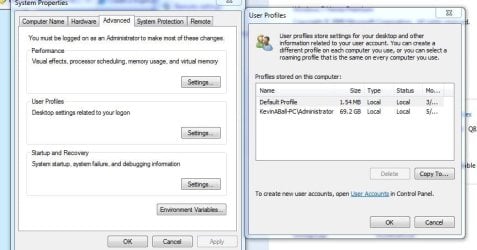
I noticed that when I changed my user account name, the actual file name did not change and I would to change it to be the same as the user account name. And Windows 7 doesn't seem to want to let me change the actual user account file name.
So right now, my user account name is "Peter" but the user account file name is "Peter DV8" and I would like to have that also be simply "Peter." When I right click on the folder "Peter DV8," there is no option presented to rename the folder.
Can anyone advise me on how to get that folder renamed?
So right now, my user account name is "Peter" but the user account file name is "Peter DV8" and I would like to have that also be simply "Peter." When I right click on the folder "Peter DV8," there is no option presented to rename the folder.
Can anyone advise me on how to get that folder renamed?
My Computer
At a glance
Windows 7 Ultimate x64 (Retail)i7-Q 7206 GBnVidia GeForce GT 230M (1GB)
- Computer Manufacturer/Model Number
- HP DV8t quad
- OS
- Windows 7 Ultimate x64 (Retail)
- CPU
- i7-Q 720
- Motherboard
- Motherboard Chipset Intel Ibex Peak-M PM55, Intel Lynnfield
- Memory
- 6 GB
- Graphics Card(s)
- nVidia GeForce GT 230M (1GB)
- Sound Card
- IDT High Definition Audio CODEC
- Monitor(s) Displays
- 18.4 inch HP Infinity FHD (Samsung 184HT03-001)
- Screen Resolution
- 1920 x 1080
- Hard Drives
- Hitachi 500GB 7200 rpm (x2)
Seagate FreeAgent 1.5 TB External USB (x2)
Thermaltake BlacX eSATA/USB 2.0 3.5/2.5 HD dock
- Cooling
- Zalman NC-2000 notebook cooling pad
- Keyboard
- laptop
- Mouse
- Logitech VX Revolution
- Other Info
- Backup Unit: Lenovo T61p