The 100mb (or was it gb) boot partition - query

IcarusII

New member
Power User
Local time
3:35 AM
Messages
108
Hi,

Just read a tutorial on here about optimising hdd performance in w7. It talks about doing a disk wipe and then creating a boot partition using diskpart so you don't end up with the 'dreaded' 100mb (or was it gb) boot partition

My question really is what was so dreadful about this boot partition. Due to being a little naive - I'm not even sure what problems this tutorial is solving! Thanks
Matt
 

My Computer My Computer

At a glance

W7 Home Prem, Vista home PremIntel E8600 3.3GHz dual core4 GbNvidia - GForce GTX 280 - 1Gb
Computer Manufacturer/Model Number
Manufacturer: Me
OS
W7 Home Prem, Vista home Prem
CPU
Intel E8600 3.3GHz dual core
Motherboard
Asus (need to find model)
Memory
4 Gb
Graphics Card(s)
Nvidia - GForce GTX 280 - 1Gb
Sound Card
Xonar Dx 5.1
Monitor(s) Displays
Hazro flatscreen
Screen Resolution
1920 x 1200
Hard Drives
1 x Samsung Spinpoint F1 300 gb
1 x Samsung Spinpoint F1 1 Tb
1 x Samsung Spinpoint F3 1 Tb
PSU
Later
Case
Infiniti Midi tower
Cooling
later
Keyboard
Logitech G11
Mouse
Logitech G9 Laser
Internet Speed
3mb/s - awful
Other Info
I built this three years ago. It was very fast at the time. Now it's about average but still runs any game I throw at it at max detail.

Currently
There is nothing dreadful about the 100MB partition. Seperating the MBR from the system is in fact a good idea - just think of a double boot. The downside though is that it takes up a primary partition and this together with the C and D partitions and a possible tools partition (in preinstalled OEM systems) saturates the system (4 primaries maximum in NTFS). Many people then do not know how to get out of this bind if they want to create an extra partition (e.g. a Data Partition) - many people who are not aware of the problem run into the dreaded dynamic partitions. But there are, of course, ways how to deal with it - not easy, but possible.

In an installation with a retail Win7 one does not have this problem because there is no D (recovery) partition and no tools partition. There the extra 100MBs really do not hurt.
 
Last edited:

My Computer My Computer

At a glance

Vista, Windows7, Mint Mate, Zorin, Windows 8from 1.6GHz Duo to i7
Computer Manufacturer/Model Number
HP, Dell, Gateway, Toshiba - 4 laptops and 2 desktops
OS
Vista, Windows7, Mint Mate, Zorin, Windows 8
CPU
from 1.6GHz Duo to i7
Monitor(s) Displays
2x HP w2207
Hard Drives
5x HDD, 7x SSD, 12x Externals
Keyboard
with trackball - no mices
Mouse
Trackball mice
Internet Speed
DSL 6000
Ahh. My thanks for the explanation - the history makes sense of the present. Didn't know about the 4 max limit either.

Cheers
 

My Computer My Computer

At a glance

W7 Home Prem, Vista home PremIntel E8600 3.3GHz dual core4 GbNvidia - GForce GTX 280 - 1Gb
Computer Manufacturer/Model Number
Manufacturer: Me
OS
W7 Home Prem, Vista home Prem
CPU
Intel E8600 3.3GHz dual core
Motherboard
Asus (need to find model)
Memory
4 Gb
Graphics Card(s)
Nvidia - GForce GTX 280 - 1Gb
Sound Card
Xonar Dx 5.1
Monitor(s) Displays
Hazro flatscreen
Screen Resolution
1920 x 1200
Hard Drives
1 x Samsung Spinpoint F1 300 gb
1 x Samsung Spinpoint F1 1 Tb
1 x Samsung Spinpoint F3 1 Tb
PSU
Later
Case
Infiniti Midi tower
Cooling
later
Keyboard
Logitech G11
Mouse
Logitech G9 Laser
Internet Speed
3mb/s - awful
Other Info
I built this three years ago. It was very fast at the time. Now it's about average but still runs any game I throw at it at max detail.

Currently
The original idea to do away with the dreaded 100MB boot partition was to reclaim as much space as possible from Solid State Drives (SSD) that had a small over-all size to start with; the "clean all" part of the tutorial has since shown it's worth in helping resolve installation issues where old Windows code being present is interfering with the installation process.

No problem, you won't know if you don't ask! ;)


If you need a fourth "Primary" have a look at Option One of this tutorial.

Partition Wizard : Use the Bootable CD
 

My Computer My Computer

At a glance

W 7 64-bit UltimateIntel Q9550 Yorkfield8GB Dominator 8500C5DATI : XFX 5870
Computer Manufacturer/Model Number
* BFK Customs *
OS
W 7 64-bit Ultimate
CPU
Intel Q9550 Yorkfield
Motherboard
ASUS P5Q Pro
Memory
8GB Dominator 8500C5D
Graphics Card(s)
ATI : XFX 5870
Sound Card
Realtek HD Audio 7-1
Monitor(s) Displays
1x 47" LCD HDMI & 3x 26" LCD HDMI
Screen Resolution
1920x1080P & 1920x1200
Hard Drives
1x 80GB Intel X25-M G2 SSD : 1x 500GB & 1x 640GB WD Caviar Black(s)
PSU
Corsair 620HX
Case
Cooler Master RC-690
Cooling
Tuniq Tower 120, 2x 140mm and 3x 120mm case fans
Keyboard
Microsoft 500
Mouse
Razer Diamondback 3G
Internet Speed
14 Mb/s
Other Info
1x Koutech 3Gb/s SATA HDD Hot Swap Rack
I can only see 2 downsides to the separate 100MB partition:
1) Uses one of the 4 disk partitions. You can still use logical partitions if you want lots of partitions for some reason.
2) For some reason (which I don't understand) the 100MB partition can fill to greater than 50MB. When this happens you have problems with Windows imaging.

If 1) or 2) aren't of concern then I would just leave it alone but recognize that it contains the boot manager and the boot configuration data (BCD). It's critical to the booting of your computer.

The MBR (Master Boot Record) does not live in this 100MB partition. For BIOS booted PCs it is the first sector of the first track of the boot disk (first 512 bytes of the boot device inc USBs). It has a fixed physical location as well as data format.
 

My Computer My Computer

At a glance

Windows 7x64 Home Premium SP1Intel i7 2600kG.Skill Ripjaws (DDR3-1600) 2x4GBNvidia GeForce GTS 450; Intel HD Graphics 300...
Computer type
PC/Desktop
Computer Manufacturer/Model Number
Own build
OS
Windows 7x64 Home Premium SP1
CPU
Intel i7 2600k
Motherboard
ASUS P8Z68 Deluxe
Memory
G.Skill Ripjaws (DDR3-1600) 2x4GB
Graphics Card(s)
Nvidia GeForce GTS 450; Intel HD Graphics 3000(GT2+)
Monitor(s) Displays
Dell Ultrasharp IPS panel U2311H, Samsung SyncMaster P2350
Screen Resolution
1920x1080
Hard Drives
Samsung 850 Pro SSD 256GB, Samsung SSD 840 120GB, Seagates 1TB Barracuda ST31000528AS x2
PSU
Seasonic M12II 520W
Case
Lian Li Lancool PC-K60
Cooling
Case: 1x120mm, 3x140mm CPU: Hyper 212+
Keyboard
Logitech MK520 (wireless)
Mouse
Logitech MK520
Internet Speed
6-7 Mbps
Antivirus
Norton Security Premium, Malwarebytes on 2 (MSE on 3rd PC)
Browser
FireFox
Other Info
Audio: Logitech Z523 2.1
I can only see 2 downsides to the separate 100MB partition:
1) Uses one of the 4 disk partitions. You can still use logical partitions if you want lots of partitions for some reason.
2) For some reason (which I don't understand) the 100MB partition can fill to greater than 50MB. When this happens you have problems with Windows imaging.

If 1) or 2) aren't of concern then I would just leave it alone but recognize that it contains the boot manager and the boot configuration data (BCD). It's critical to the booting of your computer.

The MBR (Master Boot Record) does not live in this 100MB partition. For BIOS booted PCs it is the first sector of the first track of the boot disk (first 512 bytes of the boot device inc USBs). It has a fixed physical location as well as data format.


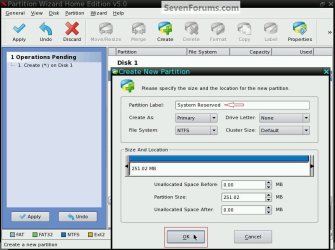
There's an option to create a larger "System Reserved" and place it where you want and mark it "Active" before you start the Windows 7 install so that space won't be an issue, using the Partition Wizard boot disk.

Partition Wizard : Use the Bootable CD

click to enlarge
SR Second.jpg
System Reserved.jpg


My Computer My Computer

At a glance

W 7 64-bit UltimateIntel Q9550 Yorkfield8GB Dominator 8500C5DATI : XFX 5870
Computer Manufacturer/Model Number
* BFK Customs *
OS
W 7 64-bit Ultimate
CPU
Intel Q9550 Yorkfield
Motherboard
ASUS P5Q Pro
Memory
8GB Dominator 8500C5D
Graphics Card(s)
ATI : XFX 5870
Sound Card
Realtek HD Audio 7-1
Monitor(s) Displays
1x 47" LCD HDMI & 3x 26" LCD HDMI
Screen Resolution
1920x1080P & 1920x1200
Hard Drives
1x 80GB Intel X25-M G2 SSD : 1x 500GB & 1x 640GB WD Caviar Black(s)
PSU
Corsair 620HX
Case
Cooler Master RC-690
Cooling
Tuniq Tower 120, 2x 140mm and 3x 120mm case fans
Keyboard
Microsoft 500
Mouse
Razer Diamondback 3G
Internet Speed
14 Mb/s
Other Info
1x Koutech 3Gb/s SATA HDD Hot Swap Rack
I2) For some reason (which I don't understand) the 100MB partition can fill to greater than 50MB. When this happens you have problems with Windows imaging.

This seems to be the result of the drive having a letter, the only way anything can write to it as far as I know.

I would resist giving it a letter.
 
I2) For some reason (which I don't understand) the 100MB partition can fill to greater than 50MB. When this happens you have problems with Windows imaging.

This seems to be the result of the drive having a letter, the only way anything can write to it as far as I know.

I would resist giving it a letter.
You shouldn't assign a letter to the System reserved partition. It's not for users to write to except when using tools like bcdedit to edit the boot configuration data. The OS can write to it.

Quote from Microsoft technical information:
"System Partition Requirements

Basic system partition requirements are:

  • Must have at least 100 megabytes (MB) of hard drive space.

  • Must have enough free space to create shadow copies of the partition.

    • If the partition is less than 500 MB, it must have at least 50 MB of free space.

    • If the partition is 500 MB or larger, it must have at least 320 MB of free space.

    • If the partition is larger than 1 gigabyte (GB), we recommend that it should have at least 1 GB free."
I thought this only applied to UEFI but clearly applies to BIOS boot as well. As stated the OS requires space for shadow copies of the partition.
There appears to be circumstances where the OS writes to the partition not leaving 50 MB of free space. When other users have found themselves in this situation they have problems with Windows imaging.
 

My Computer My Computer

At a glance

Windows 7x64 Home Premium SP1Intel i7 2600kG.Skill Ripjaws (DDR3-1600) 2x4GBNvidia GeForce GTS 450; Intel HD Graphics 300...
Computer type
PC/Desktop
Computer Manufacturer/Model Number
Own build
OS
Windows 7x64 Home Premium SP1
CPU
Intel i7 2600k
Motherboard
ASUS P8Z68 Deluxe
Memory
G.Skill Ripjaws (DDR3-1600) 2x4GB
Graphics Card(s)
Nvidia GeForce GTS 450; Intel HD Graphics 3000(GT2+)
Monitor(s) Displays
Dell Ultrasharp IPS panel U2311H, Samsung SyncMaster P2350
Screen Resolution
1920x1080
Hard Drives
Samsung 850 Pro SSD 256GB, Samsung SSD 840 120GB, Seagates 1TB Barracuda ST31000528AS x2
PSU
Seasonic M12II 520W
Case
Lian Li Lancool PC-K60
Cooling
Case: 1x120mm, 3x140mm CPU: Hyper 212+
Keyboard
Logitech MK520 (wireless)
Mouse
Logitech MK520
Internet Speed
6-7 Mbps
Antivirus
Norton Security Premium, Malwarebytes on 2 (MSE on 3rd PC)
Browser
FireFox
Other Info
Audio: Logitech Z523 2.1
When other users have found themselves in this situation they have problems with Windows imaging.


Then it may be helpful to get them to enlarge the size of the SysResv partition using something like the Partition Wizard boot disk, similar to Step One, then resize the SysResv into the free space created by the OS shrink; have a look at this tutorial for an out-line.

Dual Boot : Create Partitions Using PWBD
 

My Computer My Computer

At a glance

W 7 64-bit UltimateIntel Q9550 Yorkfield8GB Dominator 8500C5DATI : XFX 5870
Computer Manufacturer/Model Number
* BFK Customs *
OS
W 7 64-bit Ultimate
CPU
Intel Q9550 Yorkfield
Motherboard
ASUS P5Q Pro
Memory
8GB Dominator 8500C5D
Graphics Card(s)
ATI : XFX 5870
Sound Card
Realtek HD Audio 7-1
Monitor(s) Displays
1x 47" LCD HDMI & 3x 26" LCD HDMI
Screen Resolution
1920x1080P & 1920x1200
Hard Drives
1x 80GB Intel X25-M G2 SSD : 1x 500GB & 1x 640GB WD Caviar Black(s)
PSU
Corsair 620HX
Case
Cooler Master RC-690
Cooling
Tuniq Tower 120, 2x 140mm and 3x 120mm case fans
Keyboard
Microsoft 500
Mouse
Razer Diamondback 3G
Internet Speed
14 Mb/s
Other Info
1x Koutech 3Gb/s SATA HDD Hot Swap Rack
When other users have found themselves in this situation they have problems with Windows imaging.


Then it may be helpful to get them to enlarge the size of the SysResv partition using something like the Partition Wizard boot disk, similar to Step One, then resize the SysResv into the free space created by the OS shrink; have a look at this tutorial for an out-line.

Dual Boot : Create Partitions Using PWBD

Agreed. This is a very useful tutorial. Maybe the partition should have been larger to begin with?
 

My Computer My Computer

At a glance

Windows 7x64 Home Premium SP1Intel i7 2600kG.Skill Ripjaws (DDR3-1600) 2x4GBNvidia GeForce GTS 450; Intel HD Graphics 300...
Computer type
PC/Desktop
Computer Manufacturer/Model Number
Own build
OS
Windows 7x64 Home Premium SP1
CPU
Intel i7 2600k
Motherboard
ASUS P8Z68 Deluxe
Memory
G.Skill Ripjaws (DDR3-1600) 2x4GB
Graphics Card(s)
Nvidia GeForce GTS 450; Intel HD Graphics 3000(GT2+)
Monitor(s) Displays
Dell Ultrasharp IPS panel U2311H, Samsung SyncMaster P2350
Screen Resolution
1920x1080
Hard Drives
Samsung 850 Pro SSD 256GB, Samsung SSD 840 120GB, Seagates 1TB Barracuda ST31000528AS x2
PSU
Seasonic M12II 520W
Case
Lian Li Lancool PC-K60
Cooling
Case: 1x120mm, 3x140mm CPU: Hyper 212+
Keyboard
Logitech MK520 (wireless)
Mouse
Logitech MK520
Internet Speed
6-7 Mbps
Antivirus
Norton Security Premium, Malwarebytes on 2 (MSE on 3rd PC)
Browser
FireFox
Other Info
Audio: Logitech Z523 2.1
When other users have found themselves in this situation they have problems with Windows imaging.


Then it may be helpful to get them to enlarge the size of the SysResv partition using something like the Partition Wizard boot disk, similar to Step One, then resize the SysResv into the free space created by the OS shrink; have a look at this tutorial for an out-line.

Dual Boot : Create Partitions Using PWBD

Agreed. This is a very useful tutorial. Maybe the partition should have been larger to begin with?

Remember, MS originally set the size at 200MB and there was such a backlash that the size was reduced to the current 100MB?
 

My Computer My Computer

At a glance

W 7 64-bit UltimateIntel Q9550 Yorkfield8GB Dominator 8500C5DATI : XFX 5870
Computer Manufacturer/Model Number
* BFK Customs *
OS
W 7 64-bit Ultimate
CPU
Intel Q9550 Yorkfield
Motherboard
ASUS P5Q Pro
Memory
8GB Dominator 8500C5D
Graphics Card(s)
ATI : XFX 5870
Sound Card
Realtek HD Audio 7-1
Monitor(s) Displays
1x 47" LCD HDMI & 3x 26" LCD HDMI
Screen Resolution
1920x1080P & 1920x1200
Hard Drives
1x 80GB Intel X25-M G2 SSD : 1x 500GB & 1x 640GB WD Caviar Black(s)
PSU
Corsair 620HX
Case
Cooler Master RC-690
Cooling
Tuniq Tower 120, 2x 140mm and 3x 120mm case fans
Keyboard
Microsoft 500
Mouse
Razer Diamondback 3G
Internet Speed
14 Mb/s
Other Info
1x Koutech 3Gb/s SATA HDD Hot Swap Rack
Hi folks,

Sorry to chip in here during your discussion. Early on in the thread i thought i understood why the 100mb boot partition exists. However the more you learned folk discuss the details the more lost I've become. I'm a real noob here and so I'll ask two questions, the first of which will reveal how little I know:
A) on a brand new hdd, and a clean install of w7 will windows automatically create this 100mb boot partition?
B) is there a tutorial or wiki somewhere where I can read up on the standard structure of a windows install? Infer totally lost with primary, active, sys reserved, normal partitions etc. I really could do with understanding this once and for all so I am not guessing!

Many thanks
Matt
 

My Computer My Computer

At a glance

W7 Home Prem, Vista home PremIntel E8600 3.3GHz dual core4 GbNvidia - GForce GTX 280 - 1Gb
Computer Manufacturer/Model Number
Manufacturer: Me
OS
W7 Home Prem, Vista home Prem
CPU
Intel E8600 3.3GHz dual core
Motherboard
Asus (need to find model)
Memory
4 Gb
Graphics Card(s)
Nvidia - GForce GTX 280 - 1Gb
Sound Card
Xonar Dx 5.1
Monitor(s) Displays
Hazro flatscreen
Screen Resolution
1920 x 1200
Hard Drives
1 x Samsung Spinpoint F1 300 gb
1 x Samsung Spinpoint F1 1 Tb
1 x Samsung Spinpoint F3 1 Tb
PSU
Later
Case
Infiniti Midi tower
Cooling
later
Keyboard
Logitech G11
Mouse
Logitech G9 Laser
Internet Speed
3mb/s - awful
Other Info
I built this three years ago. It was very fast at the time. Now it's about average but still runs any game I throw at it at max detail.

Currently
ad A) depends. If you install into a predefined partition, it will not create the 100MBs. If you install on a blank disk, it may depending whether it is a retail version or an OEM version.

ad B) I am sure there are many tutorials. You could just Google it. Here is an example that explains the NTFS partition structure: NTFS Architecture Overview Else there is always Wikipedia: Disk partitioning - Wikipedia, the free encyclopedia
 

My Computer My Computer

At a glance

Vista, Windows7, Mint Mate, Zorin, Windows 8from 1.6GHz Duo to i7
Computer Manufacturer/Model Number
HP, Dell, Gateway, Toshiba - 4 laptops and 2 desktops
OS
Vista, Windows7, Mint Mate, Zorin, Windows 8
CPU
from 1.6GHz Duo to i7
Monitor(s) Displays
2x HP w2207
Hard Drives
5x HDD, 7x SSD, 12x Externals
Keyboard
with trackball - no mices
Mouse
Trackball mice
Internet Speed
DSL 6000
Thanks very much for the info and the links. Very informative - especially the PC Guide info on ntfs architecture. Much appreciated. After reading that lot and now also having googles about the 100 mb boot partition (i didn't realise only w7 adds this toba clean install) I have a final architecture question:

A user in these forums stated that recent ms os' don't need to be in a primary partition to work. He said he was running pre release w7 from a logical drive in his extended partition

This contradicts everything I've read because to boot that os in that logical drive you need to make the drive active right? And you aren't allowed to make logical partitions active - so help? What he doing?

Matt
 

My Computer My Computer

At a glance

W7 Home Prem, Vista home PremIntel E8600 3.3GHz dual core4 GbNvidia - GForce GTX 280 - 1Gb
Computer Manufacturer/Model Number
Manufacturer: Me
OS
W7 Home Prem, Vista home Prem
CPU
Intel E8600 3.3GHz dual core
Motherboard
Asus (need to find model)
Memory
4 Gb
Graphics Card(s)
Nvidia - GForce GTX 280 - 1Gb
Sound Card
Xonar Dx 5.1
Monitor(s) Displays
Hazro flatscreen
Screen Resolution
1920 x 1200
Hard Drives
1 x Samsung Spinpoint F1 300 gb
1 x Samsung Spinpoint F1 1 Tb
1 x Samsung Spinpoint F3 1 Tb
PSU
Later
Case
Infiniti Midi tower
Cooling
later
Keyboard
Logitech G11
Mouse
Logitech G9 Laser
Internet Speed
3mb/s - awful
Other Info
I built this three years ago. It was very fast at the time. Now it's about average but still runs any game I throw at it at max detail.

Currently
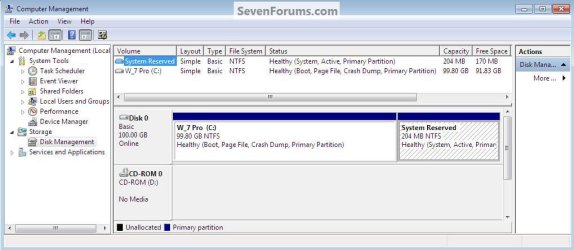
Hello Matt.


As long as there is another Windows Operating System (OS) booting from a primary partition, a second (or third) can be run from an extended/logical partition, they will share the files needed to boot; that is part of the reason (among several others) for the introduction of the SysResv partition, so all the boot files can be stored in one central location.

A Windows OS cannot boot independently from an extended/logical partition.


I hope this helps clear it up for you. :)
 

My Computer My Computer

At a glance

W 7 64-bit UltimateIntel Q9550 Yorkfield8GB Dominator 8500C5DATI : XFX 5870
Computer Manufacturer/Model Number
* BFK Customs *
OS
W 7 64-bit Ultimate
CPU
Intel Q9550 Yorkfield
Motherboard
ASUS P5Q Pro
Memory
8GB Dominator 8500C5D
Graphics Card(s)
ATI : XFX 5870
Sound Card
Realtek HD Audio 7-1
Monitor(s) Displays
1x 47" LCD HDMI & 3x 26" LCD HDMI
Screen Resolution
1920x1080P & 1920x1200
Hard Drives
1x 80GB Intel X25-M G2 SSD : 1x 500GB & 1x 640GB WD Caviar Black(s)
PSU
Corsair 620HX
Case
Cooler Master RC-690
Cooling
Tuniq Tower 120, 2x 140mm and 3x 120mm case fans
Keyboard
Microsoft 500
Mouse
Razer Diamondback 3G
Internet Speed
14 Mb/s
Other Info
1x Koutech 3Gb/s SATA HDD Hot Swap Rack
Thanks very much for the info and the links. Very informative - especially the PC Guide info on ntfs architecture. Much appreciated. After reading that lot and now also having googles about the 100 mb boot partition (i didn't realise only w7 adds this toba clean install) I have a final architecture question:

A user in these forums stated that recent ms os' don't need to be in a primary partition to work. He said he was running pre release w7 from a logical drive in his extended partition

This contradicts everything I've read because to boot that os in that logical drive you need to make the drive active right? And you aren't allowed to make logical partitions active - so help? What he doing?

Matt
Here's a reference to the Master Boot Record, not to be confused with the Volume Boot Record (which is partition based).
Master boot record - Wikipedia, the free encyclopedia
The MBR is where the BIOS firmware goes to hand over it's role in the boot sequence. In the MBR is the partition table with one partition location flagged or marked active. This is often the little 100MB partition we've been talking about.
 

My Computer My Computer

At a glance

Windows 7x64 Home Premium SP1Intel i7 2600kG.Skill Ripjaws (DDR3-1600) 2x4GBNvidia GeForce GTS 450; Intel HD Graphics 300...
Computer type
PC/Desktop
Computer Manufacturer/Model Number
Own build
OS
Windows 7x64 Home Premium SP1
CPU
Intel i7 2600k
Motherboard
ASUS P8Z68 Deluxe
Memory
G.Skill Ripjaws (DDR3-1600) 2x4GB
Graphics Card(s)
Nvidia GeForce GTS 450; Intel HD Graphics 3000(GT2+)
Monitor(s) Displays
Dell Ultrasharp IPS panel U2311H, Samsung SyncMaster P2350
Screen Resolution
1920x1080
Hard Drives
Samsung 850 Pro SSD 256GB, Samsung SSD 840 120GB, Seagates 1TB Barracuda ST31000528AS x2
PSU
Seasonic M12II 520W
Case
Lian Li Lancool PC-K60
Cooling
Case: 1x120mm, 3x140mm CPU: Hyper 212+
Keyboard
Logitech MK520 (wireless)
Mouse
Logitech MK520
Internet Speed
6-7 Mbps
Antivirus
Norton Security Premium, Malwarebytes on 2 (MSE on 3rd PC)
Browser
FireFox
Other Info
Audio: Logitech Z523 2.1
Back
Top